# Build an End-to-End Application
source: https://developer.mastercard.com/unified-installments/tutorial/integration-and-testing/step7/index.md
## Build an End-to-End Application {#build-an-end-to-end-application}
In this tutorial, we will explain how to generate and configure a simple API client for the Mastercard Installments API.
### What you will learn {#what-you-will-learn}
* How to set up the environment to develop a simple Java application
* How to generate an API client using the [OpenAPI Generator](https://openapi-generator.tech/)
* Integrate with the Mastercard Client Libraries to sign requests
* How to perform [payload encryption](https://developer.mastercard.com/platform/documentation/security-and-authentication/securing-sensitive-data-using-payload-encryption/)
* How to integrate with Mastercard Installments APIs
Tip: Refer to the [Mastercard Installments Reference App](https://developer.mastercard.com/unified-installments/documentation/api-reference/mastercard-installments-services/inbound-api/index.md#apis) for code examples that we have created for you.
### Environment Set up {#environment-set-up}
1. **Prerequisites**
To complete this tutorial, you will need:
* [JDK 11](https://www.java.com/en/) or later.
* [IntelliJ IDEA](https://www.jetbrains.com/idea/) (or any other IDE of your choice).
* Mastercard Developers account with access to the Mastercard Installments API.
* Mastercard Installments Open API specification (Retrieved by clicking the 'Open Specification' [here](https://developer.mastercard.com/unified-installments/documentation/api-reference/index.md)).
2. **Create a Maven Project**
For this tutorial, IntelliJ IDEA as the IDE is used.
* In IntelliJ IDEA, create a new Maven project that sets your directory structure automatically.
* Provide an ArtifactId and a Project name as per your choice. 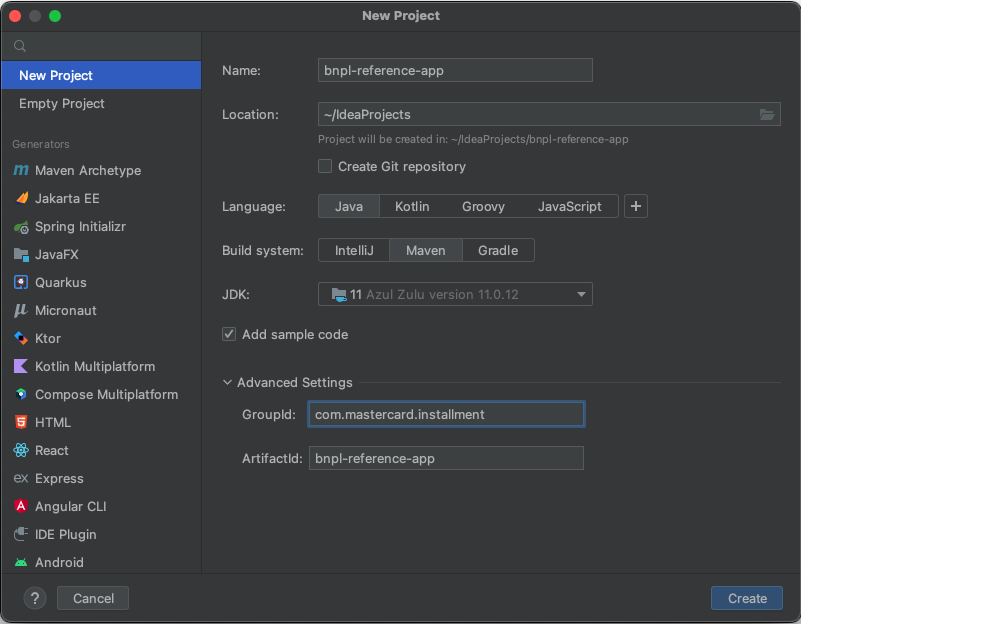
3. **Add Resources**
* Add the Mastercard Installments Open API specification to your Maven project resources folder.
* Add the generated Sandbox key (.p12 file) and encryption cert (.pem file) and decryption cert(.p12 file) to your Maven project resources folder. (This is generated while creating your project on Mastercard Developers)
* Your Maven project directory structure should appear as 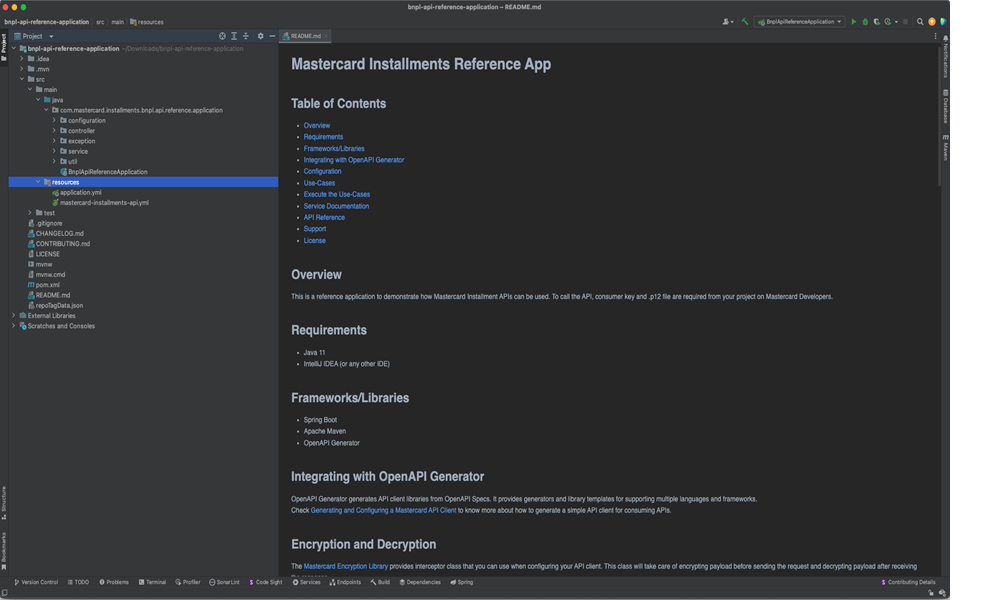
4. **Update pom.xml file**
* In your IDE, add the [OpenAPI Generator maven plugin](https://github.com/OpenAPITools/openapi-generator/tree/master/modules/openapi-generator-maven-plugin) to your project **pom.xml** file. Use the following Plugin config: Note: The [OpenAPI Generator](https://openapi-generator.tech/) generates API client libraries using OpenAPI Specification. It provides multiple generators and library templates to support multiple languages and frameworks. We will be using the java generator for this project.
```xml
org.openapitools
openapi-generator-maven-plugin
5.4.0
BNPL REST API Client
generate
${project.basedir}/src/main/resources/mastercard-installments-api.yml
java
false
false
src/gen/java/main
true
java8
Date=LocalDate
```
* Add the following Dependencies to your pom.xml file
```xml
org.springframework.boot
spring-boot-starter-parent
2.7.6
11
1.5.2
4.10.0
2.10
1.8.5
1.6.9
1.3.2
3.12.0
2.0.1.Final
1.7.6
6.2.1
3.0.2
0.8.8
2.1.1
**/UnifiedInstallmentsReferenceApplication.java,
**/com/mastercard/installments/bnpl/api/reference/application/configuration/*,
**/com/mastercard/installments/bnpl/api/reference/application/util/*
3.0.0-M8
org.springframework.boot
spring-boot-starter
org.springframework.boot
spring-boot-starter-web
org.projectlombok
lombok
true
org.springframework.boot
spring-boot-starter-test
test
com.mastercard.developer
oauth1-signer
${oauth1-signer-version}
com.squareup.okhttp3
okhttp
${okhttp-version}
com.squareup.okhttp3
logging-interceptor
${okhttp-version}
com.google.code.gson
gson
${gson-version}
io.gsonfire
gson-fire
${gson-fire-version}
io.swagger
swagger-annotations
${swagger-core-version}
javax.annotation
javax.annotation-api
${javax-annotation-version}
provided
com.google.code.findbugs
jsr305
${findbugs-version}
org.apache.commons
commons-lang3
${commons-lang3-version}
javax.validation
validation-api
${javax-validation-version}
provided
javax.ws.rs
javax.ws.rs-api
${javax-ws-rs-version}
com.mastercard.developer
client-encryption
${client-encryption-version}
```
### Generating the API Client {#generating-the-api-client}
1. Now that you have all the dependencies you need, you can generate the source code. You can navigate to the project root directory within a terminal window and run **mvn clean compile** . 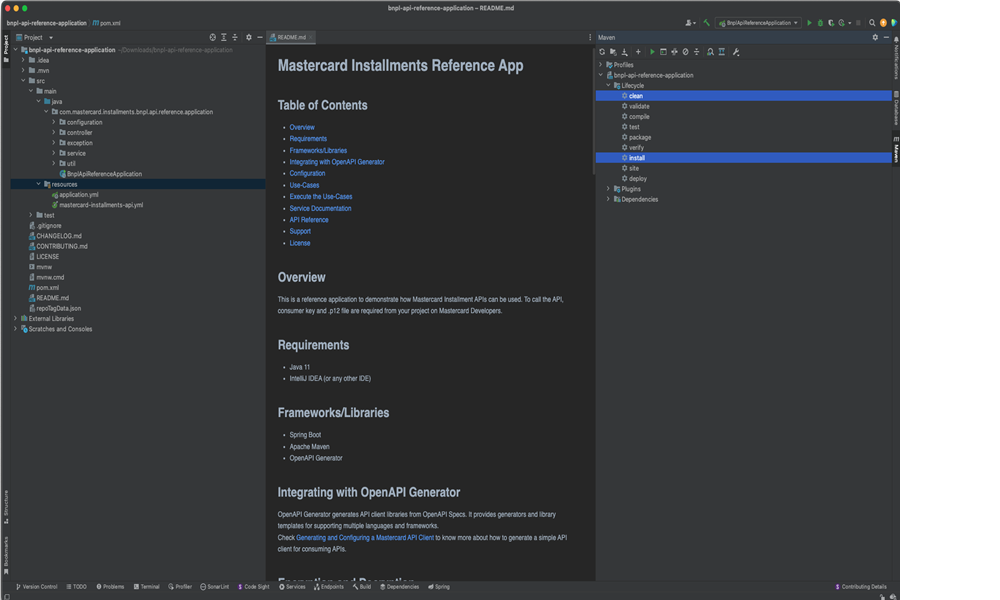
2. A new folder named **target** is created within your root directory, which contains classes generated for the schemas and API calls defined within the OpenAPI Specification. The generated classes can be found in the following target folder: 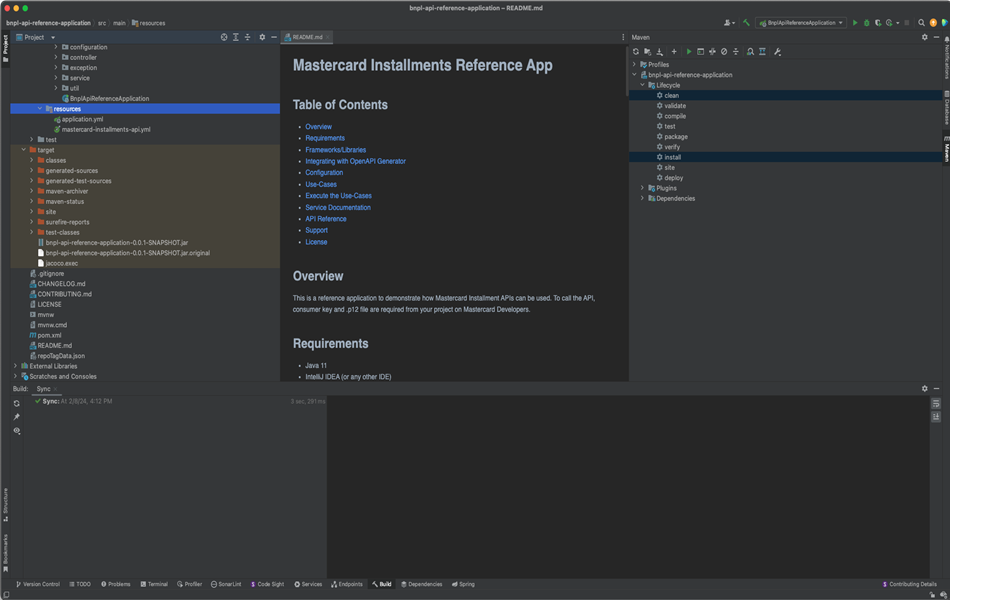
### Configure API Client to support Encryption and Decryption {#configure-api-client-to-support-encryption-and-decryption}
1. Under the src/main/java/ folder path, create a Java file named **UnifiedInstallmentsReferenceApplication.java**.
2. To make the API call, you need to make your OAuth credentials available to the program to use.
* Java
```java
String consumerKey = " ";
String signingKeyFilePath = "";
String signingKeyAlias = "";
String signingKeyPassword = "";
PrivateKey signingKey = AuthenticationUtils.loadSigningKey(signingKeyFilePath, signingKeyAlias, signingKeyPassword);
String encryptionCertPath = "";
String decryptionKeyPath = "";
String decryptionKeyAlias = "";
String decryptionKeypassword="";
```
3. Some Mastercard Installment API endpoints require request and/or response payload encryption as described in [Securing Sensitive Data Using Payload Encryption](https://developer.mastercard.com/platform/documentation/security-and-authentication/securing-sensitive-data-using-payload-encryption/). If the endpoint, you are consuming requires request and/or response payload encryption as defined in the [API specification](https://developer.mastercard.com/unified-installments/documentation/api-reference/mastercard-installments-services/inbound-api/index.md#apis), you need to configure an interceptor to encrypt the request payload and decrypt the response payload using the [Mastercard JWE Encryption libraries](https://developer.mastercard.com/platform/documentation/security-and-authentication/securing-sensitive-data-using-payload-encryption/#client-libraries), as applicable. The sample implementation for Interceptor is as follows:
* Java
```java
import com.mastercard.developer.encryption.EncryptionConfig;
import com.mastercard.developer.encryption.EncryptionException;
import com.mastercard.developer.interceptors.OkHttpJweInterceptor;
import lombok.extern.slf4j.Slf4j;
import okhttp3.Request;
import okhttp3.RequestBody;
import okhttp3.Response;
import okhttp3.ResponseBody;
import okio.Buffer;
import org.jetbrains.annotations.NotNull;
import org.springframework.http.MediaType;
import java.io.IOException;
import java.util.List;
import java.util.Objects;
@Slf4j
public class CryptoInterceptor extends OkHttpJweInterceptor {
private static final String ENCRYPTION_ERROR_MESSAGE = "Failed to intercept and encrypt request!";
private static final String CONTENT_LENGTH = "Content-Length";
private static final String ACCEPT = "Accept";
List piiClassifiedAlpha3CountryCodes;
public CryptoInterceptor(EncryptionConfig config) {
super(config);
}
public CryptoInterceptor(EncryptionConfig config, List piiClassifiedAlpha3CountryCodes) {
super(config);
this.piiClassifiedAlpha3CountryCodes = piiClassifiedAlpha3CountryCodes;
}
@NotNull
private static String getRequestPayload(RequestBody requestBody) throws IOException {
String requestPayload;
try (Buffer buffer = new Buffer()) {
requestBody.writeTo(buffer);
requestPayload = buffer.readUtf8();
}
return requestPayload;
}
@Override
public Response intercept(Chain chain) throws IOException {
Request requestChain = chain.request();
Request encryptedRequest = this.handleRequest(requestChain);
Response encryptedResponse = chain.proceed(encryptedRequest);
try {
if (encryptedRequest.url().toString().contains("plans")
|| (encryptedRequest.url().toString().contains("registrations"))) {
return this.handleResponse(encryptedResponse);
}
} catch (EncryptionException e) {
log.error(ENCRYPTION_ERROR_MESSAGE, e);
}
return encryptedResponse;
}
private Request getEncryptedRequest(Request request, Request.Builder requestBuilder, String encryptedPayload) throws IOException{
RequestBody encryptedBody = RequestBody.create(encryptedPayload, Objects.requireNonNull(request.body()).contentType());
return requestBuilder
.method(request.method(), encryptedBody)
.header(CONTENT_LENGTH, String.valueOf(encryptedBody.contentLength()))
.header(ACCEPT, MediaType.APPLICATION_JSON_VALUE)
.build();
}
private Request handleRequest(Request request) throws IOException {
try {
RequestBody requestBody = request.body();
if (null == requestBody || requestBody.contentLength() == 0) {
return request;
}
String requestPayload;
try (Buffer buffer = new Buffer()) {
request.body().writeTo(buffer);
requestPayload = buffer.readUtf8();
}
// Encrypt fields & update headers
Request.Builder requestBuilder = request.newBuilder();
String encryptedPayload = encryptPayload(request, requestBuilder, requestPayload);
return getEncryptedRequest(request, requestBuilder, encryptedPayload);
} catch (EncryptionException e) {
throw new IOException(ENCRYPTION_ERROR_MESSAGE, e);
}
}
private Response handleResponse(Response response) throws IOException, EncryptionException {
try {
ResponseBody responseBody = response.body();
if (null == responseBody) {
return response;
} else {
String responsePayload = responseBody.string();
if (com.mastercard.developer.utils.StringUtils.isNullOrEmpty(responsePayload)) {
return response;
} else {
Response.Builder responseBuilder = response.newBuilder();
String decryptedPayload = this.decryptPayload(response, responseBuilder, responsePayload);
ResponseBody decryptedBody = ResponseBody.create(decryptedPayload, responseBody.contentType());
Response decryptedResponse;
decryptedResponse = responseBuilder.body(decryptedBody).header(CONTENT_LENGTH, String.valueOf(decryptedBody.contentLength())).build();
decryptedBody.close();
return decryptedResponse;
}
}
} catch (EncryptionException e) {
throw new IOException("Failed to intercept and decrypt response!", e);
}
}
}
```
4. You need to configure the API client and JWE configuration for each endpoint you are consuming, as follows:
### 4.1 Merchant Participation {#41-merchant-participation}
Encryption and its setup are not necessary for this service. The following configurations are needed to call the endpoints:
4.1.1 `POST /merchants/participations`
Instantiate a client with your authentication credentials and configuration object as interceptors before you can send it for Merchant Participation API.
* Java
```java
private ApiClient setupPostApi(ApiConfiguration apiConfiguration) {
OkHttpClient client = new OkHttpClient().newBuilder().addInterceptor(
new OkHttpOAuth1Interceptor(apiConfiguration.getConsumerKey(), apiConfiguration.getSigningKey()))
.build();
return new ApiClient().setHttpClient(client).setBasePath(apiConfiguration.getBasePath());
}
```
4.1.2 `POST /merchants/searches`
Instantiate a client with your authentication credentials and configuration object as interceptors before you can send it for Merchant Participation API.
* Java
```java
private ApiClient setupPostMidSearches(ApiConfiguration apiConfiguration) {
OkHttpClient client = new OkHttpClient().newBuilder()
.addInterceptor(
new OkHttpOAuth1Interceptor(apiConfiguration.getConsumerKey(), apiConfiguration.getSigningKey()))
.build();
return new ApiClient().setHttpClient(client).setBasePath(apiConfiguration.getBasePath());
}
```
4.1.3 `POST /merchants/mids/searches`
Instantiate a client with your authentication credentials and configuration object as interceptors before you can send it for Merchant Participation API.
* Java
```java
private ApiClient setupPostMidSearches(ApiConfiguration apiConfiguration) {
OkHttpClient client = new OkHttpClient().newBuilder()
.addInterceptor(
new OkHttpOAuth1Interceptor(apiConfiguration.getConsumerKey(), apiConfiguration.getSigningKey()))
.build();
return new ApiClient().setHttpClient(client).setBasePath(apiConfiguration.getBasePath());
}
```
4.1.4 `GET /Merchants/participations`
Instantiate a client with your authentication credentials and configuration object as interceptors before you can send it for Merchant Participation API.
* Java
```java
private ApiClient setupGetMP(ApiConfiguration apiConfiguration) {
OkHttpClient client = new OkHttpClient()
.newBuilder()
.addInterceptor(
new OkHttpOAuth1Interceptor(apiConfiguration.getConsumerKey(), apiConfiguration.getSigningKey()))
.build();
return new ApiClient().setHttpClient(client).setBasePath(apiConfiguration.getBasePath());
}
```
### 4.2 Installments Offers {#42--installments-offers}
Encryption and its setup are necessary for this service. Load the encryption certificate and create the configuration object for Offers API.
* Java
```java
Certificate encryptionCertificate = EncryptionUtils.loadEncryptionCertificate(encryptionCertPath);
PrivateKey decryptionKey = EncryptionUtils.loadDecryptionKey(decryptionKeyPath, decryptionKeyAlias, decryptionKeypassword);
JweConfig config = JweConfigBuilder.aJweEncryptionConfig()
.withEncryptionCertificate(encryptionCertificate)
.withDecryptionKey(decryptionKey)
.withEncryptionPath("$.sensitiveData",
"$")
.withDecryptionPath("$.encryptedValue",
"$.sensitiveData")
.withEncryptedValueFieldName("encryptedValue")
.build();
```
The following configurations are needed to call the endpoints:
4.2.1 `POST /offers`
Instantiate a client with your authentication credentials and configuration object as interceptors before you can send it for Post Approval API.
* Java
```java
private ApiClient setUpOffersPresentmentsApprovedOffersApi(ApiConfiguration apiConfiguration) {
OkHttpClient client = new OkHttpClient().newBuilder().addInterceptor(
new CryptoInterceptor(apiConfiguration.getJweConfigForOffersPresentmentsApprovedOffers())
)
.addInterceptor(
new OkHttpOAuth1Interceptor(apiConfiguration.getConsumerKey(), apiConfiguration.getSigningKey()))
.build();
return new ApiClient()
.setHttpClient(client)
.setBasePath(apiConfiguration.getBasePath())
.addDefaultHeader(X_OPENAPI_CLIENT_ID, clientId);
}
```
### 4.3 Installments Plan {#43-installments-plan}
Encryption and its setup are necessary for this service. Load the encryption certificate and create the configuration object for Plan API.
* Java
```java
Certificate encryptionCertificate = EncryptionUtils.loadEncryptionCertificate(encryptionCertPath);
PrivateKey decryptionKey = EncryptionUtils.loadDecryptionKey(decryptionKeyPath, decryptionKeyAlias, decryptionKeypassword);
JweConfig config = JweConfigBuilder.aJweEncryptionConfig()
.withEncryptionCertificate(encryptionCertificate)
.withDecryptionKey(decryptionKey)
.withEncryptionPath("$.sensitiveData",
"$")
.withDecryptionPath("$.encryptedValue",
"$.sensitiveData")
.withEncryptedValueFieldName("encryptedValue")
.build();
```
4.3.1 `POST /plans`
Instantiate a client with your authentication credentials and configuration object as interceptors before you can send it for Post Plan API.
* Java
```java
ApiClient setup(ApiConfiguration apiConfiguration) throws ServiceException {
log.info("inside setup");
OkHttpClient client = new OkHttpClient().newBuilder().addInterceptor(
new CryptoInterceptor(apiConfiguration.getPlanJweConfig())).addInterceptor(
new OkHttpOAuth1Interceptor(apiConfiguration.getConsumerKey(), apiConfiguration.getSigningKey()))
.build();
return new ApiClient().setHttpClient(client).setBasePath(apiConfiguration.getBasePath())
.addDefaultHeader(X_OPENAPI_CLIENT_ID, clientId);
}
```
4.3.2 `GET /plans/{Plan_id}`
Instantiate a client with your authentication credentials and configuration object as interceptors before you can send it for Get Plan API.
* Java
```java
ApiClient setup(ApiConfiguration apiConfiguration) throws ServiceException {
log.info("inside setup");
OkHttpClient client = new OkHttpClient().newBuilder().addInterceptor(
new CryptoInterceptor(apiConfiguration.getPlanJweConfig())).addInterceptor(
new OkHttpOAuth1Interceptor(apiConfiguration.getConsumerKey(), apiConfiguration.getSigningKey()))
.build();
return new ApiClient().setHttpClient(client).setBasePath(apiConfiguration.getBasePath())
.addDefaultHeader(X_OPENAPI_CLIENT_ID, clientId);
}
```
### 4.4 PAN List {#44--pan-list}
Encryption and its setup are necessary for this service. Load the encryption certificate and create the configuration object for PAN List API.
* Java
```java
Certificate encryptionCertificate = EncryptionUtils.loadEncryptionCertificate(encryptionKeyFile.getFile().getAbsolutePath());
PrivateKey decryptionKey = EncryptionUtils.loadDecryptionKey(decryptionKeyFile.getFile().getAbsolutePath(), decryptionKeyAlias, decryptionKeyPassword);
config = JweConfigBuilder.aJweEncryptionConfig()
.withEncryptionCertificate(encryptionCertificate)
.withDecryptionKey(decryptionKey)
.withEncryptionPath("$.sensitiveData",
"$")
.withDecryptionPath("$.encryptedValue",
"$.sensitiveData")
.withEncryptedValueFieldName("encryptedValue")
.build();
```
4.4.1 `POST /consumers/pans/registrations`
Instantiate a client with your authentication credentials and configuration object as interceptors before you can send it for Post Pan List API.
* Java
```java
private ApiClient setupPostApi(ApiConfiguration apiConfiguration) {
OkHttpClient client = new OkHttpClient().newBuilder().addInterceptor(
new CryptoInterceptor(apiConfiguration.getJweConfigConsumersRegistrationsApi())
).addInterceptor(
new OkHttpOAuth1Interceptor(apiConfiguration.getConsumerKey(), apiConfiguration.getSigningKey()))
.build();
return new ApiClient().setHttpClient(client).setBasePath(apiConfiguration.getBasePath());
}
```
4.4.2 `POST /consumers/pans/deregistrations`
Instantiate a client with your authentication credentials and configuration object as interceptors before you can send it for Post Pan List API.
* Java
```java
private ApiClient setupPostApi(ApiConfiguration apiConfiguration) {
OkHttpClient client = new OkHttpClient().newBuilder().addInterceptor(
new CryptoInterceptor(apiConfiguration.getJweConfigConsumersRegistrationsApi())
).addInterceptor(
new OkHttpOAuth1Interceptor(apiConfiguration.getConsumerKey(), apiConfiguration.getSigningKey()))
.build();
return new ApiClient().setHttpClient(client).setBasePath(apiConfiguration.getBasePath());
}
```
### 4.5 Installment Notification {#45-installment-notification}
Decryption and its setup are necessary for this service. Load the decryption certificate and create the configuration object for Notification API.
* Java
```java
PrivateKey decryptionKey = EncryptionUtils.loadDecryptionKey(decryptionKeyFile.getFile().getAbsolutePath(), decryptionKeyAlias, decryptionKeyPassword);
JweConfig config = JweConfigBuilder.aJweEncryptionConfig()
.withDecryptionKey(decryptionKey)
.withDecryptionPath("$.encryptedValue",
"$.sensitiveData")
.build();
```
4.5.1 POST /notifications
To configure for the outbound notification add filter which will intercept the /notifications end point and decrypt the encrypted data.
* Java
```java
if(((HttpServletRequest)servletRequest).getRequestURI().contains("/notifications")) {
var wrappedRequest = (HttpServletRequest) servletRequest;
log.info("calling filter chain");
String requestBody = getRequestBody(wrappedRequest);
String decryptedValue;
try {
decryptedValue = JweEncryption.decryptPayload(requestBody, apiConfiguration.getInstallmentNotificationJweConfig());
filterChain.doFilter(new CustomWraper((HttpServletRequest) servletRequest, decryptedValue), servletResponse);
} catch (EncryptionException e) {
final PlanNotifErrorResponse errorNotif = new PlanNotifErrorResponse();
PlanNotifErrorWrapper errorWrapper = new PlanNotifErrorWrapper();
PlanNotifError error = new PlanNotifError();
error.setDescription(e.getMessage());
error.setSource(source);
errorWrapper.addErrorItem(error);
errorNotif.setErrors(errorWrapper);
String json = new ObjectMapper().writeValueAsString(errorNotif);
var wrappedResponse = (HttpServletResponse) servletResponse;
wrappedResponse.setStatus(HttpStatus.UNAUTHORIZED.value());
wrappedResponse.getWriter().write(json);
wrappedResponse.flushBuffer();
}
}
```
5. Following is the sample code block of `UnifiedInstallmentsReferenceApplication.java` which you will have after completion of the above steps. Note: This code block shows integration with `POST /offers` endpoint as an example and similarly it needs to be implemented for other API's.
* Java
```java
import com.mastercard.developer.encryption.JweConfig;
import com.mastercard.developer.encryption.JweConfigBuilder;
import com.mastercard.developer.interceptors.OkHttpOAuth1Interceptor;
import com.mastercard.developer.utils.AuthenticationUtils;
import com.mastercard.developer.utils.EncryptionUtils;
import com.mastercard.installments.bnpl.api.reference.application.util.CryptoInterceptor;
import org.openapitools.client.ApiClient;
import org.openapitools.client.api.InstallmentsOffersApi;
import org.openapitools.client.model.*;
import java.math.BigDecimal;
import java.security.PrivateKey;
import java.security.cert.Certificate;
public class UnifiedInstallmentsReferenceApplication {
public static void main(String[] args) throws Exception {
String consumerKey = "9wdxXlyZeoJyY3g87bJhvQQwb7FvWW2NqJUMQtzj7c282143!a38af1bb0e4f4299b7d0fafd44a272dd0000000000000000";
String signingKeyFilePath = "C:/Data/openapi/certs/mtf/MCD_Sandbox_approvals_test_API_Keys/approvals_test-sandbox.p12";
String signingKeyAlias = "keyalias";
String signingKeyPassword = "keystorepassword";
PrivateKey signingKey = AuthenticationUtils.loadSigningKey(signingKeyFilePath, signingKeyAlias, signingKeyPassword);
String encryptionCertPath = "C:/Data/openapi/certs/mtf/installmentsbnplserviceClientEnc1666025225.pem";
String decryptionKeyPath = "C:/Data/openapi/certs/mtf/keyalias-encryption-mc.p12";
Certificate encryptionCertificate = EncryptionUtils.loadEncryptionCertificate(encryptionCertPath);
PrivateKey decryptionKey = EncryptionUtils.loadDecryptionKey(decryptionKeyPath, "keyalias", "keystorepassword12");
JweConfig config = JweConfigBuilder.aJweEncryptionConfig()
.withEncryptionCertificate(encryptionCertificate)
.withDecryptionKey(decryptionKey)
.withEncryptionPath("$.sensitiveData", "$")
.withDecryptionPath("$.encryptedValue", "$.sensitiveData")
.withEncryptedValueFieldName("encryptedValue")
.build();
ApiClient client = new ApiClient();
client.setBasePath("https://sandbox.api.mastercard.com/installments");
client.setDebugging(true);
client.setHttpClient(client.getHttpClient()
.newBuilder()
.addInterceptor(
new CryptoInterceptor(config))
.addInterceptor(new OkHttpOAuth1Interceptor(consumerKey, signingKey))
.build());
InstallmentsOffersApi offersPresentmentsApprovedOffersApi =new InstallmentsOffersApi(client);
offersPresentmentsApprovedOffersApi.approvedOffers(getOfferParametersEncryptedPayload("1111222233334444"), "9b7d0fafd44a272dd0000000000000000", "EN");
}
private static OfferParametersEncryptedPayload getOfferParametersEncryptedPayload(String pan) {
OfferParametersEncryptedPayload offerParametersEncryptedPayload = new OfferParametersEncryptedPayload();
offerParametersEncryptedPayload.setTransaction(getTransactionParameters());
offerParametersEncryptedPayload.setMerchant(getMerchantParameters());
offerParametersEncryptedPayload.setSensitiveData(getSensitiveData(pan));
return offerParametersEncryptedPayload;
}
private static TransactionParameters getTransactionParameters() {
TransactionParameters transactionParameters = new TransactionParameters();
transactionParameters.setAmount(1400d);
transactionParameters.setCurrency("USD");
transactionParameters.setLocalDateTime("2023-02-01T00:00:00Z");
return transactionParameters;
}
private static MerchantParameters getMerchantParameters() {
MerchantParameters merchantParameters = new MerchantParameters();
merchantParameters.setName("Kohls");
merchantParameters.setMcc(null);
merchantParameters.setCountry("USA");
merchantParameters.setUrl("corporate.kohls.com");
return merchantParameters;
}
private static SensitiveDataField getSensitiveData(String pan) {
SensitiveDataField sensitiveData = new SensitiveDataField();
sensitiveData.setConsumer(getConsumer(pan));
return sensitiveData;
}
private static SensitiveDataFieldConsumer getConsumer(String pan) {
SensitiveDataFieldConsumer consumer = new SensitiveDataFieldConsumer();
consumer.setPrimaryAccountNumber(new BigDecimal(pan));
return consumer;
}
}
```
6. After you are able to successfully configured the Mastercard Installment API client, you can refer to test scenarios mentioned on [Testing](https://developer.mastercard.com/unified-installments/documentation/testing/index.md) page for respective API endpoints, to perform testing on Sandbox.