# Expense Management
source: https://developer.mastercard.com/transaction-notifications/documentation/use-cases/use-case-expense-mangement/index.md
Enable a suite of on-the-go expense management solutions leveraging real time
authorization data for enrolled cardholders.

## Overview {#overview}
Transaction notifications enables the transfer of real time transaction data that allows
corporate travelers to populate an expense report without needing to save and submit
receipts and CFOs to programmatically inform employees if a transaction is out of policy.
Through Transaction Notifications both companies and employees save time and effort while
preventing potential expense-related mistakes.
On average companies with employees who file expense reports experience:
19%
**percent of expense reports with error**
20 min
**minutes to complete one expense report**
18 min
**minutes spent correcting an incorrect expense report**
## Consumer Experience {#consumer-experience}
Once enabled, Transaction Notifications can be used to encourage users to create a new
expense report or build on an existing one, prompting in real time when additional
information is needed according to company policy. By providing guidance to employees at
the time of purchase - for example prompting to upload a receipt or select meal attendees
during the trip - expense management companies can drive higher compliance and remove pain
points experienced by both employees and managers during the post-trip expense reporting
process. Here are some examples of how a expense management app might leverage
notification to engage their customers:
| EVENT | POTENTIAL EXPERIENCE |
|:----------------------------------------------------|:-----------------------------------------------------------------------------------------------------------------------------------------------------------------------------------------------------------------------------------------------------------------------------------------------------------------|
| PRE-TRIP Flight booked directly with corporate card |   |
| DURING-TRIP Employee pays for their cab | 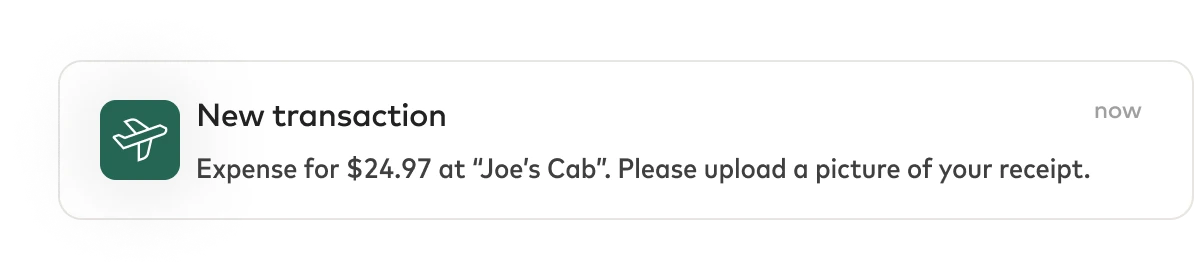 |
| DURING-TRIP An unauthorized purchase is made |  |
| DURING-TRIP Abnormally expensive dinner |  |
| POST-TRIP Expense report review and submission |  |
## Experience Guide {#experience-guide}
In order to get up and running quicker, we've created an experience design guide for
Transaction Notifications. This set of screens reflects the 'best practices' for using
this product in your app.
In this flow, we've created a faux customer, ExpenseCo, who has built an expense
management app for their corporate customers. Customers are invited to link (or bulk
enroll) their corporate cards. This flow includes both desktop and mobile flows for
reference.
## How It Works {#how-it-works}
Real time authorization data can be made available to expense management providers
following appropriate consent capture through Consent Management API and tools. Consent
can be enrolled in bulk from the Corporation or through individual authenticated
cardholders using Consent Management APIs and 3DS.

### Bulk Enrollment {#bulk-enrollment}
The Bulk Consents API can be used to enroll an entire company's portfolio when the consent
has been obtained and your application has been set up to receive enhanced cleared data
through Smart Data CDF3 files. Once you've received the consented card numbers through
CDF3 they can be enrolled for real time authorizations. During the consents flow, you will
use the Business Name field to identify the company's name or ID the consent relates to.
API Reference: `POST /cards/bulk`
### Single Enrollment with Authentication {#single-enrollment-with-authentication}
When individuals register their cards in the expense app, an experience is initiated to
identify the cardholder and get their explicit permission to share transaction data.
Identity verification is achieved through EMV 3DS NPA, an EMVCo specification that works
across all payment networks and allows for a 'non-payment-flow' experience, verifying the
cardholders identity for non-payment purposes.
If your application is PCI compliant, you can implement our Consent APIs with
Authentication.
The flow begins with a Post/Consents request contains most of the Bulk Consent Data, but
also includes CVC and Cardholder Name as Required Fields.
Additionally Consent Duration and Device channel may be required and is deterimined as
applicable during onboarding.
API Reference: `POST /consents`
Now a cardreference is returned, but in an INACTIVE state and authentication can begin.
More information on the Authentication Flows using 3DS can be found in the Consents API
Documentation.
If your application cannot handle PCI data, Mastercard's PCI Compliant iFrame experience
may be deployed within your application to collect card details.
## Notifications {#notifications}
Once a cardholder is enrolled, a notification will be sent to the expense management
provider for any activity on the card using the card reference created in the Consents
flow as an identifier for the user. To see an example payload of a notification click
here, additional data element information can be found in the FAQ section.
To finalize or update an expense using the final transaction details and final amount you
can map the authorization to the cleared data using the unique Transaction identifier
\[Financial Network Code\] + \[Banknet Ref\] + \[Settlement Date\].