# Testing
source: https://developer.mastercard.com/traditional-fulfillment-service/documentation/tutorials-and-guides/api-testing-tutorial/index.md
This tutorial walks through the steps required to test the Traditional Fulfillment Service by building an end-to-end application.
## Introduction {#introduction}
This tutorial helps you to create a simple Java application that makes an API call to the Traditional Fulfillment Service in the Sandbox environment.
### What you will learn {#what-you-will-learn}
* How to set up the environment to develop a simple Java application
* How to generate an API client using the [OpenAPI Generator](https://openapi-generator.tech/)
* How to make an API call
### Estimated time to complete this tutorial {#estimated-time-to-complete-this-tutorial}
* 15-20 minutes
### Prerequisites {#prerequisites}
To complete this tutorial, you will need:
* [JDK 11](https://www.java.com/en/) or later
* An IDE of your choice
* Mastercard Developers account with access to the Mastercard Loyalty Management API
* Traditional Fulfillment Service Open API specification (Refer to the [Open Specification](https://developer.mastercard.com/traditional-fulfillment-service/documentation/api-reference/index.md) for details.)
Note: Refer to the [API Reference](https://developer.mastercard.com/traditional-fulfillment-service/documentation/api-reference/index.md) page for more details on each API and related parameters.
## Environment Set up {#environment-set-up}
### 1. Create a Maven Project {#1-create-a-maven-project}
* In the IDE, create a new Maven project which sets your directory structure automatically. 
* Provide an ArtifactId and a project name as per your choice. 
### 2. Add Resources {#2-add-resources}
* Add the Traditional Fulfillment Service API specification to your Maven project resources folder.
* Add the generated Sandbox key (**.p12 file**) to your Maven project resources folder. (This is generated while creating the project on Mastercard Developers).
* Your Maven project directory structure should appear as: 
### 3. Update pom.xml file {#3-update-pomxml-file}
* In your IDE, add the [OpenAPI Generator maven plugin](https://github.com/OpenAPITools/openapi-generator/tree/master/modules/openapi-generator-maven-plugin) to your project **pom.xml** file. Use the Plugin config as shown below: Note: [OpenAPI Generator](https://openapi-generator.tech/) generates API client libraries using OpenAPI Specification. It provides multiple generators and library templates to support multiple languages and frameworks. We will be using the Java generator for this project.
```XML
org.openapitools
openapi-generator-maven-plugin
4.2.2
generate
${project.basedir}/src/main/resources/catalog-api-openapi-v3.yaml
java
src/gen/java/main
true
custom
Date=String
```
* Add the following dependencies to your pom.xml file to add dependencies for the API client library generation and the Mastercard OAuth1 Signer library. Read our [Using OAuth 1.0a to Access Mastercard APIs](https://developer.mastercard.com/platform/documentation/security-and-authentication/using-oauth-1a-to-access-mastercard-apis/) guide.
```XML
1.8.3
1.5.22
3.14.2
2.8.5
1.3.8
1.0
4.13.2
io.swagger
swagger-annotations
${swagger-core-version}
com.squareup.okhttp3
okhttp
${okhttp-version}
com.squareup.okhttp3
logging-interceptor
${okhttp-version}
com.google.code.gson
gson
${gson-version}
io.gsonfire
gson-fire
${gson-fire-version}
org.threeten
threetenbp
${threetenbp-version}
javax.annotation
jsr250-api
${javax-annotation-version}
junit
junit
${junit-version}
com.mastercard.developer
oauth1-signer
1.2.4
```
When using OpenAPI Generator to generate the API client library, you have two options:
* Generate and use the source files on the fly
* Generate and deploy the source files to a Maven repository
In this tutorial, you will be generating the API client library on the fly, so you include the dependencies that are needed to generate the library. (If you were deploying the source files to a Maven repository, you would only need to include the dependency for that repository.)
In addition, you include the dependency for one of the Mastercard OAuth1 Signer libraries. Mastercard offers OAuth1 Signer Libraries that are developed and maintained by Mastercard's API team, which offer code helpers targeting the HTTP clients used by the different OpenAPI Generator Library templates. The libraries are hosted on [Github](https://github.com/Mastercard?utf8=%E2%9C%93&q=oauth1-signer&type=&language=).
Refer to the following page for more information on [Generating and Configuring a Mastercard API Client](https://developer.mastercard.com/platform/documentation/security-and-authentication/generating-and-configuring-a-mastercard-api-client/#overview).
## Generating the API Client {#generating-the-api-client}
1. Now that you have all the dependencies you need, you can generate the source code. You can navigate to the project root directory within a terminal window and run `mvn clean compile `.

2. Alternatively, you can navigate to the root directory of the project within a terminal window and run mvn clean compile.
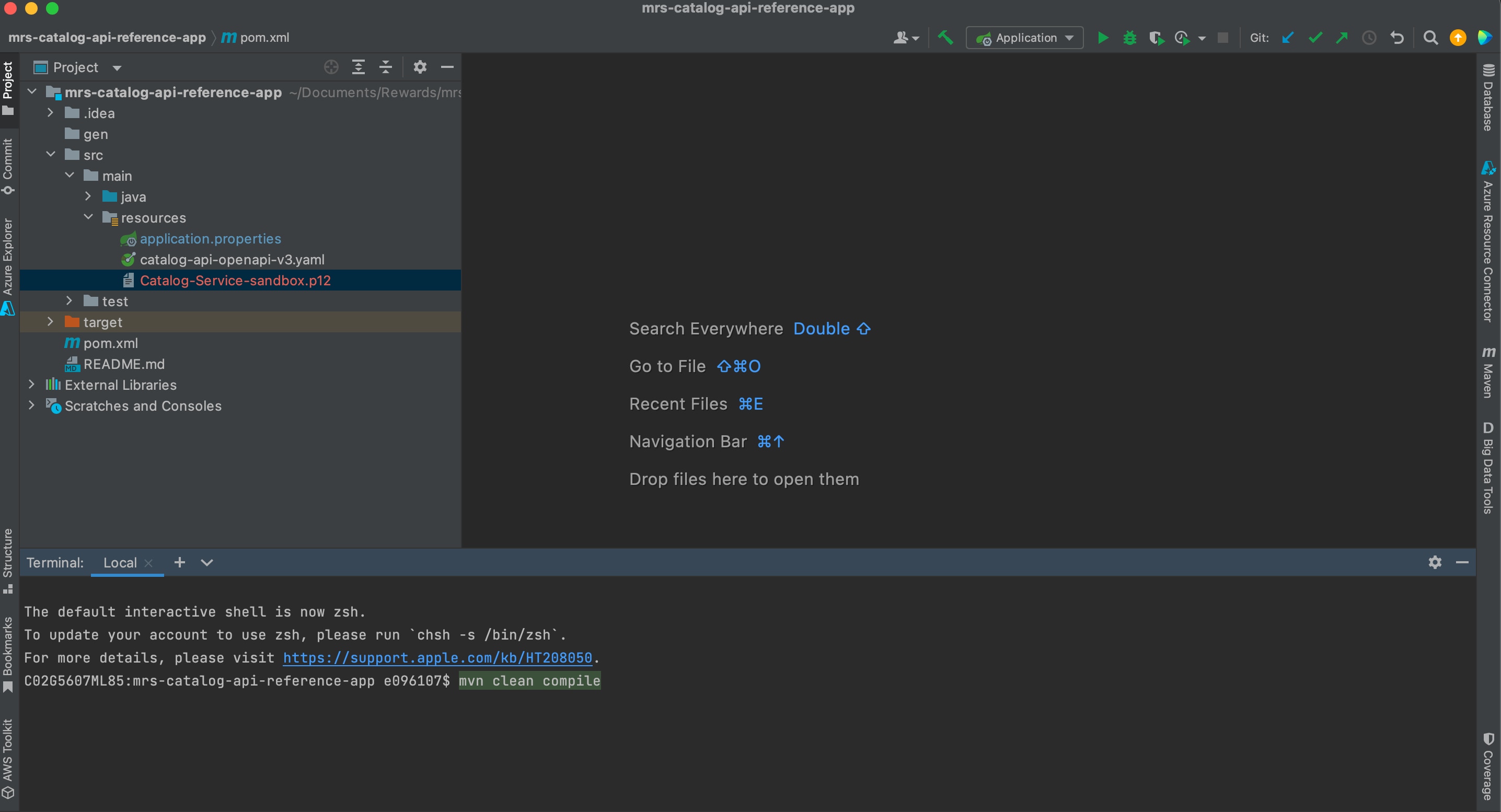
3. A folder named **target** is created within your root directory which contains classes generated for the schemas and API calls defined within the OpenAPI Specification. The generated classes can be found in the target folder as shown below:

## Making an API Call {#making-an-api-call}
1. Under the `src/main/java/` folder path, create a Java file named **ApiClientConfiguration.java**.
2. To make the API call, you need to make your OAuth credentials available to the program for use.
* A PrivateKey is created with the provided credentials for later use.
* AuthenticationUtils is provided by the Mastercard OAuth signing library.
Note: Calling `loadSigningKey` can throw an exception.
```java
// Read these values from the application properties file
@Value("${mastercard.api.key.alias}")
private String signingKeyAlias;
@Value("${mastercard.api.keystore.password}")
private String signingKeyPassword;
@Value("${mastercard.api.p12.path}")
private String signingKeyPkcs12FileName;
PrivateKey signingKey = AuthenticationUtils.loadSigningKey(signingKeyPkcs12FileName, signingKeyAlias, signingKeyPassword);
```
3. Instantiate a client with your authentication credentials and configuration object as interceptors before you can send it.
```java
apiClient = new ApiClient();
apiClient.setBasePath("https://sandbox.api.mastercard.com/loyalty/rewards");
apiClient.setDebugging(true);
OkHttpClient.Builder okHttpClientBuilder = apiClient.getHttpClient().newBuilder();
okHttpClientBuilder.addInterceptor(new OkHttpOAuth1Interceptor(consumerKey, signingKey));
return apiClient.setHttpClient(okHttpClientBuilder.build());
```
Note: For conciseness, only the barebones of what is needed to make the API call is shown above. The full contents of ApiClientConfiguration.java are shown below.
### Contents of ApiClientConfiguration.java {#contents-of-apiclientconfigurationjava}
```java
package com.mastercard.developer.config;
import com.mastercard.developer.interceptors.OkHttpOAuth1Interceptor;
import com.mastercard.developer.utils.AuthenticationUtils;
import java.security.PrivateKey;
import lombok.extern.slf4j.Slf4j;
import okhttp3.OkHttpClient;
import org.openapitools.client.ApiClient;
import org.springframework.beans.factory.annotation.Value;
import org.springframework.stereotype.Service;
@Service
@Slf4j
public class ApiClientConfiguration {
@Value("${mastercard.api.consumer.key}")
public String consumerKey;
@Value("${basePath}")
private String basePath;
@Value("${mastercard.api.key.alias}")
private String signingKeyAlias;
@Value("${mastercard.api.keystore.password}")
private String signingKeyPassword;
@Value("${mastercard.api.p12.path}")
private String signingKeyPkcs12FileName;
public ApiClient getApiClient() {
return createNewApiClient();
}
public ApiClient createNewApiClient() {
ApiClient apiClient = new ApiClient();
try {
PrivateKey signingKey = AuthenticationUtils.loadSigningKey(signingKeyPkcs12FileName, signingKeyAlias, signingKeyPassword);
apiClient.setBasePath(basePath);
apiClient.setDebugging(true);
OkHttpClient.Builder okHttpClientBuilder = apiClient.getHttpClient().newBuilder();
okHttpClientBuilder.addInterceptor(new OkHttpOAuth1Interceptor(consumerKey, signingKey));
return apiClient.setHttpClient(okHttpClientBuilder.build());
} catch (Exception e) {
log.error(e.getMessage());
}
return apiClient;
}
}
```
4. Now put everything together and you can start using the APIs by making use of the generated classes.
```java
@ApiOperation(value = "getRewardItems API Call", notes = "Returns a list of all Reward Items for a given Catalog and search criteria.",
tags = {"catalog"}
)
@GetMapping(value = "/{catalog_id}/items")
public RewardItems getItems(@Parameter(description = "The internal MRS Catalog Hierarchy ID for the rewards program.", example = "21193") @PathVariable(name="catalog_id")Long catalogId,
@Parameter(description = "Unique identifier of a rewards program.", example = "49631")
@RequestParam(name="program_id") Long programId,
@Parameter(description = "Customer preferred language code. This must be a valid language code that is configured for the MRS Program. This field is optional and will return English (en_US), if not specified.", example = "en_US")
@RequestParam(name="language",required = false) String language,
@Parameter(description = "Minimum point value for a Reward Item.", example = "9999") @RequestParam(name ="min_points", required = false) Integer minPoints,
@Parameter(description = "Maximum point value for a Reward Item.", example = "9999") @RequestParam(name = "max_points", required = false) Integer maxPoints,
@Parameter(description = "Reward Item Keywords", example = "catalog") @RequestParam(name="keyword", required = false)String keyword) {
RewardItems rewardItems = null;
try {
log.info("Method : getItems, Message: retrieves list of all Reward Items using the CatalogId and ProgramId");
ApiClient apiClient = apiClientConfiguration.createNewApiClient();
CatalogsApi catalogsApi = getCatalogsApi(apiClient);
rewardItems = catalogsApi.getItems(programId, catalogId, language, minPoints, maxPoints, keyword);
} catch (ApiException e) {
throw new InvalidRequest(e.getMessage(), e.getResponseBody());
}
log.debug("Method : getItems, Message: Successfully retrieved list of all Reward Items for a given Catalog");
return rewardItems;
}
```
Tip: Refer to the following [reference app](https://developer.mastercard.com/traditional-fulfillment-service/documentation/reference-app/index.md) for more details.
## Choose a Testing Method {#choose-a-testing-method}
This page is the primary testing hub for the Traditional Fulfillment Service. Pick the method that matches what you are doing, then run the test cases below against the Sandbox environment.
| **Method** | **Best for** | **Where to start** |
|-----------------------|--------------------------------------------|----------------------------------------------------------------------------------------------------------------------------------|
| Generated client | Building the integration you will ship | The steps above on this page |
| Postman collection | Exploring the API without writing code | [Postman Collection](https://developer.mastercard.com/traditional-fulfillment-service/documentation/postman-collection/index.md) |
| Reference application | Seeing all three operations wired together | [Reference App](https://developer.mastercard.com/traditional-fulfillment-service/documentation/reference-app/index.md) |
| curl | One quick check of a single operation | [Quick Start Guide](https://developer.mastercard.com/traditional-fulfillment-service/documentation/quick-start-guide/index.md) |
Every method needs the OAuth 1.0a signing setup and the Sandbox base URL described in [API Basics](https://developer.mastercard.com/traditional-fulfillment-service/documentation/api-basics/index.md). The Postman collection and the reference application both ship with that configuration in place.
## Test Cases {#test-cases}
Run the cases in order. They follow one end-to-end journey: list the catalogs in a program, read the items inside a catalog, then report an order status back to Mastercard. Each case states the request, the expected status code, and what to check in the response.
### Positive Test Cases {#positive-test-cases}
**Request:** `GET /catalogs?program_id=49631`
**Expected status:** `200`
**Check:** The response contains a `catalogs` array. Record the `id` of an entry where `hasRewardItems` is `true` and use it as `catalog_id` in TC2.
**Request:** `GET /catalogs/{catalog_id}/items?program_id=49631`
**Expected status:** `200`
**Check:** The response contains a `rewardItems` array, and each item carries the description, image, and points values you need to display the reward.
**Request:** `GET /catalogs/{catalog_id}/items?program_id=49631&min_points=0&max_points=9999`
**Expected status:** `200`
**Check:** Every returned item falls inside the requested points range. This confirms your query parameters reach the service correctly.
**Request:** `POST /vendors/{vendor_id}/orders/status` with an order status array in the body.
**Expected status:** `200`
**Check:** The response lists the orders the service accepted. Any order it could not apply is returned with a `status` of `FAILED` and an `errorCode`. For the full request model, see the [API Reference](https://developer.mastercard.com/traditional-fulfillment-service/documentation/api-reference/index.md).
### Negative Test Cases {#negative-test-cases}
**Request:** `GET /catalogs` with no `program_id`.
**Expected status:** `400`
**Check:** The response returns `ReasonCode` `MISSING_REQUIRED_FIELD` with the description `program_id parameter cannot be null.` This confirms your client surfaces validation errors instead of failing silently.
**Request:** `GET /catalogs/{catalog_id}/items?program_id=49631` using a `catalog_id` that does not belong to the program.
**Expected status:** `400`
**Check:** The response returns `ReasonCode` `INVALID_CATALOG_HIERARCHY_ID`. Confirm your error handling reads the `Description` field.
**Request:** Any operation signed with a key whose Client ID is not registered for the service.
**Expected status:** `401`
**Check:** The response returns `ReasonCode` `INVALID_CLIENT_ID` with the description `ClientId doesn't have access to the requested service.` This confirms the CIS registration step is complete before you debug your code.
## Validating Your Results {#validating-your-results}
### What success looks like {#what-success-looks-like}
* The status code is `200`.
* The payload contains the expected array, `catalogs` for TC1 and `rewardItems` for TC2 and TC3.
* `Recoverable` does not appear, because no error structure is returned.
### What failure looks like {#what-failure-looks-like}
* The status code is `400`, `401`, or `500`.
* The payload contains an `Errors.Error` array with `Source`, `ReasonCode`, `Description`, and `Recoverable`.
* When `Recoverable` is `true`, retry the call. When it is `false`, correct the request before retrying.
## Troubleshooting {#troubleshooting}
For error codes, their typical causes, and the resolution tips for each one, see [Code and Formats](https://developer.mastercard.com/traditional-fulfillment-service/documentation/code-and-formats/index.md). For gateway failures that occur before the service is reached, that page links to the official Gateway Error Codes reference.