# Traditional Fulfillment Service
source: https://developer.mastercard.com/traditional-fulfillment-service/documentation/index.md
## Overview {#overview}
The Traditional Fulfillment Service delivers a seamless and secure way to enable a redemption experience. A rewards program allows for the retrieval of catalogs or items based on search criteria. The fulfillment items (such as gift cards) are displayed on a consumer-facing website or used to document details in a customer-servicing application.
Additionally, for the Global Rewards Platform Promotions orders that are fulfilled by external vendors the order statuses can be fetched and
retrieved on the consumer-facing website.
## How It Works {#how-it-works}
The Traditional Fulfillment Service enables a redemption experience on a customer or partner-hosted experience. The retrieve catalog and retrieve items use cases document how to pull the content associated with a fulfillment item such as a short description, long description, product image, order information, and terms and conditions.
Additionally, for Global Rewards Platform Promotions the order status use case documents how to update the order status associated with a fulfilment item(i.e. digital gift card).
The types of customers who will be benefiting from this service are Issuers and Merchants, external vendors and the target groups would be:
* Programs where the customer is hosting the entire user experience through Mastercard Reward APIs.
* Programs, where Mastercard is hosting the product offering (that is, the client is using Mastercard white-labeled solutions, products, etc.) and a redemption experience, are enabled on a customer or partner-hosted platform.
* Programs where the external vendors are connecting to Traditional fulfillment service to update the order status.
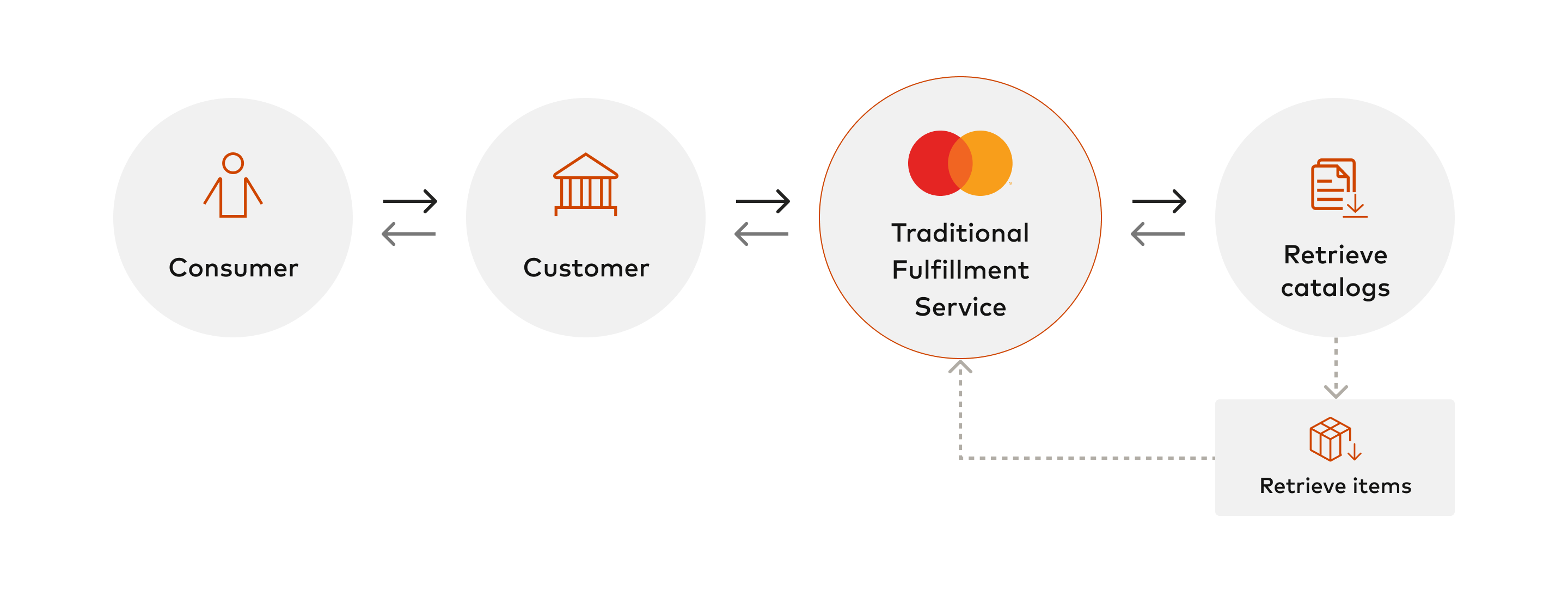
##### The following diagram shows a high-level flow between the Consumer, Customer, and the Traditional Fulfillment Service API for Catalogs and Items based operation {#the-following-diagram-shows-a-high-level-flow-between-the-consumer-customer-and-the-traditional-fulfillment-service-api-for-catalogs-and-items-based-operation}
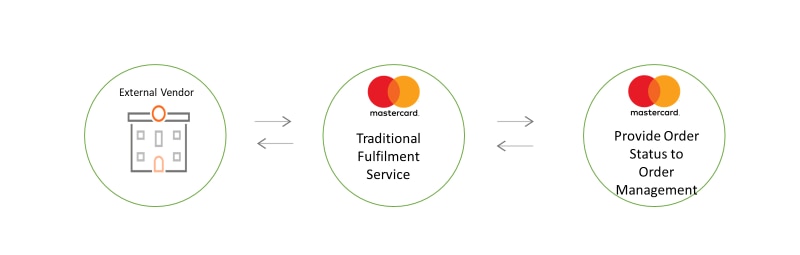
##### The following diagram shows a high-level flow between the external vendor and the Traditional Fulfillment Service API for Orders based operation {#the-following-diagram-shows-a-high-level-flow-between-the-external-vendor-and-the-traditional-fulfillment-service-api-for-orders-based-operation}
###### Execution Steps for Catalogs and Items based operation: {#execution-steps-for-catalogs-and-items-based-operation}
1. The consumer signs into the customer's application.
2. The customer authenticates the consumer.
3. The customer sends a signed request to Traditional Fulfillment Service.
4. The Traditional Fulfillment Service validates the request.
5. The Traditional Fulfillment Service will retrieve the catalog or item (which must be given a catalog).
6. The Traditional Fulfillment Service sends the response.
###### Execution Steps for Orders based operation: {#execution-steps-for-orders-based-operation}
1. The Vendor sends a signed request to Traditional Fulfillment Service.
2. The Traditional Fulfillment Service validates the request.
3. The Traditional Fulfillment Service will update the order status
4. The Traditional Fulfillment Service sends the response.
### Good to Know {#good-to-know}
* We have created a [Reference Application](https://developer.mastercard.com/traditional-fulfillment-service/documentation/reference-app/index.md) to get you started.
* Refer to the [Use Cases](https://developer.mastercard.com/traditional-fulfillment-service/documentation/use-cases/index.md) for additional details on how the API works.
* Refer to the [Tutorials and Guides](https://developer.mastercard.com/traditional-fulfillment-service/documentation/tutorials-and-guides/index.md) for additional guidance.
Tip: If you don't have a Mastercard representative, reach out for help from the [support page](https://developer.mastercard.com/traditional-fulfillment-service/documentation/support/index.md#get-help).
## Next Steps {#next-steps}
When you are ready to use the APIs, refer to the [API Basics](https://developer.mastercard.com/traditional-fulfillment-service/documentation/api-basics/index.md) page for API authentication, and environment details.