# Support
source: https://developer.mastercard.com/token-requestor-identifier-api/documentation/support/index.md
## FAQs {#faqs}
The Mastercard Digital Enablement Service (MDES) [On-Behalf-Of (OBO) model](https://developer.mastercard.com/mdes-digital-enablement/documentation/use-cases/mdes-for-merchants-on-behalf-of-model-use-cases/) for merchants allows Payment Service Providers (PSP) to perform Tokenization and Transaction activities for the merchants they represent. A PSP operating in this model is referred to as an On-Behalf-Of Token Requestor (OBOTR) and the merchant they support is described as the Token Requestor.
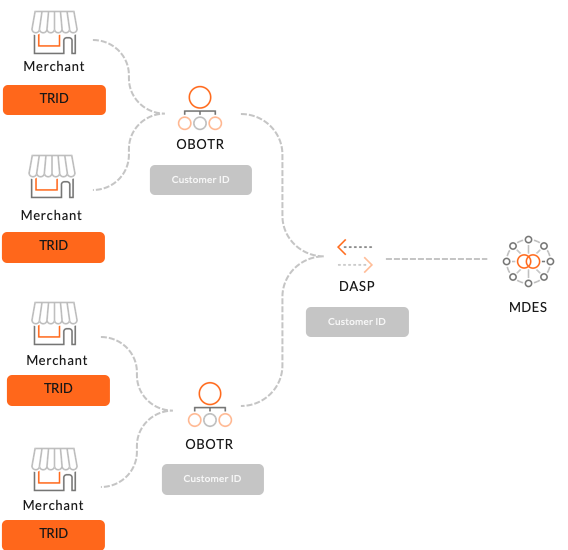
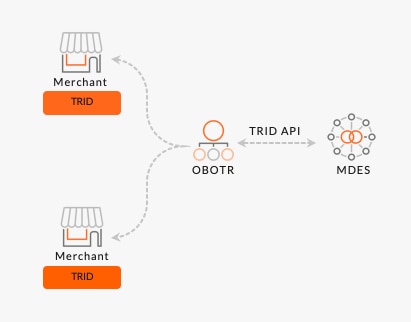 Start by creating a project. To enable integration in MTF and Production, please reach out to your CIS representative to get your client ID and customer ID on-boarded to use the API. You would also have to provide the push end-point to receive notifications from TRID API. Once the access has been granted, your CIS representative will inform you that you can commence making API requests. The Token Requestor Identifier (TRID) API is currently aimed at On-Behalf-Of Token Requestors such as Payment Service Providers who wish to provide tokenization services to their merchants using MDES. No, individual merchants integrating to MDES should follow the manual onboarding process. Please contact your Mastercard representative for more details. At launch, the Token Requestor Identifier (TRID) API is available globally. The API is free to use. This could be your Mastercard Account Manager or the Product Manager for the MDES program. A member of Mastercard Customer Implementation Services (CIS)/Customer delivery team. A DASP represents other On-Behalf-Of Token Requestors and provides them with provisioning and Token requestor services. A typical integration model for a DASP look like -
## Get Help {#get-help}
### Contact us for technical support. {#contact-us-for-technical-support}