# Using OAuth 2.0 to Access Mastercard APIs
source: https://developer.mastercard.com/platform/documentation/authentication/using-oauth-2-to-access-mastercard-apis/index.md
###### Reading Time: *20 minutes*
## Overview {#overview}
This guide explains how to use OAuth 2.0 to access Mastercard APIs. Mastercard uses [FAPI 2.0](https://openid.bitbucket.io/fapi/fapi-security-profile-2_0.html), a security profile built for financial services. It adds protections to verify your identity and prevent attackers from tampering with your API calls.
Here is a simplified view of the authentication flow:

The process uses the OAuth 2.0 client credentials flow for direct system-to-system communication (no user involved). Your application requests an access token from the Mastercard authorization server by signing a client assertion with your authentication key. You then use that access token to make requests to the API.
In addition to that, FAPI 2.0 binds access tokens to your application using DPoP (Demonstration of Proof-of-Possession). This means a stolen token cannot be used without your DPoP private key.
## Before You Start {#before-you-start}
Before you begin, make sure you are familiar with:
* Mastercard Developers projects and credentials
* The OAuth 2.0 client credentials flow
* JSON Web Tokens (JWT)
* Public key cryptography and digital signatures
* The HTTP protocol
In the next sections, you will learn how FAPI 2.0 adds security layers to OAuth 2.0. You will also learn how to get credentials from Mastercard Developers, how to request access tokens, and how to make authenticated API calls.
Tip: If you prefer to start with code, jump to the [client libraries](https://developer.mastercard.com/platform/documentation/authentication/using-oauth-2-to-access-mastercard-apis/index.md#client-libraries) section. For error handling or troubleshooting, see [handling errors](https://developer.mastercard.com/platform/documentation/authentication/using-oauth-2-to-access-mastercard-apis/index.md#handling-errors). For more details on the specifications, check the links in the [further reading](https://developer.mastercard.com/platform/documentation/authentication/using-oauth-2-to-access-mastercard-apis/index.md#further-reading) section.
## Financial-Grade API 2.0 {#financial-grade-api-20}
FAPI 2.0 is a security profile built on top of OAuth 2.0. The OpenID Foundation created it for financial services and other industries that need stronger security.
Mastercard implements the "FAPI2SP private key + DPoP" approach, which creates 2 layers of protection: only your application can get access tokens, and only your application can use those tokens. Here is how it works.
#### Strong client authentication {#strong-client-authentication}
When your application requests an access token, it authenticates using a client assertion (`private_key_jwt`). You sign this JWT with your private key and send it to prove your identity. An attacker cannot impersonate your application without your private key.
#### Token binding {#token-binding}
Access tokens are bound to your application using DPoP (Demonstration of Proof-of-Possession). Each time you use an access token to call an API, you include a DPoP proof signed with the same private key. Even if someone intercepts your access token, they cannot create valid DPoP proofs without your private key.
#### Stronger algorithms {#stronger-algorithms}
FAPI 2.0 requires modern cryptographic algorithms (ES256 or PS256) that provide better security than older options.
The next sections walk you through each step of the authentication flow.
## Authentication Flow Overview {#authentication-flow-overview}
### 1. Credential Setup {#1-credential-setup}
The first step is to get your Mastercard Developers credentials and to set them up:

| Step | Action | Description |
|----------|---------------------------|--------------------------------------------------------------------------------------------------|
| ###### ❶ | Sign in | You [sign in](https://developer.mastercard.com/account/log-in) to Mastercard Developers |
| ###### ❷ | Create project | You create a new project or select an existing one |
| ###### ❸ | Download/copy credentials | You download your authentication key and copy your client ID, key ID and scopes |
| ###### ❹ | Configure credentials | You add your authentication key, client ID, key ID, and scopes to your application configuration |
### 2. Access Token Request {#2-access-token-request}
Then, your application requests an access token using a `private_key_jwt` and a DPoP proof:

| Step | Action | Description |
|----------|-------------------------------------|-------------------------------------------------------------------------------------------------------------------------------------------|
| ###### ❶ | Generate DPoP key | Your application generates a key pair for DPoP (this is separate from your authentication key) |
| ###### ❷ | Create DPoP proof for token request | Your application creates a DPoP proof JWT, signed with your DPoP key |
| ###### ❸ | Create client assertion | Your application creates a `private_key_jwt`, signed with your authentication key |
| ###### ❹ | Request access token | Your application sends the `private_key_jwt` and DPoP proof to the authorization server |
| ###### ❺ | Create DPoP-bound access token | The authorization server verifies your client assertion and creates an access token with a `cnf.jkt` claim that binds it to your DPoP key |
| ###### ❻ | Return access token | The authorization server returns the access token to your application |
### 3. API Call {#3-api-call}
Finally, your application makes an authenticated request with the access token and a DPoP proof:

| Step | Action | Description |
|----------|---------------------------------------|--------------------------------------------------------------------------------------------------------------------------|
| ###### ❶ | Create DPoP proof for resource access | Your application creates a DPoP proof JWT, signed with your DPoP key, and with an `ath` claim (hash of the access token) |
| ###### ❷ | Make API call | Your application sends the access token and DPoP proof to the API |
| ###### ❸ | Grant access | The API validates the access token and DPoP proof before granting access |
| ###### ❹ | Return API response | The API returns the response with a `DPoP-Nonce` header containing the nonce to use for your next DPoP proof |
## Step-by-Step Implementation {#step-by-step-implementation}
Now that you have seen the big picture, let's look at each step in more detail. This section provides the exact values to use, JWTs to generate, and HTTP requests to make.
### 1. Credential Setup {#1-credential-setup-1}
To access Mastercard APIs, you need a few details from your Mastercard Developers project:
* Your authentication key file, which contains your private key for signing client assertions
* Your client ID, which identifies your application to Mastercard
* Your key ID, which tells the authorization server which public key to use when verifying your signatures
* Service scopes, which define which APIs and operations your application can access

For that:
1. [Sign in](https://developer.mastercard.com/account/log-in) to Mastercard Developers
2. Create a new project and create your authentication key
3. Navigate to the "Sandbox" or "Production" section
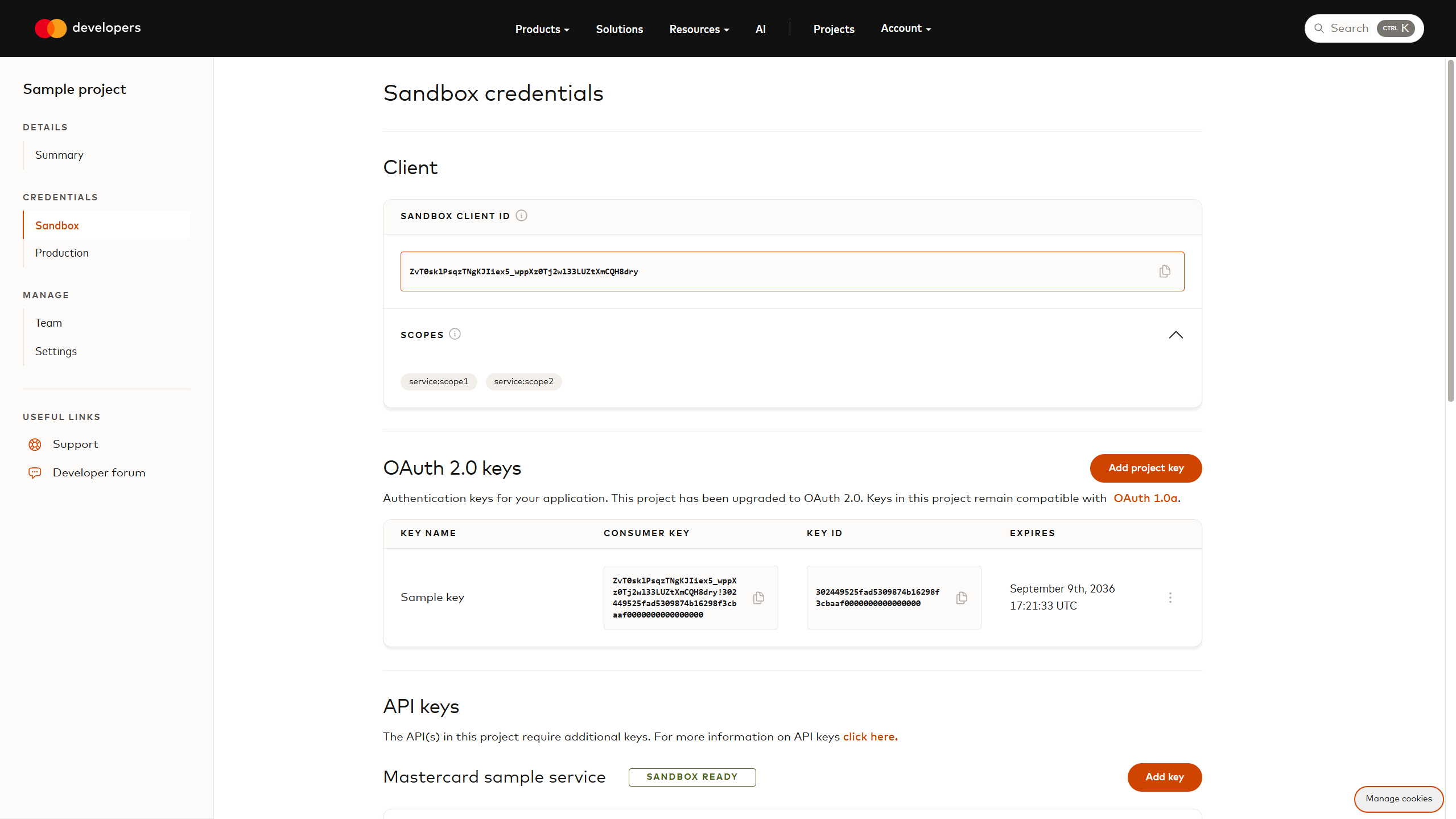
4. Copy your client ID (example: `ZvT0sklPsqzTNgKJIiex5_wppXz0Tj2wl33LUZtXmCQH8dry`)
5. Copy your key ID (example: `302449525fad5309874b16298f3cbaaf0000000000000000`)
6. Copy scopes (examples: `service:scope1`, `service:scope2`)
Note: Mastercard Developers' CSR‑based credential generation and OAuth 2.0 implementation both support RSA and EC keys. Choose the key type that best fits your cryptographic and compliance requirements.
Here is where to find your client ID, key ID, and scopes in a Sandbox project:
Warning: All credentials shown in this guide (client ID, key ID, authentication and DPoP key pairs) are examples. Replace them with your own.
### 2. Access Token Request {#2-access-token-request-1}
#### ❶ Generate DPoP key {#-generate-dpop-key}

DPoP (Demonstration of Proof-of-Possession) requires a separate key pair from your authentication key. This key proves you own the access token when making API calls. You can use either ES256 (elliptic curve) or PS256 (RSA-PSS) algorithms. We recommend ES256 because it produces smaller signatures.
Example of code generating an ES256 key pair:
* Java
```java
import java.security.KeyPair;
import java.security.KeyPairGenerator;
import java.security.SecureRandom;
import java.security.spec.ECGenParameterSpec;
KeyPairGenerator keyGen = KeyPairGenerator.getInstance("EC");
keyGen.initialize(new ECGenParameterSpec("secp256r1"), new SecureRandom());
KeyPair keyPair = keyGen.generateKeyPair();
```
Corresponding DPoP JWK (JSON Web Key):
```json
{
"kty": "EC",
"crv": "P-256",
"x": "cojbH-aPEUBxt2_uSx5P9UTUkl5X_CFbnncJ35-onlc",
"y": "89bpkg2grnJC0rzo_I2c_BTLB0sXHBvbmu5jjSwyOv8",
"d": "QSmrwP5VQoH7PzWJ3ZTKhG7S_Wr1zDP8ko6-z7SLTa8"
}
```
#### ❷ Create DPoP proof for token request {#-create-dpop-proof-for-token-request}

A DPoP proof is a JWT that proves you control the DPoP private key. For the token request, include the HTTP method (`POST`) and the token endpoint URL.
Warning: When you request an access token for the first time, you do not have a nonce yet. Send your DPoP proof without the `nonce` claim. The server will respond with a `use_dpop_nonce` error and provide a nonce in the `DPoP-Nonce` response header. Extract that nonce, include it in your next DPoP proof, and try again. Decoded DPoP proof JWT header:
```json
{
"alg": "ES256",
"typ": "dpop+jwt",
"jwk": {
"kty": "EC",
"crv": "P-256",
"x": "cojbH-aPEUBxt2_uSx5P9UTUkl5X_CFbnncJ35-onlc",
"y": "89bpkg2grnJC0rzo_I2c_BTLB0sXHBvbmu5jjSwyOv8"
}
}
```
Decoded DPoP proof JWT payload:
```json
{
"jti": "sY5d_rvBsJKCNH-y",
"htm": "POST",
"htu": "https://sandbox.api.mastercard.com/oauth/token",
"iat": 1760028605,
"exp": 1760028725,
"nonce": "5e8972513327f0b3670b21f308cf5e8e"
}
```
* `jwk`: your public DPoP key
* `jti`: a unique identifier for this proof
* `htm`: the HTTP method (always `POST` for token requests)
* `htu`: the full token endpoint URL (scheme, host, and path only - no query parameters)
* `iat`: the timestamp when this proof was created (in seconds since Unix epoch)
* `exp`: the timestamp when this proof expires (in seconds since Unix epoch)
* `nonce`: the nonce from the previous `DPoP-Nonce` header, do not include `nonce` if you do not have it yet
Signed DPoP proof ([view on jwt.io](https://www.jwt.io/#token=eyJhbGciOiJFUzI1NiIsInR5cCI6ImRwb3Arand0IiwiandrIjp7Imt0eSI6IkVDIiwiY3J2IjoiUC0yNTYiLCJ4IjoiY29qYkgtYVBFVUJ4dDJfdVN4NVA5VVRVa2w1WF9DRmJubmNKMzUtb25sYyIsInkiOiI4OWJwa2cyZ3JuSkMwcnpvX0kyY19CVExCMHNYSEJ2Ym11NWpqU3d5T3Y4In19.eyJqdGkiOiJzWTVkX3J2QnNKS0NOSC15IiwiaHRtIjoiUE9TVCIsImh0dSI6Imh0dHBzOi8vc2FuZGJveC5hcGkubWFzdGVyY2FyZC5jb20vb2F1dGgvdG9rZW4iLCJpYXQiOjE3NjAwMjg2MDUsImV4cCI6MTc2MDAyODcyNSwibm9uY2UiOiI1ZTg5NzI1MTMzMjdmMGIzNjcwYjIxZjMwOGNmNWU4ZSJ9.f9I9RZuKIbCaOREGoqgcG46l4r39kZMZFFF_tFTPS8VlMGLPiOLxop5Fj_KnO578C5GTU9PK9wR_-3HJmGLn0g)):
eyJhbGciOiJFUzI1NiIsInR5cCI6ImRwb3Arand0IiwiandrIjp7Imt0eSI6IkVDIiwiY3J2IjoiUC0yNTYiLCJ4IjoiY29qYkgtYVBFVUJ4dDJfdVN4NVA5VVRVa2w1WF9DRmJubmNKMzUtb25sYyIsInkiOiI4OWJwa2cyZ3JuSkMwcnpvX0kyY19CVExCMHNYSEJ2Ym11NWpqU3d5T3Y4In19.eyJqdGkiOiJzWTVkX3J2QnNKS0NOSC15IiwiaHRtIjoiUE9TVCIsImh0dSI6Imh0dHBzOi8vc2FuZGJveC5hcGkubWFzdGVyY2FyZC5jb20vb2F1dGgvdG9rZW4iLCJpYXQiOjE3NjAwMjg2MDUsImV4cCI6MTc2MDAyODcyNSwibm9uY2UiOiI1ZTg5NzI1MTMzMjdmMGIzNjcwYjIxZjMwOGNmNWU4ZSJ9.f9I9RZuKIbCaOREGoqgcG46l4r39kZMZFFF_tFTPS8VlMGLPiOLxop5Fj_KnO578C5GTU9PK9wR_-3HJmGLn0g
#### ❸ Create client assertion {#-create-client-assertion}

The `private_key_jwt` authenticates your application to the authorization server. You sign this JWT with your authentication key (the one you downloaded from Mastercard Developers).
Decoded `private_key_jwt` header:
```json
{
"alg": "PS256",
"typ": "JWT",
"kid": "302449525fad5309874b16298f3cbaaf0000000000000000"
}
```
Decoded `private_key_jwt` payload:
```json
{
"jti": "8rdKzOG_Ehgpcqru",
"sub": "ZvT0sklPsqzTNgKJIiex5_wppXz0Tj2wl33LUZtXmCQH8dry",
"iss": "ZvT0sklPsqzTNgKJIiex5_wppXz0Tj2wl33LUZtXmCQH8dry",
"aud": "https://sandbox.api.mastercard.com",
"iat": 1760087957,
"exp": 1760088077,
"nbf": 1760087837
}
```
* `kid`: your key ID from Mastercard Developers
* `jti`: a unique identifier for this assertion
* `iss`: your client ID (issuer)
* `sub`: your client ID (subject)
* `aud`: the authorization server's [issuer identifier value](https://sandbox.api.mastercard.com/.well-known/oauth-authorization-server)
* `iat`: the timestamp when this assertion was created (in seconds since Unix epoch)
* `exp`: the timestamp when this assertion expires (in seconds since Unix epoch)
* `nbf`: the timestamp before which this assertion is not valid (in seconds since Unix epoch)
Sample authentication key:
-----BEGIN PRIVATE KEY-----
MIIEvAIBADANBgkqhkiG9w0BAQEFAASCBKYwggSiAgEAAoIBAQCfcWgmoU8Kgr9K
fS0HKld1ryZJaCEmRT+jUJa6JH0EM9dJQvJVHVUSWeFGvQW53kW3p2w1oivQ95qr
+wVj6xlIrfaSamCxr1eCzmmp58oahUTM6YBvIuLJo5FqDHmgR11ogoZrMnwU/flJ
HtzgmiJJwhInhjR5kJkdnnRaW3xCQ//Wymjdhz3U/X+K23cPaiC+f6NyBlU8fjRw
ea7Hh5JnFCUCxPTDFkqRoKxGqNfSSg/MRe5hQKKOvROTV1sXEj8V7IBosHgF5Dg8
tr8d7CdxmdUohn2RIHw09Qv3XL/k/ed6HJvqpqbTyJ+IGYiwqabfZzRnultcceQv
Uvja0DaJAgMBAAECggEAAcWQlvdNacw8pG8CKFV53dKprgCkd6im1aGAX0anBfwu
fP+rsjLuflL13COfE+rqoukPHIR2EK8jrpwOOgdDg2l9dzCL7QWKByfUiEENX6CR
/GXu2a1NUFjLNZ64XkXUvaPPqxLHSrNsyPl5ElzcGy43Je3JmP04mlnnqJZiKdlT
k0MdLE7r2rvz4bdbbr2nLu1m7P6xgiMcqI8pRWMvxSg6o7RcGdV2aIbFJr8RAtav
XNqdzRqERM7JLELPxEvZOwuIGfu0UlH6ziGPiAqoFP03zBGNRhnWHls88tJVTTFt
Xv9sPRjvO79gDfraIGkuM+rMUyf8pceaFOeWgqk5BQKBgQDgrsK2q8wiQiA3d9O2
0lJoj/cjKDb7Cc14ofEKkfyGnY9MbPwsN4q7gdC8bHFJSx0iYB3TuJi7ZTXtnotc
OtiBhQ1UGBZbz1YEkO708QuxvqKGDhg0xqs1/HaSv0aAD1xu+9ii6vMuWN/r5uYp
jhEItisjWW7FHPdBdMxGgcWwPQKBgQC1qrtZdfthTBlwncy61+kUsXJ+kSDRVmp/
/KWzv0TcYskGqJdfz0eg/llSXLukASyuT0A3lR9Knk3Ep43acHEYvKH0ri00jDjp
jDCp4v1q1qDoiD+WKT5yW4V8GSQt5bh5IoBaMGomEh2Wl3qEvnqFshEB3ko/8S0s
LHMKfmWYPQKBgCXKXye4Z6JPevm5Ztu2LnQ12ryIFA9PS8cBffhoK5A8yhBxuEx7
nxMAt6oplzhbsO/KONoWj2HdmR95bjk6EJZgWaiOUJxqmC42bmq2bGAeD1n63ulp
jPyMlSkDkQkTDFoCdCKa4AIooqkb8hSFN6o+ca0FatMulwvkaENnqmeFAoGAZky7
bZhDs7mvxbwGstys00tNhzpgeaGpHWN/SCYYN+ak/0vm2jwWQPGaCQhRXfyPVaUp
K2OdGF7muiwEdJLHDUAED44ZxLKFxfZ83N4HCKfOOsOm0v9su+cP1x8tQW9QH16v
WppS3BdtdATfKGs/AZSRgTTVKQa+AlcRfUJKIZ0CgYAL9tG7FCeUQm0nB1SdyNer
mLCTuiqDevwQgfzi/9d6yLJS1rhq9+X6V9/wBeLBCXo6/amWtWyzL0YcUCsrQcBx
pl4wLyj/ieuH4iKkg5s8DwXCW6IHh4ObbPYmj/NgYUPNg7DrAaONjQTVEdnVUIz7
idsyqRGmO11VjVz3z0SVIA==
-----END PRIVATE KEY-----
-----BEGIN PUBLIC KEY-----
MIIBIjANBgkqhkiG9w0BAQEFAAOCAQ8AMIIBCgKCAQEAn3FoJqFPCoK/Sn0tBypX
da8mSWghJkU/o1CWuiR9BDPXSULyVR1VElnhRr0Fud5Ft6dsNaIr0Peaq/sFY+sZ
SK32kmpgsa9Xgs5pqefKGoVEzOmAbyLiyaORagx5oEddaIKGazJ8FP35SR7c4Joi
ScISJ4Y0eZCZHZ50Wlt8QkP/1spo3Yc91P1/itt3D2ogvn+jcgZVPH40cHmux4eS
ZxQlAsT0wxZKkaCsRqjX0koPzEXuYUCijr0Tk1dbFxI/FeyAaLB4BeQ4PLa/Hewn
cZnVKIZ9kSB8NPUL91y/5P3nehyb6qam08ifiBmIsKmm32c0Z7pbXHHkL1L42tA2
iQIDAQAB
-----END PUBLIC KEY-----
Signed `private_key_jwt` ([view on jwt.io](https://www.jwt.io/#token=eyJhbGciOiJQUzI1NiIsInR5cCI6IkpXVCIsImtpZCI6IjMwMjQ0OTUyNWZhZDUzMDk4NzRiMTYyOThmM2NiYWFmMDAwMDAwMDAwMDAwMDAwMCJ9.eyJqdGkiOiI4cmRLek9HX0VoZ3BjcXJ1Iiwic3ViIjoiWnZUMHNrbFBzcXpUTmdLSklpZXg1X3dwcFh6MFRqMndsMzNMVVp0WG1DUUg4ZHJ5IiwiaXNzIjoiWnZUMHNrbFBzcXpUTmdLSklpZXg1X3dwcFh6MFRqMndsMzNMVVp0WG1DUUg4ZHJ5IiwiYXVkIjoiaHR0cHM6Ly9zYW5kYm94LmFwaS5tYXN0ZXJjYXJkLmNvbSIsImlhdCI6MTc2MDA4Nzk1NywiZXhwIjoxNzYwMDg4MDc3LCJuYmYiOjE3NjAwODc4Mzd9.bviW9Cm117ZrzRrH3f5wxMPMnViGBFUcXWecm--hSPkE7wM8Dz7RQrMAHyOR2-HwKGaLxprYWWxkDrDv4IHevxHnNmTimDZTEshgaQC_St3VlZ-FW5Px-cAsNY9t3dASc5rWcGvyukGZ5hxRvlSpI-M_P1Crp3iOosu0xVTK6jEp-QQfcJrsWzMht852E1OHlOIHI_R60UKNv4557oJtPgJqeL_F3sqvrPRUc2yvp2FG7XNKXQewuKlNPy9PSK9Njy6hXtzDV0hUIyHbC8mLmlxwVj2FpVZdEy_Tz6IHaXGr51nFnrOJwCdxPD7Ya4bclTndRAvEFUaCn86IsVq-1A)):
eyJhbGciOiJQUzI1NiIsInR5cCI6IkpXVCIsImtpZCI6IjMwMjQ0OTUyNWZhZDUzMDk4NzRiMTYyOThmM2NiYWFmMDAwMDAwMDAwMDAwMDAwMCJ9.eyJqdGkiOiI4cmRLek9HX0VoZ3BjcXJ1Iiwic3ViIjoiWnZUMHNrbFBzcXpUTmdLSklpZXg1X3dwcFh6MFRqMndsMzNMVVp0WG1DUUg4ZHJ5IiwiaXNzIjoiWnZUMHNrbFBzcXpUTmdLSklpZXg1X3dwcFh6MFRqMndsMzNMVVp0WG1DUUg4ZHJ5IiwiYXVkIjoiaHR0cHM6Ly9zYW5kYm94LmFwaS5tYXN0ZXJjYXJkLmNvbSIsImlhdCI6MTc2MDA4Nzk1NywiZXhwIjoxNzYwMDg4MDc3LCJuYmYiOjE3NjAwODc4Mzd9.bviW9Cm117ZrzRrH3f5wxMPMnViGBFUcXWecm--hSPkE7wM8Dz7RQrMAHyOR2-HwKGaLxprYWWxkDrDv4IHevxHnNmTimDZTEshgaQC_St3VlZ-FW5Px-cAsNY9t3dASc5rWcGvyukGZ5hxRvlSpI-M_P1Crp3iOosu0xVTK6jEp-QQfcJrsWzMht852E1OHlOIHI_R60UKNv4557oJtPgJqeL_F3sqvrPRUc2yvp2FG7XNKXQewuKlNPy9PSK9Njy6hXtzDV0hUIyHbC8mLmlxwVj2FpVZdEy_Tz6IHaXGr51nFnrOJwCdxPD7Ya4bclTndRAvEFUaCn86IsVq-1A
#### ❹ Request access token {#-request-access-token}

Send a POST request to the token endpoint with your client assertion and DPoP proof. The request uses form-encoded data:
```bash
curl --request POST 'https://sandbox.api.mastercard.com/oauth/token' \
--header 'Content-Type: application/x-www-form-urlencoded' \
--header 'DPoP: eyJhbGciOiJFUzI1NiIsInR5c...FCWnvnqluFsBeFvbPigBRhIhA' \
--data-urlencode 'client_id=ZvT0sklPsqzTNgKJIiex5_wppXz0Tj2wl33LUZtXmCQH8dry' \
--data-urlencode 'grant_type=client_credentials' \
--data-urlencode 'scope=service:scope1 service:scope2' \
--data-urlencode 'client_assertion_type=urn:ietf:params:oauth:client-assertion-type:jwt-bearer' \
--data-urlencode 'client_assertion=eyJhbGciOiJQUzI1NiIsInR5c...NKdJ-C7yNbwU0zATbQO_gjSfQ'
```
Parameters:
* `DPoP`: the DPoP proof
* `client_id`: your client ID
* `scope`: a space-separated list of scopes
* `client_assertion`: your `private_key_jwt`
#### ❺ Create DPoP-bound access token {#-create-dpop-bound-access-token}

The authorization server validates your client assertion and DPoP proof, then creates an access token bound to your DPoP key. This happens server-side. The authorization server:
1. Verifies your `private_key_jwt` signature using your public key
2. Checks the DPoP proof signature and claims
3. Extracts the public key from the DPoP proof (`jwk` claim)
4. Calculates a thumbprint of the DPoP public key
5. Creates an access token with a `cnf.jkt` (confirmation) claim containing the key thumbprint
#### ❻ Return access token {#-return-access-token}

The authorization server response includes the token, its type, expiration time, and scopes:
```json
{
"access_token": "eyJ4NXQjUzI1NiI6Ii1sbjlQb1hyWFZQakxQTVVheC1zU29iWWhYQzNZakRfOFlvdWx2SHNjVjAiLCJraWQiOiJjN2QxZWE5Mi1kODAyLTRjZTYtYmI4NS1lZWNjZjlhOTgyZDMiLCJjdHkiOiJKV1MiLCJ0eXAiOiJKV1QiLCJhbGciOiJFUzI1NiJ9.eyJhdWQiOiJodHRwczovL3NhbmRib3guYXBpLm1hc3RlcmNhcmQuY29tIiwic3ViIjoiWnZUMHNrbFBzcXpUTmdLSklpZXg1X3dwcFh6MFRqMndsMzNMVVp0WG1DUUg4ZHJ5IiwibmJmIjoxNzYwMDk5OTU2LCJzY29wZSI6InNlcnZpY2U6c2NvcGUxIHNlcnZpY2U6c2NvcGUyIiwiaXNzIjoiaHR0cHM6Ly9zYW5kYm94LmFwaS5tYXN0ZXJjYXJkLmNvbSIsImNuZiI6eyJqa3QiOiJ0UXpOVnZWZzF4OTluOGkta0dmRmZCenRMY2FxRlMyX25iOWJRa2wtRnFrIn0sImV4cCI6MTc2MDEwMDg2NiwiaWF0IjoxNzYwMDk5OTY2LCJqdGkiOiJjM2VhNzIwM2FhNDNjNDA3OTIxN2RhMjJlYjQ4NjZjNiJ9.vfuhb0QQkgTR7dj9J8Fc6RwhKCDhmtG2KlOsSFk-LolZXPXNQEKSvZsUVhGAoLTE69XYj5oPIq4PZf2WaMxLow",
"token_type": "DPoP",
"expires_in": 900,
"scope": "service:scope1 service:scope2"
}
```
Response fields:
* `access_token`: the DPoP-bound access token
* `token_type`: always `DPoP` (not `Bearer`)
* `expires_in`: the token lifetime in seconds
* `scope`: the scopes granted to this token
### 3. API Call {#3-api-call-1}
#### ❶ Create DPoP proof for resource access {#-create-dpop-proof-for-resource-access}

When you call the API, you need a new DPoP proof. This proof is similar to the previous one, but with 2 important differences: the `htu` and `htm` match the API endpoint you are calling, and you add an `ath` claim with the hash of your access token.
Example of code calculating the access token hash:
* Java
```java
import java.nio.charset.StandardCharsets;
import java.security.MessageDigest;
import java.util.Base64;
MessageDigest digest = MessageDigest.getInstance("SHA-256");
byte[] accessTokenBytes = digest.digest("eyJ4NXQjUzI1NiI6I...5oPIq4PZf2WaMxLow".getBytes(StandardCharsets.UTF_8));
String ath = Base64.getUrlEncoder().withoutPadding().encodeToString(accessTokenBytes);
```
Decoded DPoP proof JWT header:
```json
{
"alg": "ES256",
"typ": "dpop+jwt",
"jwk": {
"kty": "EC",
"crv": "P-256",
"x": "cojbH-aPEUBxt2_uSx5P9UTUkl5X_CFbnncJ35-onlc",
"y": "89bpkg2grnJC0rzo_I2c_BTLB0sXHBvbmu5jjSwyOv8"
}
}
```
Decoded DPoP proof JWT payload:
```json
{
"jti": "47bs8_cGUYLgQmc9",
"htm": "GET",
"htu": "https://sandbox.api.mastercard.com/service/resource/86869f92",
"iat": 1760099966,
"exp": 1760100086,
"ath": "Syre2WyO2hFtZbC8v4_LF41uuF4ysyAxqIA-J6UnxLc",
"nonce": "5e8972513327f0b3670b21f308cf5e8e"
}
```
* `htm`: the HTTP method for the API call (`GET`, `POST`, `PUT`, etc.)
* `htu`: the full API endpoint URL (scheme, host, and path only - no query parameters)
* `nonce`: the nonce from the previous `DPoP-Nonce` header
* `ath`: the SHA-256 hash of the access token (base64url encoded)
Signed DPoP proof ([view on jwt.io](https://www.jwt.io/#token=eyJhbGciOiJFUzI1NiIsInR5cCI6ImRwb3Arand0IiwiandrIjp7Imt0eSI6IkVDIiwiY3J2IjoiUC0yNTYiLCJ4IjoiY29qYkgtYVBFVUJ4dDJfdVN4NVA5VVRVa2w1WF9DRmJubmNKMzUtb25sYyIsInkiOiI4OWJwa2cyZ3JuSkMwcnpvX0kyY19CVExCMHNYSEJ2Ym11NWpqU3d5T3Y4In19.eyJqdGkiOiI0N2JzOF9jR1VZTGdRbWM5IiwiaHRtIjoiR0VUIiwiaHR1IjoiaHR0cHM6Ly9zYW5kYm94LmFwaS5tYXN0ZXJjYXJkLmNvbS9zZXJ2aWNlL3Jlc291cmNlLzg2ODY5ZjkyIiwiaWF0IjoxNzYwMDk5OTY2LCJleHAiOjE3NjAxMDAwODYsImF0aCI6IlN5cmUyV3lPMmhGdFpiQzh2NF9MRjQxdXVGNHlzeUF4cUlBLUo2VW54TGMiLCJub25jZSI6IjVlODk3MjUxMzMyN2YwYjM2NzBiMjFmMzA4Y2Y1ZThlIn0.gk2b6J1SMq7KTkfge71RZY8WHiBULCjUYNGwHqVJM-P-MByhz9Ogn9hOc8UBfT1d59jEch4FL9-R_vsyUAgSwQ)):
eyJhbGciOiJFUzI1NiIsInR5cCI6ImRwb3Arand0IiwiandrIjp7Imt0eSI6IkVDIiwiY3J2IjoiUC0yNTYiLCJ4IjoiY29qYkgtYVBFVUJ4dDJfdVN4NVA5VVRVa2w1WF9DRmJubmNKMzUtb25sYyIsInkiOiI4OWJwa2cyZ3JuSkMwcnpvX0kyY19CVExCMHNYSEJ2Ym11NWpqU3d5T3Y4In19.eyJqdGkiOiI0N2JzOF9jR1VZTGdRbWM5IiwiaHRtIjoiR0VUIiwiaHR1IjoiaHR0cHM6Ly9zYW5kYm94LmFwaS5tYXN0ZXJjYXJkLmNvbS9zZXJ2aWNlL3Jlc291cmNlLzg2ODY5ZjkyIiwiaWF0IjoxNzYwMDk5OTY2LCJleHAiOjE3NjAxMDAwODYsImF0aCI6IlN5cmUyV3lPMmhGdFpiQzh2NF9MRjQxdXVGNHlzeUF4cUlBLUo2VW54TGMiLCJub25jZSI6IjVlODk3MjUxMzMyN2YwYjM2NzBiMjFmMzA4Y2Y1ZThlIn0.gk2b6J1SMq7KTkfge71RZY8WHiBULCjUYNGwHqVJM-P-MByhz9Ogn9hOc8UBfT1d59jEch4FL9-R_vsyUAgSwQ
#### ❷ Make API call {#-make-api-call}

Now you can call the Mastercard API using your access token and DPoP proof. The token goes in the `Authorization` header with the `DPoP` scheme. The proof goes in the `DPoP` header.
```bash
curl --request GET 'https://sandbox.api.mastercard.com/service/resource/86869f92' \
--header 'Authorization: DPoP eyJ4NXQjUzI1NiI6Ii1sbjlQb...LTE69XYj5oPIq4PZf2WaMxLow' \
--header 'DPoP: eyJhbGciOiJFUzI1NiIsInR5c...sDiwDtlOM341lvXMi6luvpktw'
```
Parameters:
* `Authorization`: use the `DPoP` scheme followed by your access token
* `DPoP`: your signed DPoP proof
#### ❸ Grant access {#-grant-access}

The API validates your request by checking 3 conditions:
1. The access token is valid and not expired
2. The DPoP proof is signed with the private key matching the `cnf.jkt` claim in the access token
3. The `ath` claim in the DPoP proof matches the hash of the access token
If all checks pass, the API processes your request and returns the response.
#### ❹ Return API response {#-return-api-response}

If the request is successful, the API performs the requested operation. The response includes a new `DPoP-Nonce` header. Use this nonce in your next DPoP proof.
Sample response:
```json
{
"success": true
}
```
Response headers:
DPoP-Nonce: 7f6e5d4c3b2a1098fedcba9876543210
## Handling Errors {#handling-errors}
When something goes wrong, the authorization server or API returns an error response with a specific error code. Understanding these errors helps you fix issues quickly. Here are the most common ones.
Note: For a complete list of error codes and their meanings, see [OAuth 2.0 Error Codes](https://developer.mastercard.com/platform/documentation/errors-and-troubleshooting/oauth2-error-codes/index.md).
#### use_dpop_nonce {#use_dpop_nonce}
```json
{
"error": "use_dpop_nonce"
}
```
This error occurs when the server requires you to include a nonce in your DPoP proof, but you did not include one or the nonce you provided is invalid. The response includes a `DPoP-Nonce` header with the nonce value you need to use: `DPoP-Nonce: 9a883cecdd6f6aa102e9a0e65d0b3643`.
Tip: How to fix it:
1. Extract the nonce from the `DPoP-Nonce` header
2. Add it to a new DPoP proof as the `nonce` claim
3. Send the request again with the updated DPoP proof
You do not have to wait for this error to update your nonce. You should get a `DPoP-Nonce` header with every successful response. If the nonce value changes, use the new one in your next DPoP proof. This helps you avoid errors from nonce rotation.
#### invalid_client {#invalid_client}
```json
{
"error": "invalid_client"
}
```
This error means the authorization server could not validate your client assertion. This happens when your client assertion is malformed, expired, or signed with the wrong key.
Common causes:
* Your client assertion is expired (check the `exp` claim)
* You signed the client assertion with the wrong private key, or provided the wrong `kid`
* The `iss` or `sub` claim does not match your client ID
* The signature algorithm is not supported (use ES256 or PS256)
Tip: Check your client assertion JWT. Make sure all required claims are present and valid. Verify you are using the correct private key that matches the public key you uploaded to Mastercard Developers.
#### invalid_dpop_proof {#invalid_dpop_proof}
```json
{
"error": "invalid_dpop_proof"
}
```
This error means the DPoP proof you sent is invalid. This can happen for several reasons related to how you created or signed the DPoP proof.
Common causes:
* The DPoP proof is expired (check the `exp` claim)
* The `htu` claim does not match the request URI
* The `htm` claim does not match the HTTP method (POST for token requests)
* The signature cannot be verified with the public key in the `jwk` claim
* The signature algorithm is not supported (use ES256 or PS256)
* Some required claims are missing (`jti`, `htm`, `htu`, `iat`)
Tip: Double-check your DPoP proof JWT. Make sure the `htu` matches the exact URL you are calling (including scheme and host). The `htm` must match the HTTP method. All timestamps must be valid. When calling the API (not the token endpoint), you also need to include the `ath` claim with the hash of your access token.
## Client Libraries {#client-libraries}
Mastercard provides [client authentication libraries](https://github.com/Mastercard?q=oauth2) in several languages you can integrate to your project or use as reference implementations. These libraries handle the OAuth 2.0 and FAPI 2.0 details for you, so you can get up to speed quickly without having to build everything from scratch.
| |  |  |  |  |
|----------------------|--------------------------------------------------------------------------------------------------------------------------------------------------------------------------------------------------------------------------|--------------------------------------------------------------------------------|------------------------------------------------------------------------------------|---------------------------------------------------------------------------------------------------------------------------------------------------------------------------|
| **Download/install** | [](https://search.maven.org/artifact/com.mastercard.developer/oauth2-client-java/) | Coming | Coming | [](https://www.npmjs.com/package/@mastercard/oauth2-client-js) |
| **View on GitHub** | [](https://github.com/Mastercard/oauth2-client-java) | ... soon! | ... soon! | [](https://github.com/Mastercard/oauth2-client-js) |
To get started, add the package that matches your application development language to your project. You can also refer to the different README.md files for detailed how-to information.
## Insomnia Plugin {#insomnia-plugin}
While integrating with Mastercard APIs, you can also try our plugin for [Insomnia](https://insomnia.rest/). Click the links below to browse the project.
| |  | | | | | | |
|----------------------|-----------------------------------------------------------------------------------------------------------------------------------------------------------------------------------------|----------------------------------------------------------------------------------------|----------------------------------------------------------------------------------------|----------------------------------------------------------------------------------------|----------------------------------------------------------------------------------------|----------------------------------------------------------------------------------------|---|
| **Download/install** | [](https://www.npmjs.com/package/insomnia-plugin-mastercard) |  |  |  |  |  | |
| **View on GitHub** | [](https://github.com/Mastercard/insomnia-plugin-mastercard) | | | | | | |
## Frequently Asked Questions {#frequently-asked-questions}
Yes, OAuth 1.0a is still supported. APIs that use OAuth 1.0a will continue to work without changes.
Over time, Mastercard is adding OAuth 2.0 support to these APIs. This means:
* Your existing OAuth 1.0a credentials keep working
* You can use OAuth 2.0 with new credentials if you prefer
* Some APIs let you [upgrade existing credentials to OAuth 2.0](https://developer.mastercard.com/platform/documentation/credential-management/oauth-key-management/index.md#upgrading-keys-to-oauth-20).
If you are starting a new integration, we recommend using OAuth 2.0 (when available).
*** ** * ** ***
Both OAuth 1.0a and OAuth 2.0 provide secure authentication for Mastercard APIs. Here is how they compare:
| Aspect | OAuth 1.0a | OAuth 2.0 with FAPI 2.0 |
|-----------------------|-------------------------------------|-------------------------------------------------------------------------------------------------------------------------------------------|
| **Security approach** | Request signing | Client assertions, access tokens, and DPoP proofs for token binding |
| **Authentication** | Signs each request individually | Uses reusable access tokens with a DPoP proof for each request |
| **Algorithms** | RS256 (RSA) | ES256 (ECC) or PS256 (RSA-PSS), see [here](https://openid.bitbucket.io/fapi/fapi-security-profile-2_0.html#name-cryptography-and-secrets) |
| **Industry adoption** | Mature and widely deployed | OAuth 2.0 is widely accepted, FAPI 2.0 is newer but growing |
| **Integration** | Requires signature generation logic | Standard JWT libraries work out of the box |
| **Access control** | Grants full access | Fine-grained control with scopes |
Both protocols provide strong security for API access. Your choice depends on your existing infrastructure, library availability in your programming language, and whether you are building a new integration or maintaining an existing one.
*** ** * ** ***
Mastercard implements the "FAPI2SP private key + DPoP" approach. This combines `private_key_jwt` (client assertion) for client authentication and DPoP for sender-constrained access tokens.
*** ** * ** ***
## Further Reading {#further-reading}
For more information on the topics covered in this guide, refer to the following resources:
* Mastercard Developers projects and credentials: [Quick Start Guide](https://developer.mastercard.com/platform/documentation/quick-start-guide/index.md)
* The OAuth 2.0 Authorization Framework: [RFC 6749](https://www.rfc-editor.org/info/rfc6749)
* The OAuth 2.0 Client Credentials Flow: [RFC 6749 Section 4.4](https://datatracker.ietf.org/doc/html/rfc6749#section-4.4)
* OpenID Financial-grade API 2.0: [FAPI 2.0 Security Profile](https://openid.bitbucket.io/fapi/fapi-security-profile-2_0.html)
* The `private_key_jwt` client authentication method: [OpenID Connect 1.0](https://openid.net/specs/openid-connect-core-1_0.html#ClientAuthentication)
* Demonstrating Proof of Possession (DPoP): [RFC 9449](https://www.rfc-editor.org/info/rfc9449)