# Using OAuth 1.0a to Access Mastercard APIs
source: https://developer.mastercard.com/platform/documentation/authentication/using-oauth-1a-to-access-mastercard-apis/index.md
###### Reading Time: *15 minutes*
## Overview {#overview}
Authentication is a key process when integrating with Mastercard APIs.
Mastercard uses one-legged [OAuth 1.0a](https://oauth.net/core/1.0a/) for authenticating and authorizing client applications. It means every request sent to us must be digitally signed, and only requests with **valid signatures** created by **authorized clients** are granted access to our services.
In addition to that, requests with a body must be signed using the [Google Request Body Hash](https://tools.ietf.org/id/draft-eaton-oauth-bodyhash-00.html) extension for OAuth.
Diagram simple-oauth1a-diagram
In the next sections, you will learn a bit more about the [OAuth1 scheme](https://developer.mastercard.com/platform/documentation/authentication/using-oauth-1a-to-access-mastercard-apis/index.md#oauth-1-0a-basics) and how to [set up keys](https://developer.mastercard.com/platform/documentation/authentication/using-oauth-1a-to-access-mastercard-apis/index.md#getting-keys-for-your-application) for your project.
You will also find links to our OAuth [client libraries](https://developer.mastercard.com/platform/documentation/authentication/using-oauth-1a-to-access-mastercard-apis/index.md#client-libraries), some [development tips](https://developer.mastercard.com/platform/documentation/authentication/using-oauth-1a-to-access-mastercard-apis/index.md#development-tips) and answers to [frequently asked questions](https://developer.mastercard.com/platform/documentation/authentication/using-oauth-1a-to-access-mastercard-apis/index.md#frequently-asked-questions).
Tip: Want to see some code? Browse our client library projects on [GitHub](https://developer.mastercard.com/platform/documentation/authentication/using-oauth-1a-to-access-mastercard-apis/index.md#client-libraries).
## OAuth 1.0a Basics {#oauth-10a-basics}
OAuth is a protocol originally published as [RFC 5849](https://tools.ietf.org/html/rfc5849) and used for securing access to APIs.
Mastercard uses [OAuth 1.0a](https://oauth.net/core/1.0a/) in its simplest form, also known as "*One Leg*". This implementation involves one single step, in which we rely on OAuth signatures for server-to-server authentication.
The next few sections give a brief overview of:
* What it means to digitally *sign* requests in this context
* The format of the expected `Authorization` header
* What the OAuth credentials for your client application are.
Note: This page sticks to what is necessary for consuming Mastercard APIs. To dive into the details and get a comprehensive definition of the protocol, we suggest you browse the links in the [further reading](https://developer.mastercard.com/platform/documentation/authentication/using-oauth-1a-to-access-mastercard-apis/index.md#further-reading) section.
### Signed Requests {#signed-requests}
HTTP requests are signed by client applications. Digital signatures are particularly useful as they guarantee integrity, authenticity and allow for non-repudiation of incoming API calls.
The OAuth signature process:
1. Normalizes requests (URL, body, ...) and [OAuth parameters](https://developer.mastercard.com/platform/documentation/authentication/using-oauth-1a-to-access-mastercard-apis/index.md#the-authorization-header) into a *single* string to sign
> *The Signature Base String is a consistent reproducible concatenation of the request elements into a single string (...) used as an input in hashing or signing algorithms*
2. Signs this string using a client RSA private key and, in our case, the `RSA-SHA256` method
3. Adds an `Authorization` header to the requests (for sending OAuth parameters and the signature along with the request)
Upon reception of the request, the signature base string is recomputed, and the RSA signature is verified using the client's public key. The signature must be valid, and the signed base string and recomputed base string must be identical.
### The Authorization Header {#the-authorization-header}
OAuth 1.0a uses the standard HTTP [`Authorization`](https://developer.mozilla.org/en-US/docs/Web/HTTP/Headers/Authorization) header with the authentication scheme set to `OAuth`. The header value contains signed OAuth parameters and the request signature value only your application can produce.
Let's break a real-life example down:
```java
Authorization: OAuth
oauth_body_hash="94cOcstEzvTvyBcNV94PCbo1b5IA35XgPf5dWR4OamU=",
oauth_nonce="32lqGrI0f0nQEW85",
oauth_signature="MhfaStcHU0vlIoeaBLuP14(...)qqd99lI56XuCk8RM5dDA%3D%3D",
oauth_consumer_key="aXqayIybNdwMnzGIZMAkQYSq(...)139a87746d5b00000000000000",
oauth_signature_method="RSA-SHA256",
oauth_timestamp="1558370962",
oauth_version="1.0"
```
#### oauth_body_hash {#oauth_body_hash}
This element is an extension to OAuth (also known as [Google Body Hash](https://tools.ietf.org/id/draft-eaton-oauth-bodyhash-00.html)) in order to systematically check the integrity of request bodies. It contains a base64-encoded SHA-256 digest of the body.
*** ** * ** ***
#### oauth_nonce and oauth_timestamp {#oauth_nonce-and-oauth_timestamp}
The OAuth nonce is a random string, uniquely generated for each request and also unique within a given time window.
The request timestamp is a positive integer representing the number of *seconds* since 1970. It must match the current time. In this example, `1558370962` is equivalent to `05/20/2019 @ 4:49pm (UTC)`.
The timestamp and nonce pair must be unique, or the request will be treated as a replay attack.
*** ** * ** ***
#### oauth_signature {#oauth_signature}
This is the base64-encoded RSA signature of the request, produced using your private signing key. More details in the [signed requests](https://developer.mastercard.com/platform/documentation/authentication/using-oauth-1a-to-access-mastercard-apis/index.md#signed-requests) section.
*** ** * ** ***
#### oauth_consumer_key {#oauth_consumer_key}
The consumer key is a string identifing your application. More details in the [consumer key](https://developer.mastercard.com/platform/documentation/authentication/using-oauth-1a-to-access-mastercard-apis/index.md#the-consumer-key) section.
*** ** * ** ***
#### oauth_signature_method {#oauth_signature_method}
This parameter indicates the signature method used to compute the `oauth_signature` value. It must be `RSA-SHA256`.
*** ** * ** ***
#### oauth_version {#oauth_version}
The OAuth version used. It must be `1.0`.
*** ** * ** ***
### The Consumer Key {#the-consumer-key}
Consumer keys are 97-character identifiers for client applications consuming Mastercard APIs. The consumer key is not a secret (unlike the [signing key](https://developer.mastercard.com/platform/documentation/authentication/using-oauth-1a-to-access-mastercard-apis/index.md#the-signing-key)), but rather a kind of username which appears in the OAuth header value sent with each request (see [`oauth_consumer_key`](https://developer.mastercard.com/platform/documentation/authentication/using-oauth-1a-to-access-mastercard-apis/index.md#oauth-consumer-key)).
### The Signing Key {#the-signing-key}
The signing key is a 2048-bit *private* RSA key used to generate request signatures and confirms ownership of the [consumer key](https://developer.mastercard.com/platform/documentation/authentication/using-oauth-1a-to-access-mastercard-apis/index.md#the-consumer-key). This private key is part of a public/private key pair generated by you (or your web browser) and whose public key is certified by Mastercard.
Example of unencrypted RSA key (PKCS#1 PEM):
-----BEGIN RSA PRIVATE KEY-----
MIIEowIBAAKCAQEAx8k7j56VpkzxJT3qb23cYioMZ8VtGSTglwhXjyvags4VsSIH
oCCRd0Ich4UgNfat2adhwoPEw/bER/yaKhfFxiNYyjWruhIbvmzzgcz/w679JTuD
...
TTJVAoGBAMHkR/0+VAR8vvSEEENov43R7jnuggoQej5r9R/gG8UngoJkQ8b3aKGD
fRKHqz7nK1VgT8mh+M63gzL/UW8jSn2c1CbbojK/wU3FuaaRT5eY
-----END RSA PRIVATE KEY-----
## Getting Keys for Your Application {#getting-keys-for-your-application}
As seen above, the OAuth protocol involves a consumer key and a private request signing key. OAuth keys for your projects are set up through your [Project Dashboard](https://developer.mastercard.com/dashboard) and you can manage the keys' lifecycle from there. For more information, see [OAuth Keys](https://developer.mastercard.com/platform/documentation/credential-management/oauth-key-management/index.md).
Warning: For OAuth 1.0a, RSA keys are the expected choice when using Mastercard Developers' CSR‑based credential generation.
## Client Libraries {#client-libraries}
Mastercard provides [client authentication libraries](https://github.com/Mastercard?q=oauth) in several languages you can integrate to your project or use as reference OAuth 1.0a implementations:
| |  |  |  |  |  | | | |
|----------------------|----------------------------------------------------------------------------------------------------------------------------------------------------------------------------------------------------------------|---------------------------------------------------------------------------------------------------------------------------------------------------------------------------------------------------------------|---------------------------------------------------------------------------------------------------------------------------------------------------------------------------|----------------------------------------------------------------------------------------------------------------------------------------------------------------------------|-------------------------------------------------------------------------------------------------------------------------------------------------------------------------|---|---|---|
| **Download/install** | [](https://search.maven.org/artifact/com.mastercard.developer/oauth1-signer/) | [](https://www.nuget.org/packages/Mastercard.Developer.OAuth1Signer.RestSharpV2/) | [](https://pypi.org/project/mastercard-oauth1-signer/) | [](https://www.npmjs.com/package/mastercard-oauth1-signer) | [](https://github.com/Mastercard/oauth1-signer-go) | | | |
| **View on GitHub** | [](https://github.com/Mastercard/oauth1-signer-java) | [](https://github.com/Mastercard/oauth1-signer-csharp) | [](https://github.com/Mastercard/oauth1-signer-python) | [](https://github.com/Mastercard/oauth1-signer-nodejs) | [](https://github.com/Mastercard/oauth1-signer-go) | | | |
To get started, simply add to your project the package matching your application development language. You can also refer to the different [README.md](https://github.com/Mastercard/oauth1-signer-java/blob/master/README.md) files for detailed how-to information.
Tip: OAuth 1.0a presents many edge cases that are easy to miss. We strongly encourage you to use existing OAuth libraries rather than implementing the specification yourself.
## Insomnia Plugin {#insomnia-plugin}
While integrating with Mastercard APIs, you can also try our plugin for [Insomnia](https://insomnia.rest/). Click the links below to browse the project.
| |  | | | | | | |
|----------------------|-----------------------------------------------------------------------------------------------------------------------------------------------------------------------------------------|----------------------------------------------------------------------------------------|----------------------------------------------------------------------------------------|----------------------------------------------------------------------------------------|----------------------------------------------------------------------------------------|----------------------------------------------------------------------------------------|---|
| **Download/install** | [](https://www.npmjs.com/package/insomnia-plugin-mastercard) |  |  |  |  |  | |
| **View on GitHub** | [](https://github.com/Mastercard/insomnia-plugin-mastercard) | | | | | | |
## Using Postman {#using-postman}
You can use Postman application to call Mastercard APIs. Refer to our [Postman Tutorial](https://developer.mastercard.com/platform/documentation/developer-tools/postman-collection/index.md), which provides detailed how-to information for configuring Postman with the needed authentication.
## Development Tips {#development-tips}
### Error Troubleshooting {#error-troubleshooting}
In case your request is rejected, you will receive a response with the following fields:
```json
{
"Source": "{Source}",
"ReasonCode": "{ReasonCode}",
"Description": "{Description}",
"Recoverable": false
}
```
Here's a list of common error reason codes and how to fix your request.
#### INVALID_OAUTH_SBS {#invalid_oauth_sbs}
The `Authorization` header is missing from the request or OAuth parameters are missing from the header. See also: [The Authorization Header](https://developer.mastercard.com/platform/documentation/authentication/using-oauth-1a-to-access-mastercard-apis/index.md#the-authorization-header).
*** ** * ** ***
#### INVALID_OAUTH_CONSUMER_KEY {#invalid_oauth_consumer_key}
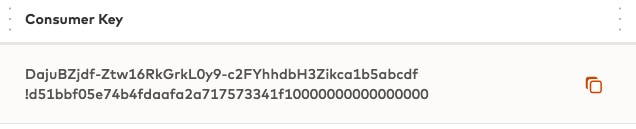
The value for `oauth_consumer_key` doesn't conform to the length/format requirements (97-character length, with an exclamation mark in the middle).
Make sure you copied the key from your [Developer Dashboard](https://developer.mastercard.com/dashboard) by clicking the copy icon next to your consumer key.
*** ** * ** ***
#### INVALID_CLIENT_ID, INVALID_KEY_ID {#invalid_client_id-invalid_key_id}
The value for `oauth_consumer_key` doesn't match an existing key or doesn't have access to the requested API.
*** ** * ** ***
#### INVALID_OAUTH_SIGNATURE_METHOD {#invalid_oauth_signature_method}
The value for `oauth_signature_method` is invalid or not supported.
*** ** * ** ***
#### INVALID_OAUTH_TIMESTAMP {#invalid_oauth_timestamp}
The value for `oauth_timestamp` was rejected. Check your clock is accurate (you can use public [NTP pools](https://en.wikipedia.org/wiki/NTP_pool) for that). See also: [oauth_nonce and oauth_timestamp](https://developer.mastercard.com/platform/documentation/authentication/using-oauth-1a-to-access-mastercard-apis/index.md#oauth-nonce-and-oauth-timestamp).
*** ** * ** ***
#### OAUTH_NONCE_USED {#oauth_nonce_used}
The value for `oauth_nonce` was already used. Check you actually send a different nonce with each new request and that your system is generating enough entropy. See also: [oauth_nonce and oauth_timestamp](https://developer.mastercard.com/platform/documentation/authentication/using-oauth-1a-to-access-mastercard-apis/index.md#oauth-nonce-and-oauth-timestamp).
*** ** * ** ***
#### INVALID_BODY_HASH {#invalid_body_hash}
The value for `oauth_body_hash` is incorrect. You can check:
* The digest algorithm used for computing the `oauth_body_hash` value matches the one used in `oauth_signature_method`
* There is no network proxy or equipment updating the request body after the request is sent
* `oauth_body_hash` contains the digest of an empty string when the request does not have an entity body
* In case the service requires encryption, make sure the payload is encrypted *before* the request is signed.
*** ** * ** ***
#### AUTHENTICATION_FAILED {#authentication_failed}
The `oauth_signature` value can't be verified (wrong signing key, wrong signing base string, ...). See also: [Signed Requests](https://developer.mastercard.com/platform/documentation/authentication/using-oauth-1a-to-access-mastercard-apis/index.md#signed-requests).
*** ** * ** ***
#### INVALID_KEY {#invalid_key}
Renew your signing key or create a new one. See also: [Getting Keys for Your Application](https://developer.mastercard.com/platform/documentation/authentication/using-oauth-1a-to-access-mastercard-apis/index.md#getting-keys-for-your-application).
*** ** * ** ***
## Frequently Asked Questions {#frequently-asked-questions}
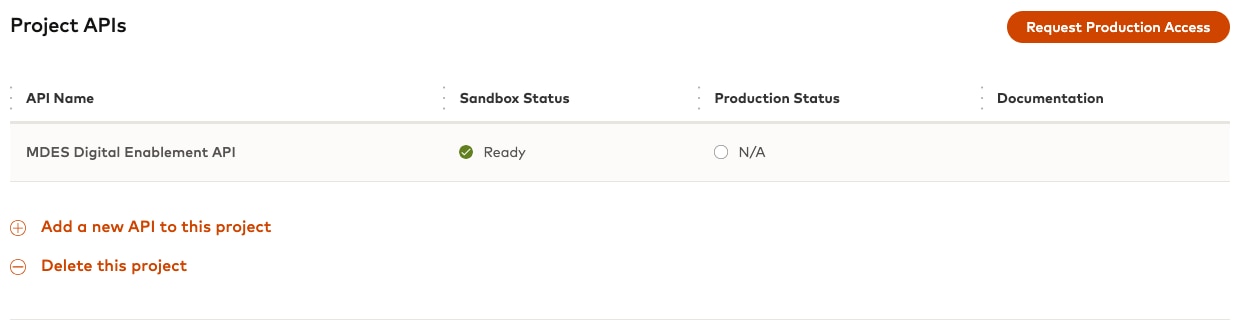
Yes. The consumer and signing keys are created for a project and projects can reference more than one API.
You can manage APIs for your project in the *Project APIs'* section of the Summary page.
*** ** * ** ***
The consumer key and signing key are linked together, as you use the signing key to prove you own the consumer key.
* If you simply renew your keys before they expire, your consumer key will stay the same
* If you revoke the keys, then you will have to create new keys and a new consumer key will be generated for you
See also: [Getting Keys for Your Application](https://developer.mastercard.com/platform/documentation/authentication/using-oauth-1a-to-access-mastercard-apis/index.md#getting-keys-for-your-application)
*** ** * ** ***
OAuth 1.0a presents many edge cases that are easy to miss. We strongly encourage you to use existing OAuth libraries rather than implementing the specification yourself. For more information, see the [client libraries](https://developer.mastercard.com/platform/documentation/authentication/using-oauth-1a-to-access-mastercard-apis/index.md#client-libraries) section above.
*** ** * ** ***
## Further Reading {#further-reading}
* [The OAuth 1.0 Protocol](https://tools.ietf.org/html/rfc5849)
* [OAuth Core 1.0 Revision A](https://oauth.net/core/1.0a/)
* [OAuth Request Body Hash](https://tools.ietf.org/id/draft-eaton-oauth-bodyhash-00.html)