# API Tutorial
source: https://developer.mastercard.com/pclo-presentment/documentation/api-tutorial/index.md
Note: Mastercard supports OAuth 2.0 for authenticating application HTTP requests. Refer to the following resources for guidance and documentation:
* [Offers for Publishers (Legacy) OAuth 2.0 authentication and first call tutorial](https://developer.mastercard.com/pclo-presentment/documentation/tutorials-and-guides/index.md)
* [Using OAuth 2.0 to Access Mastercard APIs](https://developer.mastercard.com/platform/documentation/authentication/using-oauth-2-to-access-mastercard-apis/)
* [OAuth 2.0 reference application on GitHub](https://github.com/Mastercard/oauth2-client-java): Customers are advised to update the specification file and certificates as instructed in the README.md file to ensure access and alignment with OAuth 2.0 requirements.
* [Offers for Publishers API](https://developer.mastercard.com/presentment/documentation/release-history/) updated documentation
Support for OAuth 1.0a authentication remains available.
## Introduction {#introduction}
This tutorial creates a simple Java program that can make an API call to the Offers for Publishers sandbox environment.
This tutorial also includes generating an API client library using OpenAPI Generator, using the Offers for Publishers OpenAPI Specification.
During this tutorial, you will:
1. Add appropriate resources to your project.
2. Add proper dependencies.
3. Generate the API Client SDK.
4. Make an API call.
## Setting Up {#setting-up}
### Prerequisites {#prerequisites}
* [Apache Maven](https://maven.apache.org/)
* [Java 8](http://www.oracle.com/technetwork/java/javase/downloads/index.html) or above
* [Mockito](https://site.mockito.org/)
* [Okhttp](https://square.github.io/okhttp/)
* [IntelliJ IDEA](https://www.jetbrains.com/idea/download/#section=windows/)
* A developer account on [Mastercard Developers](https://developer.mastercard.com/) with access to the Offers for Publishers APIs
* [Quick Start Guide](https://developer.mastercard.com/pclo-presentment/documentation/quick-start-guide/index.md) steps completed
* The [Platform Admin](https://static.developer.mastercard.com/content/pclo-presentment/swagger/personalized-offers-platform-admin.yaml) and [User Presentment](https://static.developer.mastercard.com/content/pclo-presentment/swagger/personalized-offers-user-presentment.yaml) .yaml files
## Create a Maven Project {#create-a-maven-project}
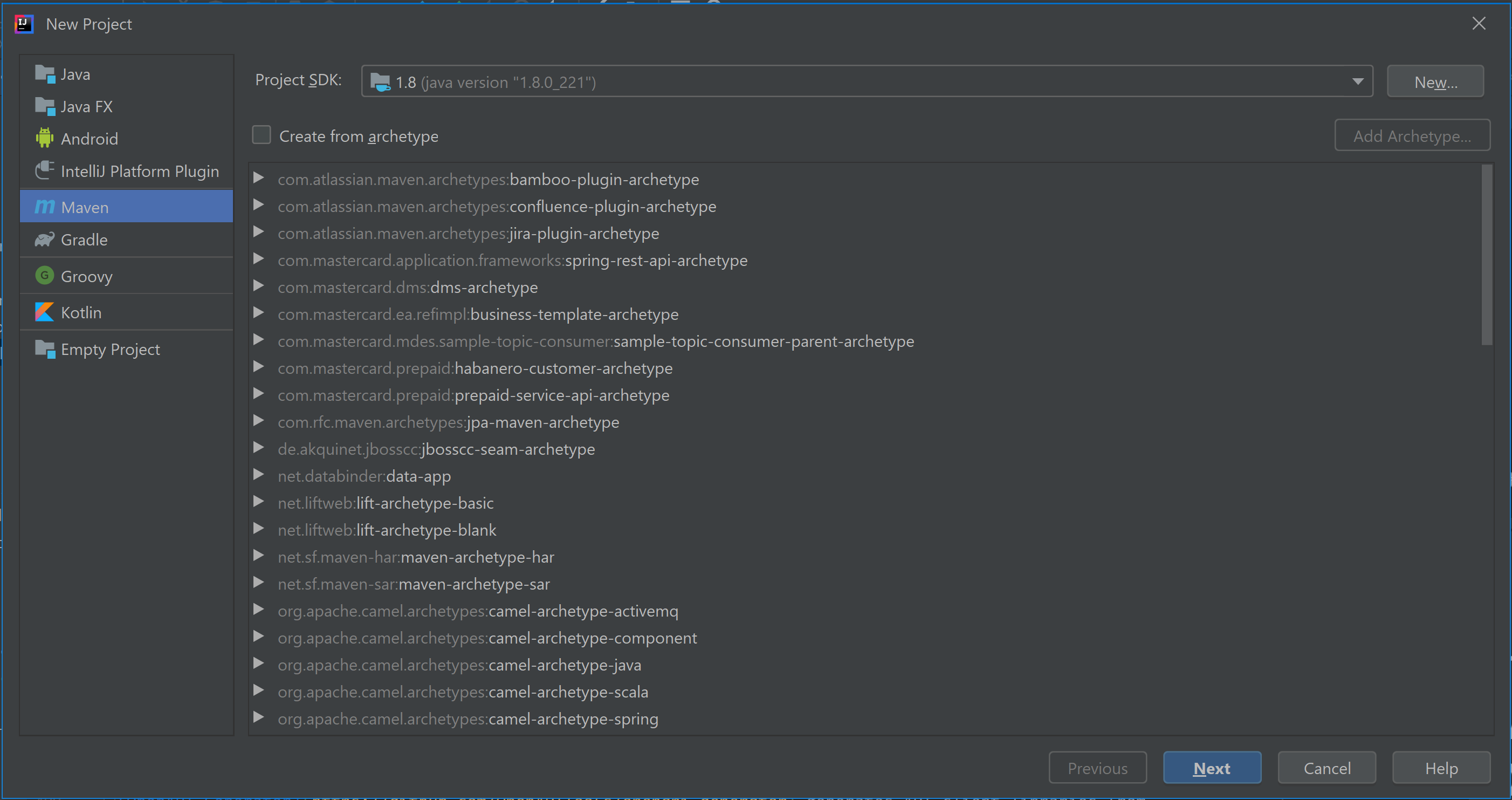
In IntelliJ IDEA, create a new Maven project, which sets up your directory structure automatically. Provide 'personalized-offers-client' as the ArtifactId.


## Add Resources {#add-resources}
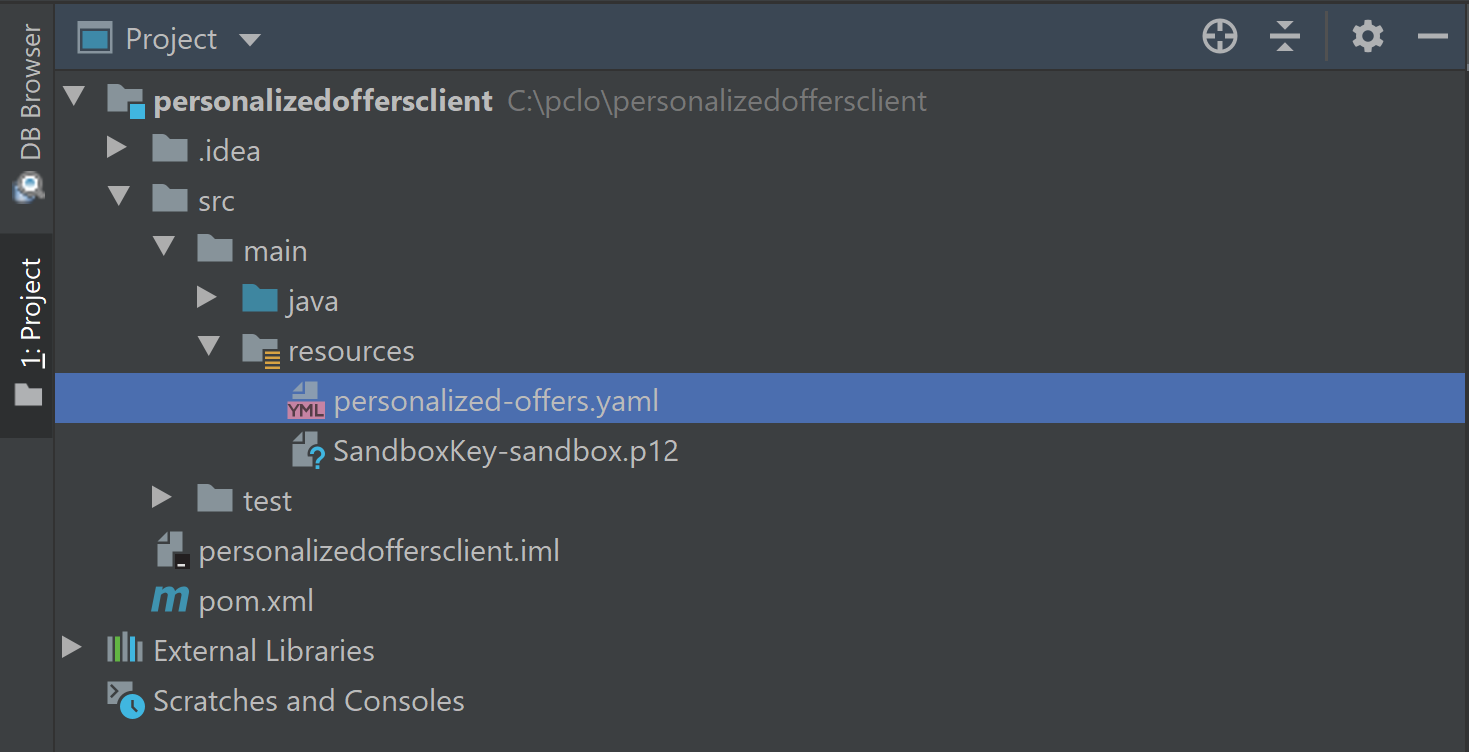
1. Retrieve the [Offers for Publishers API OpenAPI Specification](https://static.developer.mastercard.com/content/pclo-presentment/swagger/personalized-offers.yaml) .yaml file and add it to your Maven project's **resources** folder.
2. In [Mastercard Developer](https://developer.mastercard.com), generate a Sandbox Signing Key by creating a project and choosing the **Offers for Publishers** API service. Add the signing key (.p12) to your Maven project's **resources** folder.
The Mastercard APIs use OAuth authentication. For information on OAuth 1.0a and using it to access Mastercard APIs, refer to [this article](https://developer.mastercard.com/platform/documentation/security-and-authentication/using-oauth-1a-to-access-mastercard-apis/).
Your Maven project directory should look as follows (the .idea and .iml items are used by IntelliJ IDEA):
## Update the pom.xml File {#update-the-pomxml-file}
1. Add the following plugin to your Maven project's **pom.xml** file to add OpenAPI Generator to your project.
OpenAPI Generator generates API client libraries from OpenAPI Specifications (formerly known as Swagger files). OpenAPI Generator provides multiple generators and library templates to support multiple languages and frameworks. You will be using the *java generator* and the default *okhttp-gson* library template for this project.
Further information on generating and configuring a Mastercard API Client can be found [here](https://developer.mastercard.com/platform/documentation/security-and-authentication/generating-and-configuring-a-mastercard-api-client/).
* Xml
```xml
org.openapitools
openapi-generator-maven-plugin
5.3.0
generate
${project.basedir}/src/main/resources/personalized-offers.yaml
java
com.mastercard.api
com.mastercard.api.model
false
false
false
false
true
OffsetDateTime=String
LocalDate=String
java.time.OffsetDateTime=java.lang.String
java.time.LocalDate=java.lang.String
src/gen/java/main
false
java8
```
2.Add the following dependencies to your **pom.xml** file to add dependencies for the API client library generation and the Mastercard OAuth1 Signer library:
* Xml
```xml
1.8
${java.version}
${java.version}
UTF-8
1.8.4
1.6.2
4.8.1
2.8.6
3.4.6
5.6.2
1.4.0
5.3.0
3.0.2
com.squareup.okhttp3
okhttp
${okhttp.version}
com.squareup.okhttp3
logging-interceptor
${okhttp.version}
com.google.code.gson
gson
${gson.version}
io.gsonfire
gson-fire
${gson-fire.version}
com.mastercard.developer
client-encryption
${client-encryption.version}
com.mastercard.developer
oauth1-signer
${oauth1-signer.version}
io.swagger
swagger-annotations
${swagger-annotations.version}
com.google.code.findbugs
jsr305
${code-findbugs.version}
org.junit.jupiter
junit-jupiter-engine
${junit-jupiter.version}
test
org.mockito
mockito-core
${mockito.version}
test
```
When using OpenAPI Generator to generate the API client library, you have two options:
* Generate and use the source files on the fly.
* Generate and deploy the source files to a Maven repository.
In this tutorial, you will be generating the API client library on the fly, so you include the dependencies that are needed to generate the library. (If you were deploying the source files to a Maven repository, you would only need to include the dependency for that repository.)
In addition, you include the dependency for one of the Mastercard OAuth1 Signer libraries. Mastercard offers OAuth1 Signer Libraries that are developed and maintained by Mastercard's API team, which offer code helpers targeting the HTTP clients used by the different OpenAPI Generator Library templates. The libraries are hosted [here](https://github.com/Mastercard?utf8=%E2%9C%93&q=oauth1-signer&type=&language=) on GitHub.
## Generating the API Client SDK {#generating-the-api-client-sdk}
Now that you have all the dependencies you need, you can generate the sources.
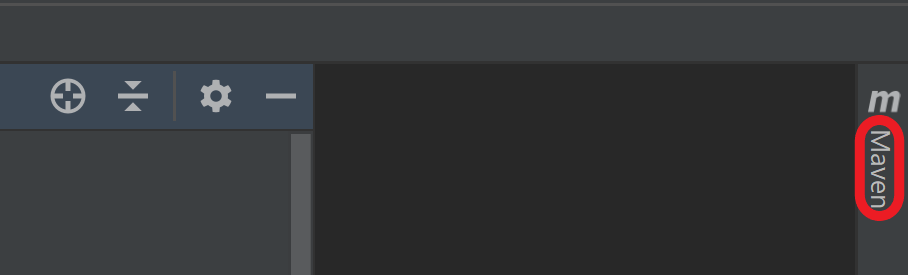
1. In IntelliJ IDEA, open the window for Maven (**View \> Tool Windows \> Maven** ).
2. Click the icons for **Reimport All Maven Projects** and **Generate Sources and Update Folders for All Projects** .

## Generate the SDK {#generate-the-sdk}
You are now ready to generate the API client library.
In the same menu, navigate to the commands (**Project \> Lifecycle** ), run **clean** and then **compile** . Alternatively, you can navigate to the root directory of the project within a terminal window and run `mvn clean compile`.
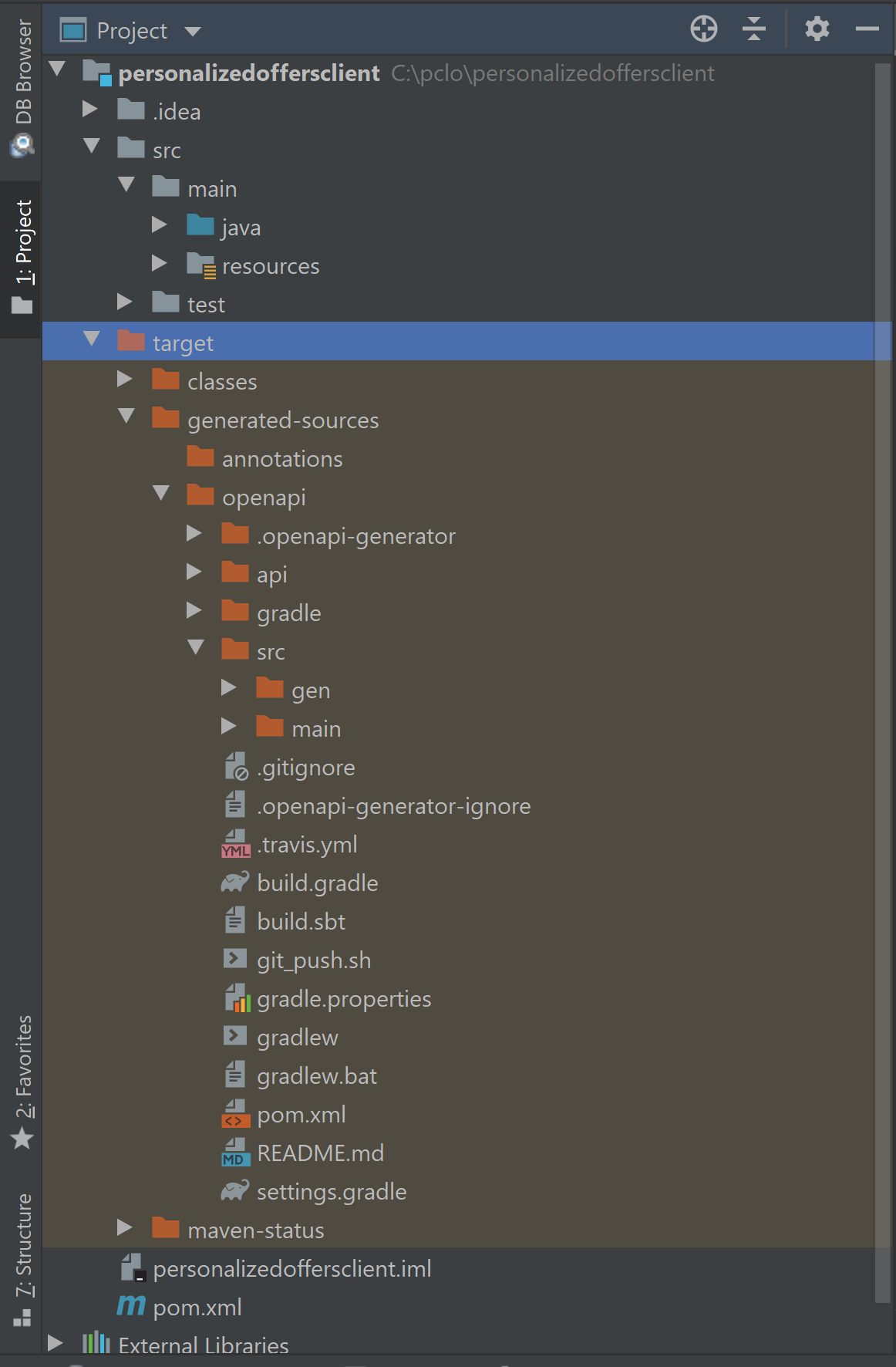
Afterwards, there should be a new folder named **target** , within your root directory, which contains classes generated for the schemas and API calls defined within the OpenAPI Specification. The generated classes can be found in **target \> generated-sources \> openapi** , as shown below.
A benefit of using an IDE like IntelliJ IDEA is that it allows you to view the generated source code, enabling you to read through the newly defined classes and methods. Example-generated class:
* Java
```Java
package com.mastercard.api.model;
import java.util.Objects;
import java.util.Arrays;
import com.google.gson.TypeAdapter;
import com.google.gson.annotations.JsonAdapter;
import com.google.gson.annotations.SerializedName;
import com.google.gson.stream.JsonReader;
import com.google.gson.stream.JsonWriter;
import io.swagger.annotations.ApiModel;
import io.swagger.annotations.ApiModelProperty;
import java.io.IOException;
/**
* RequestedAccessToken
*/
@javax.annotation.Generated(value = "org.openapitools.codegen.languages.JavaClientCodegen", date = "2021-05-18T19:47:31.300-07:00[America/Los_Angeles]")
public class RequestedAccessToken {
public static final String SERIALIZED_NAME_FI_ID = "fiId";
@SerializedName(SERIALIZED_NAME_FI_ID)
private String fiId;
public static final String SERIALIZED_NAME_USER_ID = "userId";
@SerializedName(SERIALIZED_NAME_USER_ID)
private String userId;
public static final String SERIALIZED_NAME_UTC_OFFSET = "utcOffset";
@SerializedName(SERIALIZED_NAME_UTC_OFFSET)
private String utcOffset;
public RequestedAccessToken fiId(String fiId) {
this.fiId = fiId;
return this;
}
/**
* Financial Institution Identifier. Code that specifies the platform and configuration instance, provided by Mastercard during implementation.
* @return fiId
**/
@javax.annotation.Nullable
@ApiModelProperty(example = "999999", value = "Financial Institution Identifier. Code that specifies the platform and configuration instance, provided by Mastercard during implementation.")
public String getFiId() {
return fiId;
}
public void setFiId(String fiId) {
this.fiId = fiId;
}
public RequestedAccessToken userId(String userId) {
this.userId = userId;
return this;
}
/**
* User ID as specified in enrollment, typically the Bank Customer Number (BCN)
* @return userId
**/
@javax.annotation.Nullable
@ApiModelProperty(example = "1PCLOSANDBOXBCN00002tra6athatR", value = "User ID as specified in enrollment, typically the Bank Customer Number (BCN)")
public String getUserId() {
return userId;
}
public void setUserId(String userId) {
this.userId = userId;
}
public RequestedAccessToken utcOffset(String utcOffset) {
this.utcOffset = utcOffset;
return this;
}
/**
* The UTC offset of time zone from which the user makes requests.
* @return utcOffset
**/
@javax.annotation.Nullable
@ApiModelProperty(example = "-07:00", value = "The UTC offset of time zone from which the user makes requests.")
public String getUtcOffset() {
return utcOffset;
}
public void setUtcOffset(String utcOffset) {
this.utcOffset = utcOffset;
}
@Override
public boolean equals(java.lang.Object o) {
if (this == o) {
return true;
}
if (o == null || getClass() != o.getClass()) {
return false;
}
RequestedAccessToken requestedAccessToken = (RequestedAccessToken) o;
return Objects.equals(this.fiId, requestedAccessToken.fiId) &&
Objects.equals(this.userId, requestedAccessToken.userId) &&
Objects.equals(this.utcOffset, requestedAccessToken.utcOffset);
}
@Override
public int hashCode() {
return Objects.hash(fiId, userId, utcOffset);
}
@Override
public String toString() {
StringBuilder sb = new StringBuilder();
sb.append("class RequestedAccessToken {\n");
sb.append(" fiId: ").append(toIndentedString(fiId)).append("\n");
sb.append(" userId: ").append(toIndentedString(userId)).append("\n");
sb.append(" utcOffset: ").append(toIndentedString(utcOffset)).append("\n");
sb.append("}");
return sb.toString();
}
/**
* Convert the given object to string with each line indented by 4 spaces
* (except the first line).
*/
private String toIndentedString(java.lang.Object o) {
if (o == null) {
return "null";
}
return o.toString().replace("\n", "\n ");
}
}
```
## Making an API Call {#making-an-api-call}
* Create a Java file called **Main.java**, at src/main/java/.
* Make your OAuth credentials available when making an API call:
* A PrivateKey is created with the provided credentials for later use.
* AuthenticationUtils is provided by the Mastercard OAuth signing library.
```java
String consumerKey = "your consumer key";
String signingKeyAlias = "your key alias";
String signingKeyFilePath = "path/to/your/key.12";
String signingKeyPassword = "your password";
PrivateKey signingKey = AuthenticationUtils.loadSigningKey(signingKeyFilePath, signingKeyAlias, signingKeyPassword);
```
* Afterwards, you instantiate a client that you can set up to sign requests that you send with your authentication credentials. The interceptor that you use to sign requests is also provided by the Mastercard OAuth library.
```java
OkHttpClient okHttpClient = new OkHttpClient.Builder()
.addInterceptor(
new OkHttpOAuth1Interceptor(consumerKey, signingKey))
.build();
ApiClient apiClient = new ApiClient().setHttpClient(okHttpClient).setBasePath("https://sandbox.api.mastercard.com");
TokensApi tokensApi = new TokensApi(apiClient);
```
* With your environment set up, you can start building a request. Any nested objects within the Request Body have each been assigned a wrapper class. To build the request, you will be instantiating multiple objects and ultimately wrapping those with the main request object.
```java
RequestedAccessToken requestedAccessToken = new RequestedAccessToken().fiId("fiId").userId("userId").utcOffset("utcOffset");
UserAccessToken userAccessToken = tokensApi.createAccessToken(requestedAccessToken);
System.out.println(userAccessToken.toString());
```
* For the User Presentment APIs, you make the API call by calling `createAccessToken`, and then store the response in a `UserAccessToken` object.
* Once you have the response stored, you have a couple of options, but for this tutorial you can use toString to print the body.
* The access-token is used in the subsequent User Presentment API calls.
**NOTE**: This section explains the minimum requirements to make the API calls.
## Next Steps {#next-steps}
Proceed to the [Code and Formats](https://developer.mastercard.com/pclo-presentment/documentation/code-and-formats/index.md) section to learn about error code details.