# Quick Start Guide
source: https://developer.mastercard.com/open-finance-us/documentation/quick-start-guide/index.md
###### Time to Complete: **30 minutes** {#time-to-complete-30-minutes}
Follow this guide to:
* Introduce yourself to the Mastercard Data Connect application and the foundational Open Finance APIs
* Get access to high-quality test data from our Sandbox environment
## Create a Sandbox Project {#create-a-sandbox-project}
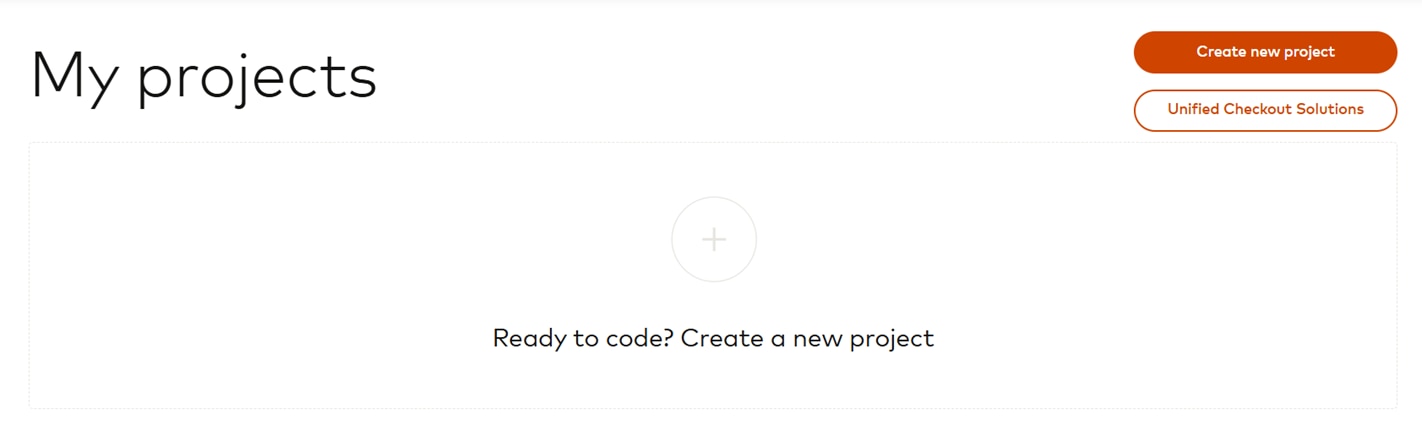
1. [Log in](https://developer.mastercard.com/account/log-in) or [sign up](https://developer.mastercard.com/account/sign-up) to Mastercard Developers and select **Create New Project**.
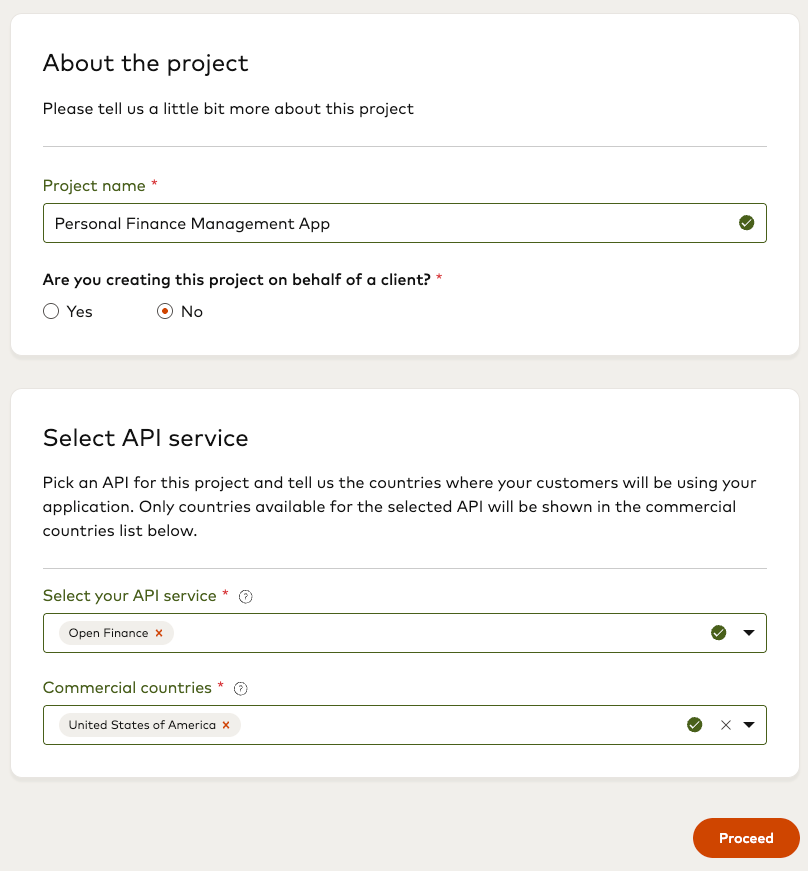
2. Provide **Project Details**:
a. Enter a name for your project.
b. Choose if you want to create a project for yourself or for a client. Select **No** if this project is for yourself or select **Yes** to create the project on behalf of a client. If you are creating a project on behalf of a client, see [Partner Direct Model](https://developer.mastercard.com/open-finance-us/documentation/participant-model/partner-direct/index.md) and learn how you can [onboard your affiliate customers](https://developer.mastercard.com/open-finance-us/documentation/participant-model/partner-direct/onboarding-customers/index.md).
c. Select **Open Finance** from the **Select your API service** drop-down list.
d. From the **Commercial Countries** drop-down list, select the country where the end users of this application will be located. You cannot update Commercial Countries after this step. Ensure you select the appropriate country before you click **Proceed**.
e. Click **Proceed**.
## Generate Your Credentials {#generate-your-credentials}
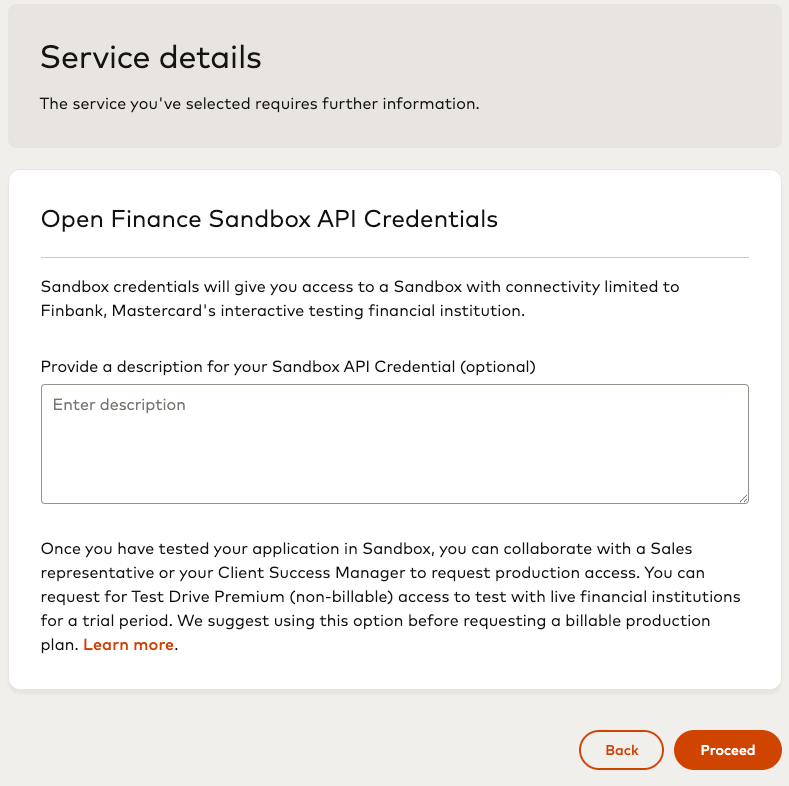
1. Provide **Service Details**:
a. Enter a description for your Sandbox credentials.
b. Click **Create Project**.
2. In the **Credentials** section at left, click **Sandbox** to view the Sandbox credentials: `Partner ID`, `Secret`, and `App Key`. These credentials are required to call the APIs.
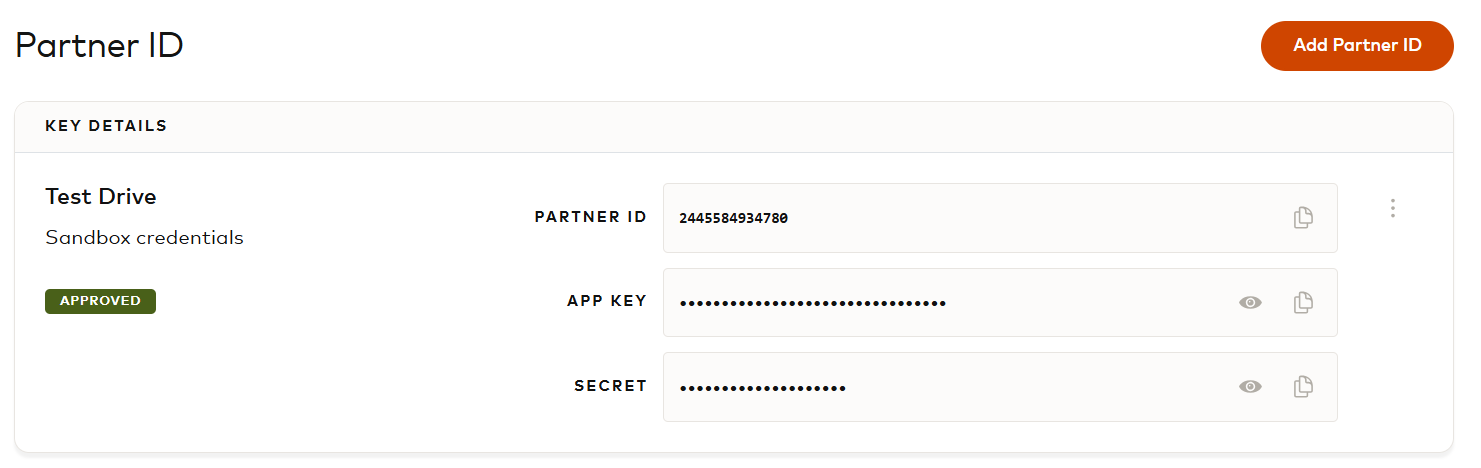
Note: If you need to use multiple environments for testing, for example, one test environment for developers and another for User Acceptance Testing (UAT), you can request additional Sandbox credentials with the **Add Partner ID** button.
## Welcome Your First Customer {#welcome-your-first-customer}
Follow the steps below to create a test customer and share some test accounts with Mastercard Open Finance. The corresponding **Customer ID** will be needed for retrieving account and financial data.
Tip: As an alternative to running the commands in the steps below, you can download and run the [setup script](https://github.com/Mastercard/open-banking-us-openapi/tree/main/bin).
There are versions for [bash](https://github.com/Mastercard/open-banking-us-openapi/blob/main/bin/setup.sh) and [Powershell](https://github.com/Mastercard/open-banking-us-openapi/blob/main/bin/setup.ps1).
For bash run: `./setup.sh {partnerId} {partnerSecret} {appKey}`
For Powershell run: `./setup.ps1 {partnerId} {partnerSecret} {appKey}`
You can also use pre-defined requests available in the "*Quick Start* " folder of the [Postman collection](https://developer.mastercard.com/open-finance-us/documentation/integration-and-testing/postman-collection/index.md). Don't forget to select the *Test Drive* environment (top right) and update the `partnerId`, `partnerSecret` and `appKey` variables.
### Step 1 - Create Access Token {#step-1---create-access-token}
Note: Requests to the Open Finance US APIs must originate from an IP address in the United States, United Kingdom, Canada or Australia.
All requests sent to Mastercard Open Finance must include a `Finicity-App-Token` HTTP header. Use your Partner ID and Secret with the following endpoint whenever you need to generate a new access token:
API Reference: `POST /aggregation/v2/partners/authentication`
Note: Access tokens are valid for two hours. As a best practice, generate a new token when the current token is older than 90 minutes to avoid expiration during API calls.
* Command:
```sh
curl --location --request POST 'https://api.finicity.com/aggregation/v2/partners/authentication' \
--header 'Content-Type: application/json' \
--header 'Finicity-App-Key: {{appKey}}' \
--header 'Accept: application/json' \
--data-raw '{
"partnerId": "{{partnerId}}",
"partnerSecret": "{{partnerSecret}}"
}'
```
* Expected response:
```json
{
"token": "YBh22Sb9Es6e66Q7lWdt"
}
```
### Step 2 - Add Test Customer {#step-2---add-test-customer}
Create a "testing" customer record you can use with FinBank test profiles:
API Reference: `POST /aggregation/v2/customers/testing`
You can omit the `applicationId` from the request when generating testing customers.
* Command:
```sh
curl --location --request POST 'https://api.finicity.com/aggregation/v2/customers/testing' \
--header 'Content-Type: application/json' \
--header 'Accept: application/json' \
--header 'Finicity-App-Key: {{appKey}}' \
--header 'Finicity-App-Token: {{appToken}}' \
--data-raw '{
"username": "customerusername1"
}'
```
* Expected response:
```json
{
"id": "1005061234",
"username": "customerusername1",
"createdDate": 1607450357
}
```
Take a note of the "id" value returned. It's the **Customer ID** you will use next.
### Step 3 - Generate Mastercard Data Connect URL {#step-3---generate-mastercard-data-connect-url}
The next step is to generate a Data Connect URL which you can present to the customer in your application. This enables the customer to start a Data Connect session and grant Mastercard Open Finance access to their accounts and financial data.
API Reference: `POST /connect/v2/generate`
* Command:
```sh
curl --location --request POST 'https://api.finicity.com/connect/v2/generate' \
--header 'Content-Type: application/json' \
--header 'Accept: application/json' \
--header 'Finicity-App-Token: {{appToken}}' \
--header 'Finicity-App-Key: {{appKey}}' \
--data-raw '{
"partnerId": "{{partnerId}}",
"customerId": "{{customerId}}"
}'
```
* Expected response:
```json
{
"link": "https://connect2.finicity.com?customerId=1005061234&origin=url&partnerId=2423653942467&signature=91f44ab969a9c7bb2568910d92501eb13aa0b7fd4fd56314ab8ebb4f1880fa83×tamp=1651326873996&ttl=1651334073996"
}
```
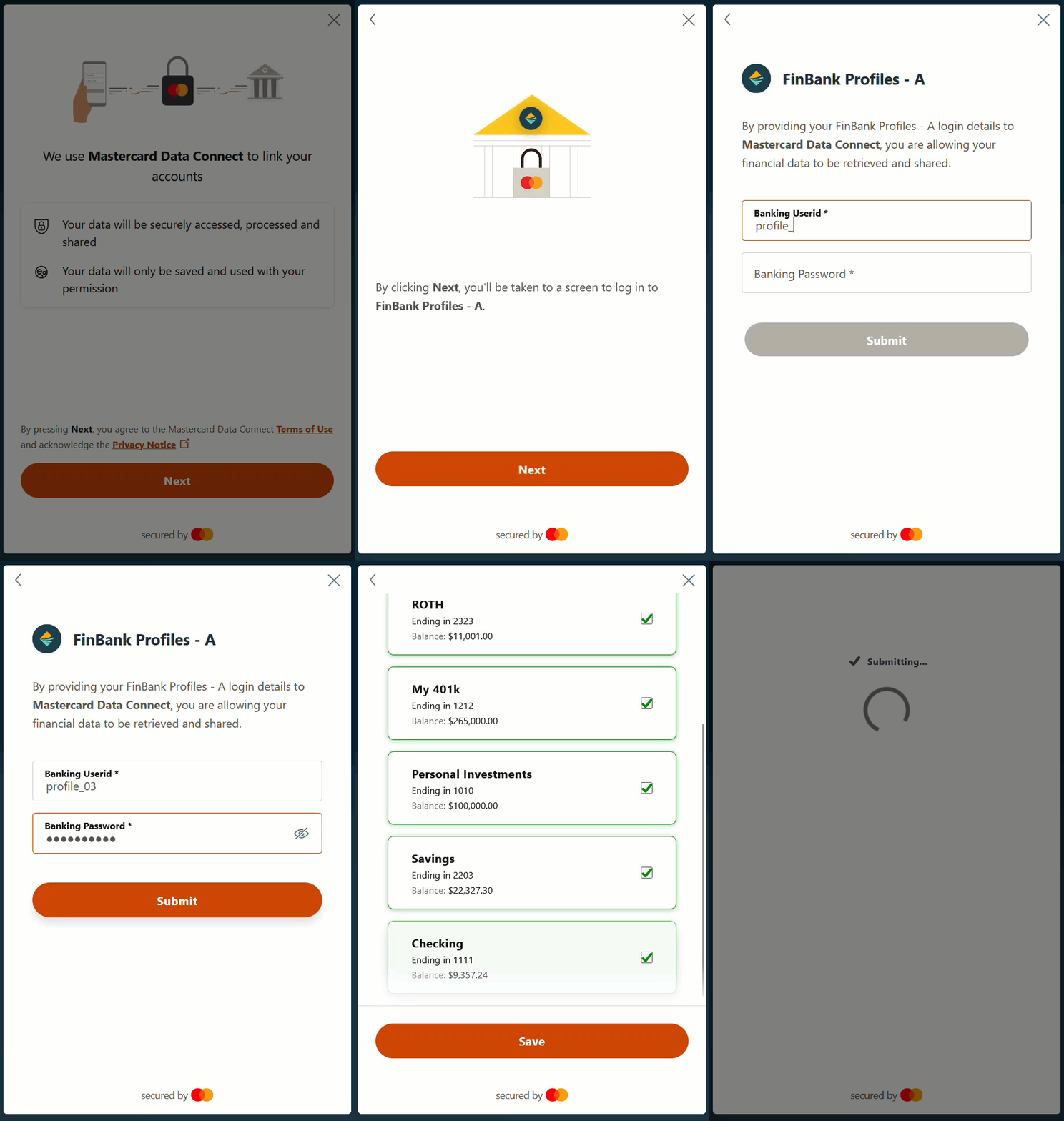
### Step 4 - Sign In to a Test Financial Institution and Submit Accounts {#step-4---sign-in-to-a-test-financial-institution-and-submit-accounts}
To simulate what a customer would experience when connecting their accounts with a real financial institution,
you can connect to our mock bank called "Finbank."
1. Open the URL generated at the previous step
2. Click **Next** to agree to the Terms and Conditions and the Privacy Policy
3. Search for *FinBank Profiles - A*
4. When asked for a username and password, type *profile_03* for both
5. Select all accounts, and then click **Save** and **Submit**
This is the expected flow an end user would see when linking their accounts with Data Connect:
### Step 5 - Refresh Customer Accounts {#step-5---refresh-customer-accounts}
Before you can retrieve account transactions, you must do an initial aggregation. Call the following endpoint:
API Reference: `POST /aggregation/v1/customers/{customerId}/accounts`
* Command:
```sh
curl --location -g --request POST 'https://api.finicity.com/aggregation/v1/customers/{{customerId}}/accounts' \
--header 'Content-Type: application/json' \
--header 'Accept: application/json' \
--header 'Finicity-App-Token: {{appToken}}' \
--header 'Finicity-App-Key: {{appKey}}' \
--data-raw '{}'
```
* Expected response:
```json
{
"accounts": [
{
"id": "6020488409",
"number": "232323",
"realAccountNumberLast4": "2323",
"accountNumberDisplay": "2323",
"name": "ROTH",
"balance": 11001.0,
"type": "roth",
"aggregationStatusCode": 0,
"status": "active",
"customerId": "6012118342",
"institutionId": "102105",
"balanceDate": 1665157710,
"aggregationSuccessDate": 1665157711,
"aggregationAttemptDate": 1665157711,
"createdDate": 1665157660,
"lastUpdatedDate": 1665157664,
"currency": "USD",
"institutionLoginId": 6009863353,
"detail": {},
"displayPosition": 5,
"accountNickname": "ROTH",
"marketSegment": "personal"
},
{
"id": "6020488411",
"number": "121212",
"realAccountNumberLast4": "1212",
"accountNumberDisplay": "1212",
"name": "My 401k",
"balance": 265000.0,
"type": "investmentTaxDeferred",
"aggregationStatusCode": 0,
"status": "active",
"customerId": "6012118342",
"institutionId": "102105",
"balanceDate": 1665157710,
"aggregationSuccessDate": 1665157711,
"aggregationAttemptDate": 1665157711,
"createdDate": 1665157660,
"lastUpdatedDate": 1665157664,
"currency": "USD",
"institutionLoginId": 6009863353,
"detail": {
"marginBalance": 0.0,
"availableCashBalance": 2000.0,
"currentBalance": 265000.0,
"vestedBalance": 225000.0,
"currentLoanBalance": 25000.0
},
"displayPosition": 4,
"accountNickname": "My 401k",
"marketSegment": "personal"
},
{
"id": "6020488412",
"number": "101010",
"realAccountNumberLast4": "1010",
"accountNumberDisplay": "1010",
"name": "Personal Investments",
"balance": 100000.0,
"type": "investment",
"aggregationStatusCode": 0,
"status": "active",
"customerId": "6012118342",
"institutionId": "102105",
"balanceDate": 1665157710,
"aggregationSuccessDate": 1665157711,
"aggregationAttemptDate": 1665157711,
"createdDate": 1665157660,
"lastUpdatedDate": 1665157664,
"currency": "USD",
"institutionLoginId": 6009863353,
"detail": {
"marginBalance": 0.0,
"availableCashBalance": 1000.0,
"currentBalance": 100000.0,
"vestedBalance": 100000.0,
"currentLoanBalance": 0.0
},
"displayPosition": 3,
"accountNickname": "Personal Investments",
"marketSegment": "personal"
},
{
"id": "6020488414",
"number": "22222203",
"realAccountNumberLast4": "2203",
"accountNumberDisplay": "2203",
"name": "Savings",
"balance": 22327.3,
"type": "savings",
"aggregationStatusCode": 0,
"status": "active",
"customerId": "6012118342",
"institutionId": "102105",
"balanceDate": 1665157710,
"aggregationSuccessDate": 1665157711,
"aggregationAttemptDate": 1665157711,
"createdDate": 1665157661,
"lastUpdatedDate": 1665157664,
"currency": "USD",
"lastTransactionDate": 1665157710,
"institutionLoginId": 6009863353,
"detail": {
"availableBalanceAmount": 0.0
},
"displayPosition": 2,
"accountNickname": "Savings",
"oldestTransactionDate": 1649851200,
"marketSegment": "personal"
},
{
"id": "6020488416",
"number": "111111",
"realAccountNumberLast4": "1111",
"accountNumberDisplay": "1111",
"name": "Checking",
"balance": 9357.24,
"type": "checking",
"aggregationStatusCode": 0,
"status": "active",
"customerId": "6012118342",
"institutionId": "102105",
"balanceDate": 1665157710,
"aggregationSuccessDate": 1665157711,
"aggregationAttemptDate": 1665157711,
"createdDate": 1665157661,
"lastUpdatedDate": 1665157664,
"currency": "USD",
"lastTransactionDate": 1665157710,
"institutionLoginId": 6009863353,
"detail": {
"availableBalanceAmount": 0.0
},
"displayPosition": 1,
"accountNickname": "Checking",
"oldestTransactionDate": 1646136000,
"marketSegment": "personal"
}
]
}
```
## Fetch Some Data {#fetch-some-data}
Now you can retrieve some recent customer transactions using the `getAllCustomerTransactions` endpoint which returns all the transactions for a particular customer between the dates you specify.
You will need to pass your required start and end dates in the query as Unix epoch timestamps (also known as Unix time or epoch time). These are integer values representing the number of seconds since midnight on 1 January 1970. If you are not familiar with this format, see [Handling Epoch Dates and Times](https://developer.mastercard.com/open-finance-us/documentation/errors/best-practices/index.md#handling-epoch-dates-and-times). For testing purposes, you can use a site like [Epoch Converter](http://www.epochconverter.com/) to convert between standard dates and Unix timestamps.
API Reference: `GET /aggregation/v3/customers/{customerId}/transactions`
* Command:
```sh
curl --location --request GET 'https://api.finicity.com/aggregation/v3/customers/{{customerId}}/transactions?fromDate={{fromDate}}&toDate={{toDate}}&includePending=true&sort=desc&limit=25' \
--header 'Finicity-App-Key: {{appKey}}' \
--header 'Accept: application/json' \
--header 'Finicity-App-Token: {{appToken}}'
```
* Expected response:
```json
{
"found": 64,
"displaying": 25,
"moreAvailable": "true",
"fromDate": "1349701444",
"toDate": "1665234244",
"sort": "desc",
"transactions": [
{
"id": 13212489147,
"amount": 1208.15,
"accountId": 6020605022,
"customerId": 6012188750,
"status": "active",
"description": "REMOTE ONLINE DEPOSIT #",
"memo": "1",
"postedDate": 1665144000,
"transactionDate": 1665144000,
"createdDate": 1665248277,
"categorization": {
"normalizedPayeeName": "Remote Online",
"category": "Income",
"bestRepresentation": "REMOTE ONLINE DEPOSIT",
"country": "USA"
}
},
{
"id": 13212489182,
"amount": 1216.2,
"accountId": 6020605022,
"customerId": 6012188750,
"status": "active",
"description": "Mad Science Research PR PAYMENT",
"memo": "PPD ID: 1234567899",
"postedDate": 1664884800,
"transactionDate": 1664884800,
"createdDate": 1665248277,
"categorization": {
"normalizedPayeeName": "Mad Science Research",
"category": "Paycheck",
"bestRepresentation": "MAD SCIENCE RESEARCH PR PAYMENT PPD ID",
"country": "USA"
}
},
{
"id": 13212489179,
"amount": 1500.0,
"accountId": 6020605022,
"customerId": 6012188750,
"status": "active",
"description": "JABERWOCKY CREDIT N.A. JABERWOCKY",
"memo": "PPD ID: 1234567893",
"postedDate": 1664712000,
"transactionDate": 1664712000,
"createdDate": 1665248277,
"categorization": {
"normalizedPayeeName": "jaberwocky credit jaberwocky ppd id",
"category": "Income",
"bestRepresentation": "JABERWOCKY CREDIT JABERWOCKY PPD ID",
"country": "USA"
}
},
{
"id": 13212489172,
"amount": 1834.49,
"accountId": 6020605022,
"customerId": 6012188750,
"status": "active",
"description": "ROCKET SURGERY PAYROLL",
"memo": "PPD ID: 1234567892",
"postedDate": 1664625600,
"transactionDate": 1664625600,
"createdDate": 1665248277,
"categorization": {
"normalizedPayeeName": "Rocket Surgery",
"category": "Paycheck",
"bestRepresentation": "ROCKET SURGERY PAYROLL PPD ID",
"country": "USA"
}
},
{
"id": 13212489185,
"amount": 1197.33,
"accountId": 6020605022,
"customerId": 6012188750,
"status": "active",
"description": "Mad Science Research PR PAYMENT",
"memo": "PPD ID: 1234567899",
"postedDate": 1663588800,
"transactionDate": 1663588800,
"createdDate": 1665248277,
"categorization": {
"normalizedPayeeName": "Mad Science Research",
"category": "Paycheck",
"bestRepresentation": "MAD SCIENCE RESEARCH PR PAYMENT PPD ID",
"country": "USA"
}
},
{
"id": 13212489150,
"amount": 0.03,
"accountId": 6020605022,
"customerId": 6012188750,
"status": "active",
"description": "INTEREST PAYMENT",
"postedDate": 1663502400,
"transactionDate": 1663502400,
"createdDate": 1665248277,
"categorization": {
"normalizedPayeeName": "interest payment",
"category": "Interest Income",
"bestRepresentation": "INTEREST PAYMENT",
"country": "USA"
}
},
{
"id": 13212489145,
"amount": 50.0,
"accountId": 6020605022,
"customerId": 6012188750,
"status": "active",
"description": "Credit Return: Online Payment 49",
"memo": "12345679 To ABC Roofers",
"postedDate": 1663329600,
"transactionDate": 1663329600,
"createdDate": 1665248277,
"categorization": {
"normalizedPayeeName": "Online",
"category": "Credit Card Payment",
"bestRepresentation": "CREDIT RETURN ONLINE PAYMENT TO ABC ROOFERS",
"country": "USA"
}
},
{
"id": 13212489158,
"amount": 1834.49,
"accountId": 6020605022,
"customerId": 6012188750,
"status": "active",
"description": "ROCKET SURGERY PAYROLL",
"memo": "PPD ID: 1234567892",
"postedDate": 1663243200,
"transactionDate": 1663243200,
"createdDate": 1665248277,
"categorization": {
"normalizedPayeeName": "Rocket Surgery",
"category": "Paycheck",
"bestRepresentation": "ROCKET SURGERY PAYROLL PPD ID",
"country": "USA"
}
},
{
"id": 13212489131,
"amount": 1888.58,
"accountId": 6020605022,
"customerId": 6012188750,
"status": "active",
"description": "Mad Science Research PR PAYMENT",
"memo": "PPD ID: 1234567899",
"postedDate": 1662379200,
"transactionDate": 1662379200,
"createdDate": 1665248277,
"categorization": {
"normalizedPayeeName": "Mad Science Research",
"category": "Paycheck",
"bestRepresentation": "MAD SCIENCE RESEARCH PR PAYMENT PPD ID",
"country": "USA"
}
},
{
"id": 13212490135,
"amount": 620.0,
"accountId": 6020605021,
"customerId": 6012188750,
"status": "active",
"description": "Withdrawal",
"postedDate": 1662120000,
"transactionDate": 1662120000,
"createdDate": 1665248277,
"categorization": {
"normalizedPayeeName": "withdrawal",
"category": "Uncategorized",
"bestRepresentation": "WITHDRAWAL",
"country": "USA"
}
},
{
"id": 13212489169,
"amount": 4942.25,
"accountId": 6020605022,
"customerId": 6012188750,
"status": "active",
"description": "ROCKET SURGERY PAYROLL",
"memo": "PPD ID: 1234567892",
"postedDate": 1662033600,
"transactionDate": 1662033600,
"createdDate": 1665248277,
"categorization": {
"normalizedPayeeName": "Rocket Surgery",
"category": "Paycheck",
"bestRepresentation": "ROCKET SURGERY PAYROLL PPD ID",
"country": "USA"
}
},
{
"id": 13212489137,
"amount": 141.2,
"accountId": 6020605022,
"customerId": 6012188750,
"status": "active",
"description": "Cash Redemption",
"postedDate": 1661774400,
"transactionDate": 1661774400,
"createdDate": 1665248277,
"categorization": {
"normalizedPayeeName": "Redemption",
"category": "Credit Card Payment",
"bestRepresentation": "CASH REDEMPTION",
"country": "USA"
}
},
{
"id": 13212489146,
"amount": 5000.0,
"accountId": 6020605022,
"customerId": 6012188750,
"status": "active",
"description": "HEALTH CARE ABC CLAIM",
"memo": "PPD ID: 1234567891",
"postedDate": 1661688000,
"transactionDate": 1661688000,
"createdDate": 1665248277,
"categorization": {
"normalizedPayeeName": "Health Care Abc",
"category": "Health & Fitness",
"bestRepresentation": "HEALTH CARE ABC CLAIM PPD ID",
"country": "USA"
}
},
{
"id": 13212489149,
"amount": 400.0,
"accountId": 6020605022,
"customerId": 6012188750,
"status": "active",
"description": "Credit Return: Online Payment 50",
"memo": "12345670 To Mary Greatfriend",
"postedDate": 1661428800,
"transactionDate": 1661428800,
"createdDate": 1665248277,
"categorization": {
"normalizedPayeeName": "Online",
"category": "Credit Card Payment",
"bestRepresentation": "CREDIT RETURN ONLINE PAYMENT TO MARY GREATFRIEND",
"country": "USA"
}
},
{
"id": 13212489144,
"amount": 1198.26,
"accountId": 6020605022,
"customerId": 6012188750,
"status": "active",
"description": "Mad Science Research PR PAYMENT",
"memo": "PPD ID: 1234567899",
"postedDate": 1661169600,
"transactionDate": 1661169600,
"createdDate": 1665248277,
"categorization": {
"normalizedPayeeName": "Mad Science Research",
"category": "Paycheck",
"bestRepresentation": "MAD SCIENCE RESEARCH PR PAYMENT PPD ID",
"country": "USA"
}
},
{
"id": 13212489164,
"amount": 0.04,
"accountId": 6020605022,
"customerId": 6012188750,
"status": "active",
"description": "INTEREST PAYMENT",
"postedDate": 1661083200,
"transactionDate": 1661083200,
"createdDate": 1665248277,
"categorization": {
"normalizedPayeeName": "interest payment",
"category": "Interest Income",
"bestRepresentation": "INTEREST PAYMENT",
"country": "USA"
}
},
{
"id": 13212489177,
"amount": 1901.33,
"accountId": 6020605022,
"customerId": 6012188750,
"status": "active",
"description": "ROCKET SURGERY PAYROLL",
"memo": "PPD ID: 1234567892",
"postedDate": 1660564800,
"transactionDate": 1660564800,
"createdDate": 1665248277,
"categorization": {
"normalizedPayeeName": "Rocket Surgery",
"category": "Paycheck",
"bestRepresentation": "ROCKET SURGERY PAYROLL PPD ID",
"country": "USA"
}
},
{
"id": 13212489165,
"amount": 300.0,
"accountId": 6020605022,
"customerId": 6012188750,
"status": "active",
"description": "REMOTE ONLINE DEPOSIT #",
"memo": "1",
"postedDate": 1660564800,
"transactionDate": 1660564800,
"createdDate": 1665248277,
"categorization": {
"normalizedPayeeName": "Remote Online",
"category": "Income",
"bestRepresentation": "REMOTE ONLINE DEPOSIT",
"country": "USA"
}
},
{
"id": 13212489138,
"amount": 30.0,
"accountId": 6020605022,
"customerId": 6012188750,
"status": "active",
"description": "REMOTE ONLINE DEPOSIT #",
"memo": "1",
"postedDate": 1660478400,
"transactionDate": 1660478400,
"createdDate": 1665248277,
"categorization": {
"normalizedPayeeName": "Remote Online",
"category": "Income",
"bestRepresentation": "REMOTE ONLINE DEPOSIT",
"country": "USA"
}
},
{
"id": 13212489171,
"amount": 13.74,
"accountId": 6020605022,
"customerId": 6012188750,
"status": "active",
"description": "BIGBOX DEBIT CRD ACH TRAN 0003",
"memo": "12345678901 POS ID: 1234567896",
"postedDate": 1660219200,
"transactionDate": 1660219200,
"createdDate": 1665248277,
"categorization": {
"normalizedPayeeName": "Crd Ach",
"category": "Shopping",
"bestRepresentation": "BIGBOX DEBIT CRD ACH TRAN POS ID",
"country": "USA"
}
},
{
"id": 13212489161,
"amount": 1140.11,
"accountId": 6020605022,
"customerId": 6012188750,
"status": "active",
"description": "Mad Science Research PR PAYMENT",
"memo": "PPD ID: 1234567899",
"postedDate": 1659960000,
"transactionDate": 1659960000,
"createdDate": 1665248277,
"categorization": {
"normalizedPayeeName": "Mad Science Research",
"category": "Paycheck",
"bestRepresentation": "MAD SCIENCE RESEARCH PR PAYMENT PPD ID",
"country": "USA"
}
},
{
"id": 13212489148,
"amount": 1744.6,
"accountId": 6020605022,
"customerId": 6012188750,
"status": "active",
"description": "ROCKET SURGERY PAYROLL",
"memo": "PPD ID: 1234567892",
"postedDate": 1659355200,
"transactionDate": 1659355200,
"createdDate": 1665248277,
"categorization": {
"normalizedPayeeName": "Rocket Surgery",
"category": "Paycheck",
"bestRepresentation": "ROCKET SURGERY PAYROLL PPD ID",
"country": "USA"
}
},
{
"id": 13212489187,
"amount": 300.0,
"accountId": 6020605022,
"customerId": 6012188750,
"status": "active",
"description": "REMOTE ONLINE DEPOSIT #",
"memo": "1",
"postedDate": 1659009600,
"transactionDate": 1659009600,
"createdDate": 1665248277,
"categorization": {
"normalizedPayeeName": "Remote Online",
"category": "Income",
"bestRepresentation": "REMOTE ONLINE DEPOSIT",
"country": "USA"
}
},
{
"id": 13212489160,
"amount": 150.0,
"accountId": 6020605022,
"customerId": 6012188750,
"status": "active",
"description": "REMOTE ONLINE DEPOSIT #",
"memo": "1",
"postedDate": 1659009600,
"transactionDate": 1659009600,
"createdDate": 1665248277,
"categorization": {
"normalizedPayeeName": "Remote Online",
"category": "Income",
"bestRepresentation": "REMOTE ONLINE DEPOSIT",
"country": "USA"
}
},
{
"id": 13212489156,
"amount": 140.0,
"accountId": 6020605022,
"customerId": 6012188750,
"status": "active",
"description": "REMOTE ONLINE DEPOSIT #",
"memo": "1",
"postedDate": 1659009600,
"transactionDate": 1659009600,
"createdDate": 1665248277,
"categorization": {
"normalizedPayeeName": "Remote Online",
"category": "Income",
"bestRepresentation": "REMOTE ONLINE DEPOSIT",
"country": "USA"
}
}
]
}
```
## Continue Your Integration {#continue-your-integration}
You now have everything you need to explore the Open Finance APIs further. Here are some tools to help you with your integration:
* **[Using the Postman Collection](https://developer.mastercard.com/open-finance-us/documentation/integration-and-testing/postman-collection/index.md)** - Explore and test the Open Finance APIs using our Postman collection
* **[Generating an API Client Library](https://developer.mastercard.com/open-finance-us/documentation/integration-and-testing/generating-an-api-client-library/index.md)** - Generate type-safe client libraries from the API specification for Java, C#, JavaScript, Python, and more
## Next Steps {#next-steps}
* For full documentation of all the APIs available, refer to [API Reference](https://developer.mastercard.com/open-finance-us/documentation/api-reference/index.md).
* For the full list of testing profiles available, refer to [Test Profiles](https://developer.mastercard.com/open-finance-us/documentation/integration-and-testing/test-the-apis/index.md).
* Explore our [Reference App](https://developer.mastercard.com/open-finance-us/documentation/reference-app/index.md) to see a simple React application which uses many of the APIs mentioned above, including Data Connect.
* To learn more about Data Connect, how to configure Data Connect for your application, and how to receive Data Connect session events, read [Data Connect Application](https://developer.mastercard.com/open-finance-us/documentation/connect/index.md).
* Consult the [Use Cases](https://developer.mastercard.com/open-finance-us/documentation/usecases/index.md) section for advice about the different solutions offered by Open Finance US and the APIs typically involved in different scenarios such as Account Opening or Lending. The [Experience Design Guide](https://developer.mastercard.com/open-finance-us/documentation/experience-design-guide/index.md) expands on this to show typical UX flows and recommendations about how to present Data Connect within your application.
Tip: If you have any questions or need assistance, please [contact us](https://developer.mastercard.com/open-finance-us/documentation/support/index.md).