# Account Validation Assistant
source: https://developer.mastercard.com/open-finance-us/documentation/products/pay/account-validation-assistant-temp/index.md
Warning: This is a preview version of the documentation. Its content is currently being edited and revised. It is meant to convey the direction of the documentation so you can begin planning; however, it is not completely accurate in its current state.
Account Validation Assistant provides bank account validation by allowing partners to verify their customers' bank account details using instant account verification before initiating payments.
This is supplementary to [Account Payment Details](https://developer.mastercard.com/open-finance-us/documentation/products/pay/verification-money-transfer/index.md), and provides those customers who are unable to locate their Financial Institution with a way to verify their payment information.
Within Data Connect, AVA is offered to the customer as a fallback when the financial institution cannot be securely linked. The customer can use AVA in either of the following scenarios (for information on testing these scenarios see [Testing AVA](https://developer.mastercard.com/open-finance-us/documentation/products/pay/account-validation-assistant/index.md#testing-ava)):
* The Financial Institution is not found or has connection issues. 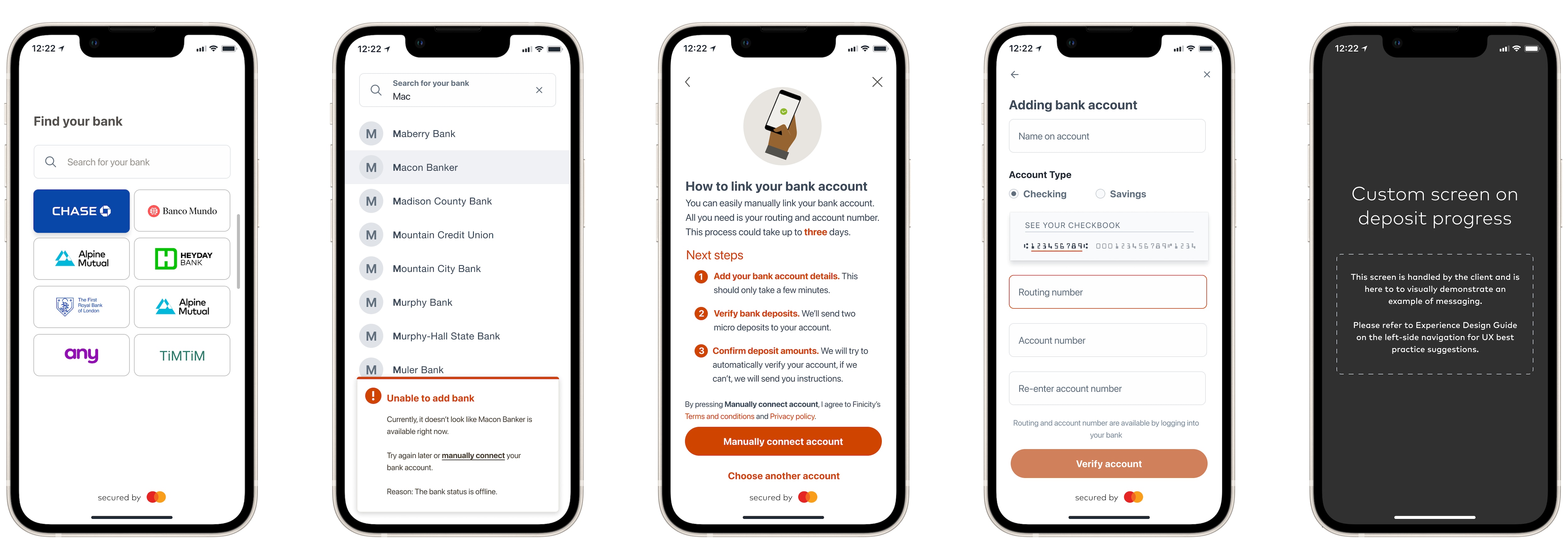
* The customer attempts to exit Connect before selecting a Financial Institution.
* The Financial Institution is [ACH decertified](https://developer.mastercard.com/open-finance-us/documentation/financial-institution/index.md#certified-institutions) (Mastercard cannot retrieve routing and account details directly from the Financial Institution). 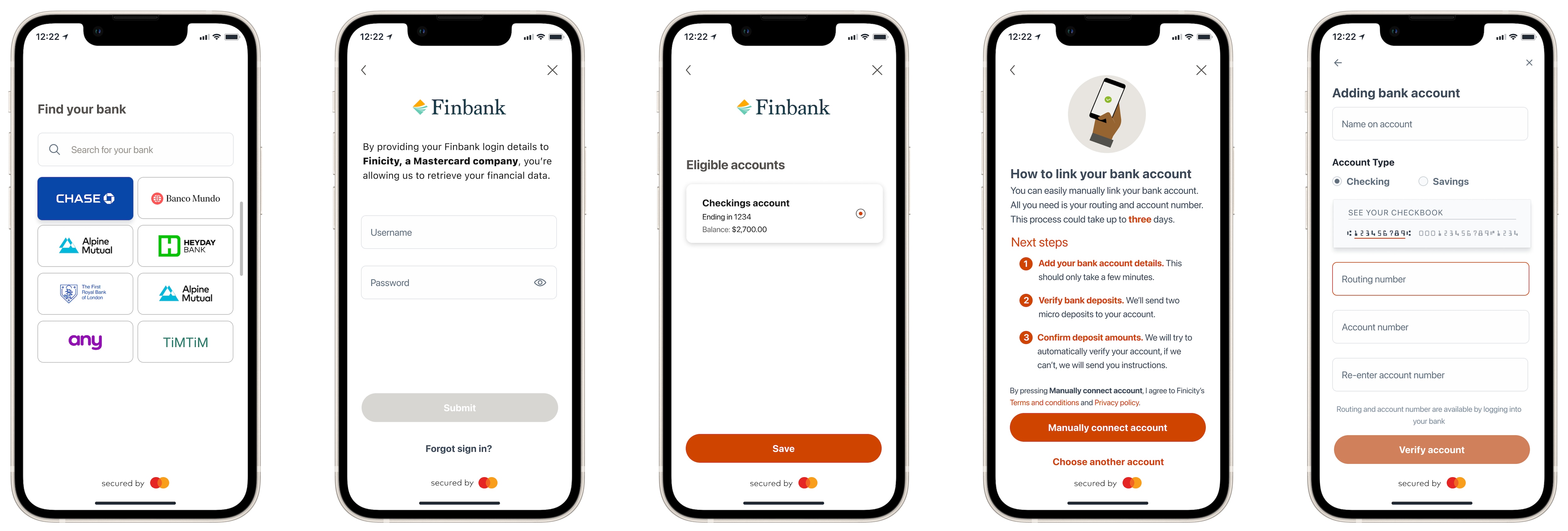
Tip: Bank account validation is the process of verifying that bank routing and account numbers are valid before a transaction is processed, to facilitate successful payment routing. This ensures compliance with [NACHA's WEB Debit rule](https://www.nacha.org/rules/supplementing-fraud-detection-standards-web-debits).
To use Account Validation Assistant, you must:
* sign up to the [Account Payment Details](https://developer.mastercard.com/open-finance-us/documentation/products/pay/verification-money-transfer/index.md) product
* have the Account Validation Assistant (AVA) feature enabled
* have either Data Connect Full or Data Connect Lite fully configured with an `experienceId` for the ACH product type --- refer to [Customizing Data Connect](https://developer.mastercard.com/open-finance-us/documentation/connect/configure-connect-experience/customize-connect/index.md#step-2-create-or-modify-a-data-connect-experience) for details
Note: Contact your Sales Representative/Account Manager if you need help creating a Data Connect experience to use with Account Validation Assistant.
## How It Works {#how-it-works}
The customer enters their routing and account number to initiate verification. You have the option to implement the validation in one of three ways:
* AUTO: attempts the INSTANT method, and if it fails initiate the MICRODEPOSIT method.
* MICRODEPOSIT: initiates a microdeposit of $0.01 to the customer's account; the transaction description includes a code that the customer enters in the flow to validate the account.
* INSTANT: initiates a request with the FI that returns a status of Verified, Rejected, or Inconclusive for the account.
Diagram ava-connect-temp
The [Experience Design Guide](https://developer.mastercard.com/open-finance-us/documentation/experience-design-guide/index.md) includes UX recommendations and best practices advice for how to present the [AVA flow](https://developer.mastercard.com/open-finance-us/documentation/products/pay/account-validation-assistant-temp/index.md#data-connect-full-ava-integration) in your application with both Data Connect Full and Data Connect Lite.
## Data Connect Full AVA Integration {#data-connect-full-ava-integration}
The initial Data Connect Full session enables the
customer to enter their FI details and initiates verification. Once the microdeposit is made and the verification code is created, the customer then verifies the deposits through the same or a new Data Connect session.
The following steps describe how to create the initial Data Connect Full session and confirm the
verification code.
1. **Create a customer record.** If you do not already have a customer record for this customer, create one using the [Add Active Customer](https://developer.mastercard.com/open-finance-us/documentation/customer-records/index.md#active-customers) (or [Add Testing Customer](https://developer.mastercard.com/open-finance-us/documentation/customer-records/index.md#test-customers)) endpoint. The response includes an `id` value - this is the **Customer ID** you use in the next step.
2. **Generate a Data Connect URL.** Call [Generate Data Connect URL](https://developer.mastercard.com/open-finance-us/documentation/connect/generate-2-connect-url-apis/index.md#data-connect-full-including-for-joint-borrower) using the customer ID. Set the `experience` parameter to the experience ID configured for the ACH product type with AVA enabled.
* Optionally specify a `verificationMethod` to indicate the validation path:
* `AUTO` (default): attempt INSTANT validation initially, and if not successful, attempts the MICRODEPOSIT validation.
* `MICRODEPOSIT`: attempt microdeposits (a single microdeposit of $0.01 that includes a verification code) only.
* `INSTANT`: attempt instant validation (a validation status is generated through the FI) only.
* Optionally provide a `webhook` URL to receive microdeposit notifications, and a `redirectUri` so that the customer returns to your application when the session ends.
* If you do not provide a `webhook`, you can poll the [Get Micro Entries Details](https://developer.mastercard.com/open-finance-us/documentation/products/pay/account-validation-assistant-temp/index.md#get-microdeposits-details) endpoint to check the microdeposit status instead (see step 4).
3. **Customer completes the Data Connect session.** Present the Data Connect URL to your customer. When the customer's financial institution cannot be securely linked, the AVA experience presents additional screens that allow the customer to enter their routing and account number manually. Mastercard initiates the method selected using the entered account as part of this flow. No separate API call is required.
4. **Confirm the microdeposit is completed.** Before prompting the customer to verify the microdeposit code or amounts, confirm that the deposit(s) has been dispatched to the financial institution. You can do this in either of these ways:
* **Webhook (recommended)** - if you provided a `webhook` in step 2, Mastercard sends a `microdepositInitiated` event when the deposits are submitted, followed by a `microdepositStatus` event with `microdepositStatus: Completed` once they have been dispatched. See [Notifications](https://developer.mastercard.com/open-finance-us/documentation/products/pay/account-validation-assistant-temp/index.md#notifications) for example payloads.
* **Polling** - call the [Get Micro Entries Details](https://developer.mastercard.com/open-finance-us/documentation/products/pay/account-validation-assistant-temp/index.md#get-microdeposits-details) endpoint and check the `status` field. Wait until the status is `Completed` before continuing.
Once the statusof the microdeposit is `Completed`, prompt the customer to return to your application so that you can present the microdeposit verification URL described in [Verify Microdeposits](https://developer.mastercard.com/open-finance-us/documentation/products/pay/account-validation-assistant-temp/index.md#verify-microdeposits).
To better understand the difference between Data Connect Full and Data Connect Lite, refer to [Generate Data Connect URL](https://developer.mastercard.com/open-finance-us/documentation/connect/generate-2-connect-url-apis/index.md).
### Verify Microdeposits {#verify-microdeposits}
The customer can verify the microdeposit was successfully completed using Data Connect once the deposit(s) has been received.
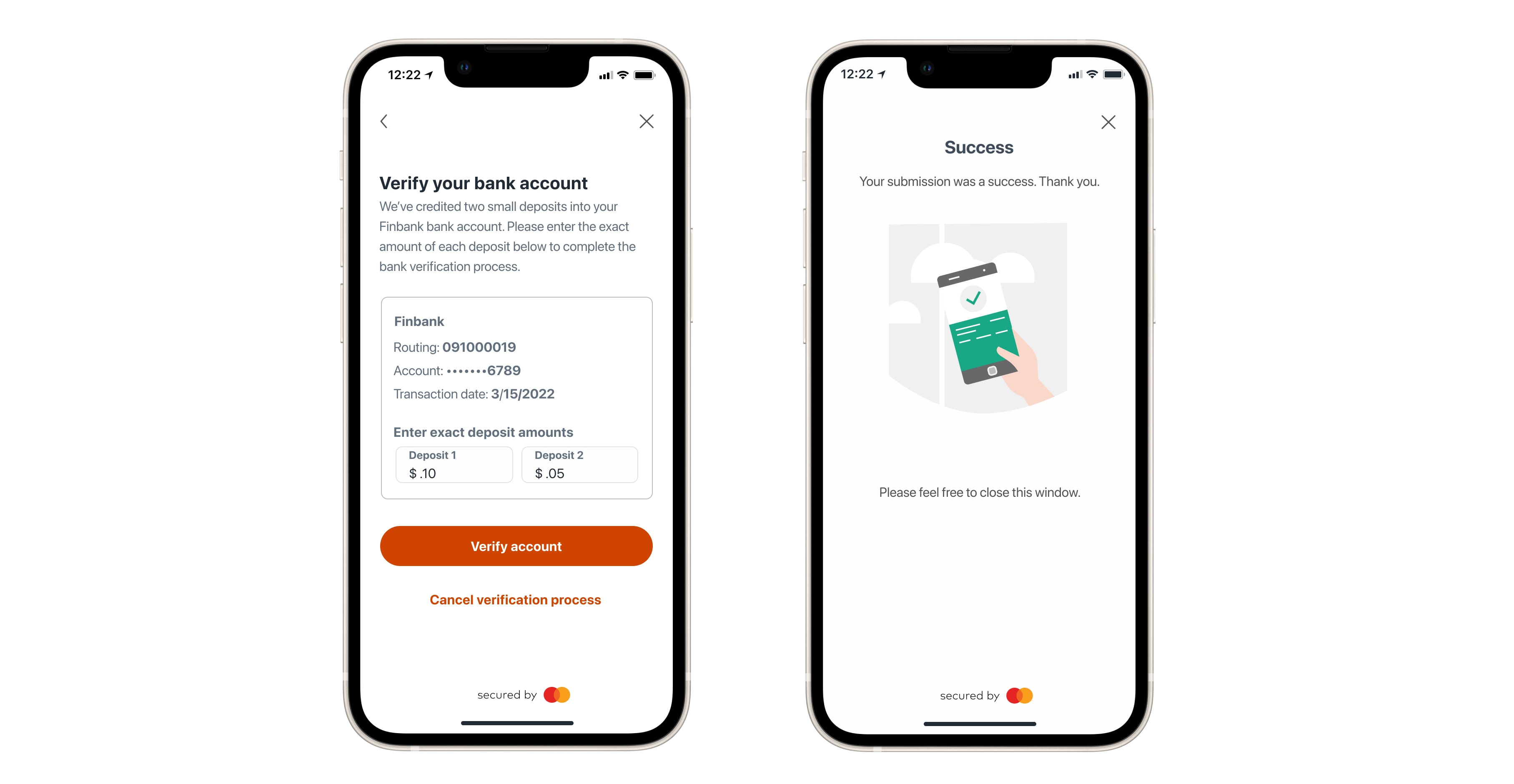
Once the microdeposit has been posted to the customer's account, the customer can return to your application to verify the microdeposit code within Data Connect. You can prompt your customer to verify the microdeposit at any stage after you have confirmed that it was completed. Customers may also return of their own accord once they see the microdeposit being posted in their bank account.
Tip: In order to generate the microdeposit verification URL, you will need the customer account ID. You can obtain this in either of the following ways:
* Call the [Get Customer Accounts](https://developer.mastercard.com/open-finance-us/documentation/api-reference/index.md?view=api#GetCustomerAccounts) API with the query parameter `?account_type=ava` which returns account numbers for the specified customer. For example:
`GET /aggregation/v1/customers//accounts?account_type=ava`
* Alternatively, the `microdepositInitiated` webhook event provides the account ID (see [Notifications](https://developer.mastercard.com/open-finance-us/documentation/products/pay/account-validation-assistant-temp/index.md#notifications)).
The microdeposit verification URL can be generated by calling the following endpoint, where the customer can securely confirm the microdeposit code.
API Reference: `POST /connect/v2/generate/microentry/verify`
See the [AVA flow](https://developer.mastercard.com/open-finance-us/documentation/experience-design-guide/open-finance-us-for-payments/ava/index.md) in the [Experience Design Guide](https://developer.mastercard.com/open-finance-us/documentation/experience-design-guide/index.md) for more detail of the user experience that will be presented to the customer for them to verify the microdeposits.
Once verification is complete, you can fetch ACH routing details for the account using the [Get Account Payment Details](https://developer.mastercard.com/open-finance-us/documentation/products/pay/verification-money-transfer/index.md) endpoint.
## Data Connect Lite AVA Integration {#data-connect-lite-ava-integration}
Data Connect Lite is an API only integration, where you as the Partner will need to build the [screens that allow the customer to verify the account](https://developer.mastercard.com/open-finance-us/documentation/experience-design-guide/open-finance-us-for-payments/ava/index.md#account-validation-assistant---data-connect-lite). You can route the customer to the account verification flow under one of the following circumstances (for information on testing these scenarios see the [Testing AVA](https://developer.mastercard.com/open-finance-us/documentation/products/pay/account-validation-assistant-temp/index.md#testing-ava) section):
* Customer's financial institution is unavailable or has connection issues.
* Customer has linked their account but their financial institution is not ACH certified.
Diagram ava-temp Warning: These endpoints are for use with the Data Connect Lite. The Data Connect Full Experience provides them for you.
### Initiate Microdeposits {#initiate-microdeposits}
You must have collected all the required bank account details, including account number and routing number, before initiating microdeposits for the customer (via your application UI or other means).
API Reference: `POST /microentry/v1/customers/{customerId}`
Optionally, you can provide a suitable `callbackUrl`, which AVA will use to send a notification when the status of the microdeposit changes. See [Notifications](https://developer.mastercard.com/open-finance-us/documentation/products/pay/account-validation-assistant-temp/index.md#notifications) for details.
If the call to Initiate Microdeposits is unsuccessful, one of the following Error Codes will be returned in the response:
| CODE | DESCRIPTION |
|---------|-------------------------------------------------------------------------------------------------------------------|
| 20024 | Invalid routing number |
| 42003 | Testing customer should not add real accounts. |
| 60009 | Invalid callbackUrl |
| 3000000 | Microdeposit initiation can't be processed at this time due to technical difficulties. Please try after some time |
| 3000001 | Invalid account number |
| 3000002 | Invalid account name |
| 3000003 | Invalid memo |
| 3100001 | Account already exists |
| 3200001 | Microdeposits initiation failed |
| 3000010 | Unable to manually link bank account |
### Verify Account Validation {#verify-account-validation}
API Reference: `POST /microentry/v1/customers/{customerId}/accounts/{accountId}/amounts`
Once verification is complete, you can fetch ACH routing details for the account using the [Get Account Payment Details](https://developer.mastercard.com/open-finance-us/documentation/products/pay/verification-money-transfer/index.md) endpoint.
If the call to Verify Microdeposits is unsuccessful, one of the following Error Codes will be returned in the response:
| CODE | DESCRIPTION |
|---------|-----------------------------------------------|
| 3000003 | Invalid amount format |
| 3200002 | Microdeposit is in `` status |
| 3200003 | Microdeposit verification attempts exceeded |
| 3200004 | Microdeposit amounts didn't match |
| 3300001 | Too many requests. Please try after some time |
### Get Microdeposit Details {#get-microdeposit-details}
You can use this endpoint to get the status of a microdeposit entry using the customer's Account ID.
API Reference: `GET /microentry/v1/customers/{customerId}/accounts/{accountId}`
The following explains all the possible microdeposit and account status, with a recommended partner action.
| Microdeposit Status | Account Status | Description | Partner Action |
|---------------------|----------------|----------------------------------------------------------------------------------------------------------------------------------------------------------------|--------------------------------------------------------------------------------------------------------------------------|
| Pending | Pending | Microdeposit is not yet dispatched to the Receiving Depository Financial Institution (RDFI) | Wait a few minutes and check the status again |
| Completed | Pending | Microdeposit is sent to receiving financial institution for posting in customers account | Re-engage the customer to verify the deposits (Finicity will also try to verify the amounts automatically in some cases) |
| Verified | Active | Microdeposit is verified automatically by Finicity or manually by the customer. This constitutes a billing event and the partner will be charged at this point | The partner calls getAccountDetails endpoint to retrieve ACH information |
| Rejected | Inactive | Microdeposit is rejected by the receiving financial institution | The partner can start over the process again |
| Returned | Inactive | Microdeposit is returned by the receiving financial institution | The partner can start over the process again |
| Failed | Inactive | An error occurred while sending microdeposits to the customer account or the customer has exceeded 3 attempts to verify the deposit amounts | The partner can start over the process again |
| Expired | Inactive | Microdeposit has remained in 'completed' state for 10 days or longer | The partner can start over the process again |
## Testing AVA {#testing-ava}
To simulate the scenarios where customers would use AVA, follow these steps:
| Scenario | Steps to reproduce |
|--------------------------------------------------------------------------|-------------------------------------------------------------------------------------------------------------------------------------------------------------------------------------------------------------------------------------------------------------------------------|
| Financial Institution is not found, decertified or has connection issues | Search for bank 'Finbank offline' or 'unicorn', then manually connect. |
| The Financial institution is ACH decertified | Search for 'Finbank Decertified' bank and add an account using the credentials specified in our [Test Profiles](https://developer.mastercard.com/open-finance-us/documentation/integration-and-testing/test-the-apis/index.md#sign-in-authentication-profiles) documentation. |
Use the routing and account numbers from the table below for testing purposes to simulate the respective AVA flows. You have up to three attempts to enter the correct code. If you exceed three attempts, you'll need to restart the AVA flow.
Warning: Use only testing customers and the test account numbers mentioned below during testing. If real account numbers are detected, an error code 42003 will be sent to the webhook listener.
| Routing number | Account number | Scenario |
|------------------------------------------------------------------------------------------------------------------------------------------------------|----------------|-------------------------------------------------------------------------------------------------------------|
| Any valid routing number which is linked to at least one FI that is not ACH certified, for example: 011000138, 121000358
| 5111111111 | User verification - The microdeposits must be manually verified. |
| Any valid routing number which is linked to at least one FI that is not ACH certified, for example: 011000138, 121000358
| 5999999999 | User verification - The microdeposits must be manually verified. |
| Any valid routing number which is linked to at least one FI that is not ACH certified, for example: 011000138, 121000358
| 6111111111 | Auto verification - The microdepositStatus will be automatically set to verified after an hour. |
| Any valid routing number which is linked to at least one FI that is not ACH certified, for example: 011000138, 121000358
| 6222222222 | Auto verification - The microdepositStatus will be automatically set to verified after an hour. |
| Any valid routing number which is linked to at least one FI that is not ACH certified, for example: 011000138, 121000358
| 4111111111 | Reminder - A reminder webhook will be sent to prompt the Partner to seek verification of the microdeposits. |
| Any valid routing number which is linked to at least one FI that is not ACH certified, for example: 011000138, 121000358
| 4999999999 | Reminder - A reminder webhook will be sent to prompt the Partner to seek verification of the microdeposits. |
| Any valid routing number which is linked to at least one FI that is not ACH certified, for example: 011000138, 121000358
| 2111111111 | Expired - The timeframe in which the microdeposits can be verified has expired. |
| Any valid routing number which is linked to at least one FI that is not ACH certified, for example: 011000138, 121000358
| 2999999999 | Expired - The timeframe in which the microdeposits can be verified has expired. |
| Any valid routing number which is linked to at least one FI that is not ACH certified, for example: 011000138, 121000358
| 1111111111 | Rejected - The microdeposits were rejected by the Financial Institution. |
| Any valid routing number which is linked to at least one FI that is not ACH certified, for example: 011000138, 121000358
| 1999999999 | Rejected - The microdeposits were rejected by the Financial Institution. |
## Notifications {#notifications}
You can receive notifications for all microdeposit status changes through the [webhook listener](https://developer.mastercard.com/open-finance-us/documentation/webhooks/webhooks-connect/index.md) you provided when generating
the Data Connect URL. The following webhook event notifications are available for the AVA flow:
Note: A `microdepositStatus` event with an empty `payload` may arrive while the deposit is being prepared, just before the `microdepositInitiated` event. You can safely ignore these events and wait for the populated `microdepositStatus` event that follows.
In addition to the AVA-specific events listed below, the Data Connect session also emits a [`done`](https://developer.mastercard.com/open-finance-us/documentation/webhooks/webhooks-connect/webhooks-events-connect/index.md#done) event when the customer closes the session. See [Connect Webhook Events](https://developer.mastercard.com/open-finance-us/documentation/webhooks/webhooks-connect/webhooks-events-connect/index.md) for the full list of Connect events.
* Pending
* StatusChange
* Reminder
* Success
* Rejected
* Returned
* Error
* VerificationError
```pending
{
"customerId": "6015986195",
"eventType": "microdepositInitiated",
"eventId": "1721812939549-8c6739f026337a93dbe2e063",
"payload": {
"accountId": "6030377866",
"status": "Pending",
"depositCount": 2,
"statusDescription": "Deposits are submitted for processing",
"railType": "rtp"
}
}
```
```statusChange
{
"customerId": "6015986195",
"eventType": "microdepositStatus",
"eventId": "1721812941769-ca8e1e85cc3683cb43a8fc88",
"payload": {
"event": {
"id": "ca81920d-a1b5-4c6e-b373-4d5a4c1505f8",
"type": "statusChange",
"class": "microdeposit"
},
"accounts": [
{
"id": "6030377866",
"name": "Savings",
"type": "moneyTransferSavings",
"status": "pending",
"customerId": "7021638961",
"createdDate": "2024-07-24T09:22:19Z",
"lastUpdatedDate": null,
"microdepositStatus": "Completed",
"description": "Microdeposits initiated successfully.",
"microdepositCreatedDate": "2024-07-24T09:22:19Z",
"microdepositLastUpdatedDate": null,
"autoVerifiedAccount": null
}
]
}
}
```
```reminder
{
"customerId": "6015986195",
"eventType": "microdepositStatus",
"eventId": "1681208719662-57a4b9e02661510b390c00e6",
"payload": {
"event": {
"id": "df569bba-39d6-4f9a-a321-d2d6d604c58b",
"type": "reminder",
"class": "microdeposit"
},
"accounts": [
{
"id": "6043045865",
"name": "Checking",
"type": "moneyTransferChecking",
"status": "pending",
"customerId": "6015986195",
"createdDate": "2023-04-11T10:25:13Z",
"lastUpdatedDate": null,
"microdepositStatus": "Completed",
"description": "Engage the user for microdeposit verification before the window expires in 2 days.",
"microdepositCreatedDate": "2023-04-11T10:25:13Z",
"microdepositLastUpdatedDate": null
}
]
}
}
```
```success
{
"customerId": "6015986195",
"eventType": "microdepositVerified",
"eventId": "1672853918255-8f3bcd7d8e7f5c44b0021111",
"payload": {
"status": "Success",
"statusDescription": "Microdeposits are verified successfully",
"accountId": "6030377866"
}
}
```
```rejected
{
"customerId": "6015986195",
"eventType": "microdepositStatus",
"eventId": "1709221545468-26ec6400711615d32d138f6d",
"payload": {
"event": {
"id": "0cf5ed33-e45a-43c1-b4b7-a9574f587e0b",
"type": "statusChange",
"class": "microdeposit"
},
"accounts": [
{
"id": "7034681725",
"name": "Checking",
"type": "moneyTransferChecking",
"status": "inactive",
"customerId": "7018439927",
"createdDate": "2024-02-29T15:45:43Z",
"lastUpdatedDate": null,
"microdepositStatus": "Rejected",
"description": "Microdeposits are rejected due to AM04",
"microdepositCreatedDate": "2024-02-29T15:45:43Z",
"microdepositLastUpdatedDate": null,
"autoVerifiedAccount": null
}
]
}
}
```
```returned
{
"customerId": "6015986195",
"eventType": "microdepositStatus",
"eventId": "1709650152470-54befb85f22f7c2d6ca283a4",
"payload": {
"event": {
"id": "43bbe0a1-1f4c-48b1-a50d-738ee53cad39",
"type": "statusChange",
"class": "microdeposit"
},
"accounts": [
{
"id": "7035839537",
"name": "Checking",
"type": "moneyTransferChecking",
"status": "inactive",
"customerId": "7019429790",
"createdDate": "2024-03-05T14:49:10Z",
"lastUpdatedDate": null,
"microdepositStatus": "Returned",
"description": " Microdeposits are returned by the receiving financial institution ",
"microdepositCreatedDate": "2024-03-05T14:49:10Z",
"microdepositLastUpdatedDate": null,
"autoVerifiedAccount": null
}
]
}
}
```
```error
{
"customerId": "6015986195",
"eventType": "microdepositError",
"eventId": "1721814857537-236dd6e5b29d6c834e912f81",
"payload": {
"code": "3100001",
"message": "Account Already Exist",
"status": 409
}
}
```
```verificationError
{
"customerId": "6015986195",
"eventType": "microdepositVerificationError",
"eventId": "1672853442355-3078e6f48295faa884555126",
"payload": {
"error": {
"code": "3200004",
"message": "Microdeposit amounts didn't match",
"status": 400,
"level": "error",
"user_message": "Microdeposit amounts didn't match"
},
"accountId": "6030377866"
}
}
```
### Notification Error Codes {#notification-error-codes}
The `microdepositError` and `microdepositVerificationError` webhook events return an error code in the `payload` to indicate why the request failed. Select a tab below to see the codes that can be returned for each event.
| CODE | DESCRIPTION |
|---------|-------------------------------------------------------------------------------------------------------------------|
| 20024 | Invalid routing number |
| 42003 | Testing customer should not add real accounts |
| 60009 | Invalid callbackUrl |
| 3000000 | Microdeposit initiation can't be processed at this time due to technical difficulties. Please try after some time |
| 3000001 | Invalid account number |
| 3000002 | Invalid account name |
| 3000003 | Invalid memo |
| 3000010 | Unable to manually link bank account |
| 3100001 | Account already exists |
| 3200001 | Microdeposits initiation failed |
| CODE | DESCRIPTION |
|---------|-----------------------------------------------|
| 3000003 | Invalid amount format |
| 3200002 | Microdeposit is in `` status |
| 3200003 | Microdeposit verification attempts exceeded |
| 3200004 | Microdeposit amounts didn't match |
| 3300001 | Too many requests. Please try after some time |