# Accessibility Guidelines
source: https://developer.mastercard.com/open-finance-us/documentation/experience-design-guide/accessibility-guidelines/index.md
Mastercard firmly believes that app and web experiences should be accessible for everyone. Mastercard's design system is committed to following and complying with accessibility best practices.
## Why It Matters {#why-it-matters}
* Accessibility is about designing and developing digital experiences that meet the varying needs of individuals, organizations, and governments internationally. This section combines information from **Web Content Accessibility Guidelines (WCAG)** and the **A11y Project**.
* One billion people (15% of the population) experience some form of disability
* Seeing: Visual impairments (covers 80% of accessibility issues)
* Hearing: Auditory impairments
* Interacting: Motor impairments
* Learning: Cognitive impairments
* Vestibular disorders and seizures: Balance impairments
## Why We Care {#why-we-care}
We need to make it easy for **everyone** to do business with Mastercard.
* Accessibility is part of compliance---it is a legal requirement in many regions of the world
* Accessibility is part of our addressable market---one in seven of our potential customers has some form of disability
* Accessibility demand is increasing---companies are increasingly asking for or including accessibility compliance into contracts with Mastercard
## Expectations for Accessibility Compliance {#expectations-for-accessibility-compliance}
As Mastercard moves toward accessibility compliance, we are working with internal teams and an external third-party expert to understand our current state.
All Open Finance US product components comply with [WCAG 2.1, Level AA.](https://www.w3.org/TR/WCAG21/)
* Keyboard accessibility
* Proper color contrast ratios (4.5:1)
* Alt tags for images implemented
* Defined navigation and heading structures
* Accessibility-coded data (and layout) tables
* Proper field labels
* Accessible dynamic content handling
* Skip to the main content function
Achieving compliance requires everyone working together in designing, developing and testing. Look at the ways that we are compliant. We strongly suggest that you follow the guidelines provided by WCAG 2.1.
## Color Contrast {#color-contrast}
### Color {#color}
s
Mastercard components are designed to comply with WCAG 2.1, Level AA accessibility standards. When using our components to create white label products, designers still need to exercise due diligence to ensure that the components are used correctly along with color contrast minimum requirements.
#### What Color Contrast Standards Do We Follow? {#what-color-contrast-standards-do-we-follow}
Success Criterion 1.4.3: Contrast (Minimum)
Level AA [source link](https://www.w3.org/WAI/WCAG21/Understanding/contrast-minimum.html)
The visual presentation of text and images of text has a contrast ratio of **at least 4.5:1**, except for the following:
* **Large text**: The contrast ratio for large-scale text and images of large-scale text is at least 3:1.
* **Incidental**: There is no contrast requirement for text or images of text when they are: part of an inactive user interface component, purely aesthetic, not visible to anyone, or are part of an image that contains significant other visual content.
* **Logotypes** : There is also no contrast requirement for text that is part of a logo or brand name.
### How Do We Test for Color Contrast? {#how-do-we-test-for-color-contrast}
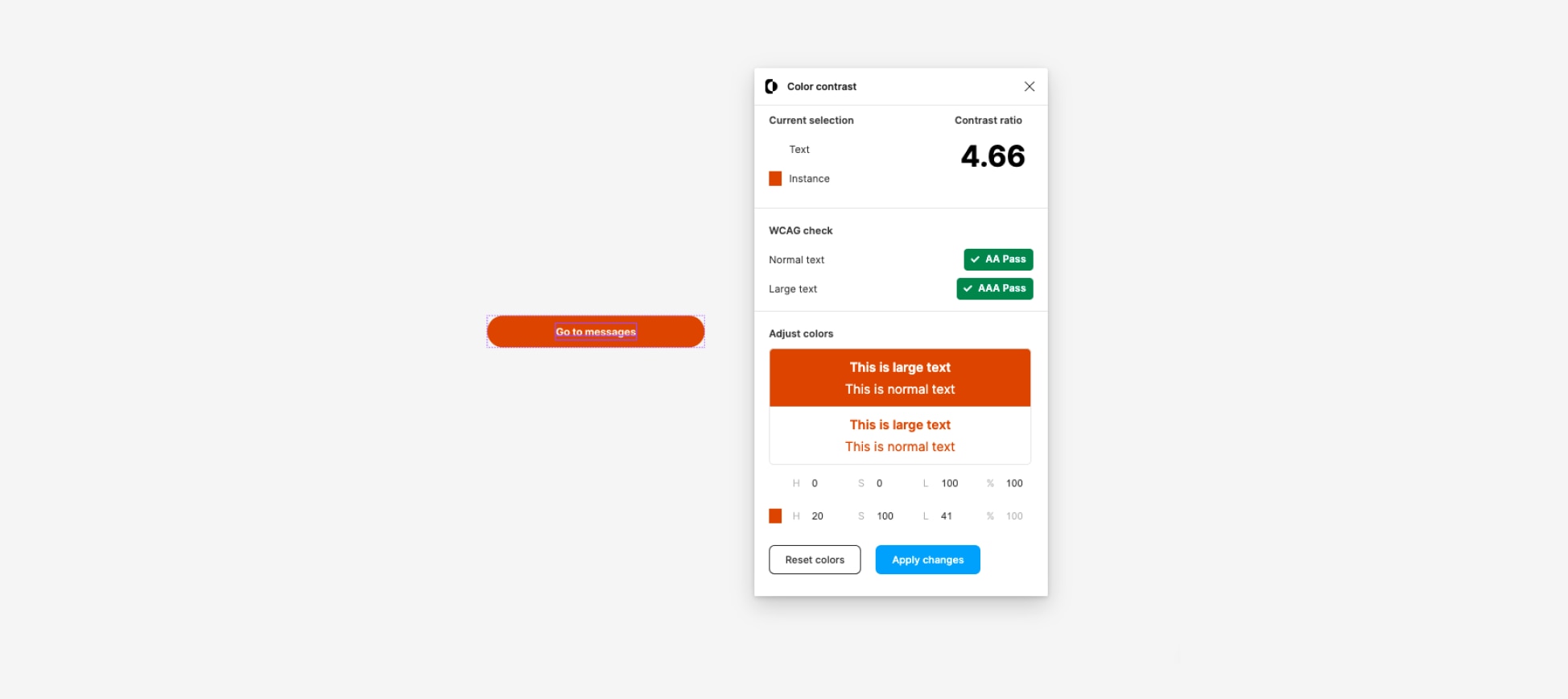
From a design perspective, we use a plugin within Figma called Contrast that checks the color contrast ratios of text and graphics. [Link to plugin](https://www.figma.com/community/plugin/748533339900865323/contrast)

## Keyboard {#keyboard}
### Keyboard Accessibility {#keyboard-accessibility}
**Common keyboard interactions** include using the **tab key** to select different interactive elements on a page and using the **enter key** or the **spacebar** to activate an in-focus element. Use the [WCAG](https://www.w3.org/WAI/WCAG21/Understanding/keyboard) guidelines to make your user experience more accessible.
### Focus Indicators {#focus-indicators}
The tab key navigates through all interactive elements on a page in the order they appear in the HTML document. A default visual indicator is provided by the web browser in use. The display is a border around the focused element. When an element is in focus, it can be further activated using the keyboard.
## Modals and SDKs {#modals-and-sdks}
A modal, or modal dialog, is an overlay window that opens on top of the current primary content or screen. It places focus on itself, usually making the background inactive ("inert") --- in other words, visually grayed out or dimmed. It can be dismissed by using a close or X button, by tapping away from the on-focus area, or by pressing an appropriate "cancel" CTA.

### Why Are Modal Interactions Typically Inaccessible? {#why-are-modal-interactions-typically-inaccessible}
Modal interactions are often considered inaccessible. The most common issues are:
* Poor communication of intention (semantics) for assistive technologies - is it a dialog or just another paragraph?
* Improper handling of focus control, allowing the user to access content intended to be blocked.
* Dialogs are not announced to assistive technologies.
* Unclear indication of which content is blocked from interaction.
* Insufficient contrast between the dialog container and the outlying content. For example, a faded background or alpha channel blending may not be sufficient contrast (see [WCAG 2.1 Contrast](https://www.w3.org/WAI/WCAG21/Understanding/contrast-minimum.html)).
Tip: If you have any questions or need assistance with the customer experience or development, [contact us](https://developer.mastercard.com/open-finance-us/documentation/support/index.md).
Next: [Experience Design Guide](https://developer.mastercard.com/open-finance-us/documentation/experience-design-guide/index.md)