# Integrating with Data Connect
source: https://developer.mastercard.com/open-finance-us/documentation/connect/integrating/index.md
There are two flexible integration paths after [generating Mastercard Data Connect URLs](https://developer.mastercard.com/open-finance-us/documentation/connect/generate-2-connect-url-apis/index.md) --- SDK-based and non-SDK implementations. Both approaches offer full support for all available Data Connect iterations and are designed to meet a range of partner needs and technical environments.
Once you've obtained your partner credentials and are ready to generate Data Connect links, you'll need to choose between these two options:
* **SDK Integration:** The SDK simplifies integration by managing the user journey and tracking key details throughout the process.
* **Non-SDK Integration:** If your environment does not support SDK usage, the non-SDK option provides equivalent functionality. In this approach, you'll be responsible for managing the user journey using [webhooks](https://developer.mastercard.com/open-finance-us/documentation/webhooks/index.md) and other tools.
Tip: If you are interested in using the Connect Transfer flow for setting up Deposit Switches or Bill Pay Switches, see the [Deposit Switch and Bill Pay Switch](https://developer.mastercard.com/open-finance-us/documentation/products/pay/switch/index.md) documentation.
## SDK vs Non-SDK {#sdk-vs-non-sdk}
To help you select the approach that best fits your implementation, the comparison tables below highlight the key features, tradeoffs, and integration considerations for each option.
**SDK Features**
| Feature / Consideration | SDK | Non-SDK |
|-------------------------|-------------------------------------------------------------------------|-------------------------------------------------------------------------|
| Platform Coverage | Requires a supported tech stack (for example, Flutter is not supported) | Works with any tech stack --- platform-agnostic |
| OAuth Flow | OAuth popup managed by SDK | Partner is responsible for managing the OAuth popup in app or browser |
| Session Management | Managed automatically by SDK using event handlers | Partner must manage session manually using webhooks |
| User Event Tracking | Captured via SDK with granular, near real-time events | Captured via webhooks; less granular and may introduce slight delays |
| Integration Complexity | Easier setup with built-in handling of user flow and events | More control, but higher complexity---especially syncing webhooks to UI |
**Integration Requirements**
| Requirement | SDK | Non-SDK |
|-----------------------|-----------------------------------------------|--------------------------------------------------------------------------------------------------------------------------------------------------------------------------|
| Installation | Web SDK requires installation | No SDK installation needed |
| Connect URL Usage | URL is passed to SDK during initialization | URL is generated directly by partner backend and launched by partner application |
| Redirect Handling | SDK manages redirection and transition | Partner must provide `redirectUri`; Data Connect redirects there after OAuth |
| Mobile Considerations | SDK handles mobile automatically if supported | Partner must set `isHostedInMobileApp = true` for mobile support |
| User Event Handling | Tracked automatically via SDK | Partner must subscribe to and handle [Data Connect webhooks](https://developer.mastercard.com/open-finance-us/documentation/webhooks/webhooks-connect/index.md) manually |
**Additional Considerations**
Unlike many SDKs that involve large codebases, our Data Connect SDKs are lightweight. Their primary function is to manage user journey data.
* Use the SDK solution when you:
* want minimal integration effort and faster time to market.
* are using a supported front-end framework or tech stack.
* want granular, near real-time user journey data.
* Use the non-SDK solution when you:
* have security restrictions on using SDKs.
* are working in an unsupported environment (such as Flutter).
* don't need built-in user journey tracking.
**Next Steps**
Once you've selected the implementation approach that best fits your use case, explore the detailed guides for each approach:
* [SDK Integration](https://developer.mastercard.com/open-finance-us/documentation/connect/integrating/sdk/index.md)
* [Non-SDK Integration](https://developer.mastercard.com/open-finance-us/documentation/connect/integrating/non-sdk/index.md)
## App to App Authentication {#app-to-app-authentication}
App to app authentication is a feature within Data Connect that allows mobile users to permission access to their data by signing in with their financial institution's (FI) mobile app if it is downloaded on the device they are using. The user can sign in utilizing the applicable biometric login features for the FI. If the app is not downloaded, the customer is directed to login through the FI's website on a browser window.
The following highlights the flow for customers, showing how they can use their facial identification (biometric recognition is device dependent) to log in to their bank and permission access to their account:
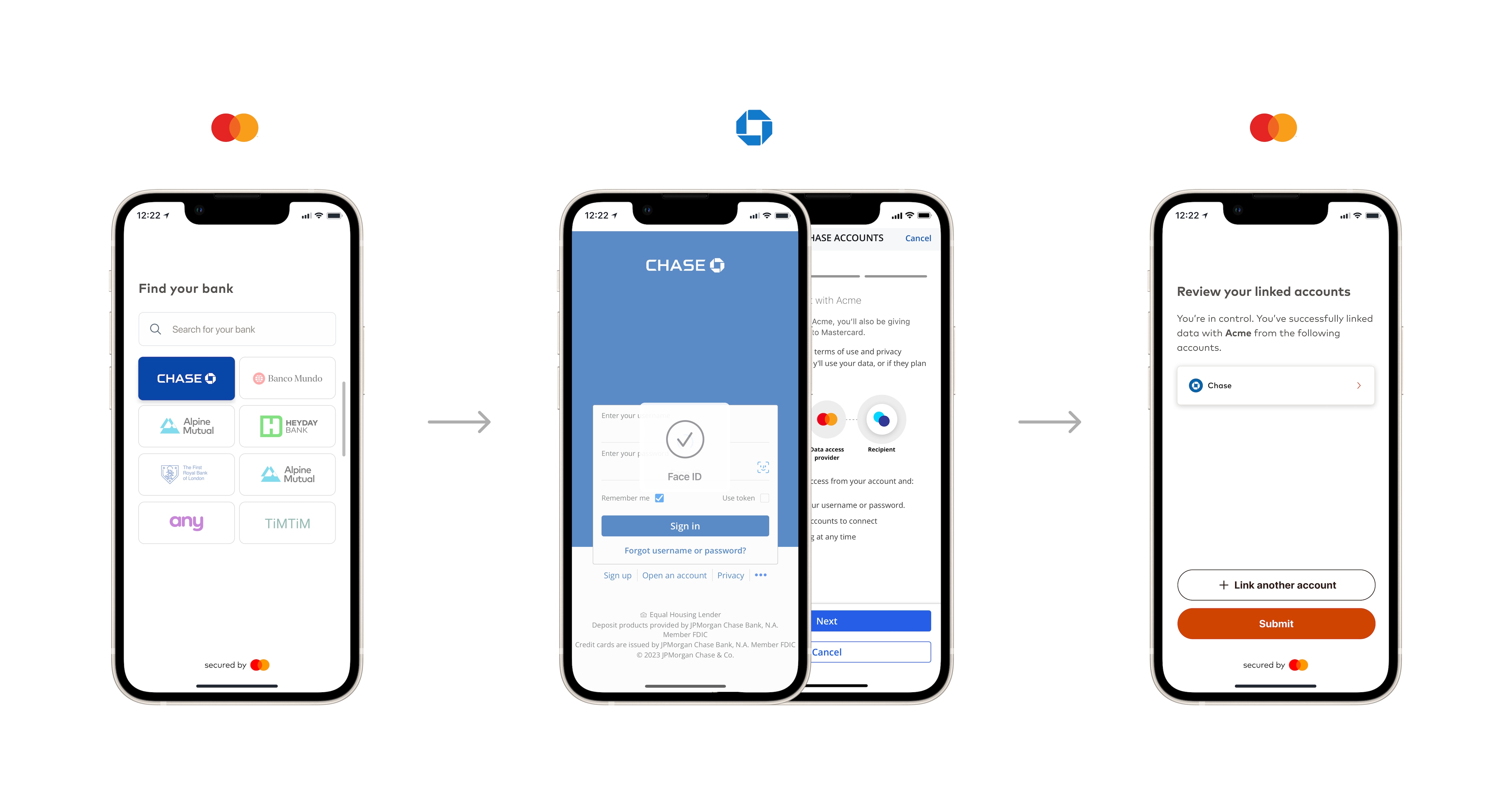
See our [App to App authentication toolkit](https://developer.mastercard.com/open-finance-us/documentation/experience-design-guide/connect-enhancements-and-features/app-to-app-auth-best-practices/index.md) in the Experience Design Guide for more details.
### How to Test App to App Authentication {#how-to-test-app-to-app-authentication}
Your implementation of the App to App Authentication flow can be tested using our Finbank test app. This is available for testing on both iOS and Android via the links below. The Finbank test app is not available via the app store.
* The iOS Finbank test app is available via Apple's Testflight service:
Sign up to Testflight if you have not already done so.
Note that the app is renewed every 90 days on Testflight. Each time the app expires, you need to visit Testflight to get the updated version.
* The Android Finbank test app is available here:
Note that the Android app is only available in the US and India.
Once the Finbank app is on the mobile testing device, you can ensure the universal link you implemented works correctly by going through your Data Connect experience and using Finbank OAuth test institution (102176) within the flow. You can expect the following:
* Instead of being directed to the browser to log in to Finbank OAuth, Data Connect redirects the flow to the Finbank app on your device.
* If your app-to-app setup is correct, Data Connect redirects the flow to the Finbank app instead of to the Finbank website in your default browser.
* After successfully adding your accounts, Data Connect redirects the flow back to your app.
Finbank OAuth test profiles used for testing can be found in the [Test Profiles](https://developer.mastercard.com/open-finance-us/documentation/integration-and-testing/test-the-apis/index.md#oauth-connection-profiles) section.