# UX Design Guidelines
source: https://developer.mastercard.com/open-finance-data/documentation/ux-design-guidelines/ux-design-guide/index.md
## Overview {#overview}
Mastercard Open Finance enables a secure, seamless way for users to connect their financial accounts during Account Opening. By leveraging Open Finance, users can quickly share permissions, verified financial data---reducing friction, improving decisioning, and accelerating time to value from the very first interaction.
The Connect Experience consists of the journey for users to link their account(s) via Mastercard Open Finance. This guide outlines UX best practices to support your implementation of the Connect Experience and ensure a seamless end user journey grounded in clarity, trust, and compliance for successful bank account linking.
Key topics include:
* UI Glossary
* Customizing the Connect Experience
* Naming
* Trust Signals \& Assets
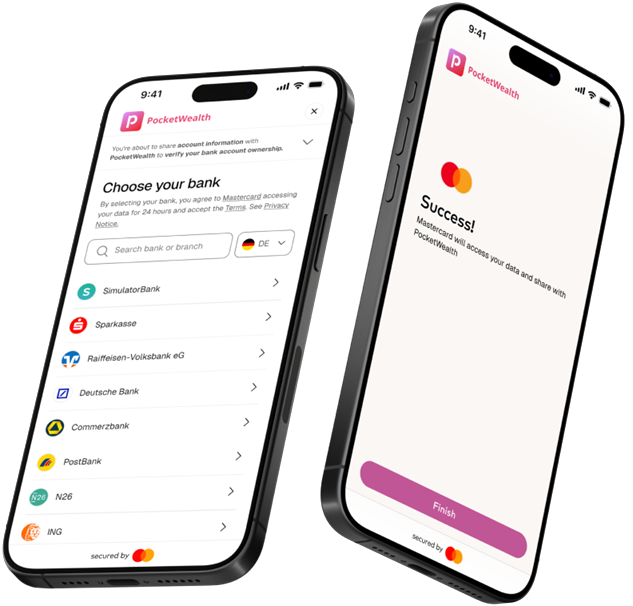
Connecting a financial account is one touchpoint in the broader user journey. This guide outlines UX best practices for the Account Opening use case, focusing on driving conversion through clear transitions and consistent context as users move from your application into the account‑linking experience---and back again---so they can complete onboarding with minimal friction.
### End-to End Connect User Journey Example {#end-to-end-connect-user-journey-example}


**Figma file**
Find the end-to-end Connect experience to duplicate and customize in your own environment.
[Access Figma file](https://www.figma.com/design/51k9TUFQjOkuvAlDDt601S/%7BExternal%7D-Global-Connect-Experience?node-id=3-3&p=f&t=5zowHxXhBojEXQxZ-0)
## UI Glossary {#ui-glossary}
Here are key UI elements referenced across this guide and the use-case-specific UX guidelines.
###### Tag {#tag}
Label used to encourage adoption (for example, Recommended, Default)
###### Name {#name}
Primary label describing the service or action
###### Call-to-Action (CTA) Button {#call-to-action-cta-button}
Button specifying action to proceed in flow, aligned to the use case
###### Bank logos {#bank-logos}
Icons to highlight sample of the most popular banks in the user's country
###### Descriptor {#descriptor}
Short explanation of the purpose of data sharing in simple, reassuring language
###### Brand {#brand}
Mastercard brand asset to drive conversion and increase credibility. In the UK or Europe, showing this asset represents using Mastercard Open Finance's AISP license
###### Banner {#banner}
Benefit-driven phrases to encourage adoption (for example, "Faster onboarding", "Connect in seconds")

## Customizing the Connect Experience {#customizing-the-connect-experience}
#### Leveraging your brand identity {#leveraging-your-brand-identity}
The Connect Experience can be customized to reflect your organization's brand identity. Use the [Theming API](https://developer.mastercard.com/product/mastercard-ob-theming/) to configure a themed user interface that showcases your brand's unique visual identity.
The following design elements can be tailored to your theme:

The [Theming API](https://developer.mastercard.com/product/mastercard-ob-theming/) provides an easy way to customize and manage your themed experience. Applying your brand identity to the Connect Experience gives customers a greater sense of security and enables you to bring your end users seamlessly from your application into the Connect experience and back to your application while maintaining branding consistency in their journey.

## Naming {#naming}
##### Use clear, action‑oriented CTAs {#use-clear-actionoriented-ctas}
Call‑to‑action (CTA) copy should be action‑oriented and aligned to the user's goal and use case. Button labels must clearly communicate what will happen next, helping users feel confident in the action they are taking.
Clear, consistent naming plays a critical role in helping users quickly understand each step of their journey. Use plain, user‑friendly language across screens, tailored to the specific use case. Avoid internal, technical, or implementation‑specific terminology, as it can introduce uncertainty and reduce trust.
##### Align naming to the use case {#align-naming-to-the-use-case}
Different Open Finance journeys require different levels of clarity and context. Naming should always reflect the user's intent at that moment in the flow.
For example, "Pay by Bank" and "Pay with Bank" are industry‑recognized terms for Open Finance payments at checkout. Most users immediately understand that these options allow them to pay using their bank account, making them effective and intuitive choices in a payments context.
For data‑sharing use cases---such as Account Opening and Funding, Personal Financial Management, or Lending---clear consent‑driven language is essential.
**Examples include:**
* Connect your accounts
* Share your data securely
* Enable data sharing
These labels clearly describe the action, set expectations, and reinforce security and transparency.
Refer to the use‑case‑specific UX design guidelines for recommended naming patterns, contextual examples, and localization guidance to ensure consistency and clarity across regions and journeys.

## Trust Signals and Assets {#trust-signals-and-assets}
#### Call-to-Action (CTA) Button {#call-to-action-cta-button}
###### Button Sizing {#button-sizing}
The recommended button height is 44 px to ensure accessibility and ease of interaction across devices. Button width may vary based on content, but CTA text should always remain center‑aligned for clarity and visual balance.
###### Button Color {#button-color}
CTA button color should align with your organization's themed experience. If no custom theming is applied, default to the Mastercard brand standard (Fill: #141413; Text: #FFFFFF).
###### Button Shape {#button-shape}
CTA buttons may be square, squoval, or fully rounded, depending on your brand's visual language. Button shape should remain consistent throughout the user journey to reinforce familiarity and reduce cognitive load.

#### Bank Logos {#bank-logos}
#### Supported market variants included {#supported-market-variants-included}
Displaying familiar bank logos during account selection helps users quickly recognize their financial institution and feel confident connecting their account as part of onboarding. Displaying country‑specific bank logos to guide users to connect their bank accounts increases user recognition and trust at the moment of data sharing. Familiar bank branding helps users feel confident and secure.
Bank logo assets are available in country‑specific variants, each featuring the three most popular banks in that country. Always select the correct variant for the country where your service is offered.
Refer to the asset library for supported country variants. For additional countries, logo variants, or sequencing guidance, contact your Mastercard Customer Delivery Manager.

#### Downloadable assets {#downloadable-assets}


[AT_logo.svg](https://static.developer.mastercard.com/content/open-finance-data/uploads/AT_logo.svg) (144KB)


[BE_logo.svg](https://static.developer.mastercard.com/content/open-finance-data/uploads/BE_logo.svg) (99KB)


[DK_logo.svg](https://static.developer.mastercard.com/content/open-finance-data/uploads/DK_logo.svg) (104KB)


[EE_logo.svg](https://static.developer.mastercard.com/content/open-finance-data/uploads/EE_logo.svg) (67KB)


[FI_logo.svg](https://static.developer.mastercard.com/content/open-finance-data/uploads/FI_logo.svg) (56KB)


[FR_logo.svg](https://static.developer.mastercard.com/content/open-finance-data/uploads/FR_logo.svg) (39KB)


[DE_logo.svg](https://static.developer.mastercard.com/content/open-finance-data/uploads/DE_logo.svg) (243KB)


[HU_logo.svg](https://static.developer.mastercard.com/content/open-finance-data/uploads/HU_logo.svg) (221KB)


[IE_logo.svg](https://static.developer.mastercard.com/content/open-finance-data/uploads/IE_logo.svg) (149KB)


[IT_logo.svg](https://static.developer.mastercard.com/content/open-finance-data/uploads/IT_logo.svg) (360KB)


[LV_logo.svg](https://static.developer.mastercard.com/content/open-finance-data/uploads/LV_logo.svg) (98KB)


[LT_logo.svg](https://static.developer.mastercard.com/content/open-finance-data/uploads/LT_logo.svg) (67KB)


[NL_logo.svg](https://static.developer.mastercard.com/content/open-finance-data/uploads/NL_logo.svg) (320KB)


[NO_logo.svg](https://static.developer.mastercard.com/content/open-finance-data/uploads/NO_logo.svg) (230KB)


[PO_logo.svg](https://static.developer.mastercard.com/content/open-finance-data/uploads/PO_logo.svg) (152KB)


[PT_logo.svg](https://static.developer.mastercard.com/content/open-finance-data/uploads/PT_logo.svg) (76KB)


[ES_logo.svg](https://static.developer.mastercard.com/content/open-finance-data/uploads/ES_logo.svg) (84KB)


[SE_logo.svg](https://static.developer.mastercard.com/content/open-finance-data/uploads/SE_logo.svg) (96KB)


[uk_logo.svg](https://static.developer.mastercard.com/content/open-finance-data/uploads/uk_logo.svg) (100KB)
### Secured-by Brand {#secured-by-brand}
Mastercard brand assets may be used to signal licensing, credibility, and trust.
>
> **Mastercard License**
> The "secured by Mastercard" branding asset may be displayed beneath the primary CTA when using Mastercard Open Finance's AISP license in the UK or Europe.
>
> **Your Own License**
> Integrators operating under their own Open Finance AISP license are not eligible to use the "secured by Mastercard" asset unless explicitly approved in their contract.
**Place the asset intentionally**
The "secured by Mastercard" asset is typically displayed near the primary account connection action or account option label. Always follow approved implementation guidelines.
**Confirm eligibility before use**
Mastercard brand assets may only be used in accordance with official branding guidelines. Contact your Mastercard Open Banking customer delivery manager for further information.

Tip:
If you have any questions or need assistance with the customer experience or development, please [contact us](https://developer.mastercard.com/open-finance-us/documentation/support/).