# Account Opening UX Design Guidelines
source: https://developer.mastercard.com/open-finance-data/documentation/ux-design-guidelines/ac-opening-ux-design-guidelines/index.md
## Overview {#overview}
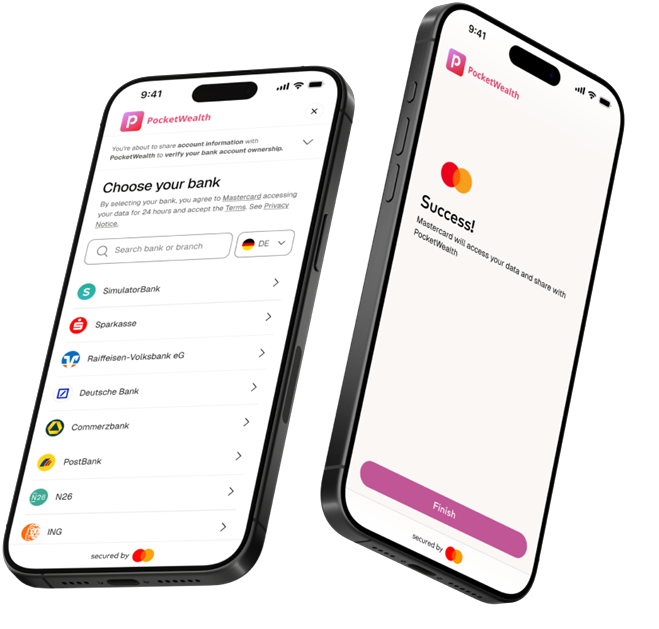
Mastercard Open Finance enables a secure, seamless way for users to connect their financial accounts during Account Opening. By leveraging Open Finance, users can quickly share permissions, verified financial data---reducing friction, improving decisioning, and accelerating time to value from the very first interaction.
Connecting a financial account is one touchpoint in the broader user journey. This guide outlines UX best practices for the Account Opening use case, focusing on driving conversion through clear transitions and consistent context as users move from your application into the account‑linking experience---and back again---so they can complete onboarding with minimal friction.
**Demo**
View an interactive Account Opening demo illustrating how the Mastercard Open Finance APIs are used.
[Access demo](https://mastercard.coastdemo.com/share/69ca9f08b6f98dbff2331f3a)

**Figma file**
Duplicate and customize the end-to-end Account Opening experience in your own environment.
[Access Figma file](https://www.figma.com/design/51k9TUFQjOkuvAlDDt601S/%7BExternal%7D-Global-Connect-Experience?node-id=3-3&p=f&t=5zowHxXhBojEXQxZ-0)

**Developer guide**
Explore technical documentation for the Account Opening use case.
[Access developer guide](https://developer.mastercard.com/open-finance-data/documentation/use-cases/account-opening-guide/account-opening-guide/index.md)
## User Journey for Account Opening {#user-journey-for-account-opening}
Account Opening with Mastercard is the fastest way to get users from "just signed up" to "ready to act." From pre-Connect to post-Connect, increase user adoption and confidence with clear, intuitive, and benefit-driven UX supported by trust cues.

**Pre-Connect**
Prompt users to connect their bank accounts to verify identity and unlock access to your financial products.
**Connect Experience**
User links their account(s) via Mastercard Open Finance.
Refer to the [General UX Design Guidelines](https://developer.mastercard.com/open-finance-data/documentation/ux-design-guidelines/index.md) for best practices.
**Post-Connect**
Show users their successfully linked account(s) and direct them to your products.
## Designing the Pre-Connect Experience {#designing-the-pre-connect-experience}

### 1. New User Onboarding {#1-new-user-onboarding}
Making bank account linking a **required step** in new user onboarding provides the most **efficient, trusted, and user-friendly path to identity verification**. Bank-based verification removes manual steps like form fills or document uploads, enabling users to complete onboarding in seconds and start using your service right away. Additionally, bank connections leverage familiar, regulated financial institutions---helping users feel confident that verification is secure, permission‑based, and legitimate.
See the "Recommended Example" below

A single, clearly framed verification step reduces decision fatigue compared to presenting multiple options too early in the journey. If you would still like to offer alternative verification methods (for example, document upload), **position bank account linking as the preferred option** for the optimal user experience---easy, fast, and secure. Present the options clearly and consistently, using UI patterns aligned with your design system (for example, radio buttons, selection cards, highlighted defaults, or expandable accordions).
See the "Alternative Example" below:

**Here are five key strategies to drive conversion across both approaches:**
* **Reduce cognitive load:** Keep the screen focused on the action and reassurance; avoid clutter
* **Progress indicators:** Use steps or breadcrumbs to set expectations and signal completion
* **Trust signals:** Display Mastercard branding and relevant bank logos for familiarity
* **Transparency:** Clearly explain what data is shared and why
* **Highlight benefits:** Reinforce value in one short line or banner
### UX Best Practices and Pitfalls {#ux-best-practices-and-pitfalls}
#### Purpose-driven Description and Banners {#purpose-driven-description-and-banners}
Research shows users often feel uncertain when redirected to the bank selection screen because the purpose is not always clearly explained beforehand.
To reduce confusion and drop-off, set expectations upfront. Clearly explain data sharing via bank account linking and its purpose on your interface immediately before redirecting users to the Mastercard Open Finance bank selection screen---so users understand what they're doing and why it matters. Use simple, reassuring language and benefit-driven phrases to encourage adoption (for example, "Faster onboarding," "Connect in seconds," "Instant connection, no delays -- Skip forms and get started in seconds").
Below are UX do's and don'ts for effective pre-direct messaging.

This example demonstrates a **clear, effective redirect** to bank account linking---without user confusion.
The initial step clearly states the user's goal: **connect a bank account to verify identity** . Supporting copy in the banner immediately explains the **reason and benefits**, reinforcing ease, security and intent. Most importantly, the CTA sets the right expectation by making it clear that clicking the button prompts the user to verify their identity.

This example illustrates a **poor redirect experience** that is likely to confuse users. The screen before the redirect does not explain what happens next or why, so users are suddenly presented with a bank list without context.
The **"Sign up" CTA lacks clarity**, and the purpose and benefits of the flow are never communicated from the user's perspective. As a result, users are left unsure why they're being asked to choose a bank or what value the action provides, which can lead to abandonment and drop-offs.
**Avoid creating user journeys that skip expectation‑setting** before redirecting to the Mastercard Open Finance bank selection screen.
#### Call-to-action (CTA) Button {#call-to-action-cta-button}
###### Button Naming {#button-naming}
Use action‑oriented CTA copy aligned to the users goal and use case. Button labels should clearly communicate the outcome.
Example recommendations:
* Connect Your Account(s)
* Verify Account Ownership
* Share Your Data Securely
* Enable Data Sharing
###### Country Variants for Bank Logos {#country-variants-for-bank-logos}
Displaying country‑specific bank logos in the CTA button increases user recognition and trust at the moment of data sharing. Familiar bank branding helps users feel confident and secure.
Bank logo assets are available in country‑specific variants, each featuring the three most popular banks in that country. Always select the correct variant for the country where your service is offered.
Refer to the asset library for supported country variants. For additional countries, logo variants, or sequencing guidance, contact your Mastercard Customer Delivery Manager.
Refer to the [General UX Design Guidelines](https://developer.mastercard.com/open-finance-data/documentation/ux-design-guidelines/index.md) for detailed guidance on button sizing, color, shape, and usage of Mastercard brand assets.
###### Downloadable assets {#downloadable-assets}

[Default_button.svg](https://static.developer.mastercard.com/content/open-finance-data/uploads/Default_button.svg) (15KB)

[Belgian_button.svg](https://static.developer.mastercard.com/content/open-finance-data/uploads/Belgian_button.svg) (114KB)

[Dutch_button.svg](https://static.developer.mastercard.com/content/open-finance-data/uploads/Dutch_button.svg) (335KB)

[Estonian_button.svg](https://static.developer.mastercard.com/content/open-finance-data/uploads/Estonian_button.svg) (82KB)

[French_button.svg](https://static.developer.mastercard.com/content/open-finance-data/uploads/French_button.svg) (54KB)

[Hungarian_button.svg](https://static.developer.mastercard.com/content/open-finance-data/uploads/Hungarian_button.svg) (236KB)

[Italian_button.svg](https://static.developer.mastercard.com/content/open-finance-data/uploads/Italian_button.svg) (365KB)

[Lithuanian_button.svg](https://static.developer.mastercard.com/content/open-finance-data/uploads/Lithuanian_button.svg) (82KB)

[Polish_button.svg](https://static.developer.mastercard.com/content/open-finance-data/uploads/Polish_button.svg) (167KB)

[Spanish_button.svg](https://static.developer.mastercard.com/content/open-finance-data/uploads/Spanish_button.svg) (99KB)

[Austrian_button.svg](https://static.developer.mastercard.com/content/open-finance-data/uploads/Austrian_button.svg) (159KB)

[Danish_button.svg](https://static.developer.mastercard.com/content/open-finance-data/uploads/Danish_button.svg) (119KB)

[English_UK_button.svg](https://static.developer.mastercard.com/content/open-finance-data/uploads/English_UK_button.svg) (115KB)

[Finnish_button.svg](https://static.developer.mastercard.com/content/open-finance-data/uploads/Finnish_button.svg) (71KB)

[German_button.svg](https://static.developer.mastercard.com/content/open-finance-data/uploads/German_button.svg) (258KB)

[Irish_button.svg](https://static.developer.mastercard.com/content/open-finance-data/uploads/Irish_button.svg) (164KB)

[Latvian_button.svg](https://static.developer.mastercard.com/content/open-finance-data/uploads/Latvian_button.svg) (113KB)

[Norwegian_button.svg](https://static.developer.mastercard.com/content/open-finance-data/uploads/Norwegian_button.svg) (245KB)

[Portugese_button.svg](https://static.developer.mastercard.com/content/open-finance-data/uploads/Portugese_button.svg) (91KB)

[Swedish_button.svg](https://static.developer.mastercard.com/content/open-finance-data/uploads/Swedish_button.svg) (111KB)
#### Secured-by Brand {#secured-by-brand}
Mastercard brand assets may be used to signal licensing, credibility, and trust.
>
> **Mastercard License**
> The "secured by Mastercard" branding asset may be displayed beneath the primary CTA when using Mastercard Open Finance's AISP license in the UK or Europe.
>
> **Your Own License**
> Integrators operating under their own Open Finance AISP license are not eligible to use the "secured by Mastercard" asset unless explicitly approved in their contract.
**Asset preview**

**Download link**
[secured_by_statement.svg](https://static.developer.mastercard.com/content/open-finance-data/uploads/secured_by_statement.svg) (11KB)

### 2. Post-Onboarding Reminder {#2-post-onboarding-reminder}
Depending on your business requirements, identity verification could be introduced as an optional step during new user onboarding. Presenting a single, clearly framed bank‑linking step helps reduce onboarding drop‑off by setting clear expectations and emphasizing speed and simplicity. If users complete onboarding without verifying their identity, the opportunity is not lost. Some users may choose to defer verification, assuming it takes time or can be completed later.
See "Optional Verification Example" below:

To re-engage these users, identity verification can be re‑introduced at moments of higher intent through targeted, post‑onboarding prompts---without disrupting the initial setup experience. Below are two proven approaches for guiding users back to bank linking, with examples you can adapt to fit your user journey.
**1) Home Dashboard Banner**

Use a sticky banner or persistent prompts on the home screen to prompt users to complete account setup if your service includes a primary dashboard or bulletin‑board view.
**UX Best Practices**
* Place the banner at the top of the home screen or dashboard to reinforce unfinished setup and keep the task visible without competing with core actions or data, especially for first session returns
* Clearly communicate the benefit (for example, faster access, verified identity, unlocked features)
* Nudges should guide, not gate functionality, unless required
* Allow the nudge to dismiss or resolve once the bank is connected
**2) Feature Gating Modal**

You can also drive bank account linking by introducing a feature‑gated modal that appears when users attempt to access a locked capability. Use this moment to clearly explain the value users unlock by verifying their identity through bank account connection.
Focus the message on outcomes---what becomes available once verification is complete---while reinforcing that the process is secure, fast, and powered by Mastercard.
**UX Best Practices**
* Recommended placements:
* Before high-intent actions (for example, Start investing, Enable payments, Access insights)
* As a modal overlay triggered by a restricted action
* As a dedicated gated page when access requires verification before proceeding
* Lead with the feature benefit, not the verification requirement
* Clearly state why bank linking is required and what happens next
* Use concise, scannable copy with a single primary CTA
* Avoid overloading the screen---this is a decision moment, not a deep explainer
* Reinforce trust with security cues and familiar branding
### 3. Account Settings {#3-account-settings}
If your product includes an account settings or management page, use it as a secondary entry point to prompt bank account connection. Users who have already onboarded are more receptive here, as they're actively managing their account and permissions.
This surface is also a strong place to reinforce the benefits of connecting a bank account---such as verified identity, enhanced functionality, or faster access to services.

**UX Best Practices**
* Place the modal in the "Linked Accounts" or "Security \& Verification" sections. Show inline prompts within account setup or preferences, and call out incomplete states (for example, No bank accounts connected)
* Keep messaging informational and benefit‑led, not urgent
* Clearly explain why connecting a bank account adds value
* Use subtle CTAs that fit the context (for example, Connect Your Accounts)
* Reinforce trust with security cues and familiar branding
* Avoid interrupting primary settings tasks
## Designing the Post-Connect Experience {#designing-the-post-connect-experience}
The transition from the account‑linking experience back into your application is a critical moment in the user journey. Maintain clear continuity and consistent context so users can easily connect the dots.
##### Confirm Success and Activate Users {#confirm-success-and-activate-users}
Once users return, visually confirm that they have successfully linked their accounts. After users are fully onboarded, the focus should shift to activation and engagement. Clearly surface the features now available to them and make it easy to get started right away.

**UX Best Practices**
Show the success state immediately after the redirect.
* Potential placements include:
* Account overview or dashboard showing newly linked accounts
* Getting started or next steps module highlighting unlocked features
* Reinforce continuity by clearly and concisely confirming success with visual cues that reflect the user's selections from the connect experience
* Keep messaging benefit‑led and action‑oriented
Tip: If you have any questions or need assistance with the customer experience or development, [contact us](https://developer.mastercard.com/open-finance-us/documentation/support/).