# Reference Application Tutorial
source: https://developer.mastercard.com/merchant-self-services/documentation/tutorials-and-guides/reference-app-tutorial/index.md
## Overview {#overview}
This tutorial shows you how to generate an API client for the Merchant Self Services API. You'll build an application that makes API calls to the Merchant Self Service to onboard a merchant and its logo.
To call these APIs, a consumer key and .p12 files are required from your
[Mastercard Developers](https://developer.mastercard.com/dashboard) project. If you haven't yet done so, first generate the Sandbox credentials that your server uses to communicate with Mastercard and the Merchant Self Services API client. See our [Quick Start Guide](https://developer.mastercard.com/merchant-self-services/documentation/tutorials-and-guides/quick-start-guide/index.md) for the steps required to set up the Sandbox project and download the keys.
## Prerequisites {#prerequisites}
* [Mastercard Developers Account](https://developer.mastercard.com/dashboard) with access to Merchant Self Services
* A text editor or Java IDE
* [Apache Maven 3.3+](https://maven.apache.org/download.cgi)
* JDK 8 or newer version
* Make sure the `JAVA_HOME` environment variable matches the location of your Java installation.
## Step-By-Step Guide {#step-by-step-guide}
To complete this tutorial, you can either start from scratch using the [Spring Getting Started](https://spring.io/guides) guides and complete each step, or you can bypass the basic setup steps that are already familiar to you. Either way, you end up with working code.
To skip the basics, do the following:
* Access the source code for this tutorial from this zip file: [merchant-self-services-reference-dev.zip](https://static.developer.mastercard.com/content/merchant-self-services/uploads/merchant-self-services-reference-dev.zip) (118KB)
* Go to [Configure Resources](https://developer.mastercard.com/merchant-self-services/documentation/tutorials-and-guides/reference-app-tutorial/index.md#step-2-configure-resources).
### Step 1: Create a Maven project {#step-1-create-a-maven-project}
Navigate to the root directory where you want to generate your maven project. Open a terminal window and run this command:
```cmd
mvn archetype:generate -DgroupId=com.mastercard.developer \
-DartifactId=merchant-self-services-client \
-Dversion=1.0-SNAPSHOT -DinteractiveMode=false
```
You should now see this directory structure:

### Step 2: Configure resources {#step-2-configure-resources}
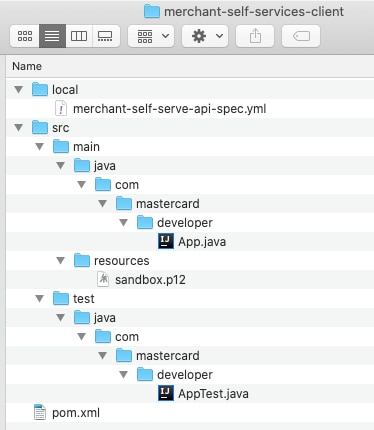
1. Create a folder called `merchant-self-services-client/local/`.
2. Download and add the Merchant Self Services `OpenAPI Specification YAML` file into the `local/` folder you created: [merchant-self-serve-api-spec.yml](https://static.developer.mastercard.com/content/merchant-self-services/swagger/merchant-self-serve-api-spec.yml) (137KB). (If necessary, right-click and save the file to your `local/` folder).
3. Create a folder called `merchant-self-services-client/src/main/resources`.
4. Place the .p12 file in the `resources` folder you created. The .p12 file was generated when you created the [Sandbox Signing Keys](https://developer.mastercard.com/merchant-self-services/documentation/tutorials-and-guides/quick-start-guide/index.md) within your project in Mastercard Developers.
Your Maven project directory should look like this:
### Step 3: Configure the OpenAPI generator {#step-3-configure-the-openapi-generator}
Add the following maven dependencies to your project's *pom.xml* file.
```Maven
com.squareup.okhttp3
logging-interceptor
4.10.0
com.squareup.okhttp3
okhttp
4.10.0
io.gsonfire
gson-fire
1.8.5
com.google.code.gson
gson
2.9.0
io.swagger
swagger-annotations
1.6.6
com.google.code.findbugs
jsr305
3.0.2
org.threeten
threetenbp
1.6.0
com.mastercard.developer
oauth1-signer
1.5.2
```
Add the following plugins section to your project's pom.xml file to generate an API client library.
```Maven
org.openapitools
openapi-generator-maven-plugin
5.2.1
generate
${project.basedir}/local/merchant-self-serve-api-spec.yml
java
okhttp-gson
false
false
src/gen/main/java
```
### Step 4: Generate the API client sources {#step-4-generate-the-api-client-sources}
You now have all the dependencies you need to generate sources. To do this, follow these steps:
1. Navigate to the root directory of your project.
2. In a terminal window, run the `mvn clean compile` command.
After you finish, there should be a new folder named *target* in your project directory. This folder contains classes generated for the schema and API calls defined within the OpenAPI Specification.

### Step 5: Create an API client instance {#step-5-create-an-api-client-instance}
To create an API client instance, you must make your consumer key and OAuth signing key credentials available to the program.
Create an instance of the generated `ApiClient` class and configure it as shown:
```ApiClient
ApiClient client = new ApiClient();
client.setBasePath("https://sandbox.api.ethocaweb.com/ethoca/merchant-self-services");
// Add the interceptor code responsible for signing HTTP requests
PrivateKey signingKey = AuthenticationUtils.loadSigningKey("./path/to/your/sandbox.p12",
"your key alias",
"your keystore password");
Builder httpClientBuilder = client.getHttpClient().newBuilder();
httpClientBuilder.addInterceptor(new OkHttpOAuth1Interceptor("your consumer key string", signingKey));
client.setHttpClient(httpClientBuilder.build());
```
Note: OpenAPI Generator supports several HTTP clients and frameworks for Java (such as Jersey, OkHttp, RestTemplate, and Retrofit). In this tutorial, we chose to use okhttp-gson. Refer to our [Java library on GitHub](https://github.com/Mastercard/oauth1-signer-java#integrating-with-openapi-generator-api-client-libraries) for a list of supported options.
### Step 6: Call the service {#step-6-call-the-service}
You can now send requests to the Merchant Self Services service through the [**/sub-merchants**](https://developer.mastercard.com/merchant-self-services/documentation/api-reference/index.md#apis) endpoint. Use the generated **SubMerchantsApi** class, as shown below.
For Ethoca Alerts, you can send requests to the Merchant Self Services service through the [**/alerts**](https://developer.mastercard.com/merchant-self-services/documentation/api-reference/index.md#apis) endpoint. When you call the API, use the generated **AlertsSubMerchantsApi** and **AlertsMerchantsApi** classes in a similar manner to create and manage a sub-merchant and merchant of your organization.
To create test data for adding a sub-merchant, add the following methods to your code:
```UserApi
private static SubMerchant getSubMerchantRequest() {
String randomUniqueString = getRandomUniqueString();
return new SubMerchant()
.name("SHOE STORE " + randomUniqueString)
.merchantType(SubMerchant.MerchantTypeEnum.SUB_MERCHANT)
.categoryCode("1234")
.subMerchantIdentifier(randomUniqueString)
.locales(populateLocaleDetails())
.locations(populateMerchantLocationDetails())
.orderAvailabilityDateTime(OffsetDateTime.parse("2021-10-18T13:56:47+00:00"))
.orderHistoryMonths(5)
.orderLatencyDays(13)
.crm(populateCrmData())
.contentTypes(Stream.of(SubMerchant.ContentTypesEnum.ONLINE_DATING,
SubMerchant.ContentTypesEnum.ADULT_LANGUAGE).collect(Collectors.toSet()))
.searchFields(populateSearchFields())
.primaryContact(populatePrimaryContactData(randomUniqueString))
.legalAddress(populateLegalAddress())
.businessType(BusinessTypeEnum.BUSINESS_CORPORATION)
.industryCode("AAF");
}
private static Set populateLocaleDetails() {
return Stream.of(new Locale()
.code(Locale.CodeEnum.EN_US)
.defaultLocale(true)
.merchantDescription("Formal shoe store in NY"),
new Locale()
.code(Locale.CodeEnum.ES_US)
.defaultLocale(false)
.merchantDescription("Zapatería formal en Nueva York")).collect(Collectors.toSet());
}
private static List populateSearchFields() {
return Stream.of(new SearchField()
.searchParameter(SearchParameterEnum.ACQUIRER_REFERENCE_NUMBER)
.searchFieldCards(Collections.singleton(SearchField.SearchFieldCardsEnum.MC))
.required(true),
new SearchField()
.searchParameter(SearchParameterEnum.TRANSACTION_AMOUNT)
.searchFieldCards(Collections.singleton(SearchField.SearchFieldCardsEnum.VISA))
.required(false),
new SearchField()
.searchParameter(SearchParameterEnum.TRANSACTION_CURRENCY_CODE)
.searchFieldCards(Collections.singleton(SearchField.SearchFieldCardsEnum.VISA))
.required(false)).collect(Collectors.toList());
}
private static Set populateMerchantLocationDetails() {
return Stream.of(new Location()
.cardAcceptorNames(Collections.singleton("SHOE STORE " + getRandomUniqueString()))
.cardAcceptorLocation("STORE 1")
.cardAcceptorLocationType(Location.CardAcceptorLocationTypeEnum.CARD_PRESENT)
.addressLine1("123 Street")
.addressLine2("Suite - 456")
.city("New York")
.postalCode("10001")
.website("https://merchantwebsite.example.com/us/customerservice.html")
.email("customerservice.merchant.us@example.com")
.contactWebsite("https://merchantwebsite.example.com/us/contactus.html")
.phone("1-234-567-8901")
.refundPolicy("30 days from purchase")
.terms("Entire merchant Terms & Conditions, formatted for text display.")
.customerServiceInstructions("email helpdesk")
.additionalInfo("check our store's website")
.regionCode("NY")
.countryCode("USA")
.termsWebsite("https://merchantwebsite.example.com/us/terms.html")
.refundPolicyWebsite("https://merchantwebsite.example.com/us/refunds.html")
.defaultLocation(true)
.displayAddressToCardHolder(true)
.displayPhoneToCardHolder(true),
new Location()
.cardAcceptorLocation("STORE 2")
.cardAcceptorLocationType(Location.CardAcceptorLocationTypeEnum.CARD_PRESENT)
.addressLine1("234 Street")
.addressLine2("Suite - 567")
.city("Toronto")
.postalCode("M3J1V6")
.website("https://merchantwebsite.example.com/ca/customerservice.html")
.email("customerservice.merchant.can@example.com")
.contactWebsite("https://merchantwebsite.example.com/ca/contactus.html")
.phone("1-456-789-0121")
.refundPolicy("45 days from purchase")
.terms("Entire merchant Terms & Conditions")
.customerServiceInstructions("Call helpdesk on phone")
.additionalInfo("check our website for additional information")
.regionCode("ON")
.countryCode("CAN")
.termsWebsite("https://merchantwebsite.example.com/ca/terms.html")
.refundPolicyWebsite("https://merchantwebsite.example.com/ca/refunds.html")
.defaultLocation(false)
.displayAddressToCardHolder(true)
.displayPhoneToCardHolder(true)).collect(Collectors.toSet());
}
private static PrimaryContact populatePrimaryContactData(String randomUniqueString) {
return new PrimaryContact()
.firstName("John"+randomUniqueString)
.lastName("Doe"+randomUniqueString)
.email("john.doe"+randomUniqueString+"@example.com")
.jobTitle("Manager")
.phone("1-222-444-1234");
}
private static LegalAddress populateLegalAddress() {
return new LegalAddress()
.addressLine1("123 Street")
.addressLine2("Suite - 456")
.city("Toronto")
.postalCode("M3J1V6")
.website("https://merchantwebsite.example.com/customerservice.html")
.email("customerservice.merchant@example.com")
.website("https://merchantwebsite.example.com/contactus.html")
.phone("1-234-567-8901")
.regionCode("ON")
.countryCode("CAN");
}
private static Crm populateCrmData() {
return new Crm()
.termsConditionsConsent(populateTermsConditionsConsentData())
.paymentConfirmation(true);
}
private static TermsConditionsConsent populateTermsConditionsConsentData() {
return new TermsConditionsConsent()
.firstName("John")
.lastName("Smith")
.date(OffsetDateTime.parse("2021-10-18T13:56:47+00:00"))
.jobTitle("Security Manager")
.email("john.smith@merchant.com")
.countryCode("CAN")
.consentUuid("3d94ab7b-fe1c-4f7d-ad4c-93c1eb6d29c3")
.consentVersion("10");
}
private static String getRandomUniqueString() {
return UUID.randomUUID().toString();
}
```
Call the API:
```UserApi
SubMerchantsApi subMerchantsApi = new SubMerchantsApi(client);
SubMerchantResource subMerchantResource =
subMerchantsApi.createSubMerchant("John.Doe", "John",
"Doe", getSubMerchantRequest());
```
The API client serializes and signs the `SubMerchant` request and de-serializes the response into a `SubMerchantResource` instance.
To make it easy to understand, only the snippets needed to make the API call are shown in this tutorial. You can download the full reference content from our [Reference App page](https://developer.mastercard.com/merchant-self-services/documentation/reference-app/index.md).
## Next Steps {#next-steps}
When ready, you can convert your sandbox keys to production.
* Log into your [Mastercard Developers Account](https://developer.mastercard.com/account/log-in) and navigate to **My Projects**.
* Request Production access for your project, which requires approval from Mastercard and assistance from the [Ethoca Customer Delivery Team](mailto:customerdelivery@ethoca.com).
You can also check out these other articles for guidance on interacting with the Merchant Self Services API:
* [API Basics](https://developer.mastercard.com/merchant-self-services/documentation/api-basics/index.md)
* [API Reference](https://developer.mastercard.com/merchant-self-services/documentation/api-reference/index.md)