# Merchant Identifier
source: https://developer.mastercard.com/merchant-identifier/documentation/index.md
Tip: Need access to real data? Request access and enjoy **up to 10,000 API calls** during the first 28 days with our **Free Trial Access**. [Get Started →](https://developer.mastercard.com/merchant-identifier/documentation/index.md#free-trial-access)
## Overview {#overview}
**Instantly enrich merchant records with trusted, global data from Mastercard.**
Built on a data corpus scraped from the Mastercard payment network, as well as third-party sources,
the Merchant Identifier API allows organizations to reliably append accurate and fresh merchant details to their records.
Financial institutions leverage Merchant Identifier to transform cryptic payment transaction messages into rich records
with merchant-level transaction insights. The API appends detailed information about the merchant (i.e. card acceptor)
within each transaction. Similarly, institutions building and maintaining a merchant directory can enrich their database
with attributes derived from the payment network.
Mastercard's Merchant Identifier database contains information about all businesses that accept Mastercard globally,
converting unidentifiable merchant details into cleansed merchant information that institutions and consumers can easily understand.
Note: Merchant Identifier now includes AI‑powered merchant matching capability which enhances match accuracy when traditional matching is insufficient. [Learn more here \>](https://developer.mastercard.com/merchant-identifier/documentation/tutorials-and-guides/endpoint-overview/search-with-ai/index.md)
## What does the API do? {#what-does-the-api-do}
The API returns standardized, human-readable merchant information pulled from Mastercard's merchant directory,
including cleansed name, brand/legal entity, geolocation, and more.
In simple terms:
* **Input:** Raw, messy transaction details (e.g., descriptors or acceptor IDs)
* **Output:** Clear, recognizable merchant information
This cleansed information allows institutions to build and deliver rich experiences to their end-users and customers.
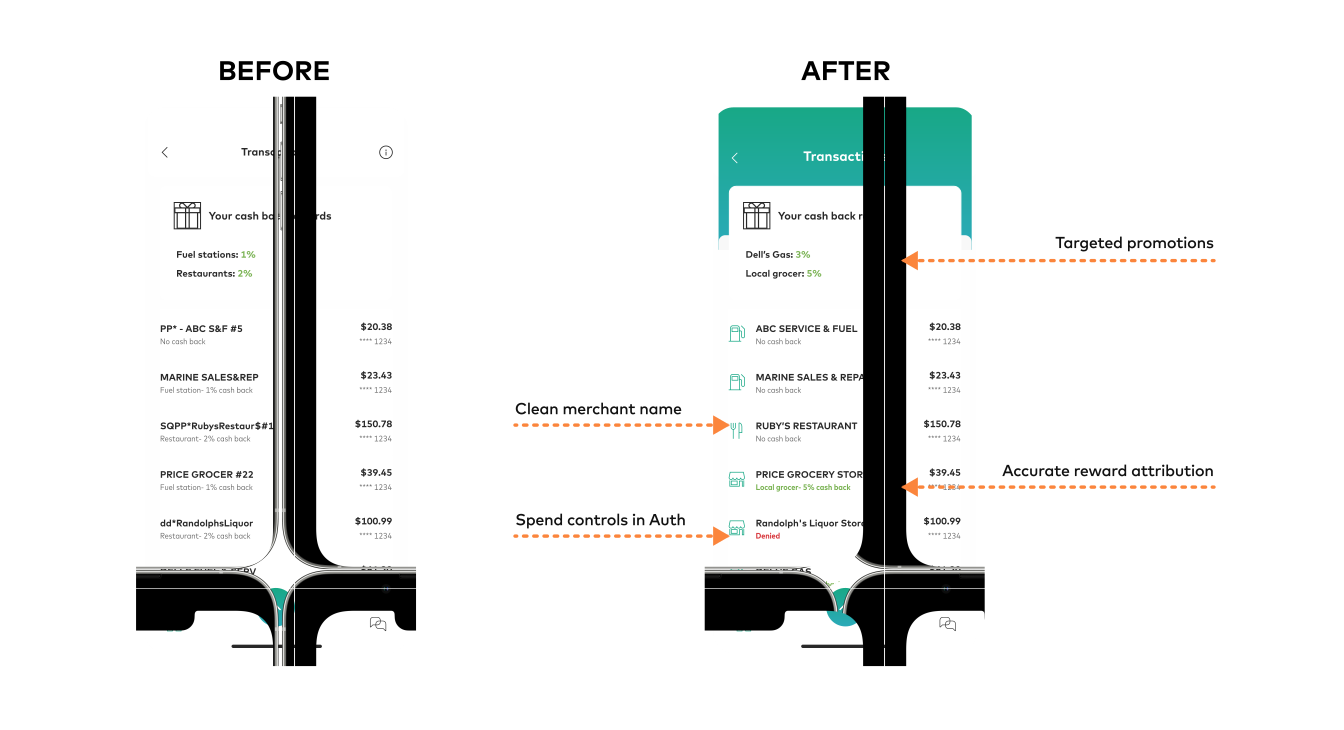
The Merchant Identifier API is designed to ingest data typically found in credit, debit, or open banking transactions
(such as descriptors, descriptions, card acceptor IDs, etc.). It can also ingest standard firmographic information
(Name, Address, Phone, etc.) for data enrichment.
## Who It Is For {#who-it-is-for}
The Merchant Identifier API is designed for organizations that need to identify merchants, enrich payment transaction records, or transform unclear merchant information into standardized, recognizable merchant details.
* **Card issuers and digital banks:** Improve transaction descriptions displayed in digital banking experiences by replacing unclear merchant descriptors with recognizable merchant names, locations and other available merchant details. This can help cardholders understand their purchases and support the handling of unrecognized transactions.
* **Fintech and open banking applications:** Enrich transaction data with consistent merchant information. Use the enriched data to create clearer transaction histories, personal financial management tools, and merchant-level insights.
* **Payment processors:** Identify merchants within transactions to support card program operations, transaction monitoring, spend controls and merchant-based business rules.
* **Rewards and loyalty providers:** Ensure accurate reward and loyalty point attribution by resolving transactions to the correct merchant brand or merchant location, or any other merchant-specific benefit logic.
* **Fraud, disputes and customer service teams:** Provide clearer merchant information when investigating transactions, responding to customer inquiries, or reviewing potentially unrecognized purchases.
* **Data, analytics and finance teams:** Standardize merchant records to support transaction analytics, consumer spending analysis, accounting reconciliation, and other merchant-level reporting requirements.
* **Acquirers and merchant platforms:** Validate and standardize merchant information during merchant onboarding or when maintaining merchant directories and internal merchant records.
* **Alt-data providers:** Link payment transaction data to accurate merchant location records to uncover spending patterns and support data-driven portfolio strategy decisions.
* **Location intelligence platforms:** Integrate footfall and mobility data with payment transaction datasets to deliver actionable insights on visitation patterns and spend attribution.
The API supports multiple ways to identify a merchant, depending on the information available:
* Search by descriptor for raw transaction descriptions.
* AI-powered search for incomplete, noisy or inconsistently formatted merchant information.
* Lookup by card acceptor ID when an acquirer-assigned merchant identifier is available.
* Lookup by tax ID when a supported government-issued merchant tax identifier and country are available.
## Key Benefits {#key-benefits}
##### [Enhanced Digital Experience](https://developer.mastercard.com/merchant-identifier/documentation/use-cases/digital-banking-experience/index.md) {#enhanced-digital-experiencedocumentationuse-casesdigital-banking-experience}
Improve consumer digital banking experiences with recognizable and categorized merchant acceptor data
##### [Transaction Analytics](https://developer.mastercard.com/merchant-identifier/documentation/use-cases/transaction-analytics/index.md) {#transaction-analyticsdocumentationuse-casestransaction-analytics}
Optimize your business by building models on transaction records, tagged with identifiable merchants
##### [Card Program Operations](https://developer.mastercard.com/merchant-identifier/documentation/use-cases/loyalty-attribution-and-spend-controls/index.md) {#card-program-operationsdocumentationuse-casesloyalty-attribution-and-spend-controls}
Launch and operate robust card programs and improve execution on banking needs.
##### [Know Your Business](https://developer.mastercard.com/merchant-identifier/documentation/use-cases/know-your-business/index.md) {#know-your-businessdocumentationuse-casesknow-your-business}
Confirm a business's identity and characteristics by matching against Mastercard's system of record
Unrecognized transactions are one of the biggest drivers of customer service calls and disputes.
By clearly identifying merchants at the moment of inquiry, the Merchant Identifier API helps reduce
inbound call volumes and improve the cardholder experience, while simultaneously allowing banks
and program managers to operate robust and reliable loyalty and spend-controlled card programs.
## Four API pathways to identify a merchant {#four-api-pathways-to-identify-a-merchant}
The Merchant Identifier API supports four distinct pathways to identify and enrich a merchant, depending on the data available.
## Search -- By Descriptor {#search--by-descriptor}
Match raw transaction descriptors against a reference dataset using string-similarity matching.
* Matches merchant information using descriptor data such as merchant name, city, and state/region
* Cleanses merchant details for consistent display
* Best when you only have raw, human-readable transaction details
**Example input:**
```PLAIN
merchant_descriptor JOHNDOERETAILNEWYORKNY
```
[Learn more](https://developer.mastercard.com/merchant-identifier/documentation/tutorials-and-guides/endpoint-overview/search-by-descriptor/index.md)
## Search -- AI Powered {#search--ai-powered}
Match client's input, applying AI-powered entity recognition, semantic reasoning, and multi-signal matching.
* Designed to maximize match coverage and accuracy across complex real-world data
* Best when available data is incomplete, noisy, or not standardized
**Example input:**
```JSON
{
"merchants": [
{
"merchantName": "JOHN DOE RETAIL #1847",
"streetAddress": "123 Acme Street",
"cityName": "NEW YORK",
"stateProvinceCode": "NY",
"countryCode": "USA",
"postalCode": "10001",
"phoneNumber": "(212) 555-0184",
"url": "www.johndoeretail.com"
}
]
}
```
[Learn more](https://developer.mastercard.com/merchant-identifier/documentation/tutorials-and-guides/endpoint-overview/search-with-ai/index.md)
## Lookup -- By Card Acceptor ID {#lookup--by-card-acceptor-id}
Match a card acceptor ID to a verified merchant profile, enabling precise merchant identification at the point of acceptance.
* Provides a direct, precise match to the merchant's official record
* Ideal for high confidence identification and downstream logic like rewards or controls
* Best when existing data includes this identifier
**Example input:**
```PLAIN
card_acceptor_id 123456
country_code BRA
```
[Learn more](https://developer.mastercard.com/merchant-identifier/documentation/tutorials-and-guides/endpoint-overview/lookup-by-acceptor-id/index.md)
## Lookup -- By Tax ID {#lookup--by-tax-id}
Match a tax identifier to a merchant record. This endpoint performs an exact match.
* Uses a merchant's government issued tax identifier and country
* Ideal for markets with reliable, location-specific, government-sponsored business identification
* Best when existing data includes this identifier
**Example input:**
```PLAIN
tax_id 123456
country_code BRA
```
[Learn more](https://developer.mastercard.com/merchant-identifier/documentation/tutorials-and-guides/endpoint-overview/lookup-by-tax-id/index.md)
Tip: Together, these four pathways ensure Merchant Identifier can identify merchants across a wide range of real-world data scenarios.
## How it works {#how-it-works}
Once the merchant identifier finds a match in the API, it is mapped to a location id which links the identifier to additional merchant information in Mastercard's merchant database.
Through the [Places API service](https://developer.mastercard.com/places/documentation/) additional insights can be appended to the merchant information
including merchant name, address, geographic coordinates, chain name, sales channel indicators, industry classification codes, and transaction-based insights such as in-business flags and last seen date.
Diagram midOverview
## How Merchant Identifier Integrates {#how-merchant-identifier-integrates}
Merchant Identifier is built for simple, scalable integration into existing data pipelines and applications:
* API-first architecture using REST
* Secure authentication via OAuth 1.0a
* Core interaction model:
* Submit input data (e.g.,merchant descriptor, card acceptor id, location id, merchant name, address etc.)
* Receive enriched Merchant Identifier attributes (cleansed merchant name, cleansed address, category, geolocation, card acceptor id)
* Use case specific endpoints
* [Search - AI Powered](https://developer.mastercard.com/merchant-identifier/documentation/tutorials-and-guides/endpoint-overview/search-with-ai/index.md)
* [Search - by Transaction Descriptor](https://developer.mastercard.com/merchant-identifier/documentation/tutorials-and-guides/endpoint-overview/search-by-descriptor/index.md)
* [Lookup - by Card Acceptor Id](https://developer.mastercard.com/merchant-identifier/documentation/tutorials-and-guides/endpoint-overview/lookup-by-acceptor-id/index.md)
* [Lookup - by Tax id](https://developer.mastercard.com/merchant-identifier/documentation/tutorials-and-guides/endpoint-overview/lookup-by-tax-id/index.md)
* Sandbox environment available for testing and evaluation
* Production access enabled through a [Freemium 28-day trial](https://developer.mastercard.com/merchant-identifier/documentation/index.md#3-steps-to-access-your-sandbox), allowing teams to validate value before scaling
Integration at a glance
| Detail | Description |
|----------------------|----------------------------------------------------------------------------------------------------------------------------------------------|
| Authentication | OAuth 1.0a |
| Transaction security | The transport between client applications and Mastercard is secured using [TLS/SSL](https://en.wikipedia.org/wiki/Transport_Layer_Security), |
| Sandbox URL | |
| Production URL | |
| Data Type | JSON request and response bodies |
| Data Refresh | Data refreshes weekly |
## Free Trial Access {#free-trial-access}
## 3 steps to access your sandbox. {#3-steps-to-access-your-sandbox}
Set up your account and **start testing** the API immediately.

STEP 1
#### Create developer account {#create-developer-account}
Use your **company email** to create a developer account.
STEP 2
#### Create new project {#create-new-project}
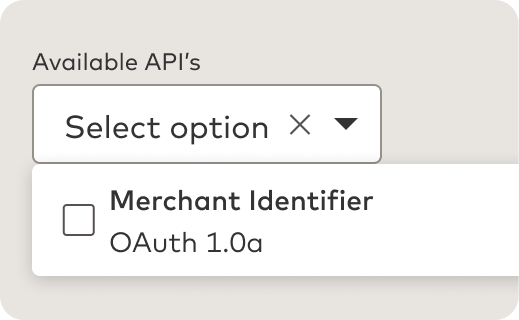
Select the **Merchant Identifier API** from the list of available options.

STEP 3
#### Start testing right away {#start-testing-right-away}
Get **immediate access** to the workspace for API sandbox.
## 3 steps to trial with real world data. {#3-steps-to-trial-with-real-world-data}
Use our **Free Trial Access** for 28 days to explore and evaluate our API with up to 10,000 free calls with no upfront commitment required.

STEP 1
#### Request access {#request-access}
Directly from the workspace created in the previous steps.

STEP 2
#### Sign terms \& conditions {#sign-terms--conditions}
Agree to **Mastercard's** terms \& conditions for **free trial access**.

STEP 3
#### Start using real data {#start-using-real-data}
**Immediate access** for previously verified companies. Up to 5-day verification period for new customers of Mastercard.
To access the trial create a **new project** in your dashboard:
Project Dashboard
## Next Steps {#next-steps}
* Make your first Merchant Identifier API call in minutes with step-by-step [Quick Start Guide](https://developer.mastercard.com/merchant-identifier/documentation/quick-start-guide/index.md)
* Learn about authentication, environments, security requirements, and making API requests on [API Basics](https://developer.mastercard.com/merchant-identifier/documentation/api-basics/index.md)
* Explore Merchant Identifier API endpoints, request parameters, response schema, and code examples on [API Reference Page](https://developer.mastercard.com/merchant-identifier/documentation/api-reference/index.md)
* Look up any unfamiliar term in the [Glossary](https://developer.mastercard.com/merchant-identifier/documentation/glossary/index.md)
* Find answers to common questions on [Support](https://developer.mastercard.com/merchant-identifier/documentation/support/index.md)