# Push Provisioning Implementation Guide
source: https://developer.mastercard.com/mdes-token-connect/documentation/tutorials-and-guides/issuer-implementation-guide/index.md
This guide explains the issuer's cardholder interface enhancements required to support the MDES Token Connect framework and describes the cardholder experience for provisioning an account to a token requestor.
Specific guidelines apply when pushing cards to Mastercard Click to Pay. [Learn More](https://developer.mastercard.com/product/click-to-pay#resources-issuing-partners)
## Capture cardholder's Choice {#capture-cardholders-choice}
In this section, as an issuer, you will:
1. Present the Push Provisioning option to the cardholder.
2. Present a list of eligible Token Requestors to choose from.
3. Request the cardholder to select a Token Requestor.
4. Present eligible cardholder accounts
### Present Push Provisioning {#present-push-provisioning}
After successful login into the mobile banking app or website, the cardholder should be educated about the Push Provisioning feature and its advantages. At Issuer's discretion, this information may be inserted within the main menu, or it may be accessible when the cardholder reviews their card or account details. Once the cardholder has been presented with Push Provisioning, they should be invited to proceed to the next step: Token Requestor and card/account(s) selection.
### Present a list of eligible Token Requestors {#present-a-list-of-eligible-token-requestors}
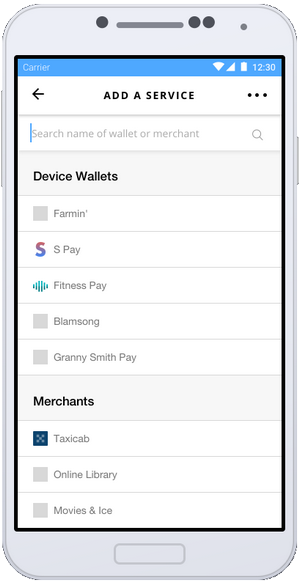
The Issuer must present a list of Token Requestors to which cardholders can push their card or financial account for tokenization. For each Token Requestor, the list should feature:
* An icon representing the Token Requestor
* A cardholder-friendly name for the Token Requestor. Note that in some (rare) cases, this name may be long (up to 100 characters), and the list should allow to display the name in full, if needed.
* The Token Requestor type: Wallet or Merchant (optional)
With the MDES Token Connect API, Issuers can retrieve information about Token Requestors that are enabled for their account ranges. This information can be used to create the list of Token Requestors for the cardholder. Issuers will call two functions from MDES Token Connect API to build the list:
* [Get Eligible Token Requestors](https://developer.mastercard.com/mdes-token-connect/documentation/api-reference/index.md): API to retrieve information such as Token Requestor type, cardholder-friendly name, available cardholder interfaces (Android/iOS app, web)
* [Get Assets](https://developer.mastercard.com/mdes-token-connect/documentation/api-reference/index.md): API to retrieve the image (logo) associated with the Token Requestor. The supplied images are square with a white background. For each Token Requestor, MDES supplies the logo in two formats: .svg (scalable) and .png (192 x 192 pixels)
Note: The information returned by these two functions evolves at slow pace. It may change whenever the Issuer enables additional wallets or programs for their account ranges, or when MDES onboards new Token Requestors to digital programs, such as new Merchants. Mastercard recommends that Issuer's back-end server calls these functions regularly, typically on a bi-weekly basis. Issuer's server should cache the information returned by MDES and relay it to issuer's app and website so as to build the list of Token Requestors for the cardholder.
#### Get Eligible Token Requestors {#get-eligible-token-requestors}
| Parameter | Description |
|------------------------------------------|-----------------------------------------------------------------------------------------------------------------------------------------------------------------------------------------------------------------------------------------------------------------------------------------------------------------------------------------------------------------------------------------------------------------------------------------------------------------------------------------------------------------------------------------------------------------------------------------------------------------------------------------------------------------------------------------------------------------------------------------|
| `tokenRequestorId` | The numeric value that identifies the Token Requestor where the card/account must be pushed to. The string contains a 11-digit numeric value. |
| `name` | The legal name of the Token Requestor. |
| `consumerFacingEntityName` | The name of the Token Requestor to be displayed to the account holder. |
| `imageAssetId` | The image of the Token Requestor (for instance a logo). Provided as an Asset ID - use the Get Asset API to retrieve the actual asset. |
| `tokenRequestorType` | The type of Token Requestor * **MERCHANT** - The Token Requestor is a Merchant. * **WALLET** - The Token Requestor is a Wallet or a Commerce Platform. |
| `walletId` | The identifier of the Wallet Provider |
| `enabledAccountRanges` | An Array of account range start numbers that are enabled for the Token Requestor. |
| `supportedPushMethods` | An array of push methods supported by a Token Requestor. The array is not returned if a Token Requestor does not participate in the MDES Token Connect program. Possible push methods are: * **ANDROID** - The Token Requestor supports app-to-app and web-to-app communication on Android. * **IOS** - The Token Requestor supports app-to-app and web-to-app communication on iOS. * **WEB** - The Token Requestor supports web-to-web or app-to-web communication. |
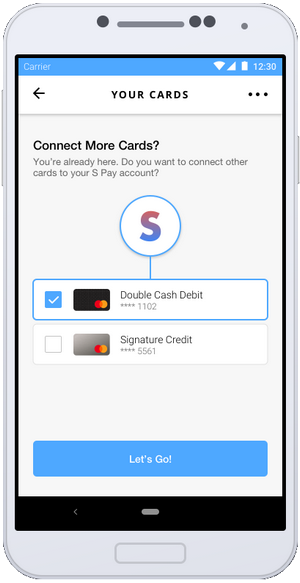
| `supportsMultiplePushedCards` | Flag to indicate if a Token Requestor supports multiple push account receipts in a single request. When supported, a maximum of 5 receipts may be sent to the Token Requestor in a single request. If the cardholder selects a Token Requestor supporting multiple cards/accounts, the Issuer may optionally allow the cardholder to select multiple cards/accounts for push - typically using checkboxes instead of radio buttons, for instance. Issuers shouldn't allow the selection of multiple cards/accounts if the Token Requestor doesn't support it. Therefore, Issuers asking for selection of the card/account before presenting the list of Token Requestors aren't allowed to offer multiple cards/accounts for selection. |
| `supportedAccountHolderData` | A list (array) of account holder data elements that the Token Requestor accepts to receive from the Issuer with a pushed card or account. If the Token Requestor participates in MDES Token Connect but doesn't accept any account holder data then an empty array is returned. **To ensure forward-compatibility, all API client implementations must be resilient to new data element values being added to responses from MDES.** Possible values are: * **NAME:** The first name and last name of the account holder. * **ADDRESS:** The billing address for the account holder. * **EMAIL_ADDRESS:** The email address for the account holder. * **MOBILE_PHONE_NUMBER:** The mobile phone number for the account holder |
| `supportsCardHolderAuthentication` | Indicates that token holder has capability to initiate cardholder authentication through MDES authentication service. A token requestor can initiate card holder authentication only if the issuer also supports * MDES authentication service for Click to Pay and Secure Card on File Token * Provides supported authentication methods in the token authorization responses On successful authentication MDES upgrade token assurance value. **This flag is only applicable to Merchant type of Token Requestors** |
| `supportsTokenConnect` | A boolean parameter that indicates if a token requestor supports Token Connect or not. **Issuer must pass a true value to receive the Token Requestors supporting Token Connect.** |
| `availablePushMethods` | An Array of push methods supported by the token requestor. It contains URI and method type. Issuer MUST use token requestor URI from pushMultipleAccount method only as it provides latest URI supported by the Token Requestors. |
| `supportIssuerInitiatedDigitizationData` | A boolean parameter indicate that token requestor supports Issuer Initiated Digitization Data. or not. Must be one of: * **true** - Issuer Initiated Digitization Data is supported * **false** - Issuer Initiated Digitization Data is not supported |
Note:
* Please contact Mastercard Regional Team before presenting token requestor that have `supportIssuerInitiatedDigitizationData` value is true.
* Issuer must not call [Get Eligible Token Requestors](https://developer.mastercard.com/mdes-token-connect/documentation/api-reference/index.md) API more than once in a week.
* Issuer must call [Get Eligible Token Requestors](https://developer.mastercard.com/mdes-token-connect/documentation/api-reference/index.md) API with the Supports Token Connect parameter value as true in the request.
### Select a Token Requestor {#select-a-token-requestor}
The cardholder interface should filter out the Token Requestors that are not applicable to this list, such as Token Requestors with an inappropriate cardholder interface. For example, cardholder is navigating from a browser on a desktop, and Token Requestor has implemented a mobile app, but there is no website.
Note:
* Mastercard certifies to have obtained Token Requestor's authorization to transfer the logo to each Issuer participating in Token Connect for the purposes of displaying eligible Token Requestors to consumers and related consumer engagement efforts.
* Mastercard Click to Pay is one of the Token Requestors that may be eligible as a destination for the card credentials of your cardholders. Specific guidelines apply for presenting Mastercard Click to Pay to cardholders. Please consult the [dedicated page](https://developer.mastercard.com/product/click-to-pay#resources-issuing-partners).
The cardholder should then be requested to select one Token Requestor (wallet or merchant) from this list. The indicative figure below suggests how an Issuer app may present this list:
### Present Eligible Cardholder Accounts {#present-eligible-cardholder-accounts}
The indicative figure below suggests how the cardholder may select a Card to be pushed:
## Send Cardholder's choice to MDES {#send-cardholders-choice-to-mdes}
When the cardholder has selected the target Token Requestor as well as the sourcing cards or financial accounts, they confirm with a cardholder gesture (for instance, a button click) to continue. The cardholder Interface must transmit the cardholder's choices to the Issuer back-end system. It is Issuer's responsibility to develop the secure encrypted channel to transmit this information from the cardholder Interface to their back-end system; it is expected though that this channel already exists and can be easily leveraged.
Issuer's back-end system will then call the [Push Multiple Accounts](https://developer.mastercard.com/mdes-token-connect/documentation/api-reference/index.md) API from the MDES Token Connect API to trigger the push provisioning process. The Token Requestor Identifier (TRID) as well as the cards and/or financial accounts details are passed as parameter. The response from MDES will include a list of receipts (`pushAccountReceipt`) representing the cards/accounts to be pushed. The Issuer will transmit these receipts to the Token Requestor who will use it in lieu of the original card/account data to request tokenization from MDES. The `pushAccountReceipt` expires after 15 minutes. One or more URIs for the Issuer to call out the Token Requestor's cardholder interface.
### Supply Account Holder Data to the Token Requestor {#supply-account-holder-data-to-the-token-requestor}
Some Token Requestors may be interested in receiving personal account holder information from the Issuer during a Push Provisioning operation, such as the name or billing address. These data elements may typically be used by the Token Requestor to reduce friction in case the customer wishes to sign up for a new account in the Token Requestor's interface - for instance by displaying an account creation form pre-filled with the information supplied by the Issuer. For instance, supplying a billing address will greatly simplify the cardholder experience, especially in some markets where a billing address is required with any stored payment instrument.
### Which data elements can be supplied? {#which-data-elements-can-be-supplied}
At their discretion, Issuers may elect to transmit any combination of account holder data elements supported by a particular Token Requestor. All account holder data elements are optional in the `pushMultipleAccount` request:
* Name (first name and last name)
* Billing Address
* E-mail Address
* Mobile Phone Number
The Token Requestor data returned by MDES in response to [Get Eligible Token Requestors](https://developer.mastercard.com/mdes-token-connect/documentation/api-reference/index.md) API informs the Issuer about each account holder data element(s) that the Token Requestor wishes to receive from the Issuer.
### How does the Token Requestor retrieve the account holder data? {#how-does-the-token-requestor-retrieve-the-account-holder-data}
If the tokenization decision is "APPROVED", the Token Requestor receives the account holder data (if any) from MDES in response to the tokenization request.
To mitigate the risk of identity theft, the Token Requestor doesn't receive the account holder data if the tokenization decision is "DECLINED" or "REQUIRE_ADDITIONAL_AUTHENTICATION". When the Issuer provides account holder data, Mastercard stores this information temporarily for the sole purpose of transmitting this information to the intended Token Requestor. Mastercard erases the account holder data once successfully sent the Token Requestor, or upon expiry of the `pushAccountReceipt`.
Warning:
If an Issuer elects to transmit account holder data to Token Requestors that request such data, the Issuer acknowledges, and agrees to comply with, the following:
* Issuers should provide the most accurate information. It is advisable to withhold a data element, rather than supplying an outdated/inaccurate data element.
* Issuers should withhold any account holder data element that is not requested by the targeted Token Requestor to avoid the unnecessary disclosure of personal information ("Privacy-by-design" principle).
* The collection and processing of personal information may be subject to local laws and regulations. This may include, for example and at a minimum, Issuers ensuring that they have provided a privacy notice and all other appropriate disclosures and terms as well as have obtained any necessary consents in order to have a valid legal basis to collect and share any personal information with Mastercard and for Mastercard to collect, store and share such data as indicated in the use of this feature. Issuers are solely responsible for ensuring that they comply with local regulations, as well as ensuring that Mastercard may receive, store, process and share any Personal Information passed through the Token Connect Services on behalf of the Issuer.
* Issuer acknowledges that Mastercard will not be liable to Issuer or any third party for any loss or harm resulting, directly or indirectly, from Mastercard sharing with Token Requestors of account holder data that Issuer provided to Mastercard in connection with Token Connect. Furthermore, Issuer agrees to fully indemnify and hold Mastercard harmless for any such loss or harm.
## Redirect to the Token Requestor interface {#redirect-to-the-token-requestor-interface}
MDES Token Connect framework supports multiple cardholder experiences:
| cardholder Experience | Description |
|-----------------------|----------------------------------------------------------------------------------------------------------------------|
| App-to-App | Communication on a mobile device (Android or iOS) between an Issuer application and the Token Requestor application. |
| App-to-Web | Communication on a mobile device (Android or iOS) between an Issuer application and a Token Requestor's website. |
| Web-to-App | Communication on a mobile device (Android or iOS) between an Issuer website and a Token Requestor application. |
| Web-to-Web | Communication on the same device (mobile or desktop) between an Issuer website and a Token Requestor website. |
This section explains how to implement these various experiences.
### Choose the right Token Requestor URI {#choose-the-right-token-requestor-uri}
The [Push Multiple Accounts](https://developer.mastercard.com/mdes-token-connect/documentation/api-reference/index.md) API (see above) returns up to 3 URIs, with a minimum of one URI:
* One URI for the Token Requestor's Android app
* One URI for the Token Requestor's iOS app
* One URI for the Token Requestor's web browser experience
Issuer must respect specific rules when selecting the URI where they will send the consumer. Because Android or iOS mobile apps provide a better mobile experience than web browsers, Issuers should always try and direct the consumer to the Android or iOS app of the Token Requestor, when possible. If the Android or iOS app URI is supplied, the web browser should remain a backup solution only.
The table below indicates when Issuers should use the various Token Requestor URIs.
| Token Requestor URI | Scenario |
|---------------------|-----------------------------------------------------------------------------------------------------------------------------------------------------------------------------------------------------------------------------------------------------------------------------------------------------------------------------------------------------------------------------------------------------------------------------------------------------------------------------------------------------------------------------------------------------------------------------------------------------------------------------------------------------------------------------------------------------------------------------------------------------------------------------------------------------------------------------------------------------------------------------------------------------------------------------------------------------------------------------------------------------------------|
| Android URI | When present, indicates the existence of an Android app for the Token Requestor for an app-to-app or web-to-app experience. **Format:** * If the Token Requestor wishes to send the consumer directly to their app, the URI should contain a [custom URI scheme](https://developer.android.com/training/basics/intents/), such as walletAppName://deep/link/path/to/pushcard/ * If the Token Requestor prefers to send the consumer first to their web server for filtering before redirecting them to their app (if installed) or to a download of their app (if not installed), the URI will be a traditional URL with http:// or https:// scheme.
**When to use it:** On Android mobile devices, from the browser or Issuer app. If the Android URI is a custom URI scheme and doesn't resolve (app is not present on the device), Issuer should call the Web URI as a fallback (when available). Otherwise the Issuer should display an error message to indicate (such as "service not available"). |
| iOS URI | When present, indicates the existence of an iOS app for the Token Requestor for an app-to-app or web-to-app experience. **Format:** URI will be a [universal link](https://developer.apple.com/documentation/uikit/core_app/allowing_apps_and_websites_to_link_to_your_content): it is formatted with http:// or https:// scheme to allow fallback to the Token Requestor web server if the Token Requestor's iOS application is not yet installed. Token Requestor should then assist the consumer for the download of their app. **When to use it** : On iOS mobile devices, from the browser or Issuer app |
| Web URI | When present, indicates the existence of a web server for the Token Requestor for an app-to-web or web-to-web experience. **Format:** URI containing http:// or https:// scheme. **When to use it** : * On all desktop devices, from the browser * On iOS mobile devices, from the browser or Issuer app, if MDES hasn't supplied any iOS URI for the Token Requestor * On Android mobile devices, from the browser or Issuer app, if MDES hasn't supplied any Android URI for the Token Requestor * On Android devices, from the browser or Issuer app, if the Android URI could not resolve (Android URI is a custom scheme URI and the app isn't present on the device) * On all mobile devices that are not Android or iOS, from the browser or Issuer app |
Note:
Some device-based wallets may decide to support a desktop-to-mobile experience for Token Connect as follows:
* On the desktop browser, the Issuer web server redirects the consumer to the Web URI of the Token Requestor.
* The Token Requestor web server then drives the consumer to pair their mobile device with their desktop browser session, for instance, via scanning or a QR code to download and open their mobile app.
* Once the mobile device is paired, the consumer goes on their journey on the mobile device where the digitization is completed.
* When digitization is complete, the Token Requestor web server refreshes the desktop browser: consumer is invited to return to the bank interface on the desktop browser.
Therefore, when the Token Requestor supports a desktop-to-mobile journey, the Issuer perceives this as a desktop web-to-web interaction. Token Requestor isn't allowed to call out the Issuer callback URL on the mobile device, if they obtained the URL on a desktop computer.
### Append Parameters to Token Requestor URI {#append-parameters-to-token-requestor-uri}
The Issuer must append parameters to the selected Token Requestor URI. This depends on Token Requestors' support for Signature.
If the `tokenRequestorSignatureSupport=true` in the response of [Push Multiple Accounts](https://developer.mastercard.com/mdes-token-connect/documentation/api-reference/index.md) API, the issuer needs to append the `pushAccountData` parameter.
If `tokenRequestorSignatureSupport` value is false in the response of [Push Multiple Accounts](https://developer.mastercard.com/mdes-token-connect/documentation/api-reference/index.md) API, the Issuer must provide the `pushAccountReceipts` to the Token Requestor. The Issuer may also provide a callback URI in the request, as well as other parameters. All information is passed by a query string.
The table below lists the parameters that the Issuer can append to the Token Requestor URI depending on the value of the `tokenRequestorSignatureSupport`:
| Parameter Name | Description | Example |
|-----------------------------------------------------------------------------------------|-----------------------------------------------------------------------------------------------------------------------------------------------------------------------------------------------------------------------------------------------------------------------------------------------------------------------------------------------------------------------------------------------------------------------------------------------------------------------------------------------------------------------------------------------------------------------------------------------------------------------------------------------------------------------------------------------------------------------------------------------------------------------------------------------------------------------------------------------------------------------------------------------------------------------------------------------------------------------------------------------------------------------------------------------------------------------------------------------------------------------------------------------------------------------------------|------------------------------------------------------------------------------------------------------------------------------------------------------------------------------------------------------------------------------------------------------------------------------------------------------------------------------------------------------------------------------------------------------------------------------------------------------------------------------------------------------------|
| `pushAccountData` - Conditional | If `tokenRequestorSignatureSupport=true` in the response of [Push Multiple Accounts](https://developer.mastercard.com/mdes-token-connect/documentation/api-reference/index.md) API, pass signature value that is received in the response of [Push Multiple Accounts](https://developer.mastercard.com/mdes-token-connect/documentation/api-reference/index.md) API | As displayed in Example 1 below |
| `pushAccountReceipts` - Conditional | If `tokenRequestorSignatureSupport=false` in the response of [Push Multiple Accounts](https://developer.mastercard.com/mdes-token-connect/documentation/api-reference/index.md) API, the `pushAccountReceipts` value obtained by the Issuer from the [Push Multiple Accounts](https://developer.mastercard.com/mdes-token-connect/documentation/api-reference/index.md) API, separated by commas. | * Issuer passes a single value: `pushAccountReceipts=MCC-C307F0AE-298E-48EB-AA43-A7C40B32DDDE`. * Issuer passes 3 pushAccountReceipts (for 3 different cards): `pushAccountReceipts=MCC-C307F0AE-298E-48EB-AA43-A7C40B32DDDE,MSI-1E8GTJ94-9D5T-96MO-WV36-56AZN95Y8DUL,DMC-9H2T37SH-RB3O-PI14-QQ9R-321UGR5ZI07A` |
| `callbackURL` - Conditional | If `tokenRequestorSignatureSupport=false` in the response of [Push Multiple Accounts](https://developer.mastercard.com/mdes-token-connect/documentation/api-reference/index.md) API, the [URL encoded](https://www.w3schools.com/tags/ref_urlencode.asp) URL for the Token Requestor to use to pass control back to the Issuer. This needs to be an absolute URL containing the scheme. If the Issuer wishes to redirect to their banking app (iOS or Android), the URL must contain a custom URI scheme. Both iOS and Android support custom URI schemes that allow the Token Requestor's app or the browser browser to open an application. Issuer can use deeplink URL for their application as callback URL. | As described in example 2 below |
| `completeIssuerAppActivation` - Conditional - if `tokenRequestorSignatureSupport=false` | Boolean value used to drive the behavior of the Token Requestor if a digitization request receives a decision of REQUIRE_ADDITIONAL_AUTHENTICATION and the cardholder chooses the Issuer Mobile App Authentication Method from the list of supplied methods. This field is not case sensitive. Possible values are: * **false:** [Streamlined Activation](https://developer.mastercard.com/mdes-token-connect/documentation/tutorials-and-guides/issuer-implementation-guide/index.md#streamlined-activation-via-issuer-application--website): The Token Requestor shouldn't execute activation. The Token Requestor should return control to the Issuer app via the callbackURL, after all tokenizations are completed, so that the Issuer can perform activation * **true:** The Token Requestor should execute activation with Issuer web site using the information supplied by MDES.
Note: This parameter is applicable only for Wallet Providers supporting activation via Issuer Banking Application. Other Token Requestors can ignore it. | `completeIssuerAppActivation=false` |
| `completeWebsiteActivation` - Conditional | Boolean value used to indicate if Issuer has supplied account holder information to MDES along with the funding account information. Must be present with value true if the Issuer supplies account holder information; not present (or present with default value=false) otherwise. MDES will provide the account holder information to the Token Requestor in certain scenarios. This field is not case sensitive. Possible values are: * **false:** : The Token Requestor shouldn't execute activation. The Token Requestor should return control to the Issuer app via the callbackURL, after all tokenizations are completed, so that the Issuer can perform activation. [Streamlined Activation](https://developer.mastercard.com/mdes-token-connect/documentation/tutorials-and-guides/issuer-implementation-guide/index.md#streamlined-activation-via-issuer-application--website) * **true:** The Token Requestor should execute activation with Issuer web site using the information supplied by MDES.
Note: This parameter is applicable only for Wallet Providers supporting activation via Issuer Banking Application. Other Token Requestors can ignore it. | `completeWebsiteActivation=false` |
| `accountHolderDataSupplied` - Conditional - `tokenRequestorSignatureSupport=false` | Boolean value used to indicate if Issuer has supplied account holder information to MDES along with the funding account information. Conditional: Must be present with value true if the Issuer supplies account holder information; not present (or present with default value=false) otherwise MDES will provide the account holder information to the Token Requestor in certain scenarios. This field is not case sensitive. Possible values are: * **false:** Issuer hasn't supplied any Account holder data * true: Issuer has supplied Account holder data for at least one of the pushAccountReceipts. | `accountHolderDataSupplied=true` |
| `locale` - Optional - `tokenRequestorSignatureSupport=false` | Consumer preferred locale (language and country). This information will be useful to the Token Requestor to offer the best consumer experience during digitization. **Format:** Two letter ISO 639-1 language in lowercase, with an underscore, followed by two letter ISO 3166-1 country code in uppercase. | en_US - fr_CA |
| `callbackRequired` - (Deprecated) | If `tokenRequestorSignatureSupport=false` | Boolean value. When callbackURL is supplied, indicates whether the Token Requestor must call the Issuer callback URL after the push provisioning operation. Possible values are: * **false:** The Token Requestor may keep the consumer in their interface at the end of the provisioning, or send him/her back to the Issuer interface. The consumer may be involved in this choice. * **true** The Token Requestor must return the consumer back to the Issuer interface at the end of the provisioning. |
**Example 1**
#### Token Requestor Supports Signature {#token-requestor-supports-signature}
If the `tokenRequestorSignatureSupport` value is true in the response of [Push Multiple Accounts](https://developer.mastercard.com/mdes-token-connect/documentation/api-reference/index.md) API, the issuer needs to append the `pushAccountData` parameter.
pushAccountData=ew0KImFsZyI6ICJSUzI1NiIsDQoNCiJraWQiOiAiYXNkZmctcXdlcnR5LXp4Y3ZiIg0KfQ.ew0KDQrCoCJwdXNoQWNjb3VudFJlY2VpcHQiOiAiTUNDLVNUTC0xMzQzMTNCRi01NTg1LTRFNzEtQUIyNC1FQ0RCQzI4RjIzRjEiLA0KImlzc3VlckNhbGxCYWNrIjogImh0dHBzOi8vaXNzdWVyY2FsbGJhY2sudXJsIiwNCiJjYWxsYmFja1JlcXVpcmVkIjogdHJ1ZSwNCiJjb21wbGV0ZVdlYnNpdGVBY3RpdmF0aW9uIjogdHJ1ZSwNCiJhY2NvdW50SG9sZGVyRGF0YVN1cHBsaWVkIjogdHJ1ZSwNCiJsb2NhbGUiOiAiZW5fVVMiDQoNCn0.dBjftJeZ4CVP-mB92K27uhbUJU1p1r_wW1gFWFOEjXk
**Sample Redirect URL when `tokenRequestorSignatureSupport` is True**
https://www.mywallet.com/pushAccount?pushAccountData=ew0KImFsZyI6ICJSUzI1NiIsDQoNCiJraWQiOiAiYXNkZmctcXdlcnR5LXp4Y3ZiIg0KfQ.ew0KDQrCoCJwdXNoQWNjb3VudFJlY2VpcHQiOiAiTUNDLVNUTC0xMzQzMTNCRi01NTg1LTRFNzEtQUIyNC1FQ0RCQzI4RjIzRjEiLA0KImlzc3VlckNhbGxCYWNrIjogImh0dHBzOi8vaXNzdWVyY2FsbGJhY2sudXJsIiwNCiJjYWxsYmFja1JlcXVpcmVkIjogdHJ1ZSwNCiJjb21wbGV0ZVdlYnNpdGVBY3RpdmF0aW9uIjogdHJ1ZSwNCiJhY2NvdW50SG9sZGVyRGF0YVN1cHBsaWVkIjogdHJ1ZSwNCiJsb2NhbGUiOiAiZW5fVVMiDQoNCn0.dBjftJeZ4CVP-mB92K27uhbUJU1p1r_wW1gFWFOEjXk
If an issuer wants to pass additional parameter, such as sessionId = sdsdw232u34oo32o2sdoo
Redirection URL:
https://www.mywallet.com/pushAccount?pushAccountData=ew0KImFsZyI6ICJSUzI1NiIsDQoNCiJraWQiOiAiYXNkZmctcXdlcnR5LXp4Y3ZiIg0KfQ.ew0KDQrCoCJwdXNoQWNjb3VudFJlY2VpcHQiOiAiTUNDLVNUTC0xMzQzMTNCRi01NTg1LTRFNzEtQUIyNC1FQ0RCQzI4RjIzRjEiLA0KImlzc3VlckNhbGxCYWNrIjogImh0dHBzOi8vaXNzdWVyY2FsbGJhY2sudXJsIiwNCiJjYWxsYmFja1JlcXVpcmVkIjogdHJ1ZSwNCiJjb21wbGV0ZVdlYnNpdGVBY3RpdmF0aW9uIjogdHJ1ZSwNCiJhY2NvdW50SG9sZGVyRGF0YVN1cHBsaWVkIjogdHJ1ZSwNCiJsb2NhbGUiOiAiZW5fVVMiDQoNCn0.dBjftJeZ4CVP-mB92K27uhbUJU1p1r_wW1gFWFOEjXk&sessionId = sdsdw232u34oo32o2sdoo
#### Token Requestor Does Not Support Signature {#token-requestor-does-not-support-signature}
If the `tokenRequestorSignatureSupport` value is false in the response of [Push Multiple Accounts](https://developer.mastercard.com/mdes-token-connect/documentation/api-reference/index.md) API, the issuer needs to append the `pushAccountData` parameter.
**Sample Redirect URL when `tokenRequestorSignatureSupport` is False**
https://www.mywallet.com/pushAccount?pushAccountReceipts=MCC-C307F0AE-298E-48EB-AA43-A7C40B32DDDE,MSI-1E8GTJ94-9D5T-96MO-WV36-56AZN95Y8DUL,DMC-9H2T37SH-RB3O-PI14-QQ9R-321UGR5ZI07A&callbackURL=moonbank%3A%2F%2Fpushcallback&completeIssuerAppActivation=false&completeWebsiteActivation=false&accountHolderDataSupplied=true&locale=en_US
**Example 2**
1. Issuer Moonbank expects a redirection to their web site at \`callbackURL=https%3A%2F%2Fwww.abank.com%2Fpushcallback\` (http://www.moonbank.com/pushcallback)
2. Issuer "Moon Bank" expects a redirection to their iOs or Android bank app (custom URI scheme) at \`callbackURL=moonbank%3A%2F%2Fpushcallback%3Fsessionid%3D123456\` (abank://pushcallback?sessionid=123456). If this value is present then the Token Requestor must display back to bank option but it will be the consumer's choice to go back to the bank or continue with merchant system.
## Invoke Token Requestor interface {#invoke-token-requestor-interface}
The consumer is the customer of both the Issuer and the Token Requestor and deserves the best experience on both sides. This requires the cooperation of both the Issuer and the Token Requestor:
* Issuer must invoke a real browser redirection (app-to-web or web-to-web),
* Token Requestor must return the consumer back to the Issuer interface when required.
**"What if I don't see the consumer back?"**
We understand that you may be afraid of "losing" the consumer when sending them to the Token Requestor's interface. This is a legitimate concern.
For an app-to-web or web-to-web experience, you may then be tempted to keep the consumer with you, within your app or web page, by embedding the Token Requestor's web page within your app or website, rather than properly redirecting the consumer to a new page in the browser, using objects such as (but not limited to):
* webviews (Android), WKWebviews (iOS) - for mobile application (app-to-web)
* embed an iFrame in your web page - for website (web-to-web)
Such implementations are not allowed with MDES Token Connect, for the following reasons:
* For the Token Requestor, this downgrades the cardholder experience. Webviews and iFrames prevent the Token Requestor from reading or writing cookies. In the Token Requestor's webpage, the consumer can't benefit from a "recognized" experience where sign-in could be avoided, either during the Push Provisioning operation or some time later.
* For some Token Requestors, this may even lead to a fatal error, by preventing the opening of their device app. Token Requestor web servers may need to execute scripts to detect device settings, download (if needed) and launch the right app. Webviews and iFrames are likely to disturb this operation.
With the parameters that you transmit to the Token Requestor, you may specify that the consumer must return to the Issuer's website or app. Mastercard duly validates that Token Requestors correctly interpret these parameters, before granting them access to MDES Token Connect. If your parameters indicate that the callback to the Issuer interface is required, you will see the consumer back (unless the consumer hasn't completed their navigation in the Token Requestor's interface).
In brief, by adding redirection, you are building the best consumer experience!
### From a web browser {#from-a-web-browser}
If the Issuer has selected the Web URI or the iOS URI as part of the Token Requestor URI selection process, the Issuer's web server simply redirects the cardholder to the selected Token Requestor URI, with [appended query string parameters](https://developer.mastercard.com/mdes-token-connect/documentation/tutorials-and-guides/issuer-implementation-guide/index.md#append-parameters-to-token-requestor-uri).
The redirection should occur in the same window.
If the Issuer has selected the **Android URI**, the Issuer's web server action depends on the type of browser:
| Browser | What to do |
|---------------------------------------------------|-----------------------------------------------------------------------------------------------------------------------------------------------------------------------------------------------------------------------------------------------------------------------------------------------------------------------------------------------------------------------------------------------------------------------------------------------------------------------------------------------------------------------------------------------------------------------------|
| * Chrome * Browser compatible with Chrome intents | Create a href anchor with a **Chrome intent** . * The intent will contain the Token Requestor's **Android URI**, split between android_URI_scheme and android_URI_path. The query string parameters must be appended to the android_URI_path part. * To allow fallback if the app is not present on the device, the intent will also contain the Token Requestor's Web URI (if available) with appended query string parameters. The resulting URL must be presented in [URL encoded](https://www.w3schools.com/tags/ref_urlencode.asp) format See format and example below |
| Other browser | * Upon cardholder gesture, try to redirect the consumer to the Android URI, with appended query string * If the redirection doesn't work and if a Web URI is available for the Token Requestor, redirect the consumer to the Web URI with appended query string |
**Format**
Continue
**Example:**
* Token Requestor's Android URI is mywallet://pushAccount: the scheme is mywallet, and the path is pushAccount
* Token Requestor's Web URI is https://mywallet.com/pushAccount
* Issuer's callback URL is https://www.moonbank.com/pushCallback
* Issuer supports streamlined activation
The resulting href anchor is (tokenRequestorSignatureSupport = true):
Continue
The resulting href anchor is (tokenRequestorSignatureSupport = false):
Continue
#### Technical References {#technical-references}
Redirections:
*
*
Chrome intents:
*
*
### From an Android app {#from-an-android-app}
The Issuer app must create an [Android implicit intent](https://developer.android.com/training/basics/intents/index.html) to call:
* The Token Requestor's Android URI, if available, with the appended query string parameters
* The Token Requestor's Web URI (with appended query string), if the Android URI is not available or can't be started safely (when the Token Requestor app is not present on the device)
The implicit intent will have only 2 parameters:
* Action: Intent.ACTION_VIEW
* URI: Android or Web URI, as applicable
**Example:**
```java
// Build the App intent
Uri tokenRequestorApp;
if(tokenRequestorSignatureSupport)
tokenRequestorApp = Uri.parse("tokenRequestor://tokenrequestor/pushToken?pushAccountData=ew0KImFsZyI6ICJSUzI1NiIsDQoNCiJraWQiOiAiYXNkZmctcXdlcnR5LXp4Y3ZiIg0KfQ.ew0KDQrCoCJwdXNoQWNjb3VudFJlY2VpcHQiOiAiTUNDLVNUTC0xMzQzMTNCRi01NTg1LTRFNzEtQUIyNC1FQ0RCQzI4RjIzRjEiLA0KImlzc3VlckNhbGxCYWNrIjogImh0dHBzOi8vaXNzdWVyY2FsbGJhY2sudXJsIiwNCiJjYWxsYmFja1JlcXVpcmVkIjogdHJ1ZSwNCiJjb21wbGV0ZVdlYnNpdGVBY3RpdmF0aW9uIjogdHJ1ZSwNCiJhY2NvdW50SG9sZGVyRGF0YVN1cHBsaWVkIjogdHJ1ZSwNCiJsb2NhbGUiOiAiZW5fVVMiDQoNCn0.dBjftJeZ4CVP-mB92K27uhbUJU1p1r_wW1gFWFOEjXk");
else
tokenRequestorApp = Uri.parse("tokenRequestor://tokenrequestor/pushToken?pushAccountReceipts=MCC-C307F0AE-298E-48EB-AA43-A7C40B32DDDE,MSI-1E8GTJ94-9D5T-96MO-WV36-56AZN95Y8DUL,DMC-9H2T37SH-RB3O-PI14-QQ9R-321UGR5ZI07A&callbackURL=issuer%3A%2F%2FpushToken%2Fcallback");
Intent tokenRequestorAppIntent = new Intent(Intent.ACTION_VIEW, tokenRequestorApp);
// Build the Browser intent
Uri tokenRequestorWeb;
if(tokenRequestorSignatureSupport)
tokenRequestorWeb = Uri.parse("https://www.tokenrequestor.com/pushToken?pushAccountData=ew0KImFsZyI6ICJSUzI1NiIsDQoNCiJraWQiOiAiYXNkZmctcXdlcnR5LXp4Y3ZiIg0KfQ.ew0KDQrCoCJwdXNoQWNjb3VudFJlY2VpcHQiOiAiTUNDLVNUTC0xMzQzMTNCRi01NTg1LTRFNzEtQUIyNC1FQ0RCQzI4RjIzRjEiLA0KImlzc3VlckNhbGxCYWNrIjogImh0dHBzOi8vaXNzdWVyY2FsbGJhY2sudXJsIiwNCiJjYWxsYmFja1JlcXVpcmVkIjogdHJ1ZSwNCiJjb21wbGV0ZVdlYnNpdGVBY3RpdmF0aW9uIjogdHJ1ZSwNCiJhY2NvdW50SG9sZGVyRGF0YVN1cHBsaWVkIjogdHJ1ZSwNCiJsb2NhbGUiOiAiZW5fVVMiDQoNCn0.dBjftJeZ4CVP-mB92K27uhbUJU1p1r_wW1gFWFOEjXk");
else
tokenRequestorWeb = Uri.parse("https://www.tokenrequestor.com/pushToken?pushAccountReceipts=MCC-C307F0AE-298E-48EB-AA43-A7C40B32DDDE,MSI-1E8GTJ94-9D5T-96MO-WV36-56AZN95Y8DUL,DMC-9H2T37SH-RB3O-PI14-QQ9R-321UGR5ZI07A&callbackURL=issuer%3A%2F%2FpushToken%2Fcallback");
Intent tokenRequestorBrowserIntent = new Intent(Intent.ACTION_VIEW, tokenRequestorWeb);
// Verify that App intent resolves
PackageManager packageManager = getPackageManager();
List activities = packageManager.queryIntentActivities(tokenRequestorIntent, 0);
boolean isAppIntentSafe = activities.size() > 0;
// Start the Token Requestor App activity if it's safe, else the Browser activity
if (isAppIntentSafe) {
startActivity(tokenRequestorAppIntent);
}
Else {
startActivity(tokenRequestorBrowserIntent);
}
```
### From an iOS app {#from-an-ios-app}
The Issuer app must call:
* The iOS URI (universal link), if available, with appended query string parameters. As the iOS URI is a universal link, it is formatted with an http:// or https:// scheme, and hence it will always resolve, even if the Token Requestor's app is not installed on the device.
* The Web URI, with appended query string parameters, if the iOS URI is not available
More information on [inter-app communication](https://developer.apple.com/library/content/documentation/iPhone/Conceptual/iPhoneOSProgrammingGuide/Inter-AppCommunication/Inter-AppCommunication.html):
***Example:***
```swift
SURL *tokenRequestorURL;
if(tokenRequestorSignatureSupport)
*tokenRequestorURL = [NSURL URLWithString:@"http://www.tokenrequestor.com/pushToken?pushAccountData=ew0KImFsZyI6ICJSUzI1NiIsDQoNCiJraWQiOiAiYXNkZmctcXdlcnR5LXp4Y3ZiIg0KfQ.ew0KDQrCoCJwdXNoQWNjb3VudFJlY2VpcHQiOiAiTUNDLVNUTC0xMzQzMTNCRi01NTg1LTRFNzEtQUIyNC1FQ0RCQzI4RjIzRjEiLA0KImlzc3VlckNhbGxCYWNrIjogImh0dHBzOi8vaXNzdWVyY2FsbGJhY2sudXJsIiwNCiJjYWxsYmFja1JlcXVpcmVkIjogdHJ1ZSwNCiJjb21wbGV0ZVdlYnNpdGVBY3RpdmF0aW9uIjogdHJ1ZSwNCiJhY2NvdW50SG9sZGVyRGF0YVN1cHBsaWVkIjogdHJ1ZSwNCiJsb2NhbGUiOiAiZW5fVVMiDQoNCn0.dBjftJeZ4CVP-mB92K27uhbUJU1p1r_wW1gFWFOEjXk" ];
else
*tokenRequestorURL = [NSURL URLWithString:@"http://www.tokenrequestor.com/pushToken?pushAccountReceipt=MCC-C307F0AE-298E-48EB-AA43-A7C40B32DDDE,MSI-1E8GTJ94-9D5T-96MO-WV36-56AZN95Y8DUL,DMC-9H2T37SH-RB3O-PI14-QQ9R-321UGR5ZI07A&callbackURL=issuer%3A%2F%2FpushToken%2Fcallback" ];
[[UIApplication sharedApplication] openURL:tokenRequestorURL];
```
## Receive response from Token Requestor {#receive-response-from-token-requestor}
The Issuer should use the response from the Token Requestor to display relevant messaging to the cardholder, as well as to update their Issuer's back-end information if needed.
| Parameter Name | Description |
|----------------|-------------------------------------------------------------------------------------------------------------------------------------------------------------------------------------------------------------------------------------------------------------------------------------------------------------------------------------------------------------------------------------------------------------------------------------------------------------------------------------------------------------------------------------------------------------------------------------------------------------------------------------------------------------------------------------------------------------------------------------------------------------------------------------------------------------------------------------------------------------------------------------------------------------------------------------------------------------------------------------------------------------------------------------------------------------------------------------------------------------------------------------------------------------------------------------------------------------------------------------------------------------------------------------------------------------------------------------------------------------------------------------------------------------------------------------------------------------------------------------------------------------------------------------------------------------|
| `results` | The map of results for the tokenization attempts. The `pushAccountReceipt` values should be used as the key to the map, and the tokenization decision as the value. In the case of an *APPROVED* or *REQUIRE_ADDITIONAL_AUTHENTICATION* decision, the tokenUniqueReference is appended to the decision, separated by a '\|' character. Possible values are: * **APPROVED:** any of the following: 1. The Issuer has approved the provisioning request 2. The Issuer has requested additional cardholder authentication for the provisioning request, and the authentication has been performed successfully * **REQUIRE_ADDITIONAL_ AUTHENTICATION:** The Issuer has requested additional cardholder authentication, and the authentication hasn't been performed. In the case of wallet tokens (typically for [streamlined activation](https://developer.mastercard.com/mdes-token-connect/documentation/tutorials-and-guides/issuer-implementation-guide/index.md#streamlined-activation-via-issuer-application--website)), the token activation is pending successful cardholder authentication. In the case of merchant tokens, the token is active with a token assurance value of 0 (zero) * **DECLINED:** The Issuer has declined the provisioning request. * **CANCELLED:** The Cardholder or Token Requestor has cancelled the provisioning request or has deleted the freshly created token. * **ERROR:** The provisioning request has resulted in an error. * **DUPLICATE_REQUEST** This card/account is already associated with wallet/merchant |
**Important notes:**
1. To ensure global acceptance, the special characters '\[', '\]' and '\|' in the results are passed by the Token Requestor in their [URL-encoded](https://www.w3schools.com/tags/ref_urlencode.asp) version, respectively **%5B** , **%5D** and **%7C**.
2. If the callbackURL supplied by the Issuer already contains string parameters introduced by a '?' character (for instance, a session identifier), the Token Requestor keeps these in the redirection URL, and further appends the tokenization results introduced by a '\&' character.
**Example 1: Single Card, no issuer-proprietary parameter**
Calling the Android Issuer app for a single card with no issuer-proprietary parameter:
* Issuer "Moon Bank" receives MDES Token Connect responses in Android app at moonbank://pushcallback
* Issuer has supplied a unique `pushAccountReceipt` to the Token Requestor, with value MCC-C307F0AE-298E-48EB-AA43-A7C40B32DDDE.
* The Token Requestor has successfully tokenized this `pushAccountReceipt`, creating a token whose tokenUniqueReference is DWSPMC000000000132d72d4fcb2f4136a0532d3093ff1a45
* The resulting (raw) URI is:
moonbank://pushcallback?results[MCC-C307F0AE-298E-48EB-AA43-A7C40B32DDDE]=APPROVED|DWSPMC000000000132d72d4fcb2f4136a0532d3093ff1a45
* After URL-encoding of the special characters, the resulting URI called by the Token Requestor is:
moonbank://pushcallback?results%5BMCC-C307F0AE-298E-48EB-AA43-A7C40B32DDDE%5D=APPROVED%7CDWSPMC000000000132d72d4fcb2f4136a0532d3093ff1a45
**Example 2: multiple cards, one issuer-proprietary parameter**
Calling the Issuer web server for multiple cards with one issuer-proprietary parameter:
* To avoid an unnecessary consumer login at callback, Issuer "Moon Bank" receives MDES Token Connect responses on their web server at a dynamic address including a session identifier. "Moon Bank" has supplied this dynamic address to the Token Requestor as callbackURL. For the current session, the desired return URL is `https://www.moonbank.com/pushcallback?session_id=789456123`
* Issuer has supplied three `pushAccountReceipts` to the Token Requestor. One has been tokenized successfully, one requires additional authentication, one has not been tokenized due to a manual cancellation by the consumer
* The resulting (raw) URI is:
https://www.moonbank.com/pushcallback?session_id=789456123&results[MCC-C307F0AE-298E-48EB-AA43-A7C40B32DDDE]=APPROVED|DWSPMC000000000132d72d4fcb2f4136a0532d3093ff1a45&results[MSI-1E8GTJ94-9D5T-96MO-WV36-56AZN95Y8DUL]=REQUIRE_ADDITIONAL_AUTHENTICATION|DWSPMC00000000032d72d4ffcb2f4136a0532d32d72d4fcb&results[DMC-9H2T37SH-RB3O-PI14-QQ9R-321UGR5ZI07A]=CANCELLED
* After URL-encoding of the special characters, the resulting URI called by the Token Requestor is:
https://www.moonbank.com/pushcallback?session_id=789456123&results%5BMCC-C307F0AE-298E-48EB-AA43-A7C40B32DDDE%5D=APPROVED%7CDWSPMC000000000132d72d4fcb2f4136a0532d3093ff1a45&results%5BMSI-1E8GTJ94-9D5T-96MO-WV36-56AZN95Y8DUL%5D=REQUIRE_ADDITIONAL_AUTHENTICATION%7CDWSPMC00000000032d72d4ffcb2f4136a0532d32d72d4fcb&results%5BDMC-9H2T37SH-RB3O-PI14-QQ9R-321UGR5ZI07A%5D=CANCELLED
## Streamlined activation via Issuer application/website {#streamlined-activation-via-issuer-applicationwebsite}
Note: This section is applicable when Issuer supports Activation via Issuer App and/or Activation via Issuer Website as token activation methods. If this is not your case, you can ignore this section.
When the Issuer triggers a token provisioning request with Token Connect, the consumer is logged in the Issuer's environment, which means they are already authenticated by the Issuer.
Leveraging on this pre-authentication of the cardholder in the Issuer's interface, Token Connect is the opportunity to tokenize cards without additional step-up, provided appropriate security controls are in place, refer [MDES Issuer Implementation Guide](https://trc-techresource.mastercard.com/r/bundle/m_mdes_iss_impl_en-us/page/d/en-US/ovo1732530667092.html), chapter Pre-Digitization, section Issuer-Initiated Digitization with MDES Token Connect.
Nevertheless, there are still situations where the Issuer will take the decision that an additional Cardholder Authentication is needed before the activation of the token. This section provides recommendations for a better cardholder experience for additional Cardholder Authentication in the case of a provisioning via Token Connect.
Cardholder authentication and token activation follow the same principles as digitization initiated by the Wallet Provider. While the consumer is in the Token Requestor's interface, MDES returns the list of available authentication methods, and the consumer selects their authentication method.
If the cardholder selects an activation via Issuer app or web site, in theory, the cardholder experience may become very painful, as the cardholder would be taken from Token Requestor's environment to an Issuer's interface (for activation), then back to Token Requestor (activation complete), then again to Issuer (provision through Token Connect complete).
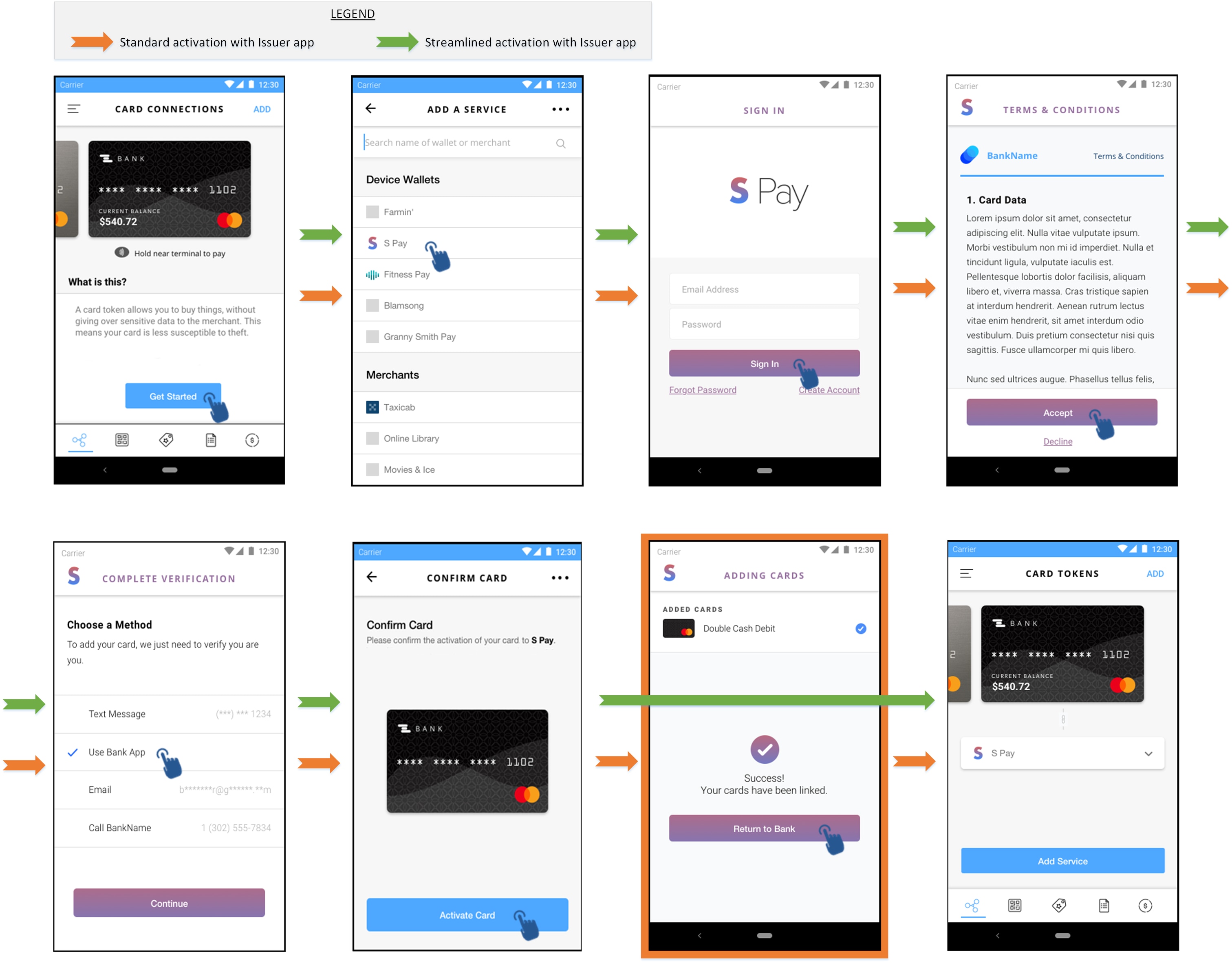
To avoid these back-and-forth interface toggles and provide a better experience, the Issuer may decide to use streamlined activation with Issuer's app or website. The Issuer will pass additional parameters in the URL to the Token Requestor: these will indicate that if the consumer selects activation via Issuer app (respectively website), the Token Requestor should NOT try to activate the token using the information supplied by MDES, and should return control to the Issuer via the Token Connect callback URL after all tokenizations (in the case of multiple pushed cards) are completed.
In this case, the cardholder will activate the token from the Issuer's app (or corresponding web site) when driven back there. The Issuer's app/website may either bypass additional authentication or require cardholder to complete authentication at this point. The Issuer's uses [MDES Customer Service API](https://developer.mastercard.com/mdes-customer-service/documentation) to request the activation of the token to MDES.
The URL query string parameters to enable streamlined activation are:
* completeIssuerAppActivation
* completeIssuerWebActivation
They are further described above, section [Append Parameters to Token Requestor URI](https://developer.mastercard.com/mdes-token-connect/documentation/tutorials-and-guides/issuer-implementation-guide/index.md#append-parameters-to-token-requestor-uri).
The figure below illustrates the difference between a standard activation and a streamlined activation using Issuer application:
## Summary: cardholder Interface Design Check-list {#summary-cardholder-interface-design-check-list}
Issuers must ensure that they respect the following checklist when creating wireframes for their website and application(s) for the push provisioning operation. During the implementation project with Mastercard, Mastercard will validate the wireframes submitted by the Issuer against the checklist below. Any deviation from this checklist must be duly justified and documented to Mastercard:
1. Token Requestors must be presented in the list of potential destinations with their logo and consumer-facing name.
2. Issuer must show wallet(s) and merchant(s) option similar with other push candidates. All the candidates where cardholder can push account(s) must be at same level in issuer cardholder experience.
3. The Issuer must remove from the list of Token Requestors those that are not available for the hosting environment (for instance, on a desktop computer, eliminate Token Requestors not supporting 'WEB' interface).
4. When redirecting to the Token Requestor's interface, the Issuer's implementation must allow the Token Requestor to launch their mobile app (when supported), as well as read and write cookies.
5. If the Token Requestor selected by the account holder only accepts a single `pushAccountReceipt`, the Issuer cardholder Interface shall not allow the selection of multiple cards/accounts.
6. The Issuer must respect local laws and regulations related to Personally Identifiable Information (PII) if they elect to transmit account holder data to the Token Requestor. This includes, but is not limited to, supplying a privacy notice and obtaining necessary consents.
7. When the Token Requestor app or website redirects the consumer back to the Issuer interface, the Issuer interface must indicate to the consumer the outcome of the digitization for each card/account.
8. If the Issuer supports token activation via their app or website, activation must be proposed to the consumer if the Token Requestor indicates a result of REQUIRE_ADDITIONAL_AUTHENTICATION for a wallet token.
## What's new {#whats-new}
Significant changes to this page are tracked here:
| Date | Description of Change |
|----------------|---------------------------------------------------------------------------------------------------------------------------------------------------------------------------------------------------------------------------------------------------------------------------------------------------------------------------------------------------------------------------------------------------------------------------------------------------------------------------------------------------------------------------------------------------------------------------------------------------------------------------------------------------------------------------------------------------------------------|
| Jan 19, 2022 | * Deprecated [Push Account](https://developer.mastercard.com/mdes-token-connect/documentation/api-reference/index.md) * Added support for [Push Multiple Accounts](https://developer.mastercard.com/mdes-token-connect/documentation/api-reference/index.md) API |
| Feb 24, 2021 | * Deprecated [callbackRequired](https://developer.mastercard.com/mdes-token-connect/documentation/tutorials-and-guides/issuer-implementation-guide/index.md#append-parameters-to-token-requestor-uri) * Changes for Jan'21 and Feb'21 releases |
| March 25, 2020 | * Introduced optional query string parameter [callbackRequired](https://developer.mastercard.com/mdes-token-connect/documentation/tutorials-and-guides/issuer-implementation-guide/index.md#append-parameters-to-token-requestor-uri) * Introduced optional query string parameter [locale](https://developer.mastercard.com/mdes-token-connect/documentation/tutorials-and-guides/issuer-implementation-guide/index.md#append-parameters-to-token-requestor-uri) * Added new [requirements](https://developer.mastercard.com/mdes-token-connect/documentation/tutorials-and-guides/issuer-implementation-guide/index.md#redirection-building-the-best-consumer-experience) to invoke the Token Requestor's web URI |
| March 30, 2020 | * Added references to Provisioning Cards to the [Mastercard Click to Pay](https://developer.mastercard.com/product/click-to-pay#resources-issuing-partners) |