# MDES for Merchants
source: https://developer.mastercard.com/mdes-digital-enablement/documentation/use-cases/mdes-for-merchants-use-cases/index.md
This guide covers use cases for a merchant implementing the [MDES Digital Enablement API](https://developer.mastercard.com/mdes-digital-enablement/documentation/) and should be used alongside this documentation. It explains the tokenization process for Mastercard and Maestro Account PANs when used in a consumer facing application such as a merchant website, mobile application, or other card on file platform. In this program, eligible merchants act as Token Requestors and benefit from connectivity to all participating Mastercard issuers allowing Mastercard and Maestro cards from these issuers to be tokenized and stored.
The uses cases contained in this guide support the following merchant functions:
1. [Tokenizing Account PANs:](https://developer.mastercard.com/mdes-digital-enablement/documentation/use-cases/mdes-for-merchants-use-cases/index.md#tokenizing-account-pans)Tokenize an Account PAN by replacing it with a unique token, which represents the PAN but provides additional security benefits.
2. [Managing Tokens:](https://developer.mastercard.com/mdes-digital-enablement/documentation/use-cases/mdes-for-merchants-use-cases/index.md#managing-tokens)Handle consumer or issuer-initiated changes to the status of the token or associated Account PAN.
3. [Displaying Payment Information:](https://developer.mastercard.com/mdes-digital-enablement/documentation/use-cases/mdes-for-merchants-use-cases/index.md#displaying-payment-info)Displaying information pertaining to the PAN and Token to the account holder
4. [Making Payments:](https://developer.mastercard.com/mdes-digital-enablement/documentation/use-cases/mdes-for-merchants-use-cases/index.md#making-payments)When a card has been tokenized, you can use the TUR returned by MDES to obtain a cryptogram and the token which is used to make payments.
5. [Customer Service:](https://developer.mastercard.com/mdes-digital-enablement/documentation/use-cases/mdes-for-merchants-use-cases/index.md#customer-service)Facilitate customer service scenarios when Account PANs have been tokenized.
This guide includes user interface illustrations for the use cases. However, the design of your merchant site, mobile application or card on file platform is completely under your control within the constraints imposed by PCI compliance, the requirements and features of the [MDES Digital Enablement API](https://developer.mastercard.com/mdes-digital-enablement/documentation/), and the mandatory certification requirements for MDES for merchants.
For clarity, "website" is used in this guide, but MDES for merchants is device independent and can be used with a mobile app or any internet-connected system. The terms card and Account PAN are used interchangeably in this guide.
**NOTE:** For full details of implementation certification requirements and recommendations, refer to the *Merchant Token Requestor Self-Assessment Questionnaire*.
## Tokenizing Account PANs {#tokenizing-account-pans}
The Tokenize request checks whether an Account PAN is eligible for tokenization, authorizes the tokenization with the issuer (as necessary), allocates a token for the Account PAN, and returns a Token Unique Reference (TUR) which you can store for future API requests. The TUR is a unique reference to the token.
There are three main scenarios in which an Account PAN can be tokenized:
* [Tokenization while Transacting](https://developer.mastercard.com/mdes-digital-enablement/documentation/use-cases/mdes-for-merchants-use-cases/index.md#tokenization-while-transacting) -- Creating a token when a consumer (or merchant) initiates a transaction on the account PAN already stored on file or by adding a new card during the checkout flow.
* [Add Card Tokenization](https://developer.mastercard.com/mdes-digital-enablement/documentation/use-cases/mdes-for-merchants-use-cases/index.md#add-card-tokenization) -- Creating a token as a result of a consumer action, such as when a consumer adds a new Account PAN to their profile on merchant website. This could occur when a consumer opts to store new payment details during checkout or when the consumer modifies the payment details associated with their profile (e.g. in account management).
* [Existing Card Tokenization](https://developer.mastercard.com/mdes-digital-enablement/documentation/use-cases/mdes-for-merchants-use-cases/index.md#existing-card-tokenization) -- Creating tokens for Account PANs already stored on file, outside of the transaction/checkout flow.
**NOTE:**
The tokenize response returns an active token and token unique reference (TUR). Token requestors can store the TUR to request for a token and cryptogram in the Transact API. If the Account PAN being tokenized is in an account range that has not yet been enabled by the issuer for MDES for merchants, the Account PAN will not be tokenized and MDES will return a PAN_INELIGIBLE response.
All API requests must use OAUTH authentication and API requests / responses that contain sensitive data will use field level encryption.
### Tokenization while Transacting {#tokenization-while-transacting}
This use case describes how a token may be created and associated with a consumer profile during the transaction flow. For example:
1. The Consumer logs in to their profile, shops for items and clicks **Checkout**.
2. Your website displays the list of cards that the consumer has on file or an option to enter new card details.
3. The Consumer selects an available card or enters new card details and clicks **Pay**.
4. Your system sends a **Tokenize** request with the encrypted Account PAN details and optional data to support the decision to tokenize.
5. If MDES returns a declined decision in the previous step, you will not be able to tokenize the Account PAN and will need to proceed with the full Account PAN and re-try the tokenization process at a later stage, depending on the error type received.
6. If the tokenization request is not declined, you will receive an active token and TUR (Token Unique Reference). The response contains the token number in `tokenDetails`, last 4 digits of Account PAN in `tokenInfo`, and card art details in the `productConfig` object. The last 4 digits of the token are also returned; however, Mastercard recommends that the merchant only display the Account PAN last 4 digits to the consumer, not the token last 4 digits, as the consumer may not be aware of tokenization. After receiving the Tokenize response, the token has been provisioned and ready for performing transactions.
7. You can then call the **Transact API** with the TUR to fetch the actual token, token expiry \& cryptogram. The token and cryptogram can then be used for the transaction and TUR to be associated with the consumer's merchant profile for future use.
If you plan to display card art, you should use **Get Asset** requests to obtain (and cache) the card art image assets for display; see [Displaying Tokenized Account PANs](https://developer.mastercard.com/mdes-digital-enablement/documentation/use-cases/mdes-for-merchants-use-cases/index.md#display-payment-info) for more details. Update the state you maintain for this token in your system. See [Making Payments with Tokenized Account PANs](https://developer.mastercard.com/mdes-digital-enablement/documentation/use-cases/mdes-for-merchants-use-cases/index.md#making-payments) and [Storing Cryptograms](https://developer.mastercard.com/mdes-digital-enablement/documentation/use-cases/mdes-for-merchants-use-cases/index.md#storing-cryptograms) for details on performing the subsequent transactions.
**NOTE:** The tokenization process may take a few seconds to complete. To avoid latency in tokenization during the consumer checkout flow, you may wish to proceed with the Account PAN for the first consumer transaction and initiate the tokenization process following a successful card add and checkout. Once the consumer's Account PAN is tokenized, the token can be used for subsequent transactions.
Diagram tokenization-while-transacting
### Add Card Tokenization {#add-card-tokenization}
This use case describes how you could allow a consumer to tokenize a card and associate it with their website profile for later payment use. For example:
1. The Consumer logs in to their profile and clicks **Add card**.
2. The Consumer enters their card details and clicks **Save**.
3. Mastercard recommends your system perform regular card checks to verify the cards as per your current process.
4. If the card checks are successful, your system sends a **Tokenize** request with the encrypted Account PAN details and optional data to support the decision to tokenize. It is recommended to send at least Account PAN number, Account PAN expiry date and Account PAN Security code such as CVC2 for Add Card Tokenization in the **Tokenize** request.
5. If MDES returns a declined decision in the previous step, you will not be able to tokenize the Account PAN and will need to proceed with the full Account PAN and retry the tokenization process at a later stage, depending on the error type received.
6. If the tokenization request is not declined, associate the returned token details with the consumer's merchant profile. The response contains the token number in tokenDetails, last 4 digits of the Account PAN in tokenInfo, and card art details in the **productConfig** object. The last 4 digits of the token are also returned; however, Mastercard recommends that they are not used to represent Account PANs to ensure consumers remain unaware of the tokenization process. After receiving the Tokenize response, the token has been provisioned and you can display the card as active.
7. You can then call the Transact API with the TUR to fetch the actual token, token expiry \& cryptogram. The token and cryptogram can then be used for the transaction and TUR to be associated with the consumer's merchant profile for future use
If you plan to display card art, you should use **Get Asset** requests to obtain (and cache) the card art image assets for display; see [Displaying Tokenized Account PANs](https://developer.mastercard.com/mdes-digital-enablement/documentation/use-cases/mdes-for-merchants-use-cases/index.md#display-payment-info) for more details. Update the state you maintain for this token in your system. See [Making Payments with Tokenized Account PANs](https://developer.mastercard.com/mdes-digital-enablement/documentation/use-cases/mdes-for-merchants-use-cases/index.md#making-payments) and [Storing Cryptograms](https://developer.mastercard.com/mdes-digital-enablement/documentation/use-cases/mdes-for-merchants-use-cases/index.md#storing-cryptograms) for details.
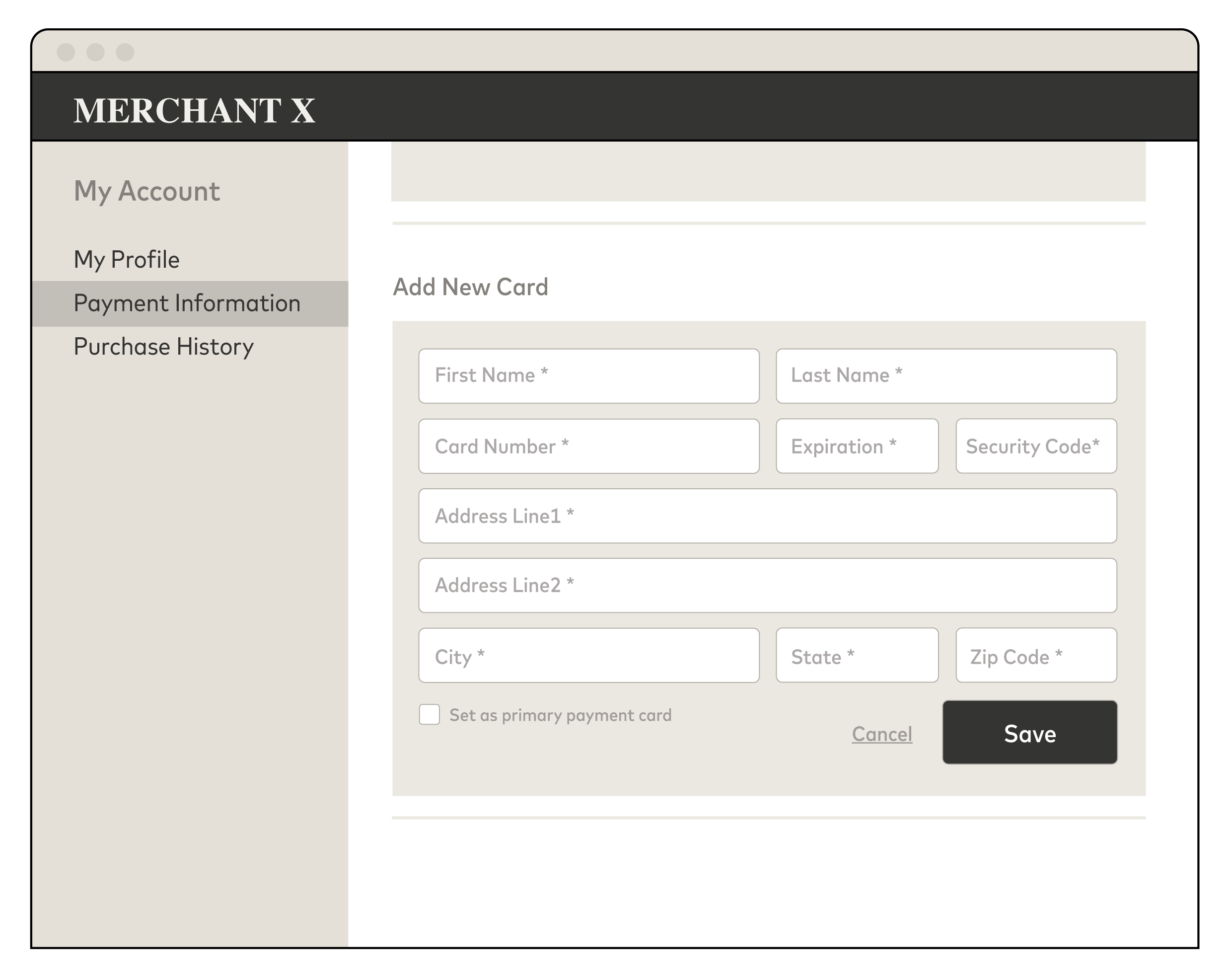
**Example Add Card Screen**
#### Add Card Tokenization Steps: {#add-card-tokenization-steps}
**NOTE:** All user interface examples are illustrative.
1. Once consumer enters the card Account data, formulate the Tokenize request - Account PAN and expiry month and year (if the card has an expiry date) are mandatory, CVC2 is recommended to Add Card Tokenization; all other fields are optional. NOTE: Optional fields are used by the card issuer to decide whether to approve or decline tokenization for the card. You can include additional information in the optional **decisioningData** object to support the issuer's decision making process.
2. Combine the card data in step 1 with the **source** parameter, which must be set to **CARD_ADDED_MANUALLY** in this case, to create the JSON **fundingAccountData** object which will include the card data; see the first code sample below.
3. Make a **Tokenize** request with the **fundingAccountData** object. Supply **taskId** , **tokenRequestorId** (unique to you as a merchant), a **requestId** (unique for each request), and **tokenType** = CLOUD. The **TaskID** can be used to monitor tokenization progress as tokens are provisioned and then activated on the MDES platform after the response in step 6 below
4. Receive the response with the following data: **decision** (tokenization decision), **accountPanSuffix** (the last four digits of the Account PAN), **tokenPanSuffix** (the last four digits of the Token), **tokenExpiry** (the expiry date in mmyy format), and a **tokenUniqueReference** (TUR) which uniquely identifies the token, and **tokenDetails** (tokenNumber, expiryMonth, expiryYear, dataValidUntilTimestamp, and PAR) .
5. If the tokenization request is not declined, associate the active token and **tokenUniqueReference** to the consumer's profile and the last four digits of the Account PAN. After the tokenize response, tokens are active and are provisioned within the MDES platform. Optionally, you can use the last four digits of the Account PAN from step 2 to represent the card details or make **Get Asset** requests using the Asset ID values returned in the **productConfig** object to fetch, cache, and display card and issuer art, etc. See [Displaying Tokenized Account PANs](https://developer.mastercard.com/mdes-digital-enablement/documentation/use-cases/mdes-for-merchants-use-cases/index.md#display-payment-info) for details.
6. If MDES returns a decline decision in the previous step, you will not be able to tokenize the card and will need to try tokenization later based on the error code.
7. After receiving the Tokenize response, an active token has been provisioned. You could also update your user interface to show this Account PAN is now available for use in a payment. Additionally, you could proceed to make a **Transact** request to obtain the token and cryptogram needed for a payment authorization request. See [Making Payments with Tokenized Account PANs](https://developer.mastercard.com/mdes-digital-enablement/documentation/use-cases/mdes-for-merchants-use-cases/index.md#making-payments) and [Storing Cryptograms](https://developer.mastercard.com/mdes-digital-enablement/documentation/use-cases/mdes-for-merchants-use-cases/index.md#storing-cryptograms) for details.
**API Flow for Adding a Card**
Diagram tokenization-new-card-add
**NOTE:**
* Currently, MDES for merchants creates a token if the issuer tokenization decision is either APPROVED or REQUIRE_ADDITIONAL_AUTHENTICATION. At this time, your system may handle these responses in the same manner. You may also receive an **authenticationMethods** object, which you can ignore.
* The sample payload loaded from the OpenAPI configuration will contain a superset of all the possible fields. As some of these fields are conditional use the following trimmed request sample to get started. You can then add additional parameters as required.
* JSON
```JSON
{
"cardAccountData": {
"accountNumber": "5412345678901234",
"expiryMonth": "12",
"expiryYear": "19"
},
"accountHolderData": {
"accountHolderName": "John Doe",
"consumerIdentifier": "",
"accountHolderAddress": {
"line1": "100 1st Street",
"line2": "Apt. 4B",
"city": "St. Louis",
"countrySubdivision": "MO",
"postalCode": "61000",
"country": "USA"
}
}
"source": "ACCOUNT_ON_FILE"
}
```
* JSON
```JSON
"fundingAccountInfo" : {
"encryptedPayload" : {
"encryptedData":"4545433044323232363739304532433610DE1D1461475BEB6D815F31764DDC20298BD779FBE37EE5AB3CBDA9F9825E1DDE321469537FE461E824AA55BA67BF6A",
"publicKeyFingerprint" : "4c4ead5927f0df8117f178eea9308daa58e27c2b",
"encryptedKey" : "A1B2C3D4E5F6112233445566",
"oaepHashingAlgorithm" : "SHA512"
}
}
```
**NOTE:** You are required to acknowledge **Notify Token Updated** requests. To minimize network traffic, you should use **Notify Token Updated** requests to monitor and keep a local copy of token state, rather than repeatedly polling MDES using **Get Token** requests.
**NOTE:** You will need to decrypt the **EncryptedPayload.encryptedData** parameter in the **Notify Token Updated** request. The encrypted data contains an array of token objects (in this case just a single token) containing the updated status of each token and any other changes to the token or associated payment account, such as changes to card art, expiry date, and last 4 digits of the Account PAN. The decryption process is the reverse of the encryption process detailed in steps 3 and 4 above, but using the **private** key from the RSA wrapped **decryption** key pair.
### Existing Card Tokenization {#existing-card-tokenization}
Existing Card Tokenization is used to create multiple tokens by sending multiple tokenization requests as a bulk process. This is typically used to replace the Account PANs already stored in your card-on-file repository with tokens. No consumer interaction is necessary.
**NOTE**: only one Account PAN can be tokenized per API request
When submitting multiple requests to MDES, you must ensure:
* The speed of tokenization does not exceed the TPS (transaction per second) limit provided by Mastercard.
* The submitted Account PANs are selected on a pseudo-random basis or spread evenly across different account ranges. This ensures an even load across Mastercard issuers and maximizes tokenization performance.
**Design Guidelines:**
Mastercard recommends that you implement one or more strategies during existing card tokenization to optimize the speed at which the repository can be converted into tokens. For example, when an Account PAN is not within an eligible account range for tokenization (as specified by the issuer), MDES will return a PAN_INELIGIBLE response. In this situation, you can filter out other cards with the same first 11 PAN digits. For simplicity, you do not need to persist the filter and should purge it after the bulk tokenization process is complete. This basic principle can be used or adapted (as necessary) to fit with your existing processes and its technical architecture and environment.
**Technical Details:**
1. Fetch an Account PAN stored on file using an optimization strategy as described above.
2. Combine the card data in step 1 with the **source** parameter, which must be set to CARD_ON_FILE in this case, to create a JSON **fundingAccountInfo** object for the card data; see the first code sample below these steps.
3. Receive the response with the following data: **decision** (tokenization decision), **accountPanSuffix** (the last four digits of the Account PAN), **tokenPanSuffix** (the last four digits of the token), **tokenExpiry** (the expiry date in mmyy format), and a **tokenUniqueReference** (TUR) which uniquely identifies the token, and **tokenDetails** (tokenNumber, expiryMonth, expiryYear, dataValidUntilTimestamp, and PAR).
4. If the tokenization request is not declined, associate the active token and **tokenUniqueReference** to the consumer's profile and the last four digits of the Account PAN. After the tokenize response, tokens are active and are provisioned within the MDES platform. If you are displaying card art, you could make **Get Asset** requests using the Asset ID values returned in the **productConfig** object to fetch and cache card and issuer art, etc. See [Displaying Tokenized Account PANs](https://developer.mastercard.com/mdes-digital-enablement/documentation/use-cases/mdes-for-merchants-use-cases/index.md#display-payment-info) for details.
5. If MDES returns a decline decision in the previous step, you will not be able to tokenize the card and will need to try tokenization later based on the error code.
6. After receiving the Tokenize response, an active token has been provisioned. Additionally, you could proceed to make a **Transact** request to obtain the token and cryptogram needed for a payment authorization request. See [Making Payments with Tokenized Account PANs](https://developer.mastercard.com/mdes-digital-enablement/documentation/use-cases/mdes-for-merchants-use-cases/index.md#making-payments) and [Storing Cryptograms](https://developer.mastercard.com/mdes-digital-enablement/documentation/use-cases/mdes-for-merchants-use-cases/index.md#storing-cryptograms) for details.
**NOTE:** Currently, MDES for merchants creates a token if the issuer tokenization decision is either APPROVED or REQUIRE_ADDITIONAL_AUTHENTICATION. At this time, your system may handle these responses in the same manner. You may also receive an **authenticationMethods** object, which you can ignore.
* JSON
```JSON
{
"accountNumber": "5412345678901234",
"expiryMonth": "12",
"expiryYear": "20",
"source": "CARD_ON_FILE"
}
```
* JSON
```JSON
"fundingAccountInfo" : {
"encryptedPayload" : {
"encryptedData":"4545433044323232363739304532433610DE1D1461475BEB6D815F31764DDC20298BD779FBE37EE5AB3CBDA9F9825E1DDE321469537FE461E824AA55BA67BF6A",
"publicKeyFingerprint" : "4c4ead5927f0df8117f178eea9308daa58e27c2b",
"encryptedKey" : "A1B2C3D4E5F6112233445566",
"oaepHashingAlgorithm" : "SHA512"
}
}
```
**NOTE:** You are required to acknowledge **Notify Token Updated** requests. To minimize network traffic, you should use **Notify Token Updated** requests to monitor and keep a local copy of token state, rather than repeatedly polling MDES using Get Token requests.
**NOTE:** You will need to decrypt the **EncryptedPayload.encryptedData** parameter in the **Notify Token Updated** request. The encrypted data contains an array of token objects (in this case just a single token) containing the updated status of each token and any other changes to the token or associated payment account, such as changes to card art, expiry date, and last 4 digits of the Account PAN. The decryption process is the reverse of the encryption process detailed in steps 3 and 4 above, but using the **private** key from the RSA wrapped **decryption** key pair.
Diagram tokenization-existing-card-repo
**API Flow for Tokenizing an Existing Payment Card Repository**
## Managing Tokens {#managing-tokens}
### Consumer Updates the Details of a Card Associated with Their Profile {#consumer-updates-the-details-of-a-card-associated-with-their-profile}
The details represented by the token (Account PAN and expiry date) cannot be updated by the consumer.
### Issuer-Initiated Status Updates {#issuer-initiated-status-updates}
An issuer can initiate an account update within the account range or across another account range.
This use case explains how you can receive change notifications relating to a token or the underlying payment account based on the following events:
* FPAN replacement within the same account range
* FPAN replacement in a different account range
* Routine issuer maintenance, such as moving from a 6 to 8-digit BIN, which may result in the token number being updated (even if underlying PAN does not change).
* Token expiry extension
In addition to these notifications, MDES seamlessly updates the Account PAN it associates with a consumer's token if the consumer loses their card and a new card is issued. This account PAN mapping may also be updated if a new card is issued due to card expiration, fraud, etc.
1. If your server receives a **Notify Token Updated** request from MDES, you must use the **tokenUniqueReference** value and **tokenInfo** object received to update the details and state you are storing for the appropriate token (or tokens---multiple tokens can be included in one request) in your system. For example, the issuer or consumer could close their card account, causing the token status to change to DEACTIVATED.
2. Send an acknowledgement response to the MDES server identified in the request received in the previous step.
**NOTE:** You are required to acknowledge Notify Token Updated requests.
Diagram issuer-account-update
**Issuer Account Update**
**Technical Details:**
1. Decrypt the **EncryptedPayload.encryptedData** in the **Notify Token Updated** request received from MDES to fetch the array of updated tokens. This is the reverse of the encryption process in steps 3 and 4 of the Technical Details section of the [Add Card Tokenization](https://developer.mastercard.com/mdes-digital-enablement/documentation/use-cases/mdes-for-merchants-use-cases/index.md#add-card-tokenization) use case above, but using the **private** key from the RSA wrapped **decryption** key pair. The reason code will be present in the token object.
2. Use the **tokenUniqueReference** value and **tokenInfo** object received for each token to update status information for the associated tokens in your system. We recommend that you store this state information on your servers for actions such as [displaying a list of available tokenized Account PANs](https://developer.mastercard.com/mdes-digital-enablement/documentation/use-cases/mdes-for-merchants-use-cases/index.md#display-payment-info) to the consumer.
3. A **Notify Token Updated** request can also contain information about new or changed card art in the productConfig object returned for each token. If you plan to display card art, you can also store the **productConfig** information (in particular, the Asset IDs) with the state information for each token. Every time you identify a new Asset ID value that has not previously been received, you can download and cache this image for future use. New Asset IDs are always used for both new and changed art, so you can cache art for unchanged Asset IDs. The **productConfig** table below (in the next section) lists the different Asset IDs that can be returned.
4. Respond to the MDES server identified in the initial request with a 200 OK HTTP response code and a JSON message body containing your server's hostname in the **responseHost** parameter and a unique identifier for this response, **responseId**.
5. In the case of **eventReasonCode = REDIGITIZATION_COMPLETE** , delete the old cryptogram and call **Transact API** to update the token (accountNumber), token expiry (applicationExpiryDate) and cryptogram (de48se43Data).
Note: Failure to fetch the new token and other token related information after receiving a **REDIGITIZATION_COMPLETE** notification may cause future transactions to fail. It is important to call Transact to retrieve the latest token information before attempting to perform another transaction.
In the case of a Merchant Initiated Transaction (MIT), if the token number has changed, you should restart the series with Security Level Indicator (SLI) value to 246 and establish domain control with a cryptogram. Subsequent transactions may revert to a 247 SLI value.
Note: If a **Notify Token Updated** request fails with a timeout, connection failure, or an HTTP response code of 302, 500, or 503, MDES will automatically retry three times with a wait of up to 5 seconds between each try. If the call has not succeeded after the initial retries, MDES will attempt a second round of three retries, with increasing time intervals between each retry. Between attempts, the system will wait 15 minutes, 30 minutes, and then 2 hours. In the case of a 503 response code, the Retry-After header will be respected if present and will count as a retry.
The diagram below shows an example token update notification. In this scenario, a consumer closes their payment account and the issuer sends a delete account request to MDES. MDES in turn sends a Notify Token Updated request with status DEACTIVATED to the relevant merchant.
Diagram issuer-account-delete
**Example API Flow for Notify Token Update**
#### List of Events which Trigger a Notify Token Update {#list-of-events-which-trigger-a-notify-token-update}
Notify Token Updates are only sent in the following circumstances:
* Issuer initiated Token lifecycle events: Delete, Suspend and Unsuspend
* Token activated by MDES
* ProductConfig changes (mainly card art changes)
* TokenInfo changes e.g. a PAN change resulting in a change to the accountPanSuffix (typically, the last 4 digits of the PAN)
**NOTE**: Notify Token Update are not sent for Token Requestor initiated lifecycle events e.g. Suspend, Unsuspend, Delete.
### Consumer Deletes a Card Associated with Their Profile {#consumer-deletes-a-card-associated-with-their-profile}
This use case describes how you can offer the consumer the ability to delete a tokenized card associated with their merchant profile.
**NOTE:** You are required to send a Delete request for the associated token when a consumer deletes a tokenized Account PAN.
1. Make a **Delete** request containing the **tokenUniqueReference** for the card the consumer has chosen to delete.
2. If the request is successful, archive the information associated with this token based on your internal policies and update the token status stored in your system to DEACTIVATED. You could then update the user interface to remove the deleted card.
3. Mastercard recommends that you delete any cryptograms you may be storing for this token as well as the token itself.
4. Based on your own internal policies and any regulatory requirements, you can delete all archived information about this token when a certain amount of time has passed, such as 2 years.
Diagram consumer-profile-card-delete
**API Flow for Deleting a Card Associated with a Consumer Profile**
### Consumer Deletes Their Profile {#consumer-deletes-their-profile}
This use case describes how a consumer can delete their merchant profile and all associated tokenized cards.
**NOTE:** You are required to make Delete requests for all associated tokens when a consumer deletes their profile from your website.
**Technical Details:**
Make a **Delete** request with an array of **tokenUniqueReference** values for all the cards associated with the consumer's profile. A single Delete request can delete a maximum of 10 tokens. If the consumer has more than 10 tokenized cards, split the Delete requests into batches.
For each Delete request:
1. If the request is successful, archive the information associated with this token based on your internal policies, update the token status you are storing to DEACTIVATED.
2. Mastercard recommends that you delete any cryptograms you may be storing for this token as well as the token itself. Based on your internal policies and any regulatory requirements, you can delete all archived information about this token when a certain amount of time has passed, such as 2 years.
Once you have completed all the delete requests, update the user interface to remove the consumer's profile.
## Displaying Payment Info {#displaying-payment-info}
### Display Tokenized Account PANs Associated with a Profile {#display-tokenized-account-pans-associated-with-a-profile}
This use case describes how to display tokenized Account PANs associated with a consumer's profile. There are several scenarios where this is required, for example:
* Creating a screen to manage Account PANs associated with a profile
* Providing an option to select between different Account PANs before making payment
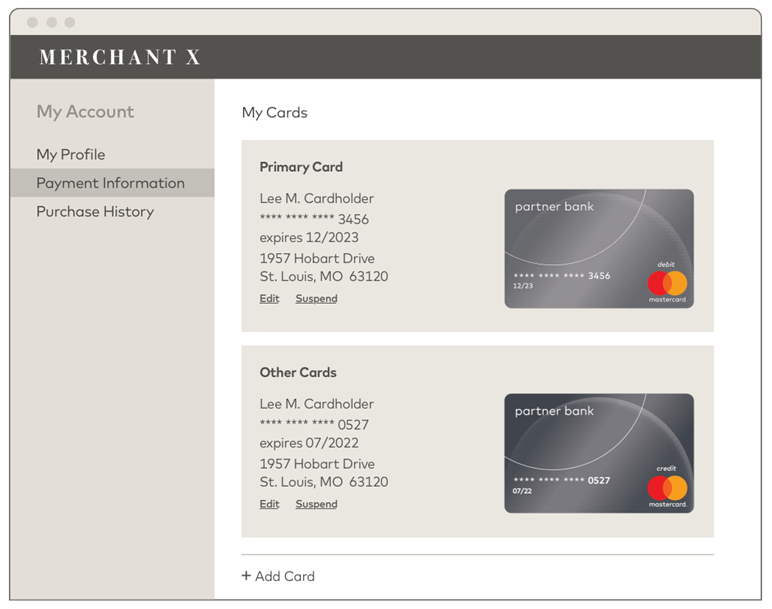
**Example Manage Cards Screen**
#### Displaying a List of Tokenized Account PANs Available for Payment {#displaying-a-list-of-tokenized-account-pans-available-for-payment}
**Technical Details:**
1. Fetch the stored state you maintain for each **tokenUniqueReference** associated with the consumer's profile, such as status, Account PAN expiry date, **accountPanSuffix** (last 4 digits of the consumer's Account PAN), and the **productConfig** object (customer service details, such as customer service link, email and phone number, and card art information) and **tokenDetails** (tokenNumber, expiryMonth, expiryYear, dataValidUntilTimestamp and PAR). This state is maintained by your code which responds to MDES Notify Token Updated requests.
2. If displaying card art, you can use the cached card art images you previously fetched from MDES using the **Get Asset** request. You can then display the composite image created from the brand logo, the issuer logo, a co-brand logo (if any) and the card background. Note:
* You cannot always rely on the presence of the composite image and will need to write code to create and display your own composite image if one is not available. See [Creating a Combined Image from Components](https://developer.mastercard.com/mdes-digital-enablement/documentation/use-cases/mdes-for-merchants-use-cases/index.md#creating-a-combined-image-from-components) for more details.
* Images may be received in either vector (PDF) or raster (PNG) format. If you choose to display card art, your code must be able to handle images in either format.
3. Repeat steps 1--2 for each token associated with the profile.
4. Display the consumer's card details using the information and assets gathered in steps 1--2. Refer to the Mastercard brand guidelines for detailed information regarding brand requirements. See the sections on 'Use at digital merchant locations' and 'Use in digital applications' at . The following table shows some options for mapping token status to display state.
| Status | Description | Example User Interface State -- Option A | Example User Interface State -- Option B |
|-------------|-------------------------------------------|----------------------------------------------------------------------|------------------------------------------|
| INACTIVE | Token has not yet been activated | Show card grayed out | Do not show last 4 digits of Account PAN |
| ACTIVE | Token is active and ready to transact | Show card as normal (it can only be used for payments in this state) | Show last 4 digits of Account PAN |
| SUSPENDED | Token is suspended and unable to transact | Show card grayed out | Do not show last 4 digits of Account PAN |
| DEACTIVATED | Token has been permanently deactivated | Show card grayed out | Do not show last 4 digits of Account PAN |
The tables below describe the combined image and the different components needed to create a combined image.
| productConfig Field | Description |
|-------------------------------|-----------------------------------------------------------------------------------------------------------------------------|
| brandLogoAssetId | The Mastercard or Maestro brand logo associated with this card |
| issuerLogoAssetId | The logo of the issuing bank |
| coBrandLogoAssetId | The co-brand logo (if any) for this product |
| cardBackgroundCombinedAssetId | The card image used to represent the digital card; this 'combined' option contains the brand, issuer and any co-brand logos |
| cardBackgroundAssetId | The card image used to represent the digital card; does not include the brand, issuer or co-brand logo |
| iconAssetId | The icon representing the primary brands associated with this product |
| foregroundColor | Color of foreground text overlayed on the card image, e.g. product type, such as Debit or Credit |
The images listed above are described in more detail below.
| Example Images | Description | Fieldname | Details |
|--------------------------------------------------------------------------------------------------------------------------------------------------------------------------------------------------|----------------------|-----------------------------|----------------------------------------------------------------------------------------------------------------------------------------------------------------------------------------------------------------------------------------------------------------------------------------------------------------------------------------------------|
|  | Composite Card Image | cardBackgroundCombinedAsset | Background image + Issuer logo + Brand logo + product type text (e.g. Debit, Credit). Height-to-width ratio should be 63%. |
|  | Card Icon | iconAsset | Icon to represent the card. Supplied as a PNG image. PDF is not supported for the Icon asset. Dimensions 100 x 100 px. |
|  | Brand Logo | brandLogoAsset | Mastercard or Maestro logo supplied as a PNG image in RGB color format or a PDF vector resource. **NOTE:** A black background has been added for illustration purposes only. The actual PNG images would be transparent (alpha channel) with no background. The alpha channel can be used for compositing the brand logo onto the Card Background. |
|  | Issuer Logo | issuerLogoAsset | **NOTE:** A gray background has been added for illustration purposes only. The actual image would be transparent (alpha channel) with no background. Supplied as a PNG image in RGB color format or a PDF vector resource. PNG images will contain an alpha channel for compositing onto the Card Background. |
|  | Background Image | cardBackgroundAsset | **NOTE:** In this example, just a solid color. Supplied as a PNG image in RGB color format or a PDF vector resource. Height-to-width ratio should be 63%. |
#### Creating a Combined Image from Components {#creating-a-combined-image-from-components}
To create a combined image
1. Scale the component images to fit within area C x D (co-brand and/or issuer logo area) or area E x D (brand logo area) shown in the diagram below. The combined image should have a width of 1536 pixels and a height of 969 pixels (a height-to-width ratio of 63%). Your code should be able to handle PDF or PNG images.
2. Using the alpha layer in the logo images, create a composite image by superimposing the logos over the background using the spacing described in the diagram below. Center the co-brand logo and/or issuer logo within the C x D area.
3. Optionally, superimpose text on the image such as the last 4 digits of the consumer's PAN, using the productConfig foregroundColor.
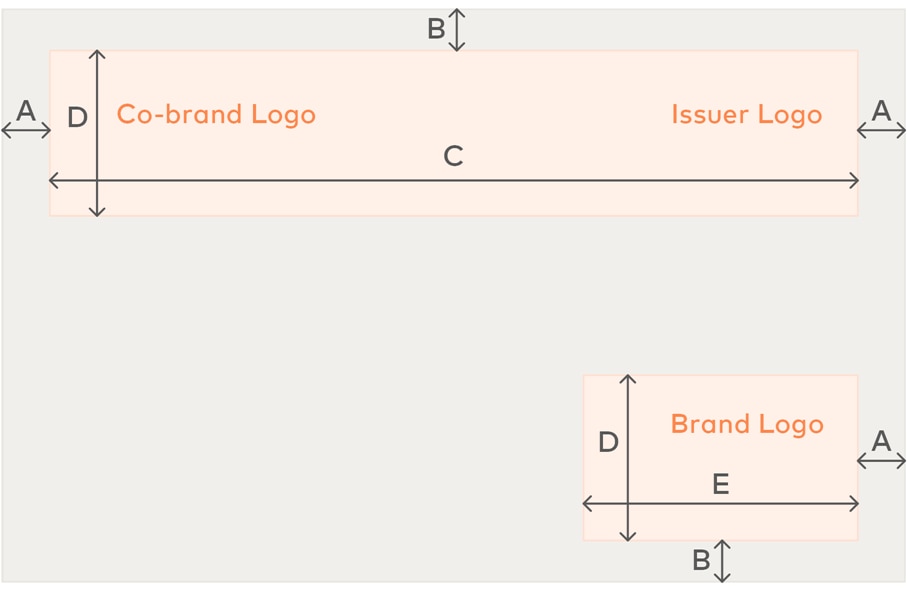
The table below shows the pixel dimensions for the measurements shown above.
| Dimension | Description | Value (in Pixels) |
|-----------|----------------------------------------|-------------------|
| A | Side Padding | 82 |
| B | Top / Bottom Padding | 57 |
| C | Co-brand and/or Issuer logo area width | 1372 |
| D | Height for the 2 logo areas | 283 |
| E | Brand logo width | 459 |
### Display Detailed Information About a Tokenized Account PAN {#display-detailed-information-about-a-tokenized-account-pan}
If the consumer needs to view detailed information about a specific Account PAN, Mastercard recommends you use the **Get Token** request because this fetches the most up-to-date token state from MDES. You should update any stored state you maintain for this **tokenUniqueReference** to ensure that your internal system state has not got out of sync with MDES due to network outages, etc. The **Get Token** request also returns Asset ID values for the different branding images associated with this card. If any new Asset ID values are returned, use the **Get Asset** request to fetch these new images for display.
**NOTE:** Assets retrieved through these requests may be cached in perpetuity. Any future updates to an asset will always result in a new Asset ID being issued. Mastercard strongly recommends you take advantage of caching to minimize **Get Asset** requests.
**NOTE:** If you set the **includeTokenDetail** request flag to true, you can also receive an additional encrypted object,
**tokenDetail,** containing the token (in the field tokenNumber)
## Making Payments {#making-payments}
### Consumer Checks Out or Makes a Payment {#consumer-checks-out-or-makes-a-payment}
This use case describes how a consumer can make payments using a tokenized Account PAN. For example, you could:
1. Allow the consumer to select their default payment card, choose another card, or pay with a new card added during checkout.
2. Make a **Transact** request using the reference for the token associated with the chosen card.
3. Receive a token and cryptogram in the response.
**NOTE:** Tokenize returns an active token and TUR. The TUR allows merchants to obtain a cryptogram (and token) via the Transact API to make payments.
1. Submit the token (instead of the Account PAN), cryptogram and token expiry date (returned in the Transact response: applicationExpiryDate) to your acquirer or payment processor for payment authorization. The acquirer or payment processor must support DSRP transactions. For subsequent recurring or partial shipment transactions, the cryptogram and expiry date should not be sent. Consult your acquirer or payment processor for details.
2. When you receive a payment authorization response from your acquirer or payment processor, display the relevant success or failure message to the consumer.
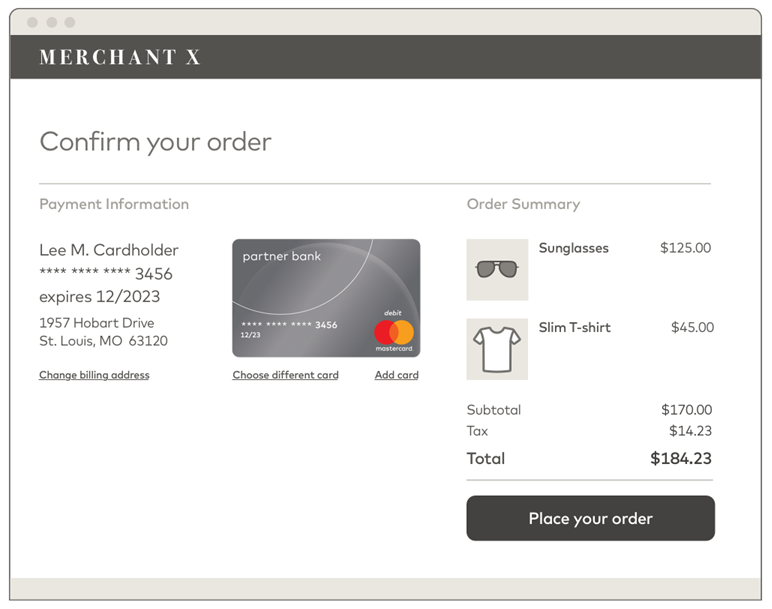
**Example Checkout Screen**
**Technical Details:**
1. Fetch the **tokenUniqueReference** associated with the consumer's profile for the consumer's chosen Account PAN via the Tokenize response. You should have already received confirmation, via a Notify Token Updated notification, that the token has been activated.
2. Make a **Transact** request with the **tokenUniqueReference** from step 1 and a unique requestId. **dsrpType** must be set to UCAF. Optionally, provide a 4-byte hex-encoded value in string format for the **unpredictableNumber** parameter (you must use a cryptographically-secure random number generator, such as an HSM). Note: Tokenize returns an active token and TUR. The TUR allows merchants to obtain a cryptogram (and token) via the Transact API to make payments.
3. Receive a response with an encrypted payload. Decrypt the response to extract the token (**encryptedPayload.encryptedData.accountNumber** ) and the cryptogram contained in **encryptedPayload.encryptedData.de48se43Data**.
4. Submit payment authorization requests, containing the token and cryptogram (from step 3), and token expiry date (returned in the Transact response: applicationExpiryDate) to your acquirer or payment processor for payment authorization. For subsequent recurring or partial shipment transactions, the cryptogram should not be sent. Consult your acquirer or payment processor for details.
Note: The acquirer used directly or through a payment processor to process these transactions must accept DSRP card-on-file tokens and e-commerce Security Level Indicator (SLI) values of 246 for standard payments and 247 for recurring/partial shipment payments. **DSRP cryptogram is required to be sent in the DE104 -- Digital Payment Data (DPD) field - please refer to AN3363 bulletin for more details.** Diagram making-a-payment
**API Flow for Making a Payment**
#### Recurring Payments {#recurring-payments}
To allow a consumer to make repeated (recurring) or partial shipment payments, you should omit the cryptogram from subsequent authorization requests to your acquirer or payment processor. However, you must ensure that the original payment is made with a cryptogram. Mastercard will check that appropriate data is passed by acquirers and/or payment processors to ensure tokens are restricted to MDES for merchants program usage only.
**NOTE:** Acquirers must use an e-commerce SLI value of 247 for recurring/partial shipments.
#### Storing Cryptograms {#storing-cryptograms}
There are several requirements for storing cryptograms:
* It is recommended to use the cryptograms generated for a particular token in the order they are obtained.
* Mastercard recommends storing one encrypted cryptogram per token.
* Stored cryptograms must be considered sensitive information and stored in an encrypted format using strong cryptography as defined by the PCI SSC. If tokens and cryptograms are stored in the same environment, they should be protected under the requirements of PCI DSS, because storing both items together presents similar risks to storing an Account PAN.
Note: Starting March 1, 2025, cryptograms may expire 5 days after they are generated from the Transact API. See [AN 6302](https://techdocs.mastercard.com/bundle/m_AN6302/page/tqi1649380838881.html) for details.
## Customer Service {#customer-service}
### Consumer Contacts Your Website's Customer Service Helpline {#consumer-contacts-your-websites-customer-service-helpline}
This use case describes how a consumer can provide their Account PAN as an additional form of identity verification for various customer service tasks.
#### Search by Full Account PAN {#search-by-full-account-pan}
MDES provides a mechanism to return a list of all tokens created for a given Account PAN as well as the status of each token. You can use the returned token information to cross reference against all the consumer profiles stored by your system to locate the relevant profile. This technique can be used as an additional identity verification step for a consumer.
**Technical Details:**
1. The consumer contacts your customer service team and provides their Account PAN. An example scenario would be that the consumer is locked out of their profile and cannot access their email to do a password reset.
2. Your customer service representative requests additional information from the consumer, such as their full name.
3. Make a **Search Tokens** request using the full Account PAN. This request only accepts an Account PAN and, optionally, an expiry date. All other **fundingAccountInfo** parameters are unsupported. The request is constructed in a similar way to a Tokenize request.
4. Receive a response containing a list of token objects that match to the Account PAN. For each object, the response contains a tokenUniqueReference value, the token status (INACTIVE, ACTIVE, SUSPENDED or DEACTIVATED), and the date and time that the token changed to the latest status (statusTimestamp). Suspended tokens have an additional field, suspendedBy, which identifies who suspended the token: either ISSUER (card issuer) or TOKEN_REQUESTOR (you). Consumer-initiated suspension is not applicable to this program.
5. Cross reference the **tokenUniqueReference** values with those associated with your consumer profiles to locate the relevant consumer.
6. Verify the consumer's identity using the information from MDES, the profile data in your system, and the information provided in step 2.
7. Additionally, you can make a Get Token request with the **tokenUniqueReference** to fetch further card details, such as card expiry date, to match against the information provided by the consumer.
Diagram customer-service-account-PAN-lookup
**API Flow for Customer Service Account PAN Lookup**