# Masterpass Checkout iOS SDK - v2.6
source: https://developer.mastercard.com/masterpass-merchant-integration-v7/documentation/previous-releases/masterpass-checkout-ios-sdk-v26/index.md
This page contains details of the latest version of the Masterpass Checkout iOS SDK, version 2.6
## Overview {#overview}
The Masterpass Checkout iOS SDK is designed to enable you to add Masterpass checkout services into your native iOS apps quickly and easily.
You can integrate Masterpass for the "Standard Checkout" and "Express Checkout" flows, and can use the Masterpass Button or Payment method selection:
* **Standard Checkout** : With Standard Checkout, your checkout screen will contain the Masterpass button, which when tapped will redirect the consumer to the Masterpass checkout experience. The checkout experience can be entirely within the app (in supported countries) called the[merchant embedded experience](https://developer.mastercard.com/masterpass-merchant-integration-v7/documentation/merchant-embedded-native-experience/index.md), or via the web.
* **Payment Method**: The payment method flow is similar to the Standard Checkout flow, except that the consumer selects a payment method from a list before launching the Masterpass checkout experience from a standard UI element rather than an explicit Masterpass button.
* **Express Checkout**: With Express Checkout, consumers have the option to pair their payment details / wallets with you so that future checkouts are more seamless.
The steps needed to implement each of these are described below.
**Note: Express Checkout is not supported in the US, Canada and India. Please contact your regional representative for more information.**
## Onboarding {#onboarding}
To integrate with the SDK, you must provide:
* A custom URL Scheme for the Standard Checkout app-to-web communication allowing a callback that deep links into your app (see the Apple developer information on [URL Schemes](https://developer.apple.com/library/content/documentation/iPhone/Conceptual/iPhoneOSProgrammingGuide/Inter-AppCommunication/Inter-AppCommunication.html#//apple_ref/doc/uid/TP40007072-CH6-SW1)) e.g. **mymerchantapp://**
This name must match the value in Url Types \[0\] \> Url Schemes \[0\] in the Info.plist file in your app.
* Merchant-specific CHECKOUTID and CARTID during Standard Checkout.
* Merchant-specific CHECKOUTID and USERID during Express Checkout.
To allow the Masterpass web checkout experience to return control to the app, add a callback URL to your Masterpass project on Mastercard Developers under Checkout Credentials.
***Note*** : During the Masterpass [merchant onboarding process](https://developer.mastercard.com/masterpass-merchant-onboarding/documentation/) , the merchant developer must configure the Checkout Credentials on Mastercard Developers with the related **CHECKOUTID** and **Callback URL** so that the callback method (from Masterpass site to merchant app) can be triggered correctly. Wnsure you have set up a custom URL scheme for deep linking into your app, as described above, and selected "iOS" as the channel for the checkout ID.
In addition, note that before being enabled for Express Checkout, merchants must pass the Masterpass security vetting specifications. The following steps outline the way in which Express Checkout should work:
1. The merchant must have a reliable method for identifying the consumer, preferably with login.
2. The consumer must log in to their merchant account and pair it with their Masterpass wallet account. This allows Masterpass to share the consumer's wallet data with the merchant during checkout.
3. The merchant requests a masked copy of the wallet data (known as precheckout data) from Masterpass to display on their site or app.
4. The consumer makes their payment and shipping selections on the merchant interface and clicks the Masterpass Button to confirm the order.
5. The merchant (or their Payment Service Provider) receives the full, unmasked payment details from the Masterpass wallet and uses that information to process the order.
## SDK download {#sdk-download}
The SDK is available for download from here:
| Zip file | Contents |
|---------------------------------------------------------------------------------------------------------------------------------------------------------------------------|----------------------------------------------------------------------------------------------------------------------|
| [masterpass-merchant-io-sdk-v2.6.1.zip](https://static.developer.mastercard.com/content/masterpass-merchant-integration-v7/uploads/masterpass-merchant-io-sdk-v2.6.1.zip) | Contains SDK, Docs and Sample app (code and executable). See below for full details Last updated: September 3rd 2018 |
The contest of the zip file are as follows:
| Folder | Description |
|------------------|----------------------------------------------------------------------------------------------------------------------------------------------------------------------------------------------------------------------------------------------------------------------------------------------------------------------------------|
| Docs | Contains appledoc and markdown documentation in docs-R4.1_261.zip |
| SampleSourceCode | MerchantCheckoutApp Source code (Xcode project) for sample app - updated for 2.6.1 (This sample project has additional dependencies - a dependency file for Carthage is provided - see Dependency.md and Cartfile in the project). |
| SampleTestApp | - MerchantCheckoutApp_Production.ipa- MerchantCheckoutApp_Sandbox.ipa |
| SDKs | - MCCMerchant.framework_Production_v261.zip - Merchant framework files - project files, storyboard files (nibs), header files, assets, production access keys, etc.- MCCMerchant.framework_Sandbox_v261.zip - Merchant framework files - project files, storyboard files (nibs), header files, assets, sandbox access keys, etc. |
You will also need to download the following static libraries from version 5.4.1 of the [card.io SDK for iOS](https://github.com/card-io/card.io-iOS-SDK) from GitHub and add them to your project:
* libcardio.a
* libopencv_core.a
* libopencv_imgproc.a
## What's new in this release? {#whats-new-in-this-release}
* PIN authentication is now enabled for Indian consumers.
* AFA Relaxation - 3D Secure checks can be relaxed for purchases under 2000 Rupees in certain cases.
* The Merchant embedded native experience is now enabled in the following additional countries / locales: French Canadian, India, Thailand.
* The code samples on this page have been updated.
* Consumers no longer need to opt-in for biometrics. Masterpass will now automatically enroll consumers for this feature if a merchant has enabled biometrics.
### Previous releases {#previous-releases}
For details of the previous supported releases, see:
* [Masterpass Checkout iOS SDK v2.5](https://developer.mastercard.com/masterpass-merchant-integration-v7/documentation/previous-releases/masterpass-checkout-ios-sdk-v25/index.md)
* [Masterpass Checkout iOS SDK v2.4](https://developer.mastercard.com/masterpass-merchant-integration-v7/documentation/previous-releases/masterpass-checkout-ios-sdk-v24/index.md)
* [Masterpass Checkout iOS SDK v2.0](https://developer.mastercard.com/masterpass-merchant-integration-v7/documentation/previous-releases/masterpass-checkout-ios-sdk-v2/index.md)
## Migration notes {#migration-notes}
There are no migration notes for this release.
**Note**: If migrating from an earlier version, refer to the migration notes for all intervening releases at the links above.
## Integration {#integration}
This integration tutorial goes through the typical steps involved to demonstrate how you can add Masterpass to your iOS merchant app (the code samples have been tested in Xcode 9.2 with version 2.6.2 of the Masterpass iOS SDK).
### 1. Add the SDK to your application {#1-add-the-sdk-to-your-application}
In your Xcode project, select your target and add **MCCMerchant.framework** to:
* General tab: **Linked Frameworks and Libraries** and **Embedded Binaries**
* Build Phases tab:**Link Binary with Libraries**
You can drag the framework file into each area or use the + buttons, as shown below.
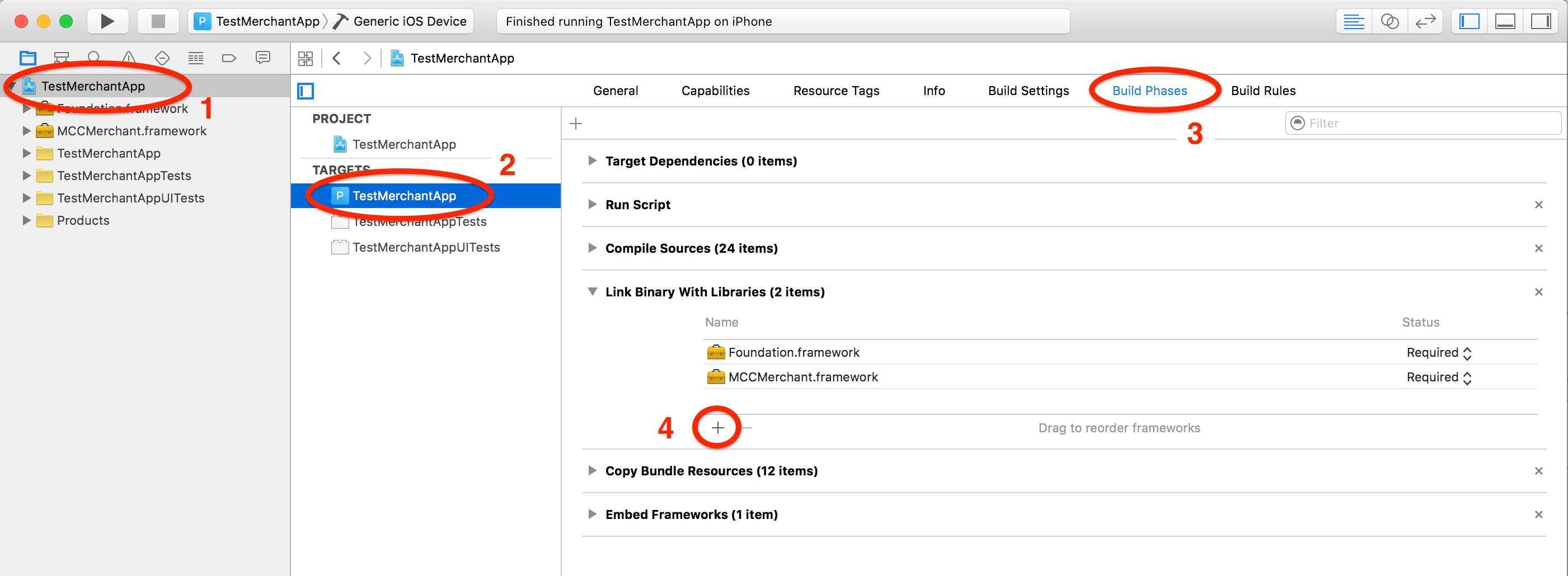
Xcode automatically adds the framework to **Embed Frameworks** , in the Build Phases tab. Ensure that **Code Sign On Copy** is checked for the framework.
### 2. Initialize the SDK {#2-initialize-the-sdk}
To initialize the SDK, you must provide an **MCCConfiguration** object to the SDK initializing class method, which returns a singleton instance of the SDK. Note that while **merchantName, merchantUserId** and **locale** are required for the SDK, all the other properties are optional.
**Sample initialization code (swift 4.0)**
* Swift
```Swift
// Create SDK configuration object
let configuration: MCCConfiguration = MCCConfiguration()
configuration.merchantName = "Principle" //place merchantName here
configuration.merchantUserId = "1234" //place unique id of user here
configuration.locale = NSLocale.current
// Start SDK initialization
MCCMerchant.initializeSDK( with: configuration) { (status:[AnyHashable : Any], error: Error?) -> Void in
let statusDictionary = status as? [String:AnyObject]
let statusCode: Int = (statusDictionary?[kInitializeStateKey]?.intValue)!
switch (MCCInitializationState(rawValue: statusCode)!) {
case .started:
//Started
//Here you can perform other custom UI tasks like showing an activity indicator.
break
case .completed:
//Complete
//Here you can hide the activity indicator and add call the getMPButton or create your own button
//self.masterPassButton = self.getMasterPassButton()
break
case .fail:
//Error
//On error, reset any custom UI / animations (e.g. hide the activity indicator) and if the MPButton was previously shown, hide it.
//Inform the user an error has occurred.
//if (self.masterPassButton != nil) {
// self.masterPassButton?.removeFromSuperview()
//}
break
}
}
```
The MCCConfiguration class defines the settings you wish to configure the SDK with, such as the locale, etc.
| **Parameter** | **Description** |
|------------------------|-------------------------------------------------------------------------------------------------------------------------------------------------------------------------------------------------------------------|
| locale | The application locale. Note that this is used by the SDK when deciding whether to use the native checkout experience or the web checkout experience (as initially not all regions will support native checkout). |
| merchantName | Merchant name to be used in checkout UI. |
| merchantUserId | Unique id for user. This will be used for express checkout pairing. |
| expressCheckoutEnabled | Boolean flag specifying whether the app is enabled for express checkout. |
### 3.Implement Standard Checkout {#3implement-standard-checkout}
To start the Standard Checkout process, there is typically a checkout view controller subclass (such as a table view) that shows the items being purchased and other transaction details. Add the Masterpass Button to this checkout view.
#### 3a. Set up your Checkout View Controller with MCCMasterpassButton {#3a-set-up-your-checkout-view-controller-with-mccmasterpassbutton}
To display the Masterpass Button use the **getMasterPassButton** method within the **MCCMerchant** class (this method will create an **MCCMasterpassButton** object if the library is initialized, otherwise it returns nil).
* Swift
```Swift
//Checkout UI Page
class CheckOutVC: UIViewController {
var masterPassButton : MCCMasterpassButton?
self.masterPassButton = self.getMasterPassButton()
// Other custom implementation for your view controller ...
}
```
#### 3b. Display the Masterpass Button {#3b-display-the-masterpass-button}
To display the Masterpass Button, the **getMasterPassButton()** function wraps the call to the SDK.
* Swift
```Swift
// MARK: Buy with Masterpass button
func getMasterPassButton() -> MCCMasterpassButton? {
let masterpassButton = MCCMerchant.getMasterPassButton(self)
return masterpassButton
}
```
#### 3c. Declare merchant delegate {#3c-declare-merchant-delegate}
Add the **MCCMerchantDelegate** object to your checkout class (MerchantCheckoutManager) declaration line:
* Swift
```Swift
class MerchantCheckoutManager:NSObject, MCCMerchantDelegate {
//Checkout Logic ...
}
```
#### 3d. Implement the merchant delegate method {#3d-implement-the-merchant-delegate-method}
Add the delegate method, providing the **CHECKOUTID** and **CARTID** variables for your merchant app.
* Swift
```Swift
//MerchantCheckoutManager.swift
// MARK: Build up your checkout request here
func didGetCheckoutRequest(_ completionBlock: ((MCCCheckoutRequest) -> Bool)? = nil) {
let transactionRequest = MCCCheckoutRequest()
//check merchant on-boarding process for checkoutId & cartID
transactionRequest.checkoutId = {ADD_YOUR_CHECKOUTID}
transactionRequest.cartId = {ADD_YOUR_CARTID}
//amount and currency
let total = NSDecimalNumber(string:"75")
let amount:MCCAmount = MCCAmount()
amount.total = total
amount.currencyCode = "USD"
transactionRequest.amount = amount
//network type
var allowedNetworkTypesSet = Set()
allowedNetworkTypesSet.insert(MCCCardType(type: MCCCard.MASTER)!);
transactionRequest.allowedCardTypes = allowedNetworkTypesSet
//shipping required
transactionRequest.isShippingRequired = true
_ = completionBlock!(transactionRequest)
}
// MARK: delegate method to handle the checkout error
func didReceiveCheckoutError(_ error: Error) {
let errorObject = error as NSError
if (errorObject.code == MCCMerchantErrorCode.MCCTransactionError.rawValue) {
//Do something with Transaction error
} else {
//Do something with error
}
}
//MARK: delegate method to handle the checkout response
func didFinishCheckout(_ checkoutResponse: MCCCheckoutResponse) {
let checkoutType : MCCResponseType = checkoutResponse.responseType
if (checkoutType == .appCheckout) {
//embedded checkout experience
} else if (checkoutType == .webCheckout) {
//web checkout
}
}
```
#### 3e. Perform Standard Checkout {#3e-perform-standard-checkout}
Clicking the Masterpass button will trigger the merchant embedded checkout experience, or alternatively trigger the Safari to web checkout experience (depending on whether the embedded experience is supported in the locale in which the app is running - the SDK will communicate with the Masterpass server concerned behind the scenes and initiate the appropriate flow / experience).
To build the checkout request details create an MCCCheckoutRequest object and set the checkoutId, cartId, amount, allowsCardTypes, cryptogramType, and isShippingRequired properties as required in the didGetCheckoutRequest function within the MCCMerchantDelegate (see the merchant delegate code sample above).
#### 3f. Transaction completion {#3f-transaction-completion}
##### 3f.I. Configure CustomURL Scheme callback (web checkout) {#3fi-configure-customurl-scheme-callback-web-checkout}
When the wallet returns the transaction response data (payment information), the merchant app will be brought to the foreground. Web checkout will use the merchant custom URL Scheme but the merchant embedded experience will not. This event needs to be handled in the **application:open url:sourceApplication** of the app delegate for the merchant app by invoking the **handleMasterpassResponse** method of the SDK.
* Swift
```Swift
//AppDelegate.swift
func application(_ application: UIApplication, open url: URL, sourceApplication: String?, annotation: Any) -> Bool {
return MCCMerchant.handleMasterpassResponse(url.absoluteString, delegate: self)
}
```
**Note** : The URL callback method uses the **CHECKOUTID** and **URL Scheme** configured in the Masterpass Merchant Portal during onboarding. As shown in section 3d, the **didFinishCheckout** delegate method will be triggered when the correct response is generated. You need to handle the response correctly inside this delegate method.
##### 3f .II. Transaction completion delegate method {#3f-ii-transaction-completion-delegate-method}
As shown in the example in 3d, your didFinishCheckoutDelegate method needs to handle the response appropriately:
* Swift
```Swift
//MARK: delegate method to handle the checkout response here
func didFinishCheckout(_ checkoutResponse: MCCCheckoutResponse) {
let checkoutType : MCCResponseType = checkoutResponse.responseType
if (checkoutType == .appCheckout) {
//embedded checkout experience
} else if (checkoutType == .webCheckout) {
//web checkout
}
}
```
### 4. Implement Express Checkout {#4-implement-express-checkout}
To enable the Express Checkout experience, the SDK is used to retrieve the **pairingTransactionId** with class method **pairingwithCheckout(isCheckout, merchantDelegate)** provided. The delegate methods need to be slightly altered based on the request.
#### 4a. Set up button with API {#4a-set-up-button-with-api}
The **pairingWithCheckoutClicked** function wraps the call to the Express Checkout API.
***Setup button with API***
* Swift
```Swift
@IBAction func pairingWithCheckoutClicked(_ sender: Any) {
//MARK: trigger pairing with/without checkout
MCCMerchant.pairing(withCheckout: _isCheckout, merchantDelegate: MerchantCheckoutManager.sharedInstance)
}
```
#### 4b. Pairing with or without checkout {#4b-pairing-with-or-without-checkout}
Add the delegate method, providing the **CHECKOUTID** variable.
The following example code shows the additional changes needed:
***Pairing with or without checkout***
* Swift
```Swift
//MerchantCheckoutManager.swift
// MARK: Build up your checkout request here
func didGetCheckoutRequest(_ completionBlock: ((MCCCheckoutRequest) -> Bool)?) {
let transactionRequest = MCCCheckoutRequest()
if (self.isPairingOnly) {
//Pairing only request needs checkoutID
transactionRequest.checkoutId = {ADD_YOUR_CHECKOUTID}
_ = completionBlock!(transactionRequest)
return
}
//... follow the same logic as web checkout
_ = completionBlock!(transactionRequest)
}
//MARK: delegate method to handle the checkout response here
func didFinishCheckout(_ checkoutResponse: MCCCheckoutResponse) {
let checkoutType : MCCResponseType = checkoutResponse.responseType
if (checkoutType == .webCheckout) {
//analyze response
} else if (checkoutType == .pairingWithCheckout) {
//add pairing response
if (checkoutResponse.pairingTransactionID != nil) {
//retrieve pairingTransactionID
}
}
}
```
#### 4c. Complete the implementation {#4c-complete-the-implementation}
You can read more about [Express Checkout](https://developer.mastercard.com/documentation/masterpass-merchant-integration-v7#express-checkout) in the main [Masterpass Merchant Integration](https://developer.mastercard.com/documentation/masterpass-merchant-integration-v7) page.
### 5. Implement Payment Method Checkout {#5-implement-payment-method-checkout}
Payment method checkout is similar to standard checkout but differs in that the payment method must first be set up before it can later be invoked. This allows a more consistent UI for those merchants who wish to allow consumers to select their preferred payment method prior to invoking payment via a generic UI element (rather than having to provide the Masterpass Button to invoke payment via Masterpass and another UI element to invoke payment via other services). Note that the UI providing the choice to the consumer must follow the Masterpass branding guidelines.
#### 5a. Set up payment method {#5a-set-up-payment-method}
To set up a payment method, first call the add masterpass payment method API to retrieve the payment method object. It is the merchant's responsibility to save this MCCPaymentMethod object which will be used when payment method checkout being called. Also don't forget to declare your merchant delegate (as shown for Standard Checkout in step 3c).
* Swift
```Swift
func addMasterpassPaymentMethod() {
//set the delegate
MCCMerchant.addMasterpassPaymentMethod(self) {(paymentMethod: MCCPaymentMethod? ,error: Error?) -> (Void) in
if (error != nil) {
//error
} else {
if (paymentMethod != nil) {
//store paymentMethod
let archivedData = NSKeyedArchiver.archivedData(withRootObject: paymentMethod!)
UserDefaults.standard.set(archivedData, forKey: "userAddedPaymentMethod")
//store pairingTransactionId for express checkout if paired during payment method set up
UserDefaults.standard.set(paymentMethod!.pairingTransactionID, forKey: "pairingTransactionID")
}
}
}
}
```
Next, implement a delegate method to provide necessary information used during payment method setup:
* Swift
```Swift
func didGetAddPaymentMethodRequest(_ completionBlock: ((Set,String) -> Void)?) {
//provide network type
var allowedNetworkTypesSet = Set()
allowedNetworkTypesSet.insert(MCCCardType(type: MCCCard.MASTER)!);
//provide checkout id
var checkoutId = {ADD_YOUR_CHECKOUTID}
completionBlock!(allowedNetworkTypesSet, checkoutId)
}
```
Now payment method set up should be ready, a MCCPaymentMethod object will be returned once the consumer successfully set up the payment method via our SDK.
#### 5b. Check out with payment method {#5b-check-out-with-payment-method}
To checkout with payment method, call the payment method checkout API provided:
* Swift
```Swift
func doCheckoutWithPaymentMethod () {
//set the delegate
MCCMerchant.paymentMethodCheckout(self)
}
```
Two delegate methods need to be implemented before payment method checkout: one to load the payment method you want to check out with and the other to provide the checkout request (like standard checkout 3d).
* Swift
```Swift
func loadPaymentMethod() -> MCCPaymentMethod {
if let data = UserDefaults.standard.data(forKey: "userAddedPaymentMethods") {
let storePaymentMethods = (NSKeyedUnarchiver.unarchiveObject(with: data) as? [MCCPaymentMethod])!
//return cached MCCPaymentMethod object
return storePaymentMethod[0]
}else{
//error
}
//return a new instance if not cached
return MCCPaymentMethod()
}
func didGetCheckoutRequest(_ completionBlock: ((MCCCheckoutRequest) -> Bool)?) {
//build up the checkout request just like standard checkout
completionBlock!(self.checkoutRequest())
}
```
#### 5c. Transaction completion {#5c-transaction-completion}
Follow standard checkout transaction completion instruction 3f above to finish the transaction completion part.
## Appendix {#appendix}
### MCCCheckoutRequest object details {#mcccheckoutrequest-object-details}
The following table lists the field details for the MasterpassCheckoutRequest object.
This represents the details required by a single Masterpass transaction.
| Field | Description |
|----------------------------------------|------------------------------------------------------------------------------------------------------------------------------------------------------------------------------------------------------------------------------------------------------------------------------------------------------------------------------------------------------------------------------------------------------|
| MCCCheckoutRequest | |
| MCCCheckoutRequest.amount | Contains the amount of the transaction and the currency code. **Data Type:** MCCAmount object **Required:** Yes |
| MCCCheckoutRequest.checkoutId | An ID provided to a merchant partner during onboarding. **Data Type:** NSString **Required:** Yes |
| MCCCheckoutRequest.cartId | An ID provided by a merchant partner to Masterpass to indicate a unique transaction. **Data Type:** NSString **Required:** Yes |
| MCCCheckoutRequest.allowedCardTypes | This property constrains the merchant supported payment network types that the user can select for transaction being performed. MasterCard, Visa etc... **Data Type:** Set of MCCCardType (NS_ENUM, one of: MCCCardMASTER, MCCCardVISA, MCCCardAMEX, MCCCardDISCOVER, MCCCardDINERS) **Required:** Yes |
| MCCCheckoutRequest.shippingProfileId | Constrains the locations that the merchant can ship the product. If null, 'default' profile id will be used **Data Type:** NSString **Required:** No |
| MCCCheckoutRequest.isShippingRequired | Indicates if this transaction requires Shipping or not. If false, the wallet will not display any shipping addresses for the user to select. **Data Type:** BOOL **Required:** No |
| MCCCheckoutRequest.cryptogramType | Contains the parameters to indicate the support of tokenized card details **Data Type:** MCCCryptogram **Required:** No |
| MCCCheckoutRequest.userId | An ID provided by a merchant to Masterpass for express checkout pairing purpose. **Data Type:** NSString **Required:** No |
| MCCCheckoutRequest.merchantLocale | The locale supported by the merchant. **Data Type:** String **Required:** No |
| MCCCheckoutRequest.suppress3DS | Used to describe the state of 3DS required. **Data Type:** BOOL **Required:** No |
| MCCCheckoutRequest.unpredictableNumber | Random number that can be generated by the merchant for use generating the DSRP cryptogram - this is the recommended option. If no unpredictable number is passed, Mastercard will generate an unpredictableNumber for the transaction. **Data Type:** NSString **Required:** No |
| MCCCheckoutRequest.extentionPoint | Reserved for future use. This property is currently not used but is provided as a mechanism to enable additional optional data to be passed by the application in future without requiring a new major version of the SDK or web API service. Any such extensions will be optional, and any unknown elements in the data will be ignored by Masterpass. **Data Type:** NSDictionary **Required:** No |
| MCCCheckoutRequest.merchantName | The property used to describe the merchant name. DEPRECATED - as of v2.4.1 this property is deprecated and should not be used. The merchant name should instead be defined in the MCCConfiguration class. **Data Type:** NSString **Required:** No |
| | |
| MCCAmount | |
| MCCAmount.total | Total to be used for transaction. The value may have precision up to 2 decimal places. For example, 12.55 is a valid amount (representing $12.55 if USD is the currency), while 12.456 will not be considered as valid total. **Data Type:** NSDecimalNumber **Required:** Yes |
| MCCAmount.currencyCode | A string representing currency code in which the amount is being charged. The value should be following ISO 4217 standard. **Data Type:** NSString **Required:** Yes |
| | |
| MCCCryptogram | |
| MCCCryptogram.cryptogramType | Contains the parameters to indicate the support of tokenized Mastercard or Visa card details. **Data Type:** MCCCryptogramType object (NS_ENUM, one of: MCCCryptogramICC, MCCCryptogramUCAF, MCCCryptogramUCAFAndICC, MCCCryptogramNone) **Required:** Yes |
| MCCCryptogram.cryptogramIdentifier | Cryptogram id. **Data Type:** NSString **Required:** Yes |
For more information about tokenization, see the [Masterpass DSRP and Tokenization](https://developer.mastercard.com/masterpass-merchant-onboarding/documentation/masterpass-dsrp-and-tokenization/) guide.
### Error code details {#error-code-details}
| Error | Description |
|-----------------------------------------|----------------------------------------------------------------|
| MCCMerchantSDKInitializationErrorDomain | The domain for errors originating from SDK initialization. |
| MCCMerchantErrorDomain | The domain for errors originating from transaction processing. |
| MCCMerchantErrorDomain | The domain for errors originating from Exception. |