# Mastercom API Client Generation Tutorial
source: https://developer.mastercard.com/mastercom/documentation/tutorials-and-guides/sdk-tutorial/index.md
## Overview {#overview}
This tutorial describes how to create a simple Java program to make an API call to the Mastercom Sandbox environment.
The program creates a customizable Java API client from the Mastercom API specification and lets Mastercard's Java open-source client library handle the authentication for you.
Alert: Mastercom API does not support SDK and customers have to create their own API Client from the Mastercom OpenAPI specification.
>
> #### What you will learn {#what-you-will-learn}
>
> * How to create a Java (Maven) project
> * How to add proper resources
> * How to add proper dependencies
> * How to generate the API client
> * How to make an API call
## Before you start {#before-you-start}
Before starting this tutorial, ensure that you have:
* Maven 3+
* JDK 1.8.0+
* IntelliJ IDEA 2017+ (any other IDE can be used)
* A developer account on [Mastercard Developers](https://developer.mastercard.com/account/log-in) and a Mastercom API project.
Tip: For instructions on how to create a developer account and API project, refer to the [Quick Start Guide](https://developer.mastercard.com/mastercom/documentation/quick-start-guide/index.md).
* The [Mastercom OpenAPI Specification](https://developer.mastercard.com/mastercom/documentation/api-reference/v6-reference/index.md).
## Step 1: Create a new Maven project {#step-1-create-a-new-maven-project}
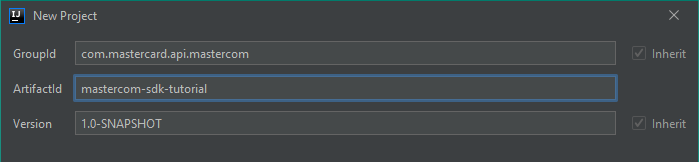
In IntelliJ IDEA, create a new Maven project, which sets up your directory structure automatically. Provide "mastercom-sdk-tutorial" as the ArtifactId and Project name.


## Step 2: Add resources {#step-2-add-resources}
### 1. Download the Mastercom OpenAPI specification: {#1-download-the-mastercom-openapi-specification}
[mastercom-v6.yaml](https://static.developer.mastercard.com/content/mastercom/swagger/mastercom-v6.yaml) (308KB)
Add it to your Maven project's **resources** folder.
Tip: Review [Generating and Configuring a Mastercard API Client](https://developer.mastercard.com/platform/documentation/getting-started-with-mastercard-apis/generating-and-configuring-a-mastercard-api-client/).
### 2. Add the Sandbox Signing Key (.p12) generated for your Mastercom project to your Maven project's resources folder. {#2-add-the-sandbox-signing-key-p12-generated-for-your-mastercom-project-to-your-maven-projects-resources-folder}
The steps to create the project and generate the Sandbox Signing Key are described in the [Quick Start Guide](https://developer.mastercard.com/mastercom/documentation/quick-start-guide/index.md).
Detailed information on the Signing Keys can be found [here](https://developer.mastercard.com/platform/documentation/authentication/using-oauth-1a-to-access-mastercard-apis/).
Tip: Review information regarding consumer keys and [Credential Management](https://developer.mastercard.com/platform/documentation/credential-management/).
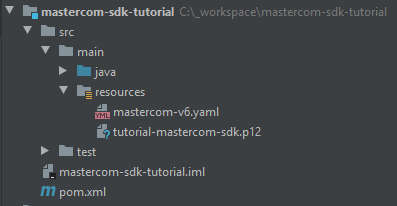
Your Maven project directory should look as follows (the .iml file is used by IntelliJ IDEA):
## Step 3: Update the pom.xml file {#step-3-update-the-pomxml-file}
* Add the following plugin to your Maven project's **pom.xml** file to add the OpenAPI Generator to your project.
OpenAPI Generator generates API client libraries from [OpenAPI Specifications](https://github.com/OAI/OpenAPI-Specification) (formerly known as Swagger Files). OpenAPI Generator provides multiple generators and library templates to support multiple languages and frameworks. In this tutorial, we are using the *java* generator and the default *okhttp-gson* library template.
```xml
org.openapitools
openapi-generator-maven-plugin
5.0.1
Mastercom API REST Client
generate
${project.basedir}/src/main/resources/mastercom-v6.yaml
java
src/gen/java/
com.mastercard.api.mastercom.api
com.mastercard.api.mastercom
mastercom-v6
com.mastercard.api.mastercom.model
```
* Add the following dependencies for the API client library generation and the Mastercard OAuth1 Signer library to your **pom.xml** file.
Mastercard APIs use OAuth 1.0a authentication. OAuth1 Signer libraries are developed and maintained by the Mastercard API team and hosted [here](https://github.com/Mastercard?utf8=%E2%9C%93&q=oauth1-signer&type=&language=) on GitHub.
They include code helpers targeting the HTTP clients used by the different OpenAPI Generator library templates.
More information on how to use OAuth 1.0a to access Mastercard APIs can be found [here](https://developer.mastercard.com/platform/documentation/security-and-authentication/using-oauth-1a-to-access-mastercard-apis/).
```xml
1.8
${java.version}
${java.version}
UTF-8
1.5.1
4.9.1
2.8.6
1.8.5
1.6.2
1.5.0
4.13.2
3.0.2
com.squareup.okhttp3
okhttp
${okhttp-version}
com.squareup.okhttp3
logging-interceptor
${okhttp-version}
com.google.code.gson
gson
${gson-version}
io.gsonfire
gson-fire
${gson-fire-version}
io.swagger
swagger-annotations
${swagger-core-version}
org.threeten
threetenbp
${threetenbp-version}
com.google.code.findbugs
jsr305
${jsr305-version}
com.mastercard.developer
oauth1-signer
${oauth1-signer-version}
junit
junit
${junit-version}
```
When using OpenAPI Generator to generate the API client library, there are two options:
1. Generate and use the source files on the fly.
2. Generate and deploy the source files to a Maven repository.
In this tutorial, we are generating the API client library on the fly, so we include the dependencies that are needed to generate the library. If you were deploying the source files to a Maven repository, you would only need to include the dependency for that repository.
## Step 4: Generate the API client {#step-4-generate-the-api-client}
Now that you have all the dependencies you need, you can generate the sources.
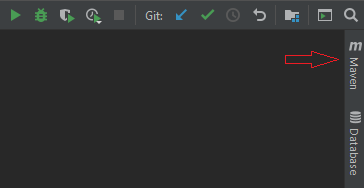
1. In IntelliJ IDEA, open the Maven window (**View \> Tool Windows \> Maven**).
2. Select the icons for **Reimport All Maven Projects** and **Generate Sources and Update Folders for All Projects**.
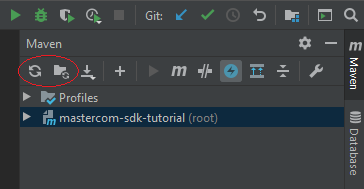
The sources are generated in the **target** folder inside the Maven project structure. This project can be built and used as a standalone dependency in whatever project you want to develop.

## Step 5: Make an API call {#step-5-make-an-api-call}
Make an API call using the generated API client.
* Create a Java file called **Main.java** in any package of your choice.
* Add the following code to the main() method of the class. This will make your OAuth credentials available to the program and will create the PrivateKey used for signing the requests.
Class `AuthenticationUtils` is provided by the Mastercard OAuth1 Signer library.
Note: Calling `loadSigningKey()` can throw an exception.
```java
String consumerKey = "#YOUR 97 CHARACTER CONSUMER KEY HERE#";
String signingKeyFilePath = "#PATH TO YOUR P12 FILE HERE#";
String signingKeyAlias = "#YOUR KEY ALIAS HERE#";
String signingKeyPass = "#YOUR KEY PASSWORD HERE#";
PrivateKey signingKey = AuthenticationUtils.loadSigningKey(signingKeyFilePath, signingKeyAlias, signingKeyPass); // Provided by the OAuth1 Signer lib
```
* Add the following code to instantiate an `ApiClient` and configure it to sign requests with your authentication credentials. The `OkHttpOAuth1Interceptor` used to sign the requests is provided by the Mastercard OAuth1 Signer library. We are also using `client.setDebugging(true)` to be able to see detailed request information when we run the application.
```java
ApiClient client = new ApiClient();
client.setBasePath("https://sandbox.apiedge.mastercard.com/mastercom");
client.setDebugging(true);
client.setHttpClient(
client.getHttpClient()
.newBuilder()
.addInterceptor(new OkHttpOAuth1Interceptor(consumerKey, signingKey)) // Provided by the OAuth1 Signer lib
.build()
);
```
* With the API client set up, we can now perform a request. Add the code below to create a request to list all available queue names.
```java
QueuesApi queuesApi = new QueuesApi(client);
List queues = queuesApi.getQueues();
```
* The complete **Main** class should look like the one below.
```java
package com.mastercard.api.mastercom; // change accordingly
import com.mastercard.api.mastercom.api.QueuesApi;
import com.mastercard.api.mastercom.model.Queue;
import com.mastercard.developer.interceptors.OkHttpOAuth1Interceptor;
import com.mastercard.developer.utils.AuthenticationUtils;
import java.security.PrivateKey;
import java.util.List;
public class Main {
public static void main(String[] args) throws Exception {
String consumerKey = "#YOUR 97 CHARACTER CONSUMER KEY HERE#"; // change accordingly
String signingKeyFilePath = "#PATH TO YOUR P12 FILE HERE#"; // change accordingly
String signingKeyAlias = "#YOUR KEY ALIAS HERE#"; // change accordingly
String signingKeyPass = "#YOUR KEY PASSWORD HERE#"; // change accordingly
PrivateKey signingKey = AuthenticationUtils.loadSigningKey(signingKeyFilePath, signingKeyAlias, signingKeyPass); // Provided by the OAuth1 Signer lib
ApiClient client = new ApiClient();
client.setBasePath("https://sandbox.apiedge.mastercard.com/mastercom");
client.setDebugging(true);
client.setHttpClient(
client.getHttpClient()
.newBuilder()
.addInterceptor(new OkHttpOAuth1Interceptor(consumerKey, signingKey)) // Provided by the OAuth1 Signer lib
.build()
);
QueuesApi queuesApi = new QueuesApi(client);
List queues = queuesApi.getQueues();
}
}
```
* Run the application. **Right-click on Main.java file \> Run 'Main.main()'** .
You will see something like this on the output console.
```text
--> GET https://sandbox.apiedge.mastercard.com/mastercom/v6/queues/names HTTP/1.1
Accept: application/json
User-Agent: OpenAPI-Generator/1.0.0/java
--> END GET
<-- HTTP/1.1 200 OK (2313ms)
correlation-id: 00000175c34edf9b-df1025
Content-Type: application/json
Server: CA-API-Gateway/9.0
X-EdgeConnect-MidMile-RTT: 19
X-EdgeConnect-Origin-MEX-Latency: 202
Date: Mon, 11 Jan 2021 12:34:27 GMT
Connection: keep-alive
Vary: Accept-Encoding
X-MC-Correlation-ID: 0.e15ffea5.1610368467.5c89374
OkHttp-Sent-Millis: 1610368466952
OkHttp-Received-Millis: 1610368467418
[{"queueName":"Closed","queueDescription":"Closed"},{"queueName":"Rejects","queueDescription":"Rejects"},{"queueName":"IssuerRepresentmentUnworked","queueDescription":"Issuer Re-presentment Unworked"},{"queueName":"AcquirerFirstCBUnworked","queueDescription":"Acquirer First CB Unworked"},{"queueName":"AcquirerRRUnworked","queueDescription":"Acquirer RR Unworked"},{"queueName":"AcquirerArbCBUnworked","queueDescription":"Acquirer Arb. CB Unworked"},{"queueName":"FeeCollectionUnworked","queueDescription":"Fee Collection Unworked"},{"queueName":"IssuerWorked","queueDescription":"Issuer Worked"},{"queueName":"AcquirerWorked","queueDescription":"Acquirer Worked"},{"queueName":"Pending","queueDescription":"Pending"},{"queueName":"IssuerRRUnworked","queueDescription":"Issuer RR Unworked"},{"queueName":"SenderCaseFiling","queueDescription":"Sender Case Filing"},{"queueName":"ReceiverCaseFiling","queueDescription":"Receiver Case Filing"},{"queueName":"PendingDocumentation","queueDescription":"Pending Documentation"}]
<-- END HTTP (1022-byte body)
```
* Example: how to retrieve the queue's claims list.
```java
QueuesApi queuesApi = new QueuesApi(client);
GetQueueContentRequest getQueueContentRequest = new GetQueueContentRequest();
getQueueContentRequest.setQueueName("Pending");
getQueueContentRequest.setLastModifiedDateFrom("2020-10-15T00:00");
getQueueContentRequest.setLastModifiedDateTo("2020-10-15T23:59");
getQueueContentRequest.setPageNb("1");
QueueContentSummary queueContentSummary = queuesApi.getQueueSummaryPost(getQueueContentRequest);
queueContentSummary.getClaimList();
```
* Example: how to retrieve a claim detail.
```java
ClaimsApi claimsApi = new ClaimsApi(client);
ClaimDetail claimDetail = claimsApi.getClaimDetail("#Claim ID Here#");
```
Note: Refer to the [Mastercom Complex Business Flows Tutorial](https://developer.mastercard.com/mastercom/documentation/tutorials-and-guides/complex-flows-tutorial/index.md) for an in-depth review of dispute's complex business flows.
Return to [Tutorials](https://developer.mastercard.com/mastercom/documentation/tutorials-and-guides/index.md).