# Mastercom Extended API Client Generation Tutorial
source: https://developer.mastercard.com/mastercom-extended/documentation/tutorials-and-guides/clientgeneration-tutorial/index.md
## Overview {#overview}
This tutorial explains how to create a simple Java program to make an API call to the Mastercom Extended Sandbox environment.
The program creates a customizable Java API client from the Mastercom Extended API specification and lets Mastercard's Java open-source client library handle the authentication for you.
Alert: Mastercom Extended API does not support SDK and customers have to create their own API Client from the Mastercom Extended OpenAPI specification.
#### What you will learn {#what-you-will-learn}
> * How to create a Java (Maven) project
> * How to add proper resources
> * How to add proper dependencies
> * How to generate the API client
> * How to make an API call
## Before you start {#before-you-start}
Before starting this tutorial, ensure that you have:
* Maven 3+
* JDK 1.8.0+
* A developer account on [Mastercard Developers](https://developer.mastercard.com/account/log-in) and a Mastercom Extended API project
* [Mastercom Extended OpenAPI Specification](https://developer.mastercard.com/mastercom-extended/documentation/api-reference/index.md)
* Completed the [Quick Start Guide](https://developer.mastercard.com/mastercom-extended/documentation/quick-start-guide/index.md)
Tip: For instructions on how to create a developer account and API project, refer to the [Quick Start Guide](https://developer.mastercard.com/platform/documentation/getting-started-with-mastercard-apis/quick-start-guide/).
## Step 1: Create a new Maven project {#step-1-create-a-new-maven-project}
The first step is to create a new Maven project, which will set up your directory structure automatically. This can be done either in an IDE or via the command line.
Provide "mastercom-extended-sdk-tutorial" as the ArtifactId and Project name.
For more information on how to create a Maven project via the command line, see [Maven in 5 Minutes](https://maven.apache.org/guides/getting-started/maven-in-five-minutes.html).
## Step 2: Add resources {#step-2-add-resources}
### 1. Download the Mastercom Extended OpenAPI specification: {#1-download-the-mastercom-extended-openapi-specification}
* [dispute-processing-api.yml](https://static.developer.mastercard.com/content/mastercom-extended/swagger/dispute-processing-api.yml) (72KB)
* [transactions-claims-documents-fraud-api.yml](https://static.developer.mastercard.com/content/mastercom-extended/swagger/transactions-claims-documents-fraud-api.yml) (157KB)
* [queues-reports-api.yml](https://static.developer.mastercard.com/content/mastercom-extended/swagger/queues-reports-api.yml) (49KB)
* [send-payment-dispute-processing-api.yml](https://static.developer.mastercard.com/content/mastercom-extended/swagger/send-payment-dispute-processing-api.yml) (16KB)
Add it to your Maven project's **resources** folder.
Tip: Review [Generating and Configuring a Mastercard API Client](https://developer.mastercard.com/platform/documentation/getting-started-with-mastercard-apis/generating-and-configuring-a-mastercard-api-client/).
### 2. Add the Sandbox Signing Key (.p12) generated for your Mastercom Extended project to your Maven project's resources folder. {#2-add-the-sandbox-signing-key-p12-generated-for-your-mastercom-extended-project-to-your-maven-projects-resources-folder}
The steps to create the project and generate the Sandbox Signing Key are described in the [Quick Start Guide](https://developer.mastercard.com/platform/documentation/getting-started-with-mastercard-apis/quick-start-guide/).
Detailed information on the Signing Keys can be found [here](https://developer.mastercard.com/platform/documentation/security-and-authentication/using-oauth-1a-to-access-mastercard-apis/#getting-keys-for-your-application).
Your Maven project directory should look as follows:

## Step 3: Update the pom.xml file {#step-3-update-the-pomxml-file}
* Add the following plugin to your Maven project's **pom.xml** file to add the OpenAPI Generator to your project.
OpenAPI Generator generates API client libraries from [OpenAPI Specifications](https://github.com/OAI/OpenAPI-Specification), formerly known as swagger files. OpenAPI Generator provides multiple generators and library templates to support multiple languages and frameworks. In this tutorial we are using the *java* generator and the default *okhttp-gson* library template.
```xml
org.openapitools
openapi-generator-maven-plugin
5.2.0
Mastercom - Extended API REST Client
generate
${project.basedir}/src/main/resources/dispute-processing-api.yml
java
src/gen/java/
com.mastercard.api.mastercomextended.api
com.mastercard.api.mastercomextended
mastercom-extended
com.mastercard.api.mastercomextended.model
```
* Add the following dependencies for the API client library generation and the Mastercard OAuth1 Signer library to your **pom.xml** file.
Mastercard APIs use OAuth 1.0a authentication. OAuth1 Signer libraries are developed and maintained by the Mastercard API team and hosted
[here](https://github.com/Mastercard?utf8=%E2%9C%93&q=oauth1-signer&type=&language=) on GitHub.
They include code helpers targeting the HTTP clients used by the different OpenAPI Generator library templates.
More information on how to use OAuth 1.0a to access Mastercard APIs can be found
[here](https://developer.mastercard.com/platform/documentation/security-and-authentication/using-oauth-1a-to-access-mastercard-apis/).
```xml
1.8
${java.version}
${java.version}
UTF-8
1.5.1
4.9.1
2.8.6
1.8.5
1.6.2
1.5.0
4.13.2
3.0.2
com.squareup.okhttp3
okhttp
${okhttp-version}
com.squareup.okhttp3
logging-interceptor
${okhttp-version}
com.google.code.gson
gson
${gson-version}
io.gsonfire
gson-fire
${gson-fire-version}
io.swagger
swagger-annotations
${swagger-core-version}
org.threeten
threetenbp
${threetenbp-version}
com.google.code.findbugs
jsr305
${jsr305-version}
com.mastercard.developer
oauth1-signer
${oauth1-signer-version}
junit
junit
${junit-version}
```
When using OpenAPI Generator to generate the API client library, there are two options:
* Generate and use the source files on the fly.
* Generate and deploy the source files to a Maven repository.
In this tutorial, we are generating the API client library on the fly, so we include the dependencies that are needed to generate the library. If you were deploying the source files to a Maven repository, you would only need to include the dependency for that repository.
## Step 4: Generate the API Client {#step-4-generate-the-api-client}
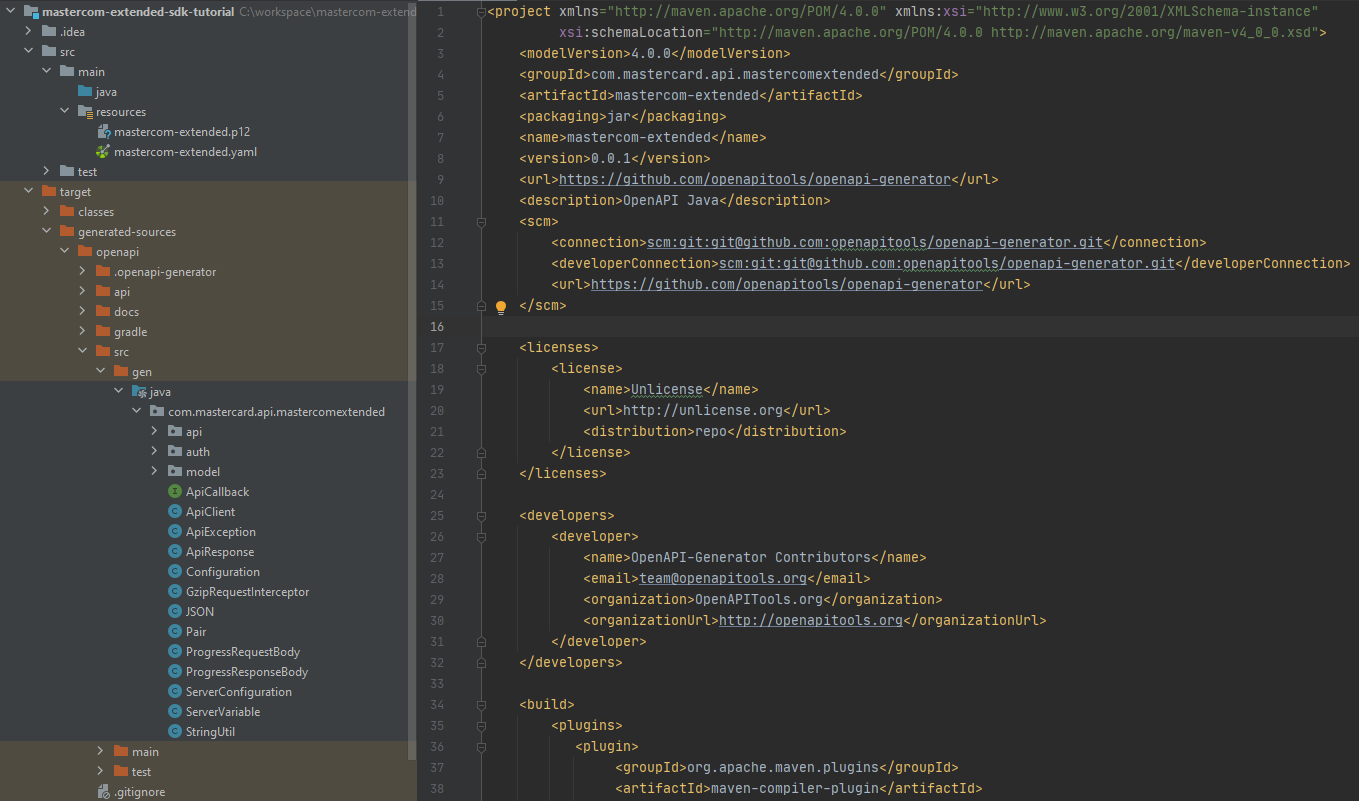
Now that you have all the dependencies you need, you can generate the sources by running **mvn clean install**.
You will see that the sources are generated in the **target** folder inside the Maven project structure.
This project can be built and used as a standalone dependency in whatever project you want to develop.
## Step 5: Make an API call {#step-5-make-an-api-call}
Now it is time to make an API call using the generated API client.
* Create a Java file called **Main.java** in any package of your choice.
* Add the following code to the main() method of the class. This will make your OAuth credentials available to the program and will create the PrivateKey used for signing the requests. Class `AuthenticationUtils` is provided by the Mastercard OAuth1 Signer library.
```java
String consumerKey = "#YOUR 97 CHARACTER CONSUMER KEY HERE#"; // change accordingly
String signingKeyFilePath = "#PATH TO YOUR P12 FILE HERE#"; // change accordingly
String signingKeyAlias = "#YOUR KEY ALIAS HERE#"; // change accordingly
String signingKeyPass = "#YOUR KEY PASSWORD HERE#"; // change accordingly
PrivateKey signingKey = AuthenticationUtils.loadSigningKey(signingKeyFilePath, signingKeyAlias, signingKeyPass); // Provided by the OAuth1 Signer lib
```
* Now add the following code to instantiate an `ApiClient` and configure it to sign requests with your authentication credentials. The `OkHttpOAuth1Interceptor` used to sign the requests is provided by the Mastercard OAuth1 Signer library.
```java
ApiClient client = new ApiClient();
client.setBasePath("https://sandbox.api.mastercard.com/mastercom-extended");
client.setHttpClient(
client.getHttpClient()
.newBuilder()
.addInterceptor(new OkHttpOAuth1Interceptor(consumerKey, signingKey)) // Provided by the OAuth1 Signer lib
.build()
);
```
* With the API client set up, we can now perform a request. Add the code below to create a request to list all available queue definitions.
```java
QueuesApi queuesApi = new QueuesApi(client);
Integer offset = 0;
Integer limit = 1000;
QueueDefinitionsList result = queuesApi.getQueueList(offset, limit);
result.getDefinitions().forEach(
q -> System.out.println("queueId: " + q.getQueueId() + " | queueName: " + q.getName())
);
```
* The complete **Main** class should look like the one below.
```java
package com.mastercard.api.mastercom_extended; // change accordingly
import com.mastercard.api.mastercomextended.ApiClient;
import com.mastercard.api.mastercomextended.api.QueuesApi;
import com.mastercard.api.mastercomextended.model.QueueDefinitionsList;
import com.mastercard.developer.interceptors.OkHttpOAuth1Interceptor;
import com.mastercard.developer.utils.AuthenticationUtils;
import java.security.PrivateKey;
public class Main {
public static void main(String[] args) throws Exception {
String consumerKey = "#YOUR 97 CHARACTER CONSUMER KEY HERE#"; // change accordingly
String signingKeyFilePath = "#PATH TO YOUR P12 FILE HERE#"; // change accordingly
String signingKeyAlias = "#YOUR KEY ALIAS HERE#"; // change accordingly
String signingKeyPass = "#YOUR KEY PASSWORD HERE#"; // change accordingly
PrivateKey signingKey = AuthenticationUtils.loadSigningKey(signingKeyFilePath, signingKeyAlias, signingKeyPass); // Provided by the OAuth1 Signer lib
ApiClient client = new ApiClient();
client.setBasePath("https://sandbox.api.mastercard.com/mastercom-extended");
client.setHttpClient(
client.getHttpClient()
.newBuilder()
.addInterceptor(new OkHttpOAuth1Interceptor(consumerKey, signingKey)) // Provided by the OAuth1 Signer lib
.build()
);
QueuesApi queuesApi = new QueuesApi(client);
Integer offset = 0;
Integer limit = 1000;
QueueDefinitionsList result = queuesApi.getQueueList(offset, limit);
result.getDefinitions().forEach(
q -> System.out.println("queueId: " + q.getQueueId() + " | queueName: " + q.getName())
);
}
}
```
* Now we can run the application. **Right click on Main.java file \> Run 'Main.main()'** .
You will see something like this on the output console.
```text
queueId: 1 | queueName: Acquirer Collaboration Unworked
queueId: 2 | queueName: Acquirer Collaboration In Progress
queueId: 3 | queueName: Acquirer Collaboration Unworked & In Progress
queueId: 4 | queueName: Acquirer Collaboration Worked
...
```
Return to [Tutorials](https://developer.mastercard.com/mastercom-extended/documentation/tutorials-and-guides/index.md).