# Mastercard Send Funding
source: https://developer.mastercard.com/mastercard-send-funding/documentation/index.md
## Overview {#overview}
The [Mastercard Send](https://developer.mastercard.com/product/mastercard-send/) Funding service enables a registered Program Participant (such as a Financial Institution or digital player) to secure funds from a consumer's sending account (known as the Funding Account) that will then be transferred (given or sent) to a Recipient/beneficiary.
Acting as an Originating Institution or Transaction Initiator, the registered participant uses the service to initiate a Funding Transaction via the Mastercard Send platform to the Sender's Issuer, who debits the Funding Account. The participant can then transfer the debited amount to the Recipient, for example by using the [Mastercard Send Person-to-Person (P2P) services](https://developer.mastercard.com/mastercard-send-person-to-person/documentation/) to initiate a Payment Transaction to the issuer holding their account (Receiving Institution).
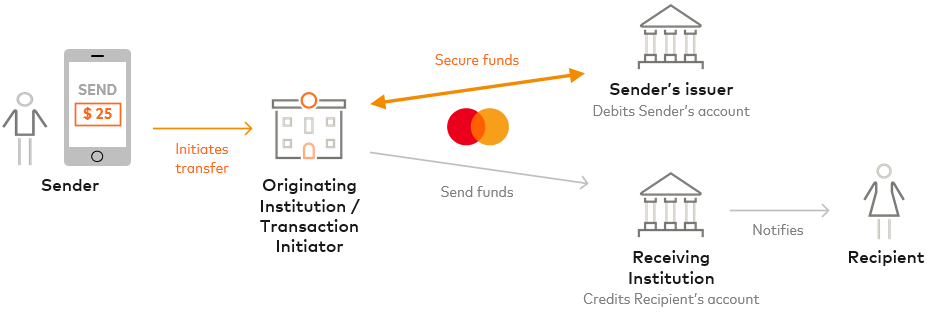
Funding Transactions can also be used to load or top up digital wallets, prepaid accounts, and other accounts in near real-time.
See [the product page](https://developer.mastercard.com/product/mastercard-send/) for marketing and case study details. See the [Experience Design Guide](https://developer.mastercard.com/mastercard-send-experience-design-guide/documentation/) for example user experience (UX) journeys.
## How It Works {#how-it-works}
Depending on the use cases and program requirements, you can secure funds from supported Mastercard or Maestro debit card accounts. In regions where connectivity is established, you can also secure funds from supported non-Mastercard debit cards including Visa debit cards; Mastercard Send will route the Funding Transaction to the appropriate Network.
There are two resources:
* **Funding API** creates and retrieves details for a funding transfer (Funding Transaction)
* **Funding Reversal API** creates a Funding Reversal Transaction to reverse a funding transfer
You (as an Originating Institution or Transaction Initiator) use a [Funding API](https://developer.mastercard.com/mastercard-send-funding/documentation/api-reference/index.md) POST request to create a Funding Transaction to secure the funds you are going to send to the Recipient. Mastercard Send validates the request (e.g. API request checks, Transaction controls, and limit validations) and, if OK, sends a Funding Transaction request message to the Sender's Issuer via the relevant Network for approval. The Issuer approves or declines the transaction, and that decision is provided to you in the API response from Mastercard Send:
* Approved = 201 response with `status` value as 'APPROVED'
* Declined = The type of response is determined by the API request `decline_details` query parameter. The response is either:
* 201 response with `status` value as 'DECLINED', if the query parameter was set to 'true'
* 402 error with `ReasonCode` as 'DECLINE' (the default)
For details on the possible status values, see [Transfer Status](https://developer.mastercard.com/mastercard-send-funding/documentation/response-error-codes/status/index.md).
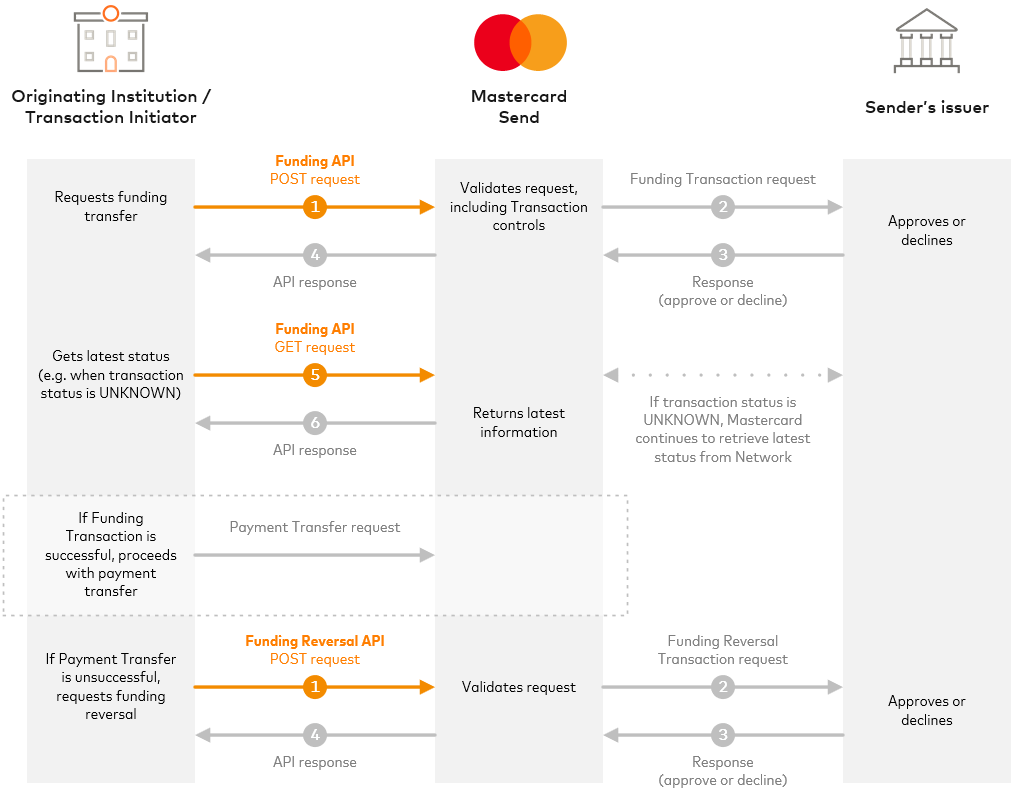
Each funding transfer has a unique `transfer_reference` ID, which you must generate and provide in the request, and it will be assigned a unique system-generated ID (`id`), which is returned in the response.
Depending on the downstream network, most API responses are within 2 seconds, see [API Response Times and Timeouts](https://developer.mastercard.com/mastercard-send-funding/documentation/api-basics/index.md#api-response-times-and-timeouts). In rare cases, such as timeouts or network communication issues, a transfer can have an ['UNKNOWN' status](https://developer.mastercard.com/mastercard-send-funding/documentation/response-error-codes/status/index.md#unknown-or-pending-status); Mastercard Send will continue to retrieve the latest status from the Network.
You can use a [Funding API](https://developer.mastercard.com/mastercard-send-funding/documentation/api-reference/index.md) GET request (with one of the IDs) to retrieve more information for a funding transfer, including its latest status. Example uses:
* Get the network decline code and description when a transaction is declined --- useful when the `decline_details` query parameter was not used to return those fields in the POST response
* Get the latest status when a transaction response was 'UNKNOWN'
* Transaction history and research purposes
There is an optional extra [Idempotency](https://developer.mastercard.com/mastercard-send-funding/documentation/tutorials-and-guides/repeat-flag/index.md#idempotency) feature that, when enabled, allows you to make the same funding transfer request multiple times without worrying about the transaction being processed multiple times.
If the overall funds transfer cannot complete successfully (for example the P2P Payment Transaction to the Sender is rejected or declined), use a [Funding Reversal API](https://developer.mastercard.com/mastercard-send-funding/documentation/api-reference/index.md) POST request to reverse the Funding Transaction. Funding reversals must be submitted within 30 minutes of the funding transfer request.
Note: Mastercard does not transmit funds. All Mastercard Send and Mastercard Network funds are transmitted by a licensed Financial Institution for which Mastercard provides data processing services.
### Aliases and Tokenized PANs {#aliases-and-tokenized-pans}
Depending on your implementation, you can use different types of aliases in your Mastercard Send API calls to identify sending or receiving accounts (Account URIs), such as:
* PANs and tokenized PANs
* Accounts registered in the Mastercard Send Consumer Mapping service
You supply the alias using the appropriate schema, see [Account URIs](https://developer.mastercard.com/mastercard-send-funding/documentation/field-uris-codes/account-uris/index.md).
Mastercard Send supports the use of Mastercard and Visa tokenized PANs, which are supplied using 'pan' [Account URIs](https://developer.mastercard.com/mastercard-send-funding/documentation/field-uris-codes/account-uris/index.md). You can use the [Mastercard Digital Enablement Service (MDES)](https://developer.mastercard.com/product/mdes) to tokenize Mastercard PANs. If you use a Visa token in an API request, Mastercard Send passes the token to Visa, who will pass the PAN to the issuer.
### Additional Services {#additional-services}
There are other optional Mastercard Send services you can use with the Funding service to enhance the funds transfer flow, including:
* [Account Information Service](https://developer.mastercard.com/mastercard-send-account-info/documentation/), which retrieves information about card accounts, including sending and receiving eligibility.
* [Account Verification Service (AVS)](https://developer.mastercard.com/mastercard-send-avs/documentation/), which checks card accounts with issuers in real time.
* [Account Validation](https://developer.mastercard.com/account-validation/documentation/), which checks cardholder names and, optionally, the Card Verification Code (CVC or CVV) with issuers in real time.
* **Consumer Mapping** , which is a consumer registration service for storing the consumer and account information that you capture, so that it is retained securely by Mastercard for your long-term use. The mappings you create have system-generated IDs and reference IDs that you provide. For more information about this service, contact your [Mastercard representative](https://developer.mastercard.com/mastercard-send-funding/documentation/support/index.md).
Some services are optional fee-based services and require configuration. For more information about available services, see the [product page](https://developer.mastercard.com/product/mastercard-send).
You can use Consumer Mapping IDs as [Account URI](https://developer.mastercard.com/mastercard-send-funding/documentation/field-uris-codes/account-uris/index.md) aliases in Account Information, Account Verification, and Funding API calls.
### Additional Resources {#additional-resources}
* **Reports** ---Mastercard provides reconciliation reports to Mastercard Send participants who are using the Funding service. For information on report specifications, obtaining the reports, and sample files, see [Mastercard Send Reconciliation Reports](https://developer.mastercard.com/mastercard-send/documentation/reports/).
During program onboarding, you can configure up to four custom fields which will be added to your reconciliation reports. This enables you to provide custom values in your Funding API POST requests (in the `reconciliation_data.custom_field` array) which will appear in your reports, providing additional transaction reference information that assists with reconciliation and transaction research.
* **Customer Portal** ---The Mastercard Move: Send Customer Portal is a near real‑time, self‑service tool to search transactions and download reconciliation reports for your Mastercard Send activity. You can look up financial and non‑financial transactions using multiple search filters, export results, and view transaction details and API payloads. The portal enables you to research and validate transactions quickly, helping you assist your consumers without needing Mastercard Support. See [Customer Portal](https://developer.mastercard.com/mastercard-send/documentation/customer-site/).
* **API changes and announcements** ---We provide advance notice of changes to the APIs. There may also be Mastercard announcements that impact Mastercard Send API customers. See [Release History](https://developer.mastercard.com/mastercard-send-funding/documentation/release-history/index.md).
## Good to Know {#good-to-know}
* **Sandbox**---We have an open Sandbox so you can try the APIs quickly before onboarding.
* **Registration** ---To use the full API service, you must become a Mastercard Send Program Participant, see [Onboarding Checklist](https://developer.mastercard.com/mastercard-send-funding/documentation/tutorials-and-guides/onboarding-checklist/index.md).
* **Region availability** ---This API service is available in most markets. For pricing and region information, contact your Mastercard representative or use the **Contact sales** button and form on the [Mastercard Send product page](https://developer.mastercard.com/product/mastercard-send/).
* We recommend you also use the [Account Information Service](https://developer.mastercard.com/mastercard-send-account-info/documentation/) and [AVS](https://developer.mastercard.com/mastercard-send-avs/documentation/) (in that order) to check Sender and Recipient card accounts prior to making Funding API calls. You can integrate and test with those services at the same time as the Funding service.
## Next Steps {#next-steps}
Now that you have an understanding of what the service does, you can proceed to the [Quick Start Guide](https://developer.mastercard.com/mastercard-send-funding/documentation/quick-start-guide/index.md) to get started, or to the [API Basics](https://developer.mastercard.com/mastercard-send-funding/documentation/api-basics/index.md) section for details on authentication.
Your Mastercard representative can provide more information about this service. If you do not have one, please use the **Contact sales** button and form on the [Mastercard Send product page](https://developer.mastercard.com/product/mastercard-send/) to request a regional representative, identifying your company name, region, and the Mastercard Send services that interest you.