# Java API Client
source: https://developer.mastercard.com/mastercard-send-account-info/documentation/tutorials-and-guides/api-tutorial/index.md
## Overview {#overview}
This tutorial generates a Java API client library using the OpenAPI Generator and the API specification and then builds a simple Java program that makes API calls to the Sandbox environment. You can also adapt this tutorial to [make API Calls to MTF](https://developer.mastercard.com/mastercard-send-account-info/documentation/tutorials-and-guides/api-tutorial/index.md#make-api-calls-to-mtf).
Note that the sample code in this tutorial does not prescribe the design and coding of your funds transfer service; those aspects are for you to define.
## Prerequisites {#prerequisites}
To complete this tutorial, you need:
* [Java 11+](https://www.java.com/en/download/manual.jsp). Ensure that your `JAVA_HOME` environment variable is pointing to your JDK installation or have the Java executable on your `PATH` environment variable.
* [Maven 3.6.0+](https://maven.apache.org/download.cgi)
* The latest [OpenAPI Generator CLI](https://openapi-generator.tech/docs/installation/#jar) JAR directly from Maven.org.
* Integrated Development Environment (IDE) of your choice. The tutorials use the IntelliJ IDEA IDE.
* If your organization uses internal artifact repositories for obtaining dependencies, refer to this [documentation](https://maven.apache.org/guides/mini/guide-multiple-repositories.html) to ensure that your dependencies are set up.
* A Mastercard Developers [project](https://developer.mastercard.com/dashboard) created with the **Mastercard Send** API service, which generated the Sandbox keys and credentials required for accessing the Sandbox and MTF environments. See the [Quick Start Guide](https://developer.mastercard.com/mastercard-send-account-info/documentation/quick-start-guide/index.md).
* The API specification: [account-information-api-swagger.yaml](https://static.developer.mastercard.com/content/mastercard-send-account-info/swagger/account-information-api-swagger.yaml) (15KB)
## Generate a Client Application {#generate-a-client-application}
Note: This tutorial was developed using a Windows machine. You can follow the same steps in other Operating Systems (OS) as well.
In File Explorer, create a folder in your desired location. In that folder:
1. Add the API specification YAML file and OpenAPI Generator CLI JAR file.
2. Create a `config.json` file and add the following configurations to the file:
```json
{
"groupId":"com.acme.app",
"artifactId":"mastercard-api-client",
"artifactVersion":"1.0.0",
"invokerPackage":"com.acme.app.mastercard",
"apiPackage":"com.acme.app.mastercard.api",
"modelPackage":"com.acme.app.mastercard.model"
}
```
Your current folder should look as follows:

3. Open the Command Prompt, navigate to that folder, and run this command to generate the client application:
openapi-generator-cli-7.8.0.jar generate -g java --library okhttp-gson -i account-information-api-swagger.yaml -c config.json -o MyTestClient
In the above command, alter these parts as necessary:
* JAR version number, for example, "7.8.0"
* Name of the swagger file, for example, "account-information-api-swagger.yaml"
* Name of the desired client application, for example, "MyTestClient"
After you run the command, a client application folder is generated within your folder:

## Set up a Maven Project {#set-up-a-maven-project}
After generating the client application, complete the below Maven project setup to download the dependencies and generate the Java client library.
1. In the IntelliJ IDE, open the client application as a **Maven** project. Your IntelliJ IDE should look as follows:

2. Edit the **pom.xml** file to add the following OAuth Client Authentication Library as one of the dependencies:
```xml
com.mastercard.developer
oauth1-signer
1.5.2
```
For example:

3. In the IntelliJ IDE, navigate to the Terminal window and run this command:
mvn clean install
When you have successfully run the command, a new folder named **target** is generated within your root directory, which contains classes generated for the schemas and API calls defined within the API specification. The generated classes can be found in `target/classes/com/acme/app/mastercard`:

4. In `./src/main/`, create a **resources** folder and copy the Sandbox signing key (.p12) file to that folder:

## Make API Calls to Sandbox {#make-api-calls-to-sandbox}
These steps build a simple Java program that makes calls to the Sandbox API using the generated client library. You can either:
* Download and use the Java class file [AccountInfoSampleClass.java](https://static.developer.mastercard.com/content/mastercard-send-account-info/uploads/AccountInfoSampleClass.java) (4KB), then locate and adjust its code snippets as directed below.
* Create a new Java class file, then add and adjust the code snippets as directed below.
In your IntelliJ IDE project, add or create the Java class file in `./src/main/java`:

Open the Java class file and modify or add the following parts accordingly:
1. Add or adjust the code to import the required classes:
```java
import com.acme.app.mastercard.ApiClient;
import com.acme.app.mastercard.ApiException;
import com.acme.app.mastercard.api.AccountInfoApi;
import com.acme.app.mastercard.model.*;
import com.mastercard.developer.interceptors.OkHttpOAuth1Interceptor;
import com.mastercard.developer.utils.AuthenticationUtils;
import java.security.PrivateKey;
```
If any external class libraries do not import automatically, you may need to click the **Reload All Maven Projects** button in the Maven project window (**View \> Tool Windows \> Maven**):

2. Update the consumer key and signing key values to match your .p12 file and the Sandbox Credentials from your Mastercard Developers project. These will be used by the `AuthenticationUtils.loadSigningKey()` method to generate a private signing key object.
```java
// Update these values to match your OAuth credentials
String consumerKey = "your_consumer_key_WdnUc_-2345tF245A-_DE7f71c_-75!b10-_23451b440ab_-e210b12-_58f650000000000000000";
String signingKeyAlias = "your_key_alias";
String signingKeyFilePath = "./src/main/resources/Send_API_Testing-sandbox.p12";
String signingKeyPassword = "your_key_password";
// This method generates the signing key which can be used to sign your API requests
PrivateKey signingKey = AuthenticationUtils.loadSigningKey(signingKeyFilePath, signingKeyAlias, signingKeyPassword);
// Set request header values
String partnerId = "ptnr_BEeCrYJHh2BXTXPy_PEtp-8DBOo";
String fieldsQuery = "metadata";
```
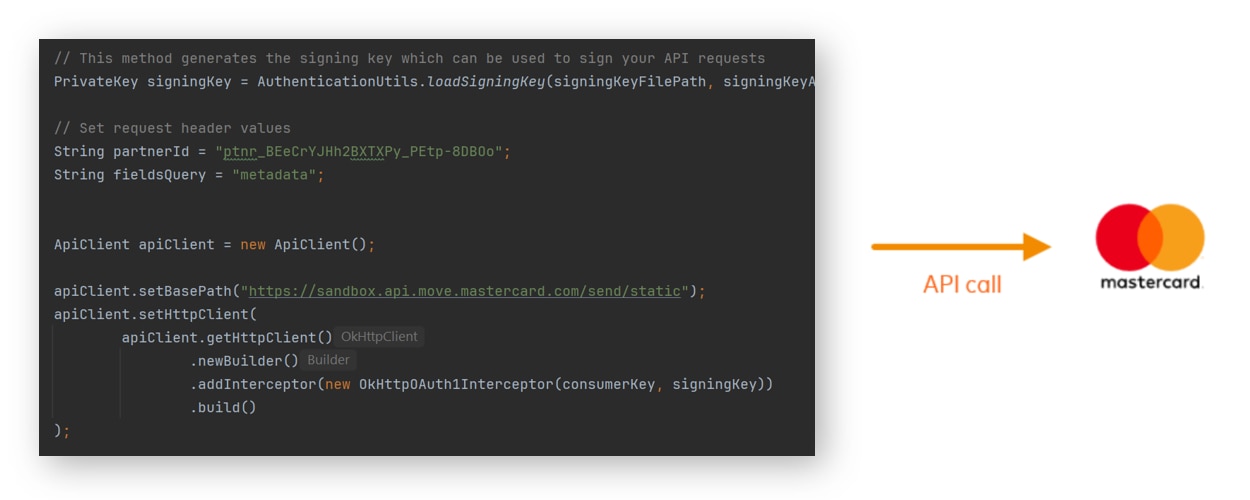
3. The base path is set to the Sandbox environment by default. You instantiate a client that can sign requests with your authentication credentials.
```java
ApiClient apiClient = new ApiClient();
apiClient.setBasePath("https://sandbox.api.move.mastercard.com/send/static");
apiClient.setHttpClient(
apiClient.getHttpClient()
.newBuilder()
.addInterceptor(new OkHttpOAuth1Interceptor(consumerKey, signingKey))
.build()
);
```
4. You create a new `accountInfoApi` request object to make the API call to the `/v1/partners/{partnerId}/accounts/account-info` endpoint.
```java
AccountInfoApi accountInfoApi = new AccountInfoApi(apiClient);
```
5. The `accountInfoParent` object sets the values to the Request Body fields that are required to make a successful API call to the endpoint. You can modify the values as required.
```java
AccountInfoParent accountInfoParent = new AccountInfoParent();
// Set the values for the accountInfo object
AccountInfo accountInfo = new AccountInfo();
accountInfo.setAccountUri("pan:5102589999999913;exp=2077-08;cvc=123");
accountInfo.setAmount("1000");
accountInfo.setCurrency("USD");
accountInfo.setPaymentType("P2P");
accountInfo.setEnhancedResponse(true);
accountInfo.setOriginationCountry("USA");
// Wrap accountInfo object into the main parent object
accountInfoParent.setAccountInfo(accountInfo);
```
6. You call the `retrieveAccountInfo` function to make the API call to the `/v1/partners/{partnerId}/accounts/account-info` endpoint and store the response in an `accountInfoResponse` object.
```java
// Make the PUT call to retrieve information about the card account
EligibilityAndAccountInfoParent accountInfoResponse = null;
try {
accountInfoResponse = accountInfoApi.retrieveAccountInfo(partnerId, accountInfoParent, fieldsQuery);
System.out.println("Request:");
System.out.println(accountInfoParent);
System.out.println();
System.out.println("Response:");
System.out.println(accountInfoResponse);
} catch (ApiException e) {
System.err.println("Exception when calling accountInfoApi.retrieveAccountInfo");
System.err.println("Status code: " + e.getCode());
System.err.println("Reason: " + e.getResponseBody());
System.err.println("Response headers: " + e.getResponseHeaders());
e.printStackTrace();
}
```
7. You can access the individual response values using the `accountInfoResponse.get()` method. For example, this code interprets the eligibility results:
```java
// Interpret the eligibility results
Boolean canSend = accountInfoResponse.getAccountInfo().getSendingEligibility().getEligible();
String cannotSendReason = accountInfoResponse.getAccountInfo().getSendingEligibility().getReasonDescription();
Boolean canReceive = accountInfoResponse.getAccountInfo().getReceivingEligibility().getEligible();
String cannotReceiveReason = accountInfoResponse.getAccountInfo().getReceivingEligibility().getReasonDescription();
System.out.println();
if (canSend == true) {
System.out.println("This account can send these funds (subject to issuer approval). You can try a Funding Transaction from this account.");
}
else {
System.out.println("This account cannot send these funds because: " + cannotSendReason);
}
if (canReceive == true) {
System.out.println("This account can receive these funds (subject to issuer approval). You can try a Payment Transaction to this account.");
}
else {
System.out.println("This account cannot receive these funds because: " + cannotReceiveReason);
}
```
8. Build and run the Java class file. You can do this using the **Build Project** and **Run** buttons:

#### Expected result {#expected-result}
When run successfully, the Java code should print the request and response objects in the IntelliJ IDE Run window, and then use the eligibility results to state whether the account can send or receive these funds. Example output:
```plain
Request:
class AccountInfoParent {
accountInfo: class AccountInfo {
accountUri: pan:5102589999999913;exp=2077-08;cvc=123
amount: 1000
currency: USD
paymentType: P2P
enhancedResponse: true
originationCountry: USA
}
}
Response:
class EligibilityAndAccountInfoParent {
accountInfo: class EligibilityAndAccountInfo {
resourceType: account_info
sendingEligibility: class SendingEligibility {
eligible: true
reasonCode: null
reasonDescription: null
}
receivingEligibility: class ReceivingEligibility {
eligible: true
reasonCode: null
reasonDescription: null
}
type: DEBIT
brand: MASTERCARD
fundsAvailability: IMMEDIATE
institutionName: BANKCORP BANK, THE
institutionCountry: USA
accountStatementCurrency: USD
acceptanceBrand: MCC
productType: Consumer
}
}
This account can send these funds (subject to issuer approval). You can try a Funding Transaction from this account.
This account can receive these funds (subject to issuer approval). You can try a Payment Transaction to this account.
```
## Make API Calls to MTF {#make-api-calls-to-mtf}
You can make calls to the MTF environment when you have registered for this service and Mastercard has configured that environment for your Sandbox keys. When you have the tutorial working with Sandbox, you can adapt the code easily to call MTF:
* Adjust the base path to "https://sandbox.api.move.mastercard.com/send".
* Change the `partnerId` value to match your onboarded configuration.
You may need to adjust the code to pass request fields and values appropriate to the environment and your configuration, such as valid test account numbers.