# API Reference
source: https://developer.mastercard.com/mastercard-send-account-info/documentation/api-reference/index.md
## Environment Domains {#environment-domains}
In January 2026, we introduced the following new RNTZ (Regional Network Transit Zone) domains for this API. New customers should use these domains. Existing customers are encouraged to migrate soon.
* Sandbox
* MTF
* Production
```Sandbox
https://sandbox.api.move.mastercard.com/send/static
```
```MTF
https://sandbox.api.move.mastercard.com/send
```
```Production
https://api.move.mastercard.com/send
```
* Sandbox
* MTF
* Production
```Sandbox
https://sandbox.api.mastercard.com/send/static
```
```MTF
https://sandbox.api.mastercard.com/send
```
```Production
https://api.mastercard.com/send
```
To form the full endpoint URL, combine the appropriate domain portion (shown above) with the path portion shown by the OpenAPI specification (see below).
Note: The non-RNTZ domains will remain active for this API at this time. Any plans to decommission them will be communicated in the API release notes and here. Some parts of this documentation may still show the non-RNTZ domains and will be updated soon.
## APIs {#apis}
This API supports JSON and XML requests. The expandable section below shows JSON example requests and responses. For XML examples, see [Sample Requests and Responses](https://developer.mastercard.com/mastercard-send-account-info/documentation/api-reference/index.md#sample-requests-and-responses). Use [HTTP Headers](https://developer.mastercard.com/mastercard-send-account-info/documentation/api-basics/index.md#http-headers) to determine the response format. We recommend you log the Correlation ID (correlation-id) response header value for tracking purposes. When seeking support, providing the relevant Correlation ID may help resolve your inquiry more quickly.
The `partnerId` portion of the URL makes the request unique to a specific Originating Institution or Transaction Initiator:
* Sandbox API: Use any ID of valid length (32 characters), e.g. `ptnr_BEeCrYJHh2BXTXPy_PEtp-8DBOo`
* MTF and Production APIs: Use the Partner Reference ID you receive when you [register for the Mastercard Send program](https://developer.mastercard.com/mastercard-send/documentation/send-eligibility/)
For guidance on the API specification's **Execute** button, see [Sandbox Testing](https://developer.mastercard.com/mastercard-send-account-info/documentation/api-reference/index.md#sandbox-testing).
Tip: Guidance for the API sections below:
The expandable API sections below are rendered from the API specification, which you can download using **Download spec**.
Each API call type is a section. Expand it to see the request parameters and example JSON body payload and/or example response for that call. There may be multiple examples, which may not show all possible fields. If so, select **All fields** to see the possible fields:

To see the field descriptions, click **Model** and expand the object/array blocks to show their contents.
**Request URI** shows the call's endpoint path based on the selected environment (for example, Sandbox URL).
You can edit the example payload. Switching to the Model view will reset the payload to the default example.
The API specification identifies the required (mandatory) API fields as per Mastercard Send API validation and systems. In the expandable sections below, these fields are indicated as follows:
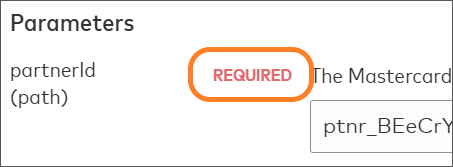
* REQUIRED indicates a required parameter, for example:
* In the **Model** section, a red asterisk \* indicates a required object/array and **required: yes** indicates a required item, for example:
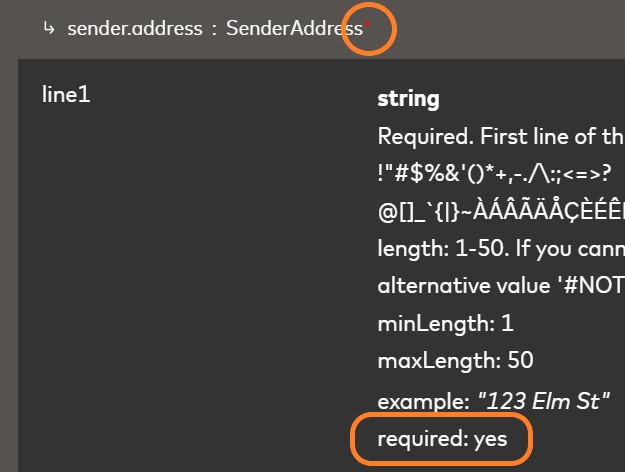
If an item is marked as required but its parent object/array is not, you only need to provide that item if you provide the parent.
The required indicator relates to general API validation. Some conditional fields might be required depending on the payment type, region, and so on. Some of the other optional fields might also be required as per program or network rules.
API Specification: `https://static.developer.mastercard.com/content/mastercard-send-account-info/swagger/account-information-api-swagger.yaml`
## Sandbox Testing {#sandbox-testing}
To try this API quickly, use the **Execute** button (in the expandable section above) to send requests directly from your browser to the Sandbox, without needing to create a Mastercard Developers project and keys. This functionality will send the shown Request parameters and Body payload, which you can alter, and the response will appear in a **Server Response** tab.
You can also make API calls to the Sandbox server from an API tool or your application code or the [tutorials](https://developer.mastercard.com/mastercard-send-account-info/documentation/tutorials-and-guides/index.md), which involves creating a Mastercard Developers project and using the Sandbox keys to generate the required OAuth 1.0a Authorization Header.
The Sandbox server returns simulated responses. For testing guidance, see [Testing](https://developer.mastercard.com/mastercard-send-account-info/documentation/testing/index.md).
## Sample Requests and Responses {#sample-requests-and-responses}
This section presents example API messages for each type of API call. For request messages:
* **Format:** JSON / XML
* **HTTP Version:** 1.0 / 1.1
* **HTTP Header Parameters:** see [HTTP Headers](https://developer.mastercard.com/mastercard-send-account-info/documentation/api-basics/index.md#http-headers)
Response messages also contain the content-type and content-length header parameters.
### PUT Request {#put-request}
**Sandbox URL:** https://sandbox.api.move.mastercard.com/send/static/v1/partners/{partnerId}/accounts/account-info?fields={fields}
**MTF URL:** https://sandbox.api.move.mastercard.com/send/v1/partners/{partnerId}/accounts/account-info?fields={fields}
**Production URL:** https://api.move.mastercard.com/send/v1/partners/{partnerId}/accounts/account-info?fields={fields}
* JSON
* XML
```JSON
{
"account_info": {
"account_uri": "pan:5102589999999913;exp=2077-08;cvc=123",
"amount": "1000",
"currency": "USD",
"payment_type": "P2P",
"enhanced_response": "true"
}
}
```
```XML
pan:5102589999999913;exp=2077-08;cvc=123
1000
USD
P2P
true
```
### 200 Response -- Eligible to Send and Receive {#200-response--eligible-to-send-and-receive}
* JSON
* XML
```JSON
{
"account_info": {
"resource_type": "account_info",
"sending_eligibility": {
"eligible": true
},
"receiving_eligibility": {
"eligible": true
},
"type": "DEBIT",
"brand": "MASTERCARD",
"funds_availability": "IMMEDIATE",
"institution_name": "BANCORP BANK, THE",
"institution_country": "USA",
"account_statement_currency": "USD",
"acceptance_brand": "DMC",
"product_type": "Consumer"
}
}
```
```XML
account_info
true
true
DEBIT
MASTERCARD
IMMEDIATE
BANCORP BANK, THE
USA
USD
DMC
Consumer
```
### 200 Response -- Not Eligible to Send, Eligible to Receive {#200-response--not-eligible-to-send-eligible-to-receive}
* JSON
* XML
```JSON
{
"account_info": {
"resource_type": "account_info",
"sending_eligibility": {
"eligible": false,
"reason_code": "ACCOUNT_NOT_ELIGIBLE",
"reason_description": "Account not eligible"
},
"receiving_eligibility": {
"eligible": true
},
"type": "DEBIT",
"brand": "MASTERCARD",
"funds_availability": "IMMEDIATE",
"institution_name": "BANCORP BANK, THE",
"institution_country": "USA",
"account_statement_currency": "USD",
"acceptance_brand": "DMC",
"product_type": "Consumer"
}
}
```
```XML
account_info
false
ACCOUNT_NOT_ELIGIBLE
Account not eligible
true
DEBIT
MASTERCARD
IMMEDIATE
BANCORP BANK, THE
USA
USD
DMC
Consumer
```
### 200 Response -- Not Eligible to Send or Receive {#200-response--not-eligible-to-send-or-receive}
* JSON
* XML
```JSON
{
"account_info": {
"resourceType": "account_info",
"sending_eligibility": {
"eligible": false,
"reason_code": "ACCOUNT_NOT_ELIGIBLE",
"reason_description": "Account not eligible"
},
"receiving_eligibility": {
"eligible": false,
"reason_code": "ACCOUNT_NOT_ELIGIBLE",
"reason_description": "Account not eligible"
}
}
}
```
```XML
account_info
false
ACCOUNT_NOT_ELIGIBLE
Account not eligible
false
ACCOUNT_NOT_ELIGIBLE
Account not eligible
```
For information on response codes and error messages, see [Code and Formats](https://developer.mastercard.com/mastercard-send-account-info/documentation/code-and-formats/index.md).