# Application Server Setup
source: https://developer.mastercard.com/mastercard-merchant-presented-qr/documentation/server-apis/reference-app/application-server-setup/index.md
Now that you understand the architecture of the reference application and have generated the sandbox credentials, you need to set up the middle-tier application server. This will be the interface between the MPQR APIs and client devices. As mentioned, we use Spring IO as our application framework.
### Prerequisites {#prerequisites}
To complete this application server setup, you need:
* Maven 3.6.0 or later
* JDK 1.8.0 update 161 or later
* A developer account on [Mastercard Developers](https://developer.mastercard.com/) with access to the MPQR APIs
* Spring Boot application that can be downloaded [here](https://static.developer.mastercard.com/content/mastercard-merchant-presented-qr/uploads/mpqr-api-reference-application.zip)
### Notes on application.properties {#notes-on-applicationproperties}
You need to edit this file to contain your OAuth authentication details for use later on:
* Java
```java
partnerId = #your_partner_id
consumerKey = #your_consumer_key
keyAlias = #your_keyalias
p12PrivateKey = #path_to_the_p12
keyPassword = #your_key_password
```
### Notes on pom.xml {#notes-on-pomxml}
* Since you are using Spring Boot and OpenAPI Generator, include their plugins.
* For the OpenAPI Generator plugin, you need an execution for each of the OpenAPI Specification files (**MerchantPayment_swagger_final.yaml** ).
If you want to alter where the OpenAPI Specifications are stored or where the client library is to be generated, edit the configuration for the execution you want to change.
* Most of the dependencies are for OpenAPI Generator, but we also include a dependency for the Mastercard OAuth Signing Library, which simplifies the process of authenticating requests.
* Xml
```xml
1.8
1.8.0
1.5.18
2.7.5
2.8.1
1.4.0
4.12
1.4.0
org.springframework.boot
spring-boot-starter-thymeleaf
org.springframework.boot
spring-boot-starter-web
org.springframework.boot
spring-boot-starter-test
test
org.junit.vintage
junit-vintage-engine
org.springframework.boot
spring-boot-configuration-processor
true
org.projectlombok
lombok
true
io.swagger
swagger-annotations
${swagger-core-version}
com.squareup.okhttp
logging-interceptor
${okhttp-version}
com.google.code.gson
gson
${gson-version}
com.google.code.gson
gson
io.gsonfire
gson-fire
${gson-fire-version}
org.apache.oltu.oauth2
org.apache.oltu.oauth2.client
1.0.1
org.threeten
threetenbp
${threetenbp-version}
junit
junit
com.mastercard.developer
oauth1-signer
${oauth1-signer-version}
com.google.code.findbugs
jsr305
3.0.2
org.springframework.boot
spring-boot-maven-plugin
org.openapitools
openapi-generator-maven-plugin
3.3.4
Payment API
generate
${project.basedir}/src/main/resources/MerchantPayment_swagger_final.yaml
java
src/gen/java/main
```
### Generate the Client Library {#generate-the-client-library}
You should now be able to generate your client library. In a terminal, go to the root directory of the project, and run 'mvn clean compile'.
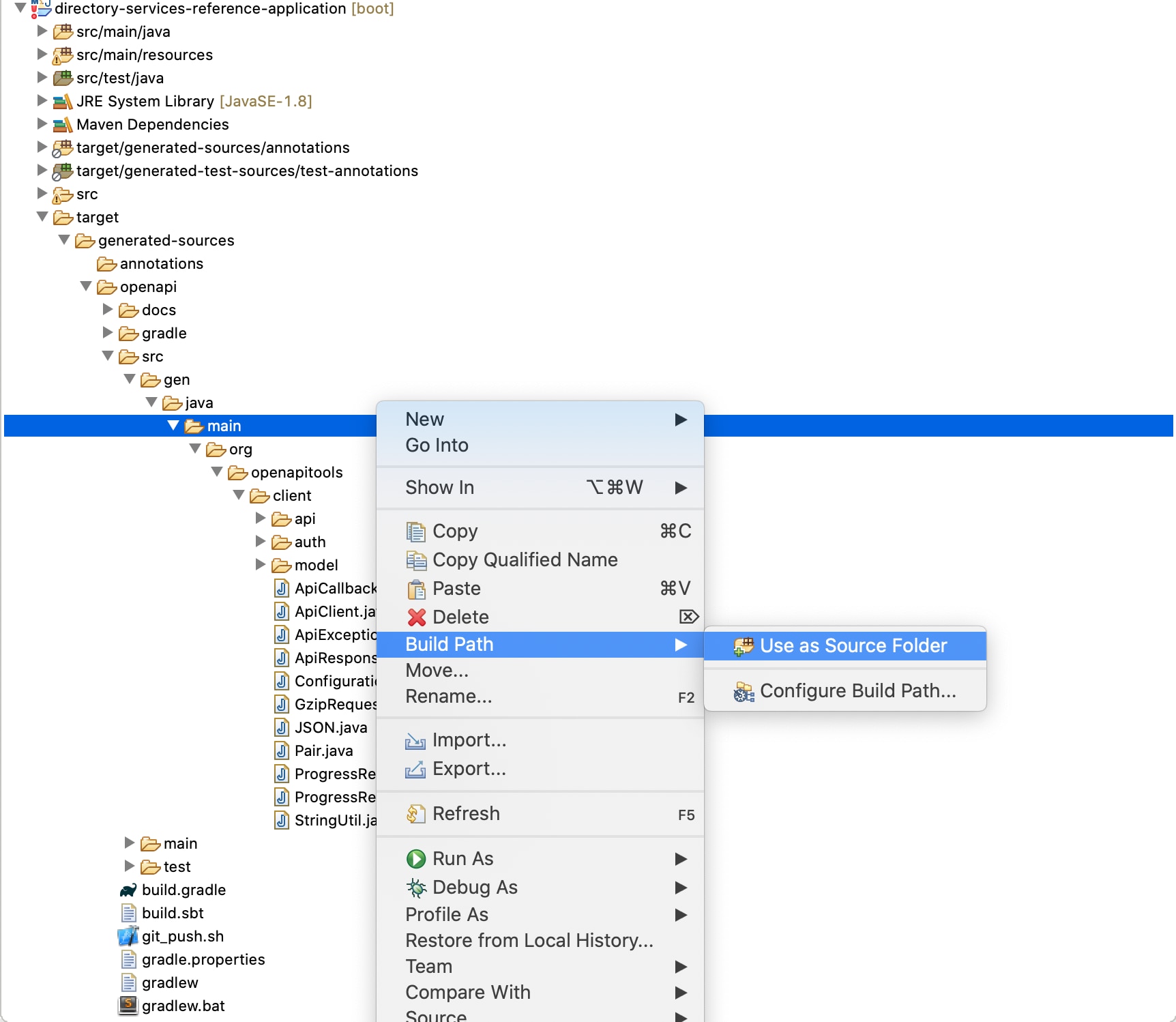
If you are successful, there should be a new folder named **target** within your project, as shown below. If you are using an IDE like IntelliJ IDEA, you can view the code of the generated classes.

To access these generated classes in the application source folder, you should add it to the source folder like shown in below image.
### Check and Start the Application {#check-and-start-the-application}
1. Check functionality by running `mvn test`.
All tests should pass. If they do not, make sure that your authentication credentials are correct and that you have the correct OpenAPI Specification files (by default, they are located in src/main/resources).
2. Start the application by running `mvn spring-boot:run`.
3. Your application should be running now. In a web browser, go to **localhost:8080** to interact with it.
### Making API Calls {#making-api-calls}
* All requests sent to MPQR must follow the Mastercard OAuth guidelines. You sign your requests using the Mastercard OAuth Signer Library. For creating an APIClient create a config class MPQRAPIConfig.java. Create instance of ApiClient in the same.
* Java
```java
/**
* Creates an instance of ApiClient, with an interceptor to
* sign requests to align with Mastercard's OAuth 1.0a requirements.
* @param env Environment from which we pull property details
* @return Instance of ApiClient
* @throws Exception
*/
@Bean
public ApiClient apiClient(Environment env) throws Exception {
String consumerKey = env.getProperty("consumerKey");
String signingKeyAlias = env.getProperty("keyAlias");
String signingKeyFilePath = env.getProperty("p12PrivateKey");
String signingKeyPassword = env.getProperty("keyPassword");
PrivateKey signingKey = AuthenticationUtils.loadSigningKey(signingKeyFilePath, signingKeyAlias, signingKeyPassword);
ApiClient client = new ApiClient();
client.setBasePath("https://sandbox.api.mastercard.com"); //for sandbox environment use: https://sandbox.api.mastercard.com; for production, use https://api.mastercard.com
client.setDebugging(true);
List interceptors = client.getHttpClient().networkInterceptors();
interceptors.add(new OkHttp2OAuth1Interceptor(consumerKey, signingKey));
return client;
}
```
* For mapping the request from mobile application in a class format create a model class MerchantTransferPaymentRequest in MerchantTransferPaymentRequest.java.
* Java
```java
/**
* Request object for Merchant Transfer - Payment
*/
@Data
@FieldDefaults(level = AccessLevel.PRIVATE)
public class MerchantTransferPaymentRequest {
@JsonProperty("partnerId")
String partnerId;
MerchantTransfer merchant_transfer;
public String getPartnerId() {
return partnerId;
}
@Data
public static class MerchantTransfer {
String transfer_reference;
String payment_type;
String payment_origination_country;
String transaction_local_date_time;
TransferAmount transferAmount;
String sender_account_uri;
Sender sender;
String recipient_account_uri;
Recipient recipient;
String mastercard_assigned_id;
String processor_id;
String additional_message;
String participation_id;
Participant participant;
@Data
public static class TransferAmount {
String value;
String currency;
//Add getter - setter methods
}
@Data
public static class Person {
String first_name;
String middle_name;
String last_name;
Address address;
String phone;
String email;
String authentication_value;
TokenCryptogram token_cryptogram;
@Data
public static class Address {
String line1;
String line2;
String city;
String country_subdivision;
String postal_code;
String country;
//Add getter - setter methods
}
@Data
public static class TokenCryptogram {
String type;
String value;
//Add getter - setter methods
}
}
@Data
@EqualsAndHashCode(callSuper = true)
public static class Sender extends Person {
}
@Data
@EqualsAndHashCode(callSuper = true)
public static class Recipient extends Person {
String merchant_category_code;
//Add getter - setter methods
}
@Data
public static class Participant {
String card_acceptor_id;
String card_acceptor_name;
//Add getter - setter methods
}
//Add getter - setter methods
}
public void setPartnerId(String object) {
// TODO Auto-generated method stub
this.partnerId = object;
}
public MerchantTransfer getMerchant_transfer() {
return merchant_transfer;
}
public void setMerchant_transfer(MerchantTransfer merchant_transfer) {
this.merchant_transfer = merchant_transfer;
}
}
```
Add getters and setters for all the properties in the class.
* When request for create payment is received, the model class that is linked to the request is passed to the MPQRAPIService class, which builds instances of a MerchantTransferCreateRequestWrapper class from model class. This class is passed to the ApiClient when you make call. This class holds Merchant Transfer object in it. To build a request in desired format we need to add function buildPaymentTransferRequest() in RequestBuilder.java class as shown below:
* Java
```java
/**
* Takes a MerchantTransferPaymentRequest, and builds a MerchantPaymentTransferWrapper class instance.
* @param model MerchantTransferPaymentRequest instance, that contains all data needed to construct request
* @return Instance of MerchantPaymentTransferWrapper that is ready to be used with an instance of MerchantTransferPaymentApi to make API calls
*/
public static MerchantPaymentTransferWrapper buildPaymentTransferRequest(MerchantTransferPaymentRequest model) {
MerchantPaymentTransferWrapper wrapper = new MerchantPaymentTransferWrapper();
MerchantPaymentTransfer request = new MerchantPaymentTransfer();
request.setTransferReference(model.getMerchant_transfer().getTransfer_reference());
request.setPaymentType(model.getMerchant_transfer().getPayment_type());
request.setAmount(model.getMerchant_transfer().getTransferAmount().getValue());
request.setCurrency(model.getMerchant_transfer().getTransferAmount().getCurrency());
request.setPaymentOriginationCountry(model.getMerchant_transfer().getPayment_origination_country());
request.setSenderAccountUri(model.getMerchant_transfer().getSender_account_uri());
Sender sender = new Sender();
sender.setFirstName(model.getMerchant_transfer().getSender().getFirst_name());
sender.setLastName(model.getMerchant_transfer().getSender().getLast_name());
SenderAddress sAddress = new SenderAddress();
sAddress.setLine1(model.getMerchant_transfer().getSender().getAddress().getLine1());
sAddress.setLine2(model.getMerchant_transfer().getSender().getAddress().getLine2());
sAddress.setCity(model.getMerchant_transfer().getSender().getAddress().getCity());
sAddress.setCountrySubdivision(model.getMerchant_transfer().getSender().getAddress().getCountry_subdivision());
sAddress.setCountry(model.getMerchant_transfer().getSender().getAddress().getCountry());
sAddress.setPostalCode(model.getMerchant_transfer().getSender().getAddress().getPostal_code());
sender.setAddress(sAddress);
sender.setPhone(model.getMerchant_transfer().getSender().getPhone());
sender.setEmail(model.getMerchant_transfer().getSender().getEmail());
request.setSender(sender);
request.setRecipientAccountUri(model.getMerchant_transfer().getRecipient_account_uri());
Recipient recipient = new Recipient();
recipient.setFirstName(model.getMerchant_transfer().getRecipient().getFirst_name());
recipient.setLastName(model.getMerchant_transfer().getRecipient().getLast_name());
RecipientAddress rAddress = new RecipientAddress();
rAddress.setLine1(model.getMerchant_transfer().getRecipient().getAddress().getLine1());
rAddress.setLine2(model.getMerchant_transfer().getRecipient().getAddress().getLine2());
rAddress.setCity(model.getMerchant_transfer().getRecipient().getAddress().getCity());
rAddress.setCountrySubdivision(model.getMerchant_transfer().getRecipient().getAddress().getCountry_subdivision());
rAddress.setCountry(model.getMerchant_transfer().getRecipient().getAddress().getCountry());
rAddress.setPostalCode(model.getMerchant_transfer().getRecipient().getAddress().getPostal_code());
recipient.setAddress(rAddress);
recipient.setPhone(model.getMerchant_transfer().getRecipient().getPhone());
recipient.setEmail(model.getMerchant_transfer().getRecipient().getEmail());
recipient.setMerchantCategoryCode(model.getMerchant_transfer().getRecipient().getMerchant_category_code());
request.setRecipient(recipient);
Participant participant = new Participant();
participant.setCardAcceptorName(model.getMerchant_transfer().getParticipant().getCard_acceptor_name());
participant.setCardAcceptorId(model.getMerchant_transfer().getParticipant().getCard_acceptor_id());
request.setParticipant(participant);
request.setMastercardAssignedId(model.getMerchant_transfer().getMastercard_assigned_id());
request.setTransactionLocalDateTime(model.getMerchant_transfer().getTransaction_local_date_time());
wrapper.setMerchantPaymentTransfer(request);
return wrapper;
}
```
* You then send the request to Mastercard by calling createMerchantPayment API. Here is the code you need to add in MPQRAPIService.java class
* Java
```java
/**
* Takes a MerchantTransferPaymentRequest, and uses it to make an API call which will create a payment request.
* Uses buildPaymentTransferRequest to get the data in the form needed.
* @param model MerchantTransferPaymentRequest instance, that contains all data needed to construct request
* @return Instance of MerchantPaymentTransferResponseWrapper if the call was made successfully, or null otherwise
*/
public MerchantPaymentTransferResponseWrapper makePaymentTransferApiCall(MerchantTransferPaymentRequest model) {
createPaymentTransferRequest = RequestBuilder.buildPaymentTransferRequest(model);
try {
MerchantPaymentTransferResponseWrapper response = createPaymentTransferApi.createMerchantPayment(partnerId, createPaymentTransferRequest);
System.out.println(response.toString());
return response;
} catch (ApiException e) {
JSONObject json = new JSONObject(e.getResponseBody()).getJSONObject("Errors").getJSONArray("Error").getJSONObject(0);
errorMessage = "Error occurred while creating mapping";
error = json.toString(4);
System.out.println(json.toString());
}
return null;
}
```