# Field URIs, Codes and Formats
source: https://developer.mastercard.com/mastercard-merchant-presented-qr/documentation/server-apis/field-uris-codes/index.md
## Account URIs {#account-uris}
Different schemas can be used to identify an Account URI in fields such as `sender_account_uri`, `recipient_account_uri`, `digital_account_reference_number` and `account_uri`.
For the `sender_account_uri` field, see [Funding Source](https://developer.mastercard.com/mastercard-merchant-presented-qr/documentation/server-apis/field-uris-codes/index.md#funding-source) for further guidance if the source is a deposit account, cash, or any form of Mobile Money account or staged wallet.
| Scheme | Scheme Specific Data |
|--------|------------------------------------------------------------------------------------------------------------------------------------------------------------------------------------------------------------------------------------------------------------------------------------------------------------------------------------------------------------------------------------------------------------------------------------------------------------------------------------------------------------------------------------------------------------------------------------------------------------------------------------------------------------------------------------------------------------------------------------------------------------------------------------------------------------------------------------------------------------------------------------------------------------------------------------------------------------------------------------------------------------------------------------------------------------------------------------------------------------------------------------------------------------------------------------------------------------------------------------------------------------------------------------------------------------------------------------------------------------------------------------------------------------------------------------------------------------------------------------------------------------------------------------------------|
| pan | Specifies a card account number (PAN) or tokenized PAN (also known as a token). If you provide a tokenized PAN, you can provide the associated cryptogram information using the `token_cryptogram` fields, see [Token Cryptogram](https://developer.mastercard.com/mastercard-merchant-presented-qr/documentation/server-apis/field-uris-codes/index.md#token-cryptogram). Data format: {PAN/tokenized PAN}\[;exp=YYYY-MM\]\[;cvc=NNN\] Where: * PAN = numeric, length 11-19 * Tokenized PAN = numeric, length 16 * The square brackets indicate optional elements: expiration date \[;exp=YYYY-MM\] and Card Verification Code (CVC) \[;cvc=NNN\] * For PANs, expiration date is optional, but including it can improve approval rates * For tokenized PANs, expiration date is optional. For Recipient Account URI, expiration date is required if you provide the [Token Cryptogram](https://developer.mastercard.com/mastercard-merchant-presented-qr/documentation/server-apis/field-uris-codes/index.md#token-cryptogram) in the `token_cryptogram` fields\*. * CVC is optional
PAN examples: * pan:5102589999999913 * pan:5102589999999913;exp=2077-08 * pan:5102589999999913;cvc=123 * pan:5102589999999913;exp=2077-08;cvc=123
Tokenized PAN examples: * pan:5432231452673894 * pan:5432231452673894;exp=2077-08 * pan:5432231452673894;cvc=123 * pan:5432231452673894;exp=2077-08;cvc=123 For the situation indicated \* above: * pan:5432231452673894;exp=2077-08 * pan:5432231452673894;exp=2077-08;cvc=123 |
| raw | Specifies a deposit account or generic account number that is not a PAN. You can only use this scheme for Sender Account URI. You can use this scheme to specify account identifiers such as email addresses, phone numbers, social network IDs, and wallet IDs. For wallet accounts, see also [Funding Source](https://developer.mastercard.com/mastercard-merchant-presented-qr/documentation/server-apis/field-uris-codes/index.md#funding-source). Data format: alphanumeric special, max length 50. Special characters: \ ! " # $ % \& ' ( ) \* + , - . / : ; \< = \> ? @ \[ \\ \] _ \` { \| } \~ Examples: * raw:123456789012 * raw:test123@abcmail.com |
## Funding Source {#funding-source}
This table provides guidance for populating the `funding_source` and `sender_account_uri` fields in your Payment API requests, based on the funding source. For more information on the Account URI format for the `sender_account_uri` field, see [Account URIs](https://developer.mastercard.com/mastercard-merchant-presented-qr/documentation/server-apis/field-uris-codes/index.md#account-uris).
| Funding Source Value | Use When Processing Payments Funded by... | Sender Account URI |
|----------------------|---------------------------------------------------------------------------------------------------------------------|--------------------------------------------------------------------------------------------------------------------------------------------------------------------------------------------------------------------------------------------------------------------------|
| CREDIT | A credit card. This includes cards and tokens\* enabled via pass-through wallets, such as Apple Pay or Google Pay. | Provide the PAN or token used for funding the payment, accepted in any form via a contactless tap, contact chip, magstripe. |
| DEBIT | A debit card. This includes cards and tokens\* enabled via pass-through wallets, such as Apple Pay or Google Pay. | Provide the PAN or token used for funding the payment. |
| PREPAID | A prepaid card. This includes cards and tokens\* enabled via pass-through wallets, such as Apple Pay or Google Pay. | Provide the PAN or token used for funding the payment. |
| DEPOSIT_ACCOUNT | A deposit account, such as a routing transit number (RTN) or bank account. | If the account number is 50 characters or less, provide the value as `raw:{account number}`, for example `raw:123456789012`. Otherwise, provide the value `raw:9999999999999995` (to represent 'not available' to the Receiving Institution). |
| MOBILE_MONEY_ACCOUNT | Any form of Mobile Money account or staged wallet account. | Provide the wallet account details (such as the Wallet ID) if 50 characters or less, in the format `raw:{Wallet ID}`, for example `raw:73645201048300`. Otherwise, provide the value `raw:9999999999999995` (to represent 'not available' to the Receiving Institution). |
| CASH | Cash | Provide the value `raw:9999999999999995`. |
| OTHER | A source other than those listed above. | Provide the appropriate value as per the guidance in [Account URIs](https://developer.mastercard.com/mastercard-merchant-presented-qr/documentation/server-apis/field-uris-codes/index.md#account-uris). Otherwise, provide the value `raw:9999999999999995`. |
*\* With tokens, use the same process to identify credit, debit and prepaid accounts as you would for funding PANs.*
## Business Names {#business-names}
The Recipient Name and Address fields must be populated. When the Recipient name is a business name, provide it in the Recipient `first_name` and `last_name` fields as shown in the following table:
| Business Name | Recipient First Name | Recipient Last Name |
|-------------------|----------------------|---------------------|
| XYZ | XYZ | XYZ |
| XYZ International | XYZ | International |
| XYZ DBA MA | XYZ | DBA MA |
## Token Cryptogram {#token-cryptogram}
Your Payment API requests can contain tokenized PANs (tokens).
In a Payment API request, the `token_cryptogram` fields relate to the Recipient. When the `recipient_account_uri` field contains a token, you may optionally provide the associated cryptogram information using the `token_cryptogram` fields, for example:
* JSON
* XML
```JSON
"recipient_account_uri": "pan:5432231452673894;exp=2077-02",
"token_cryptogram": {
"type": "CONTACTLESS_CHIP",
"value": "jjoutwsdgfdou124354ljlsdhgout968957"
},
```
```XML
pan:5432231452673894;exp=2077-02
CONTACTLESS_CHIP
jjoutwsdgfdou124354ljlsdhgout968957
```
### Type and Value Guidance {#type-and-value-guidance}
This table provides guidance for populating the `token_cryptogram.type` field based on the `token_cryptogram.value`.
| Cryptogram Type | Used When the Cryptogram Value Is... |
|-----------------------|-------------------------------------------------------------------------------------------------------------------------------------------------------------|
| CONTACTLESS_CHIP | The result of a contactless tap and chip information is read by the terminal. |
| CONTACTLESS_MAGSTRIPE | The result of a contactless tap and the magstripe information is read by the terminal and the full track data is included without alteration or truncation. |
| DSRP_UCAF | The result of an in-app purchase and the chip information is included as a Universal Cardholder Authentication Field (UCAF) value. |
| CONTACT_CHIP | The result of PAN auto-entry via chip. |
| DSRP_DPD | Used to transport the digital payment data for electronic commerce (ecommerce) transactions. |
| DSRP_CHIP | The result of PAN/token entry via ecommerce containing a Digital Secure Remote Payments (DSRP) cryptogram. |
## Additional Message Data {#additional-message-data}
In a Payment API request, populate the `additional_message` field with the data from the QR code's Additional Data Field (Tag 62).
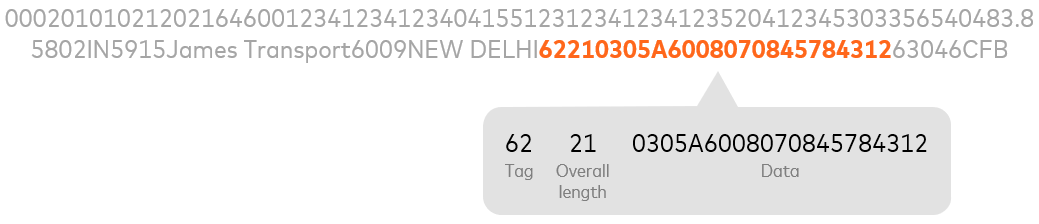
As shown in the diagram above:
1. An example QR code result is:
000201010212021646001234123412340415512312341234123520412345303356540483.85802IN5915James Transport6009NEW DELHI62210305A600807084578431263046CFB
2. The Additional Data Field (Tag 62) portion is:
62210305A6008070845784312
3. Exclude the Tag number ('62') and total length ('21'). The data to provide in the `additional_message` field is:
0305A6008070845784312
If Tag 62 is not present in the QR code, default the `additional_message` value to 000000 (six zeros).
For the QR Code Specifications, refer to the [*Mastercard QR: Send Program Guide*](https://trc-techresource.mastercard.com/r/bundle/mc_qr_send_pg_en-us/page/d/en-US), which is available in the [Technical Resource Center](https://trc-techresource.mastercard.com/) on Mastercard Connect.
## Authentication Value URIs {#authentication-value-uris}
The following schemas can be used in `authentication_value` field.
| Schema | Description | Example |
|--------|------------------------------------------------------------------------------------------------------------------------------------------------------------------------------------------------------------------------------------------------------------------------------------------------------------------------------------------------------------------------------------------------------------------------------------------|----------------------------------|
| ucaf | Universal Cardholder Authentication Field (UCAF) is a cryptographic value. The UCAF value is Mastercard® SecureCode™ issuer or cardholder-generated authentication data resulting from all SecureCode full authentication attempts for a Mastercard account. This field is populated when a UCAF-enabled merchant has collected authentication data and must pass it in the transaction to the issuer. Data format: string, length: 1-32 | ucaf:jJJLtQa+Iws8AREAEbjsA1MAAAA |
| cavv | Cardholder Authentication Verification Value (CAVV) is a cryptographic value. The CAVV is issuer or cardholder-generated authentication data resulting from full authentication attempts for an account. This field is populated when a merchant has collected authentication data and must pass it in the transaction to the issuer. Data format: string, length: 1-40 | cavv:00000109260000719349 |
## Location URIs {#location-uris}
The following schemas can be used in `location` fields.
| Schema | Description | Example |
|--------|------------------------|----------------------------|
| geo | Latitude and Longitude | geo:38.7467626,-90.7462917 |
| state | State | state:MO |
## Country and Currency Codes {#country-and-currency-codes}
### Country Codes {#country-codes}
The codes are the ISO 3166-1 alpha-3 (three-letter) country codes defined by the International Organization for Standardization (ISO). For information about the ISO standard, see [here](https://www.iso.org/iso-3166-country-codes.html).
### Currency Codes {#currency-codes}
The codes are the ISO 4217 alpha-3 (three-letter) currency codes defined by ISO. For information about the ISO standard, see [here](https://www.iso.org/iso-4217-currency-codes.html).
The applicable country and currency codes are published in the [*Quick Reference Booklet*](https://trc-techresource.mastercard.com/r/bundle/m_qrb_en-us/page/d/en-US), which is available in the [Technical Resource Center](https://trc-techresource.mastercard.com/) on Mastercard Connect.
## Date and Time Formats {#date-and-time-formats}
| Date/Time Field | Format |
|------------------------------------|-------------------------------------------------------------------------------------------------------------|
| Full Date (Year, Month, Day) | YYYY-MM-DD |
| Month and Day | MM-DD |
| Year and Month | YYYY-MM |
| Time (Hours, Minutes, and Seconds) | HH:MM:SS±hh\[:mm\] or HH:MM:SSZ 24 hour clock ±hh:mm is time zone offset Z indicates UTC; shorthand for +00 |
| Timestamp or Date/Time | YYYY-MM-DDTHH:MM:SS±hh\[:mm\] or YYYY-MM-DDTHH:MM:SSZ |
Times and timestamps present in resources returned by API calls will be in UTC.