# Mastercard Merchant Presented QR
source: https://developer.mastercard.com/mastercard-merchant-presented-qr/documentation/index.md
## Overview {#overview}
Mastercard® Merchant Presented QR (MPQR) is a [Mastercard QR](https://developer.mastercard.com/product/mastercard-qr) program providing a consumer-initiated, mobile payment solution. MPQR enables consumers to make cashless payments for goods and services from their mobile phones by simply scanning a Mastercard QR Code provided by any Mastercard QR accepting merchant. This push payment method has the convenience of cash and the security of a card payment, without needing a card payment terminal.
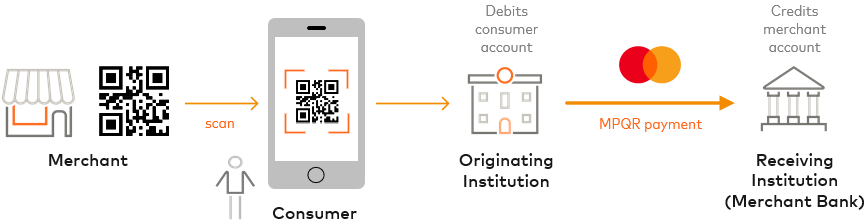
The MPQR program provides the Software Development Kits (SDKs), APIs and processing that enable registered participants (acquiring merchant banks, issuing consumer banks and wallet providers) to provide this payment solution:
* **Merchant banks** (known as the **Receiving Institutions**) can generate Mastercard QR codes for their merchants to present to their consumers.
* **Consumer banks** (known as the **Originating Institutions** ) and **wallet providers** (known as the **Transaction Originators**) can add Mastercard QR-scanning functionality to their payment applications (apps), enabling consumers to initiate MPQR payments when they scan merchants' QR codes.
MPQR payments can be made from eligible Mastercard accounts or Maestro accounts to eligible Mastercard accounts.
These documentation pages describe:
* MPQR [Device SDKs](https://developer.mastercard.com/mastercard-merchant-presented-qr/documentation/device-sdks/index.md), which can be used by Receiving Institutions to generate QR codes, and Originating Institutions/Transaction Originators to scan, parse and verify QR codes
* MPQR [Server APIs](https://developer.mastercard.com/mastercard-merchant-presented-qr/documentation/server-apis/index.md), which are used by Originating Institutions/Transaction Originators to create MPQR payment transfers and retrieve transfer details
Use this information in conjunction with the rules and standards provided by the *Mastercard Merchant Presented QR Program Guide*.
## How It Works {#how-it-works}
MPQR and Mastercard QR codes facilitate many different fast payment [use cases](https://developer.mastercard.com/mastercard-merchant-presented-qr/documentation/server-apis/use-cases/index.md). Merchants can present QR codes on their websites, mobile devices, in-store signage, invoices, ticket machines, and so on, providing additional secure payment methods to consumers.
Mastercard QR codes can be:
* **Dynamic:** The code includes the transaction amount and is generated for each transaction.
* **Static:** The code excludes the transaction amount and is used for all transactions. The consumer enters the transaction amount in their payment app after scanning the code.
The following process summarizes how an MPQR payment works. It does not prescribe the design of your system.
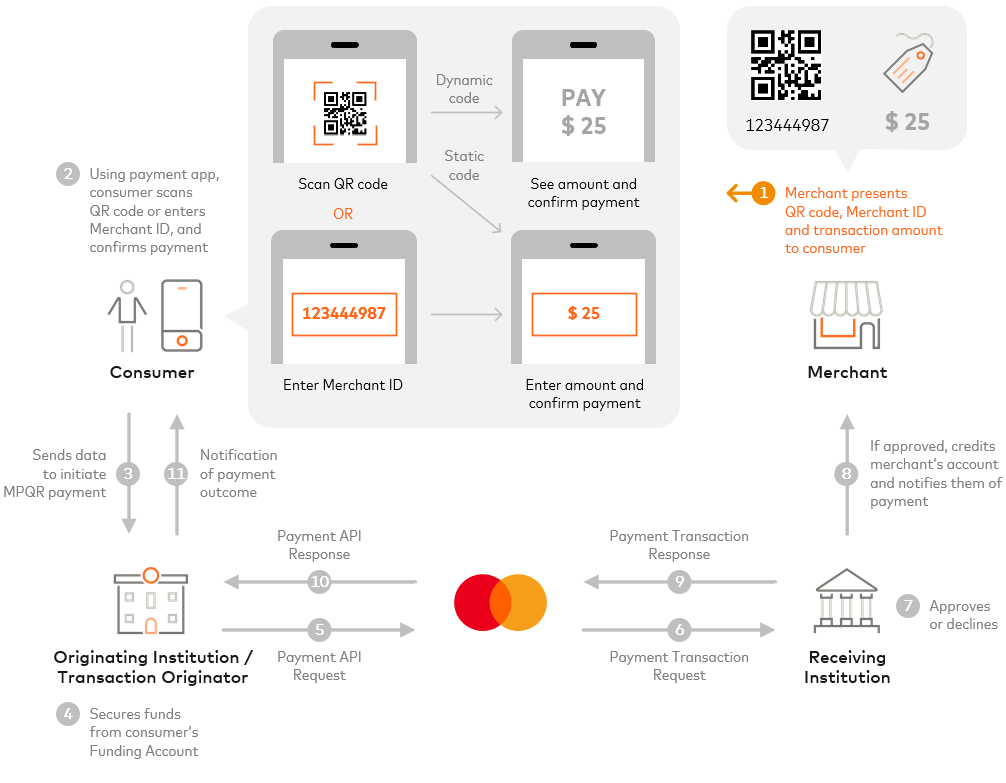
1. The merchant (Recipient) presents their Mastercard QR code, Merchant ID and transaction amount to the consumer.
These could be shown on the merchant's website, mobile device, in-store signage, invoice, and so on.
2. Using a payment app, the consumer (Sender) scans the QR code or enters the Merchant ID (if unable to scan). The app parses and verifies the QR code and, if the QR code is dynamic, shows the amount to the consumer for confirmation. Otherwise, the consumer enters the amount and confirms payment.
3. The payment app sends the data to the Originating Institution/Transaction Originator to initiate the MPQR payment.
4. The Originating Institution/Transaction Originator verifies that the funding is available. If it's the consumer's bank, it debits the consumer's account (Funding Account).
5. The Originating Institution/Transaction Originator sends a [Payment API Request](https://developer.mastercard.com/mastercard-merchant-presented-qr/documentation/server-apis/api-reference/payment-api/index.md) to Mastercard.
6. Mastercard sends a Payment Transaction Request to the Network to route to the Receiving Institution (Merchant Bank) for approval.
7. The Receiving Institution approves or declines the payment.
8. If approved, the Receiving Institution credits the merchant's account (Receiving Account) and notifies them of the payment.
9. The Receiving Institution sends a Payment Transaction Response to Mastercard.
10. Mastercard sends a Payment API Response to the Originating Institution/Transaction Originator.
11. The Originating Institution/Transaction Originator notifies the consumer of the payment outcome via the payment app. If the MPQR Payment was rejected or declined, the Originating Institution/Transaction Originator must refund the Funding Account (if it's the consumer's bank).
If an MPQR payment transfer response has an 'UNKNOWN' status, the Originating Institution/Transaction Originator can use the [Retrieval API](https://developer.mastercard.com/mastercard-merchant-presented-qr/documentation/server-apis/api-reference/retrieval-api/index.md) to retrieve the transfer details and latest status.
### Tokenized PANs {#tokenized-pans}
MPQR supports the use of Mastercard tokenized PANs in API requests, which are supplied using 'pan' [Account URIs](https://developer.mastercard.com/mastercard-merchant-presented-qr/documentation/server-apis/field-uris-codes/index.md#account-uris). You can use the [Mastercard Digital Enablement Service (MDES)](https://developer.mastercard.com/product/mdes) to tokenize Mastercard PANs.
### Additional Services {#additional-services}
Additional services can be used to enhance the payment flow. For example, Originating Institutions can use the **Currency Conversion Calculator** to access daily currency conversion rates for cross-border MPQR payments, helping them determine the funds needed to reconcile with Mastercard.
Note: Mastercard does not transmit funds. All Mastercard QR and Mastercard Network funds are transmitted by a licensed Financial Institution for which Mastercard provides data processing services.
## Next Steps {#next-steps}
### Receiving Institutions {#receiving-institutions}
See the [Device SDKs](https://developer.mastercard.com/mastercard-merchant-presented-qr/documentation/device-sdks/index.md), which can help you develop QR code generation functionality for web, Android and iOS applications.
### Originating Institutions and Transaction Originators {#originating-institutions-and-transaction-originators}
See the [Device SDKs](https://developer.mastercard.com/mastercard-merchant-presented-qr/documentation/device-sdks/index.md), which can help you develop QR code scanning, parsing and verification functionality for web, Android and iOS applications.
For the [Server APIs](https://developer.mastercard.com/mastercard-merchant-presented-qr/documentation/server-apis/index.md):
1. Ensure you have met the eligibility requirements, see [Before You Start](https://developer.mastercard.com/mastercard-merchant-presented-qr/documentation/server-apis/getting-started/index.md#before-you-start).
2. Create a Mastercard Developers project with the **Mastercard Merchant Presented QR** API service, see [Create Your Project and Keys](https://developer.mastercard.com/mastercard-merchant-presented-qr/documentation/server-apis/getting-started/index.md#create-your-project-and-keys) and try the Sandbox API stubs without Mastercard assistance.
3. For guidance on API authentication, see [API Basics](https://developer.mastercard.com/mastercard-merchant-presented-qr/documentation/server-apis/api-basics/index.md).
4. To understand the parameters and fields that can be in API request and response messages, see [API Reference](https://developer.mastercard.com/mastercard-merchant-presented-qr/documentation/server-apis/api-reference/index.md).
5. OPTIONAL: Try the [reference application](https://developer.mastercard.com/mastercard-merchant-presented-qr/documentation/server-apis/reference-app/index.md).
6. [Request setup in the Mastercard Test Facility (MTF)](https://developer.mastercard.com/mastercard-merchant-presented-qr/documentation/server-apis/getting-started/index.md#request-mtf-setup) environment, then test the service in MTF.
Mastercard will need to configure the MTF environment before you can use it.
7. When testing is complete, [request Production access](https://developer.mastercard.com/mastercard-merchant-presented-qr/documentation/server-apis/getting-started/index.md#request-production-access-and-set-up-the-production-keys) for your project and set up the Production Keys, and validate in the Production environment.
Mastercard will need to approve your request and configure the Production environment before you can use it.
8. For FAQs and queries, see [Support](https://developer.mastercard.com/mastercard-merchant-presented-qr/documentation/server-apis/support/index.md).
Note: The MPQR program requires participants to perform the necessary testing and validation relating to their role and use case, such as checking that QR codes are presented correctly and certifying the payment/wallet application.
**Originating Institutions and Transaction Originators:** All app certification requests must be submitted to [mpqr_approvals@mastercard.com](mailto:mpqr_approvals@mastercard.com) for evaluation.
**Receiving Institutions:** Complete the MPQR M-TIP certification process to ensure that the QR code adheres to EMV® specifications and meets functional requirements and specifications. Requests must be submitted to [QR_RI_Testing@mastercard.com](mailto:QR_RI_Testing@mastercard.com) for assessment.
Your Mastercard representative can provide more information about this service. If you do not have one, please use the **Contact sales** button and form on the [Mastercard Developers page](https://developer.mastercard.com/) to request a regional representative, identifying your company name, region, and the Mastercard services that interest you.