# UI/UX Best Practices
source: https://developer.mastercard.com/mastercard-checkout-solutions/tutorial/returninguser_recognized_ui/best-practices/index.md
The user experience (UX) requirements and recommended best practices provided here are to assist participants in implementing a seamless Click to Pay checkout experience.
| \[*R* \] or \[*BP*\] | **Meaning** |
|----------------------|---------------|
| **R** | Requirement |
| **BP** | Best Practice |
### Card List hierarchy \[R\] {#card-list-hierarchy-r}

Follow the below hierarchy to display cards from multiple Click to Pay systems on the payments page:
* The most recently used card shows at the top.
* This next set of cards are sorted by first card enrolled in the profile based on date and timestamp OR cards that have been added but unused for any transactions.
As a best practice, for each card, display:
* Card art if available
* Next to card art: the card's specific issuer name, then the card networks name
* Below this "\*\*\*\*" and the last 4 digits of the PAN
* If card has benefits, digital card benefit message that is 2 lines or less
Note: An exception may be made in case of displaying merchant co-brand card at the top of the list when the consumer is shopping at that particular merchant.
### Payment options sequence and display \[BP\] {#payment-options-sequence-and-display-bp}

* Display the Click to Pay card as the first payment option followed by other options on the payment page:
* All cards returned by Click to Pay system
* Other payment methods
* Other available payment options
* We recommend to follow existing UI implementation on merchant's side.
### Expired and Non-Supported cards \[R\] {#expired-and-non-supported-cards-r}

* Disable all expired cards and cards from non-supported payment networks for user selection on the payment page.
* Include a descriptor for disabled card (see example).
### Last Used Card display \[BP\] {#last-used-card-display-bp}

* Display the recently used card as the only card.
* Present the list of other cards enrolled for Click to Pay network below this card.
### Not Your cards \[BP\] {#not-your-cards-bp}
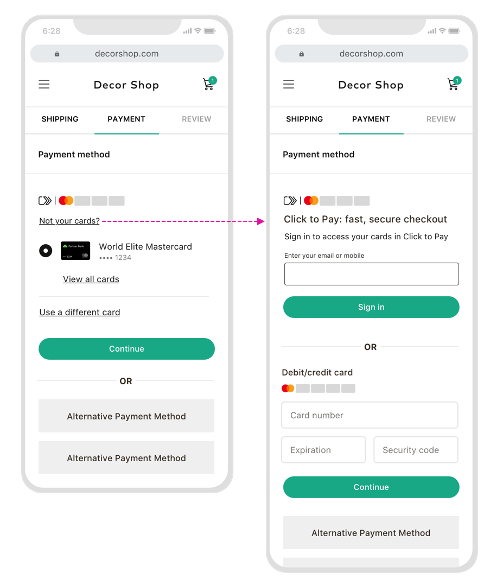
* Provide an option to consumers to sign out of their Click to Pay profile and sign into a different profile with email or mobile number.
### Card on File \[BP\] {#card-on-file-bp}
**Single Card on File with Merchant**
* If both Click to Pay and partner's card on file solution are available on the payment page, display partners' card on file first, followed by Click to Pay option.
**Multiple Cards on File with Merchant**
* If a list of cards are available on file with Merchant, present Click to Pay as an option to continue under it.