# Perform Transaction Authentication
source: https://developer.mastercard.com/mastercard-checkout-solutions/tutorial/authentication_scof_guide/step1/index.md
## Transaction Authentication Use Cases {#transaction-authentication-use-cases}
* [Use Case 1](https://developer.mastercard.com/mastercard-checkout-solutions/tutorial/authentication_scof_guide/step1/index.md#use-case-1-transaction-authentication-with-passkey): Transaction Authentication with Passkey
* [Use Case 2](https://developer.mastercard.com/mastercard-checkout-solutions/tutorial/authentication_scof_guide/step1/index.md#use-case-2-transaction-authentication-with-3ds): Transaction Authentication with 3DS
## Use Case 1: Transaction Authentication with Passkey {#use-case-1-transaction-authentication-with-passkey}
Mastercard supports passkeys (FIDO) for transaction authentication. Passkey creation is a pre-requisite to use them for transaction authentication.
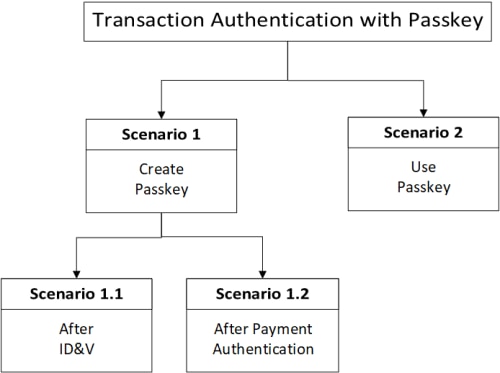
Note: The UI displayed in these scenarios is for illustration purpose. Read the [Product Guide](https://techdocs.mastercard.com/) for details.
### Scenario 1.1: Create Passkey after ID\&V {#scenario-11-create-passkey-after-idv}
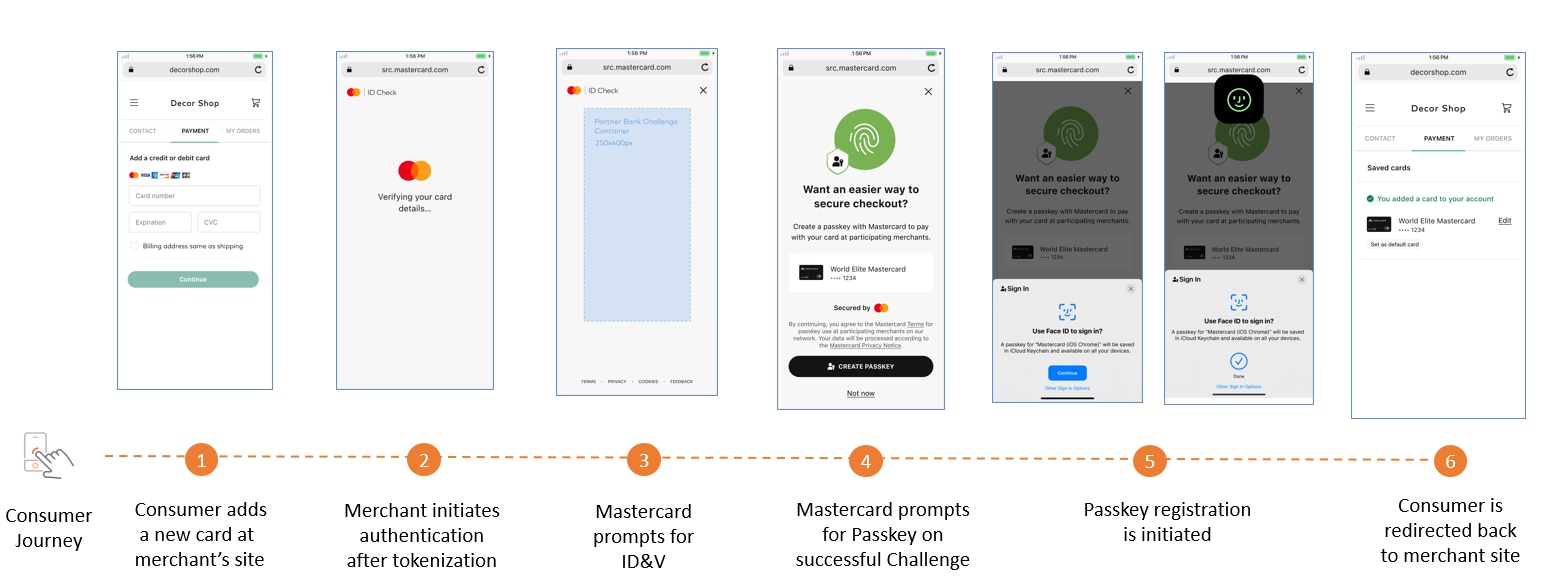
Identity \& Verification (ID\&V) is a pre-requisite before creating a passkey.
| Sequence | Cardholder | Integrator |
|----------|--------------------------------------------------|----------------------------------------------------------------------------------------------------------------------------------------------------------------------------------------------------------------------------------------------------------------------------------------------------------------------------------------------------------------------------------------------------|
| 1. | Adds a new card for checkout. | With a new card added, fetches the authentication methods from the response of [Enroll Card](https://developer.mastercard.com/mastercard-checkout-solutions/documentation/api-reference/apis/index.md#card) API. |
| 2. | Completes ID\&V on Mastercard Authentication UI. | Launches Mastercard [Authentication UI](https://developer.mastercard.com/mastercard-checkout-solutions/tutorial/integrate_apis_scof/step4/index.md) with the following key parameters: * `authenticationMethodType` = MANAGED_AUTHENTICATION * `authenticationReasons` = ENROL_FINANCIAL_INSTRUMENT |
| 3. | Is prompted to create a passkey. | Receives proof of authentication for ID\&V from Mastercard Checkout Solutions. ```javascript { "assuranceData": { "verificationData": [ { "verificationType":"CARDHOLDER", "verificationEntity":"03", "verificationMethod":"01", "verificationResults": "01", "verificationTimestamp":"2023-07-13T19:52:44.551Z", "verificationEvents": ["02"], "additionalData":"(proof of 3DS ID&V)" } ] } } ``` |
### Scenario 1.2: Create Passkey after Transaction Authentication {#scenario-12-create-passkey-after-transaction-authentication}
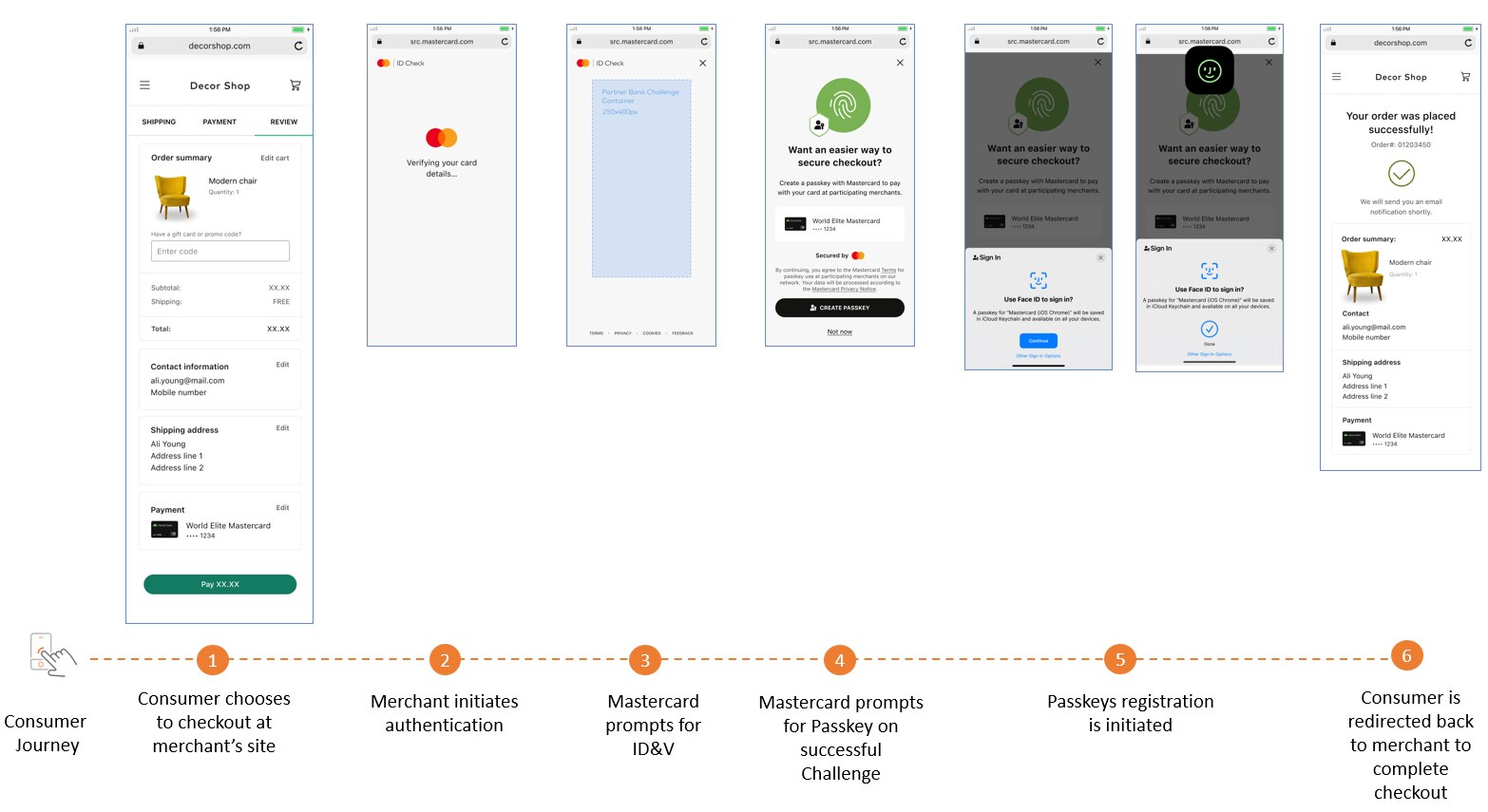
| Sequence | Cardholder | Integrator |
|----------|-----------------------------------------------------------|------------------------------------------------------------------------------------------------------------------------------------------------------------------------------------------------------------------------------------------------------------------------------------------------------------------------------------------------------------------------------------------------------------------|
| 1. | Chooses to perform checkout. | During checkout, fetches the authentication methods from the response of [Lookup Authentication Method](https://developer.mastercard.com/mastercard-checkout-solutions/documentation/api-reference/apis/index.md#authentication) API. |
| 2. | Completes ID\&V on Mastercard Authentication UI. | If the Issuer has requested challenge, launch Mastercard [Authentication UI](https://developer.mastercard.com/mastercard-checkout-solutions/tutorial/integrate_apis_scof/step4/index.md) with the following key parameters: * `authenticationMethodType` = MANAGED_AUTHENTICATION * `authenticationReasons` = TRANSACTION_AUTHENTICATION
Else perform frictionless 3DS. |
| 3. | Is prompted to create a passkey only after 3DS challenge. | Receives authentication results from Mastercard Checkout Solutions. ```javascript { "assuranceData": { "verificationData": [ { "verificationType":"CARDHOLDER", "verificationEntity": "03", "verificationMethod": "01", "verificationResults": "01", "verificationTimestamp": "2023-07-13T19:52:44.551Z", "verificationEvents": ["01"], "additionalData":"(Proof of 3DS Transaction Authentication)" } ] } } ``` |
Step-by-step authentication tutorial is available [here](https://developer.mastercard.com/mastercard-checkout-solutions/tutorial/authentication_scof/index.md).
### Scenario 2: Use Passkey for Transaction Authentication {#scenario-2-use-passkey-for-transaction-authentication}
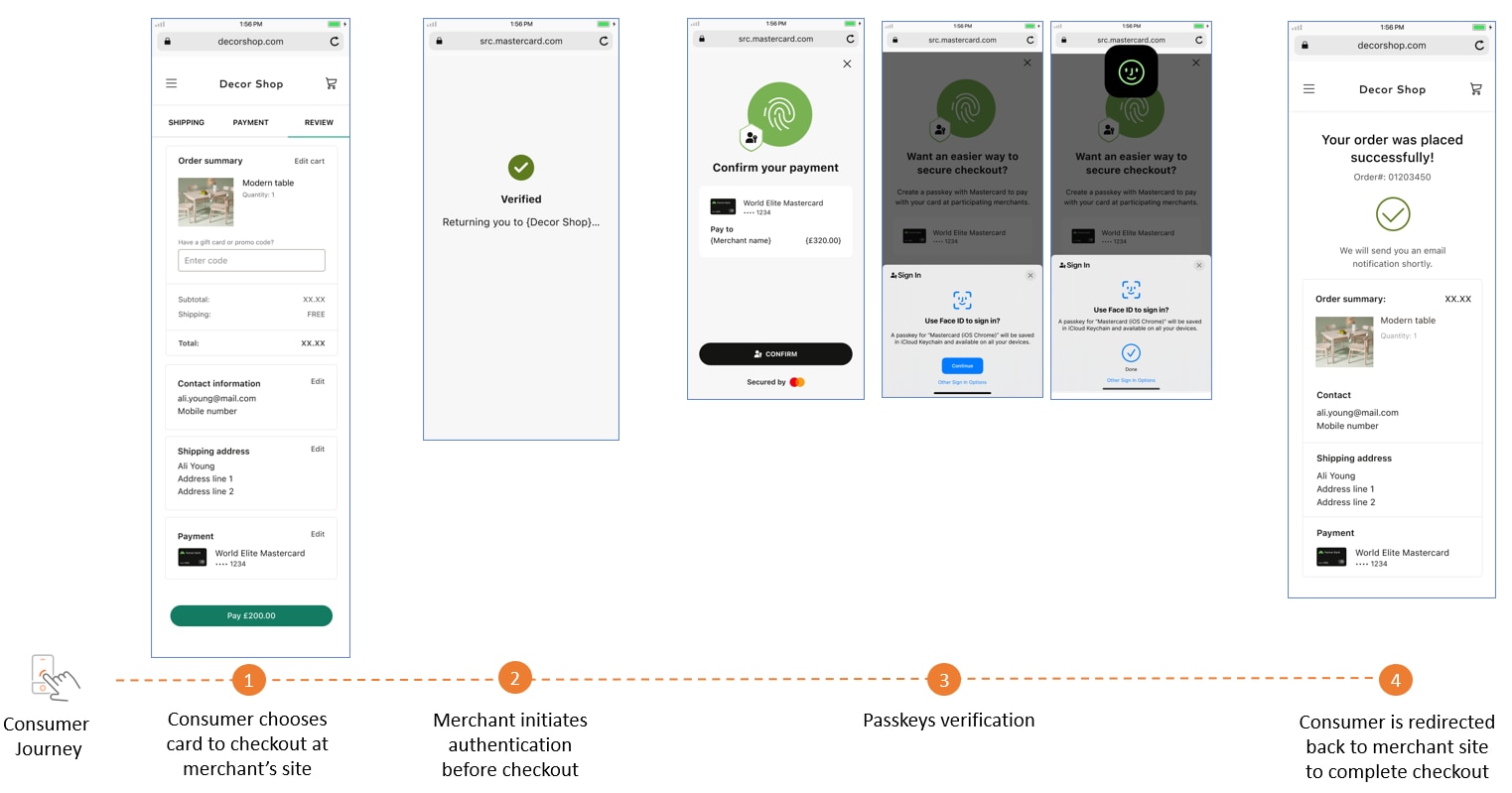
| Sequence | Cardholder | Integrator |
|----------|----------------------------------------|--------------------------------------------------------------------------------------------------------------------------------------------------------------------------------------------------------------------------------------------------------------------------------------------------------------------------------------------------------------------------------------------------------------------------------------------------------------------------------------------------------------------------------------------------------------------------------------------------------------------------------------------------------------------------------------------------------------------------------------------------------------------------------------------------------------------------------|
| 1. | Uses a card for checkout. | Fetches the authentication methods from the response of [Lookup Authentication Method](https://developer.mastercard.com/mastercard-checkout-solutions/documentation/api-reference/apis/index.md#authentication) API. * For `authenticationMethodType` = MANAGED_AUTHENTICATION and `authenticationReasons` = TRANSACTION_AUTHENTICATION: * Frictonless 3DS authentication occurs and the results are used for transaction authentication. * Does not prompt the cardholder to create passkeys. * For `authenticationMethodType` = MANAGED_AUTHENTICATION and `authenticationReasons` = ENROL_FINANCIAL_INSTRUMENT: * Launches [Authentication UI](https://developer.mastercard.com/mastercard-checkout-solutions/tutorial/integrate_apis_scof/step4/index.md) for 3DS challenge. * Prompts the cardholder to create a passkey. |
| 2. | Performs verification using a passkey. | If a passkey exists, prompts the cardholder for authentication. Receives authentication results from Mastercard Checkout Solutions. ```javascript { "assuranceData ": { "verificationData": [ { "verificationType":"CARDHOLDER", "verificationEntity": "02", "verificationMethod": "07", "verificationResults": "01", "verificationTimestamp": "2023-07-13T19:52:44.551Z", "verificationEvents": ["01"], "additionalData": "Proof of FIDO Authentication" } ] } "eci": "02", } ``` |
## Use Case 2: Transaction Authentication with 3DS {#use-case-2-transaction-authentication-with-3ds}
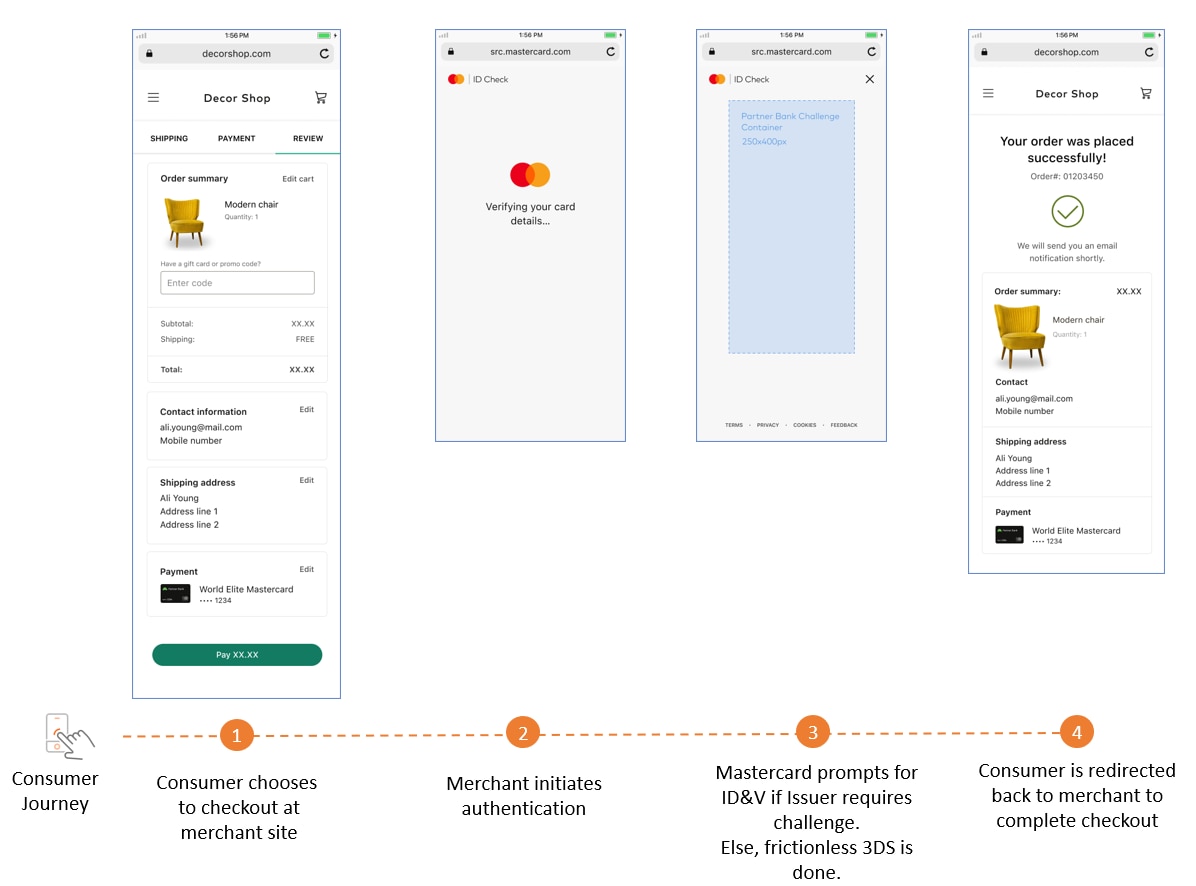
| Sequence | Cardholder | Integrator |
|----------|-------------------------------------------------------------------|-----------------------------------------------------------------------------------------------------------------------------------------------------------------------------------------------------------------------------------------------------------------------------------------------------------------------------------------------------------------------------------------------------------------------------------------------------------------------------------------------------------------------------------------------------------------------------------------------------------------------------------------------------------------------------------------------------------------------|
| 1. | Chooses to perform checkout. | Fetches the authentication methods from either of the APIs: * For a new card, use [Enroll Card](https://developer.mastercard.com/mastercard-checkout-solutions/documentation/api-reference/apis/index.md#card) API * For an existing card, use [Get Cards](https://developer.mastercard.com/mastercard-checkout-solutions/documentation/api-reference/apis/index.md#card) or [Lookup Authentication Method](https://developer.mastercard.com/mastercard-checkout-solutions/documentation/api-reference/apis/index.md#authentication) |
| 2. | Performs verification using a 3DS challenge on Authentication UI. | Launches Mastercard [Authentication UI](https://developer.mastercard.com/mastercard-checkout-solutions/tutorial/integrate_apis_scof/step4/index.md) with the following key parameters: * `authenticationMethodType` = 3DS * `authenticationReasons` = TRANSACTION_AUTHENTICATION
Receives authentication results from Mastercard Checkout Solutions. ```javascript { "assuranceData ": { "verificationData": [ { "verificationType":"CARDHOLDER", "verificationEntity": "03", "verificationMethod": "01", "verificationResults": "01", "verificationTimestamp": "2023-07-13T19:52:44.551Z", "verificationEvents": ["01"], "additionalData": "Proof of 3DS Transaction Authentication" } ] } "eci": "02", } ``` |
Step-by-step authentication tutorial is available [here](https://developer.mastercard.com/mastercard-checkout-solutions/tutorial/authentication_scof/index.md).