# Reference Application Tutorial
source: https://developer.mastercard.com/ethoca-alerts-for-merchants/documentation/tutorials-and-guides/reference-app-tutorial/index.md
## Overview {#overview}
This tutorial shows you how to generate an API client for the Alerts for Merchants API. You'll build an application that makes an API call to the Alerts service to retrieve details about a specific merchant and transaction.
### What you need {#what-you-need}
* [Mastercard Developers Account](https://developer.mastercard.com/dashboard) with access to the Alerts Merchant API
* A text editor or IDE
* [Apache Maven 3.3+](https://maven.apache.org/download.cgi)
* JDK 17 or newer version
* Make sure the `JAVA_HOME` environment variable matches the location of your Java installation.
### Generate API keys {#generate-api-keys}
To call these APIs, a consumer key and .p12 files are required from your
[Mastercard Developers](https://developer.mastercard.com/dashboard) project. If you haven't yet done so, first generate the Sandbox credentials that your server uses to communicate with Mastercard and the Alerts for Merchants API client. See our [Quick Start Guide](https://developer.mastercard.com/ethoca-alerts-for-merchants/documentation/tutorials-and-guides/quick-start-guide/index.md) for the steps required to set up the Sandbox project and download the keys.
## Step-By-Step Guide {#step-by-step-guide}
To complete this tutorial, you can either start from scratch using the [Spring Getting Started](https://spring.io/guides) guides and complete each step, or you can bypass the basic setup steps that are already familiar to you. Either way, you end up with working code.
To skip the basics, do the following:
* Access the source code for this tutorial from this zip file: [alerts-reference.zip](https://static.developer.mastercard.com/content/ethoca-alerts-for-merchants/uploads/alerts-reference.zip) (275KB)
* Go to [Configure Resources](https://developer.mastercard.com/ethoca-alerts-for-merchants/documentation/tutorials-and-guides/reference-app-tutorial/index.md#step-2-configure-resources).
### Step 1: Create or import a Maven project {#step-1-create-or-import-a-maven-project}
1. Start by creating a Maven project from scratch or importing an existing project.
* If creating a project from scratch, in Maven, select **File** \> **New** \> **Project** to create a new Maven project. This sets up your directory structure automatically.
* If importing the project, then select **File** \> **Open** \> \<*path to extracted alert-reference source code* \>.
2. Select **Project SDK** , then select **Next**.
3. If not already present, enter a **GroupId** , **ArtifactId** , and **Version**. These are required to configure a Maven project.
4. Select **Next**.
5. Enter a project **Name** , such as *alerts-reference* , and a **Location** .
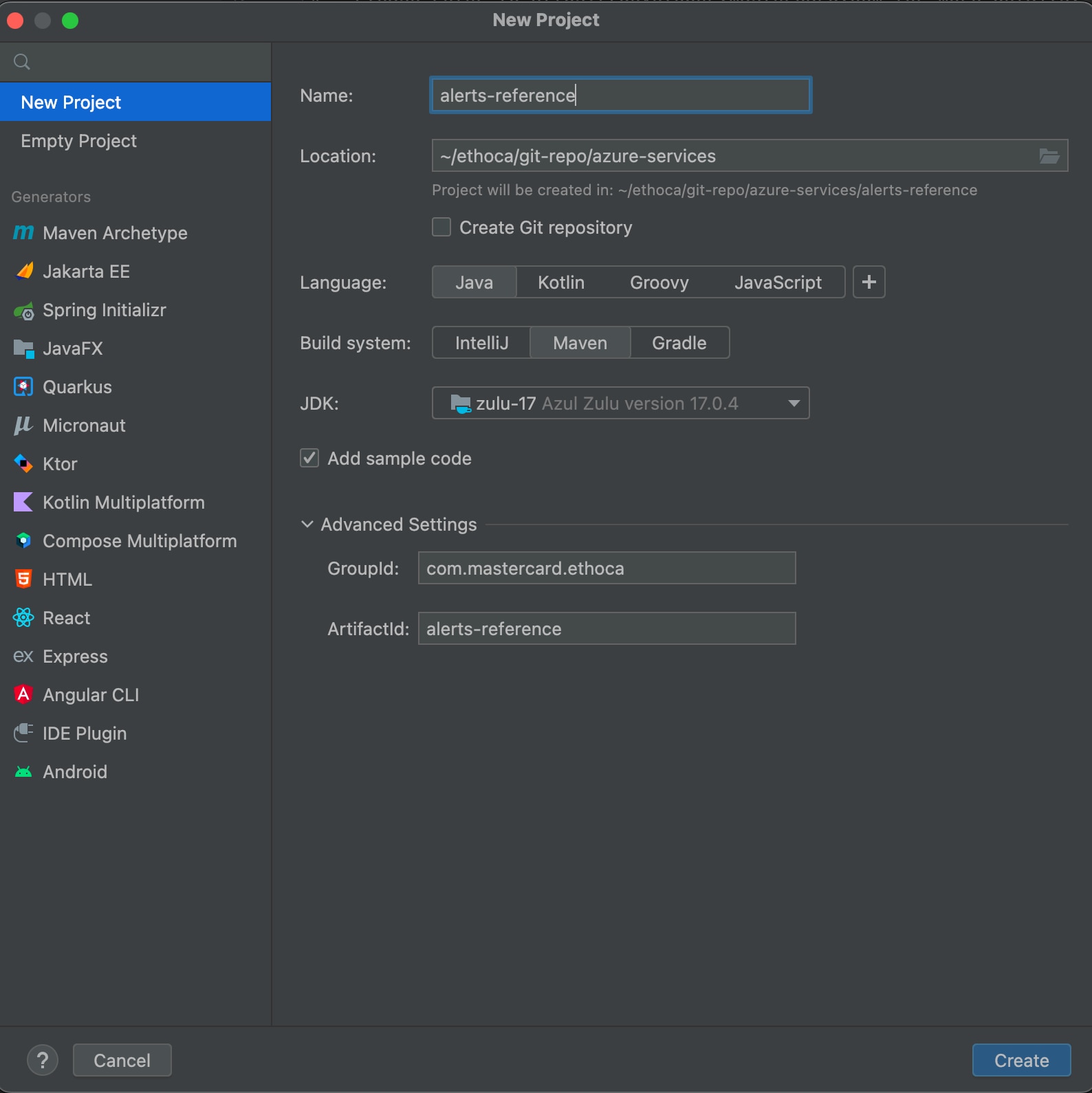
6. Select **Create**.
### Step 2: Configure resources {#step-2-configure-resources}
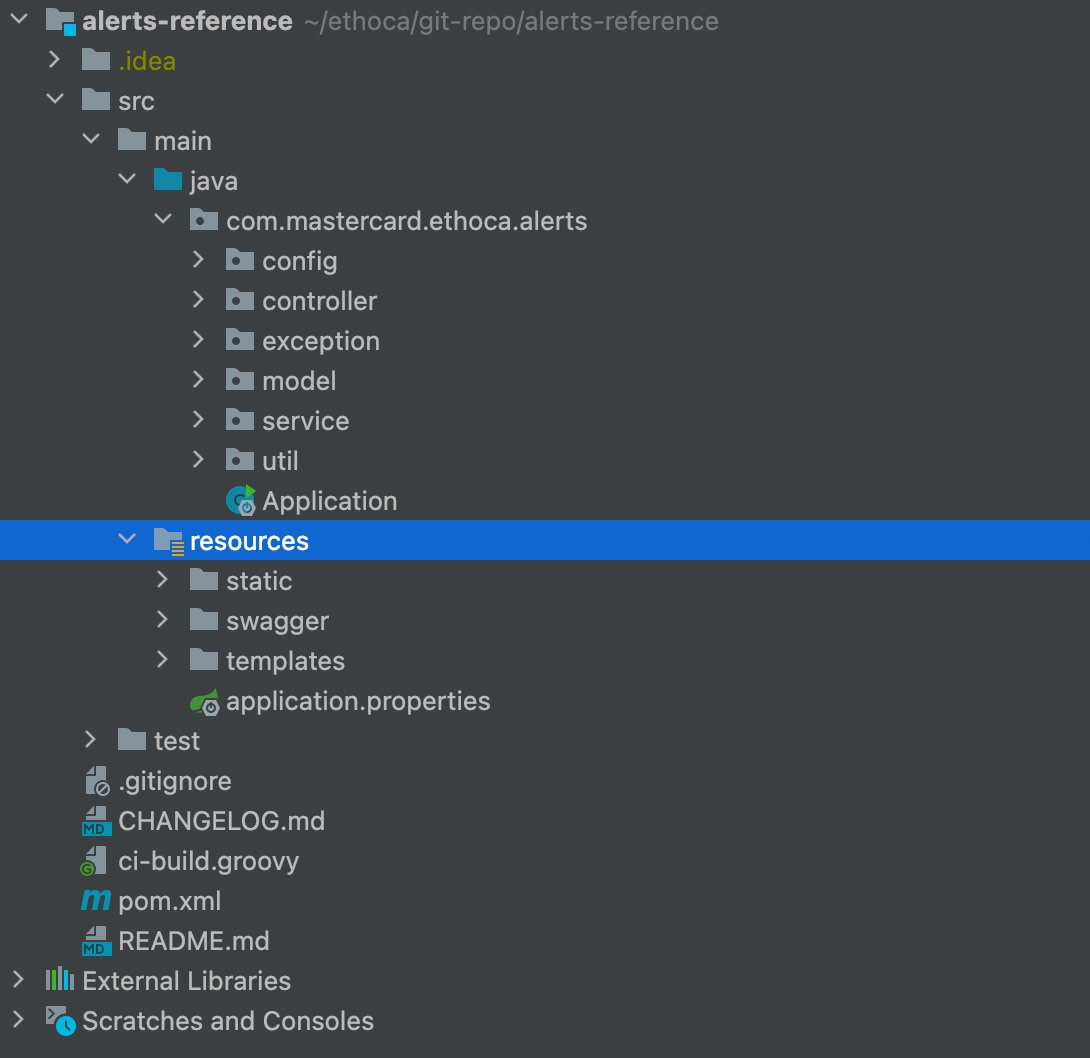
1. If required, download and add the `OpenAPI Specification YAML` file into your Maven project's `resources/swagger` folder: [alert-outcome-specs_inbound.yaml](https://static.developer.mastercard.com/content/ethoca-alerts-for-merchants/swagger/alert-outcome-specs_inbound.yaml) (13KB).
2. Place the .p12 file on the `{local-file-path}` of your system. The .p12 file was generated when you created the [Sandbox Signing Keys](https://developer.mastercard.com/ethoca-alerts-for-merchants/documentation/tutorials-and-guides/quick-start-guide/index.md#sandbox-oauth-credentials) within your project in Mastercard Developers.
Your Maven project directory should look like this. (Note that the *.idea* and *.iml* items are generated and used by IntelliJ IDEA):
### Step 3: Update the application configuration {#step-3-update-the-application-configuration}
Edit the `src/main/resources/application.properties` file to update these property values:
* `alerts.cert.path` to `file:configkeys/{p.12 file name}`.
* `alerts.consumer.key`. Use the **CONSUMER KEY** shown in the **Sandbox Keys** and **Production Keys** section of your project page in [Mastercard Developers](https://developer.mastercard.com/dashboard).
* `alerts.keyalias` to the key alias.
* `alerts.keyalias.password` to the password you received from Mastercard when you created your project.
* `alerts.api.base.path` to the appropriate base path. Refer to comments in the `application.properties` file.
### Step 4: Generate an API client project {#step-4-generate-an-api-client-project}
The *pom.xml* file already contains all the details, but if you're creating a project from scratch, then add the following plugin to your project's *pom.xml* file to generate an API client library.
```Maven
org.openapitoolsopenapi-generator-maven-plugin6.0.0generate${project.basedir}/src/main/resources/swagger/alerts-reference-api.yamljavaokhttp-gsonfalsefalsesrc/gen/java/main
```
Note: If you created your project from scratch, also add the following libraries to the dependencies section of your *pom.xml* file. Otherwise you can use the existing pom file in the project.
```Maven
4.0.0com.mastercard.ethocaalerts-reference1.0.0alerts-reference-appAlerts Reference Applicationjar17UTF-81.6.111.2.31.8.52.10.11.3.54.124.10.02.7.152.7.152.7.151.18.282.7.151.0.14.2.0org.springframework.bootspring-boot-starter-parent2.7.15pomorg.springframework.bootspring-boot-starter-thymeleaf${spring-boot-starter-thymeleaf-version}org.springframework.bootspring-boot-starter-web${spring-boot-starter-web}org.projectlomboklomboktrue${lombok-version}org.springframework.bootspring-boot-starter-test${spring-boot-starter-test-version}testcom.google.code.gsongson${gson-version}org.webjarsjquery3.7.0io.swaggerswagger-annotations${swagger-core-version}com.squareup.okhttp3okhttp${okhttp-version}com.squareup.okhttp3logging-interceptor${okhttp-version}io.gsonfiregson-fire${gson-fire-version}com.mastercard.developeroauth1-signer${oauth1-signer-version}javax.ws.rsjavax.ws.rs-api2.1.1com.github.spotbugsspotbugs-annotations${spotbugs-annotations-version}junitjunit${junit-version}org.junit.jupiterjunit-jupiter5.7.2org.jacocoorg.jacoco.ant0.8.7testorg.apache.maven.pluginsmaven-compiler-plugin3.8.1${java.version}${java.version}falseorg.apache.maven.pluginsmaven-surefire-plugin${surefireArgLine}false**/*IT.javaorg.apache.maven.pluginsmaven-failsafe-plugin${failsafeArgLine}false${skipITs}**/*IT.javaorg.jacocojacoco-maven-plugin0.8.7**/model/***/Constants.javapre-unit-testprepare-agent${project.build.directory}/jacoco-ut.execsurefireArgLinepost-unit-testtestreport${project.build.directory}/jacoco-ut.exec${project.build.directory}/jacoco-unit-test-coverage-reportpre-integration-testpre-integration-testprepare-agent${project.build.directory}/jacoco-int-it.execfailsafeArgLinepost-integration-testpost-integration-testreport${project.build.directory}/jacoco-int-it.exec${project.build.directory}/jacoco-integration-test-coverage-reportmerge-resultsverifymerge${project.build.directory}*.execmerged.exec${project.build.directory}/merged.execcreate-merged-reportverifyreport${project.build.directory}/merged.exec${project.build.directory}/jacoco-merged-test-coverage-reportorg.apache.maven.pluginsmaven-surefire-plugin2.22.1org.openapitoolsopenapi-generator-maven-plugin6.0.0generate${project.basedir}/src/main/resources/swagger/alerts-reference-api.yamljavatruesrc/gen/java/mainorg.springframework.bootspring-boot-maven-plugin2.7.13truecom.mastercard.ethoca.alerts.ApplicationJARrepackage${distribution.repository.id}${distribution.repository.url}
```
### Step 5: Generate the API client sources {#step-5-generate-the-api-client-sources}
You now have all the dependencies you need to generate sources. To do this, use one of these methods:
#### Method 1 {#method-1}
1. In IntelliJ IDEA, open the Maven window by selecting **View** \> **Tool Windows** \> **Maven**.
2. Select **Reimport All Maven Projects** and **Generate Sources and Update Folders for All Projects**.
#### Method 2 {#method-2}
1. In the same menu, navigate to the commands by selecting **{Project name}** \> **Lifecycle**.
2. Select **clean and compile** then select **Run Maven Build**.
Alternatively, you can navigate to the root directory of the project within a terminal window and run the `mvn clean compile` command.
After you finish, there should be a new folder named *target* within your root directory. This folder contains classes generated for the schemas and API calls defined within the OpenAPI Specification.
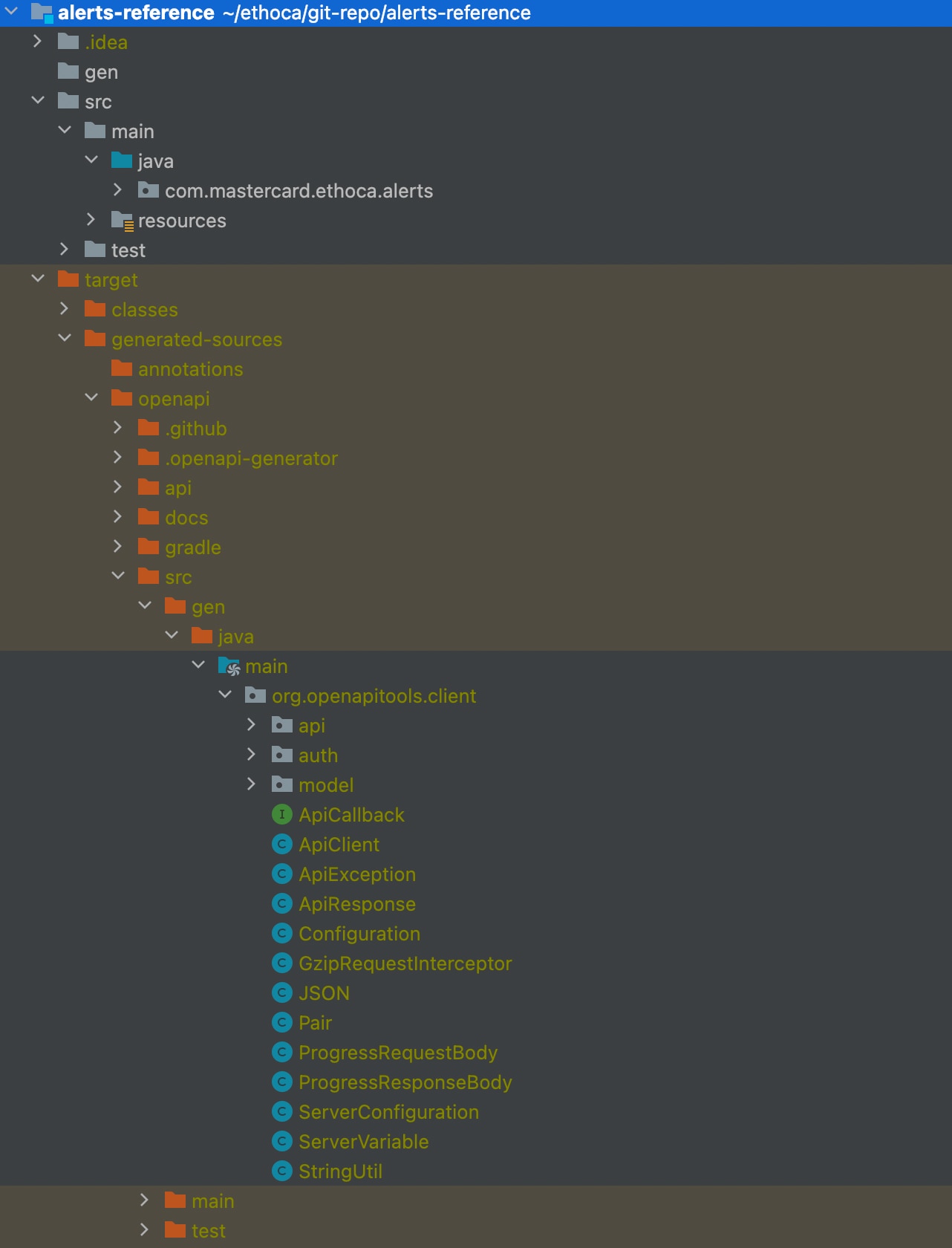
Note: OpenAPI Generator supports several HTTP clients and frameworks for Java (such as Jersey, OkHttp, RestTemplate, and Retrofit). In this tutorial, we chose to use `okhttp-gson`. Refer to our [Java library on GitHub](https://github.com/Mastercard/oauth1-signer-java#integrating-with-openapi-generator-api-client-libraries) for a list of supported options.
### Step 6: Build and execute {#step-6-build-and-execute}
After you've set the correct properties, you can build the application. Navigate to the project's base directory from a terminal window and run the following command.
`mvn clean package spring-boot:repackage`
After the project builds successfully, you'll see the following content in `${APP_LAUNCH_DIR}/target/`:
```Maven
/ the ${APP_LAUNCH_DIR}/target/
xxx # other generated resources
alerts-reference-1.0.0.jar # generated application jar file
xxx/ # other build time intermediate directories
xxx # other build time intermediate files
```
To start the application, go to the command prompt and change your working directory to the *alerts-reference* extracted directory that contains the target folder. Then run the following command:
`$: java -jar target/alerts-reference-1.0.0.jar`
You are now running an application that uses the Alerts Merchant API Service.
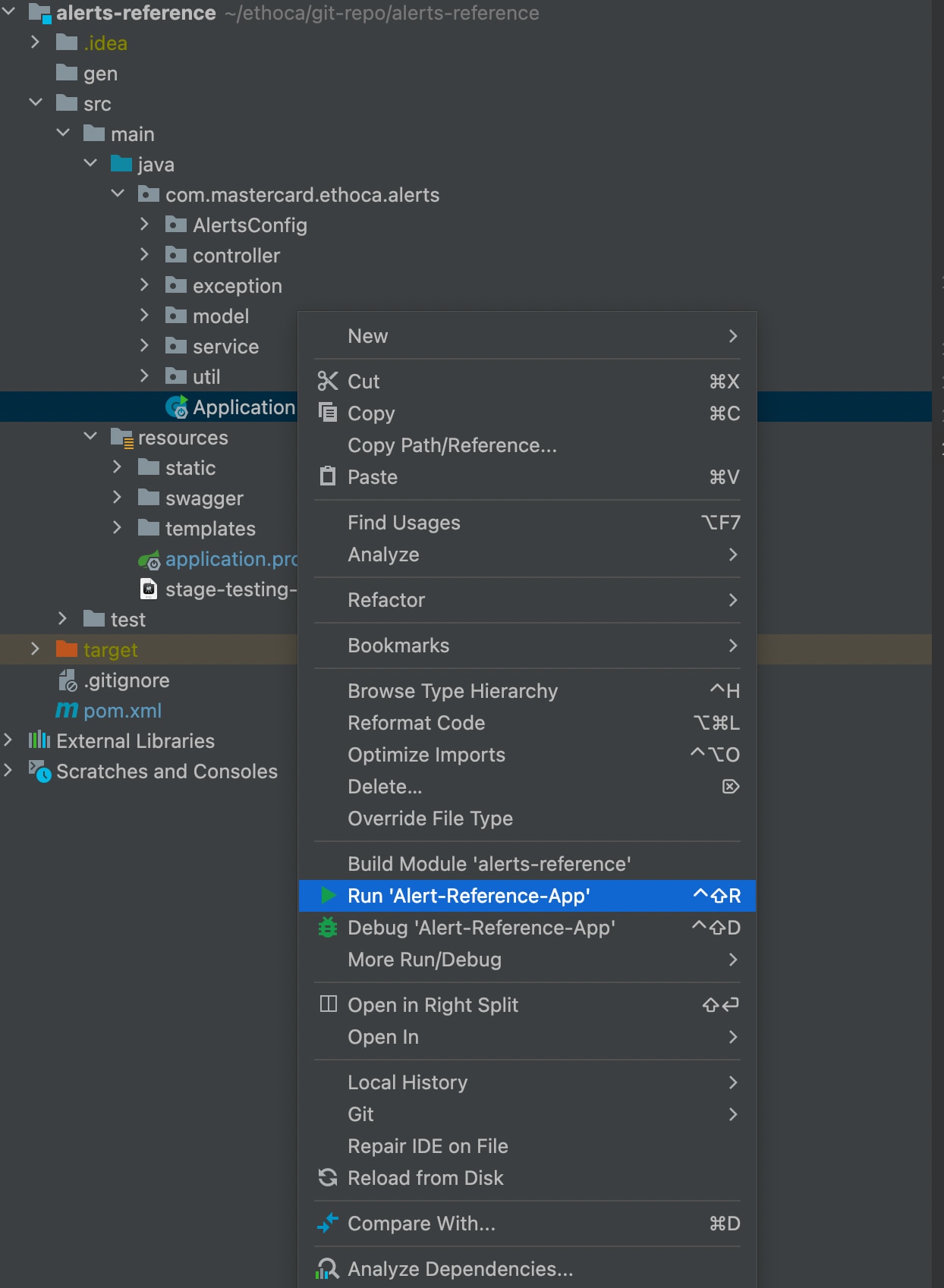
#### Running the application using an IDE {#running-the-application-using-an-ide}
Select **Application.java** to run it in your IDE.
### Send requests to sandbox {#send-requests-to-sandbox}
After successful execution of the application, you can see the home page accessible on `http://localhost:8080/main`. You can now send requests to the sandbox alert service using this UI application.
1. Select **Outcomes** and add the request payload in the text area.
2. Validate a JSON by selecting **Validate**.
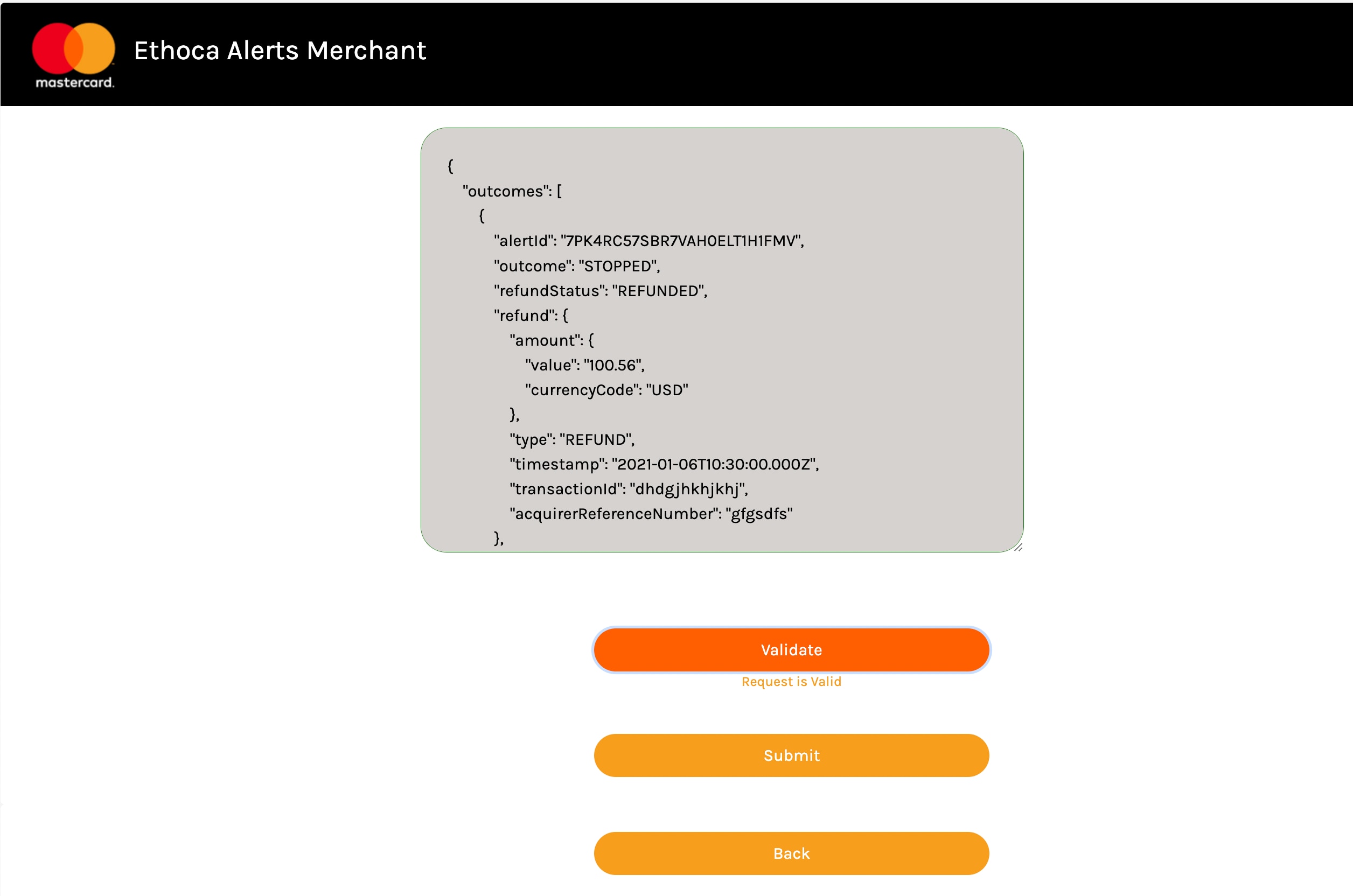
3. If the JSON is valid, you can select **Submit** and the response is shown with the status code.
**Successful**
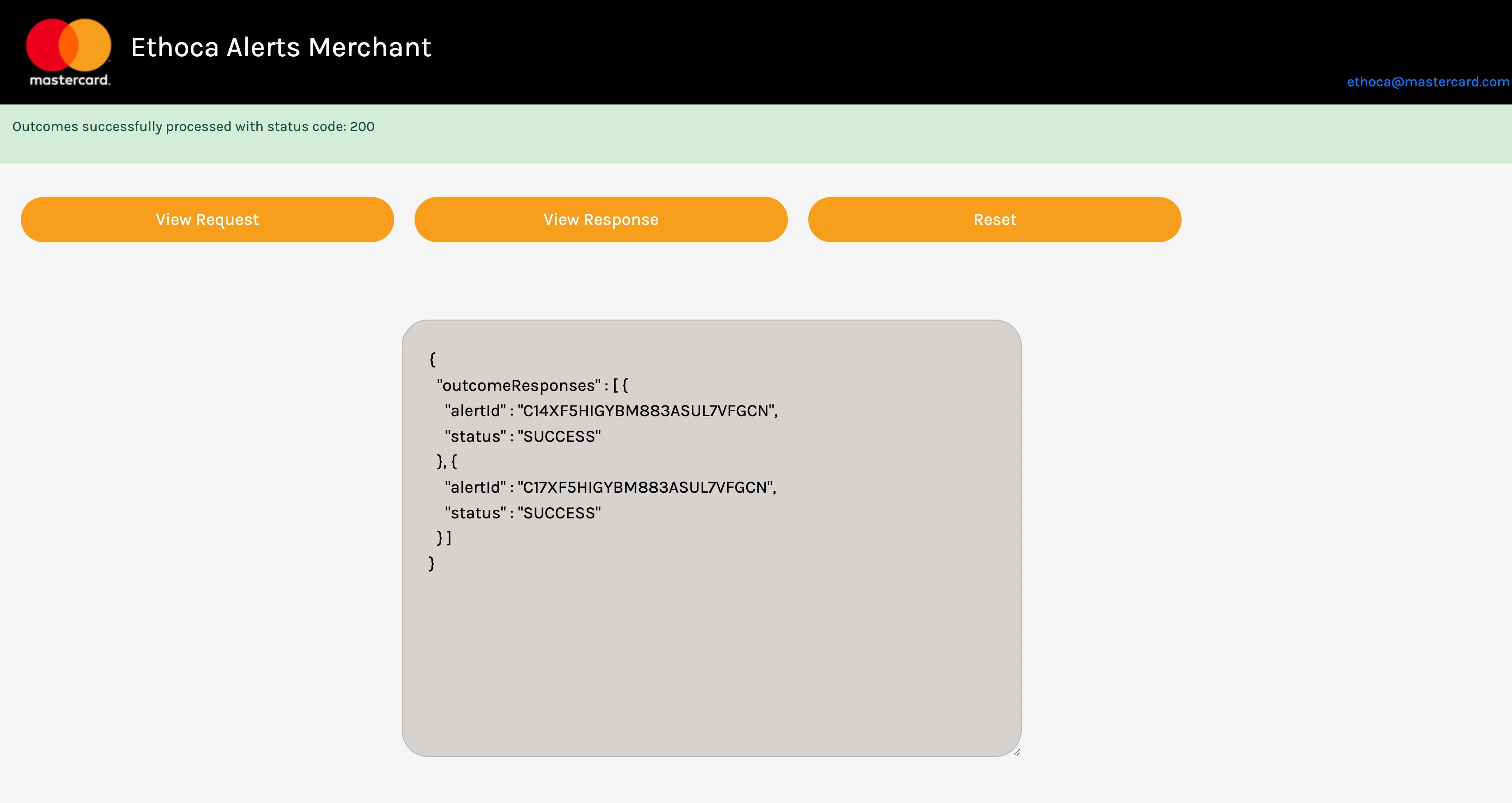
**Failed**
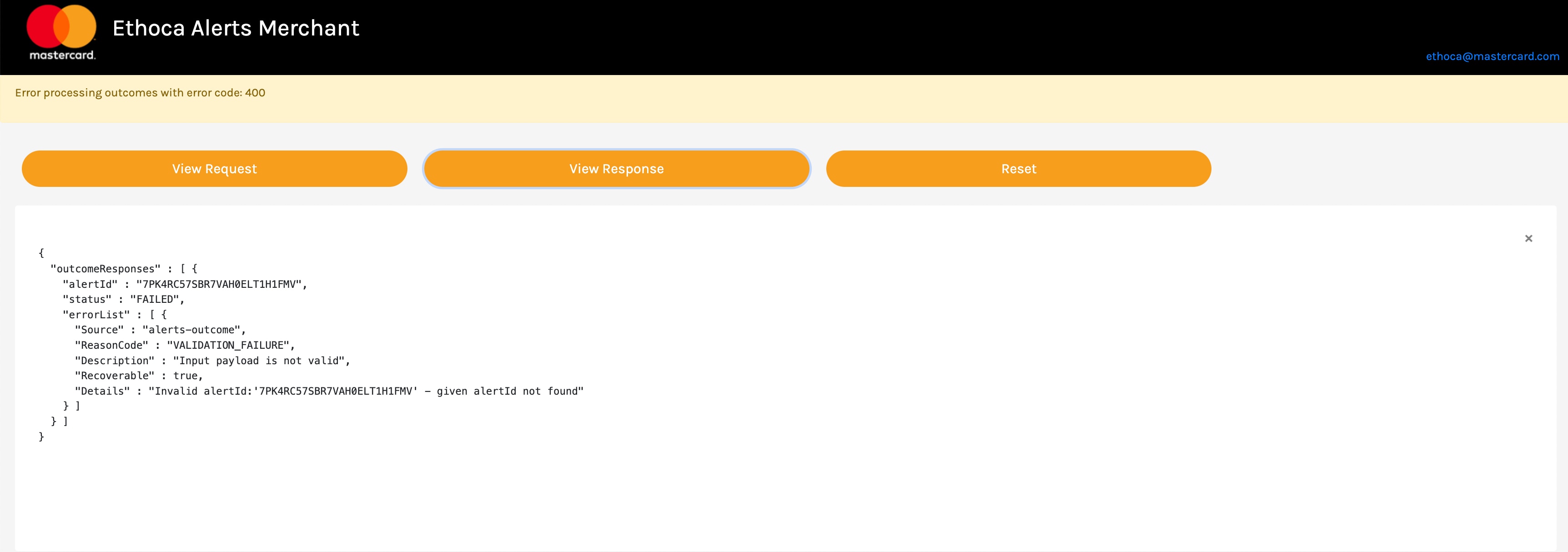
4. You can choose to **View Request** or **View Response** if you'd like.
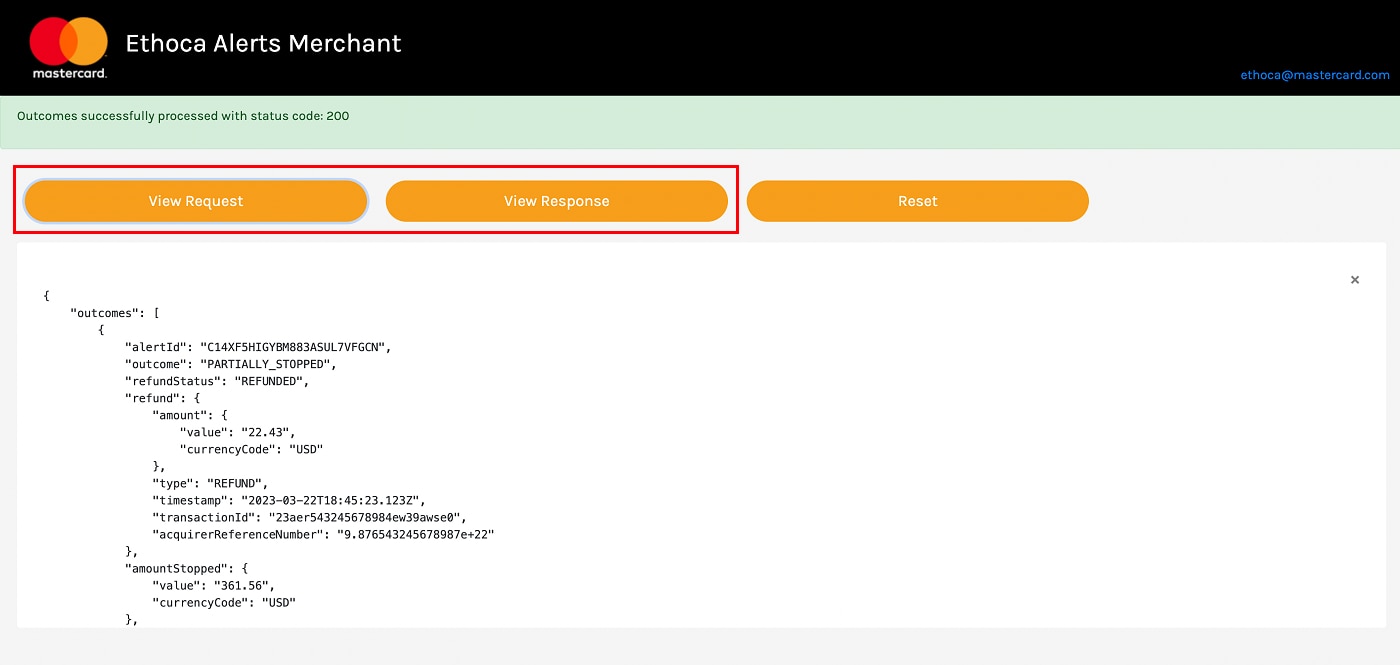
Here is an example request and response from our provided [test case data](https://developer.mastercard.com/ethoca-alerts-for-merchants/documentation/testing/index.md).
##### Request {#request}
```JSON
{
"outcomes": [
{
"alertId": "C14XF5HIGYBM883ASUL7VFGCN",
"outcome": "PARTIALLY_STOPPED",
"refundStatus": "REFUNDED",
"refund": {
"amount": {
"value": "22.43",
"currencyCode": "USD"
},
"type": "REFUND",
"timestamp": "2023-03-22T18:45:23.123Z",
"transactionId": "23aer543245678984ew39awse0",
"acquirerReferenceNumber": "9.876543245678987e+22"
},
"amountStopped": {
"value": "361.56",
"currencyCode": "USD"
},
"comments": "Refunded via transactionId XXX on YYY",
"actionTimestamp": "2023-03-22T18:45:23.123Z"
},
{
"alertId": "C17XF5HIGYBM883ASUL7VFGCN",
"outcome": "PARTIALLY_STOPPED",
"refundStatus": "REFUNDED",
"refund": {
"amount": {
"value": "361.56",
"currencyCode": "USD"
},
"type": "REFUND",
"timestamp": "2023-03-22T18:45:23.123Z",
"transactionId": "23aer543245678984ew39awse0",
"acquirerReferenceNumber": "9.876543245678987e+22"
},
"amountStopped": {
"value": "361.56",
"currencyCode": "USD"
},
"comments": "Refunded via transactionId XXX on YYY",
"actionTimestamp": "2023-03-22T18:45:23.123Z"
}
]
}
```
##### Response {#response}
```JSON
{
"outcomeResponses": [
{
"alertId": "C14XF5HIGYBM883ASUL7VFGCN",
"status": "SUCCESS"
},
{
"alertId": "C16XF5HIGYBM883ASUL7VFGCN",
"status": "SUCCESS"
},
{
"alertId": "C17XF5HIGYBM883ASUL7VFGCN",
"status": "SUCCESS"
}
]
}
```
### Configuration for multiple environments {#configuration-for-multiple-environments}
You can configure the application to support multiple environments. If you want to support the sandbox and production environments, and the application will be launched from within `APP_LAUNCH_DIR` (the current directory when launching the application), then you can follow these steps:
1. Copy `${REF_APP_ROOT}/src/main/resources/application.properties` to `${APP_LAUNCH_DIR}/application-sandbox.properties`.
2. Update `${APP_LAUNCH_DIR}/application-sandbox.properties`, according to the inline comments.
3. Run the application as follows:
cd ${APP_LAUNCH_DIR}
# java -Dactive.profile=sandbox -jar path/to/alert-reference-1.0.0.jar
# If APP_LAUNCH_DIR == REF_APP_ROOT, then
java -Dactive.profile=sandbox -jar target/alert-reference-1.0.0.jar
To run against the prod environment, repeat steps 1 to 3. Replace *sandbox* with *prod* wherever applicable.
## Next Steps {#next-steps}
When ready, you can convert your sandbox keys to production.
* Log into your [Mastercard Developers Account](https://developer.mastercard.com/account/log-in) and navigate to **My Projects**.
* Request Production access for your project, which requires approval from Mastercard and assistance from the [Ethoca Customer Delivery Team](mailto:customerdelivery@ethoca.com).
You can also check out these other articles for guidance on interacting with the Alerts for Merchants API:
* [API Basics](https://developer.mastercard.com/ethoca-alerts-for-merchants/documentation/api-basics/index.md)
* [API Reference](https://developer.mastercard.com/ethoca-alerts-for-merchants/documentation/api-reference/index.md)