# Eligibility Tutorial
source: https://developer.mastercard.com/eligibility-api/documentation/tutorials-and-guides/eligibility-tutorial/index.md
## Overview {#overview}
This tutorial creates a simple Java program that can make an API call to the Mastercard Eligibility service Sandbox environment. It includes generating an API client library using the OpenAPI Generator, using the Mastercard Eligibility API OpenAPI Specifications.
### What you will learn {#what-you-will-learn}
1. Generate the API Client SDK
2. Make an API call
### Pre-requisites {#pre-requisites}
To complete this tutorial, you will need:
1. Maven 3.3.0 or later
2. JDK 1.8.0 or later
3. A developer account on [Mastercard Developers](https://developer.mastercard.com/) with access to the Eligibility
4. You must be onboarded to Eligibility and have access to APIs in sandbox environment. For more details, refer to our [quick start guide](https://developer.mastercard.com/eligibility-api/documentation/tutorials-and-guides/guide-quickstart/index.md)
### APIs used in this tutorial {#apis-used-in-this-tutorial}
* Refer to Mastercard Eligibility [API reference](https://developer.mastercard.com/eligibility-api/documentation/api-reference/index.md) section.
## Step 1 - Create a Simple Java Application {#step-1---create-a-simple-java-application}
### Create a maven project {#create-a-maven-project}
* Create a new Java project in your favorite IDE
* For example,
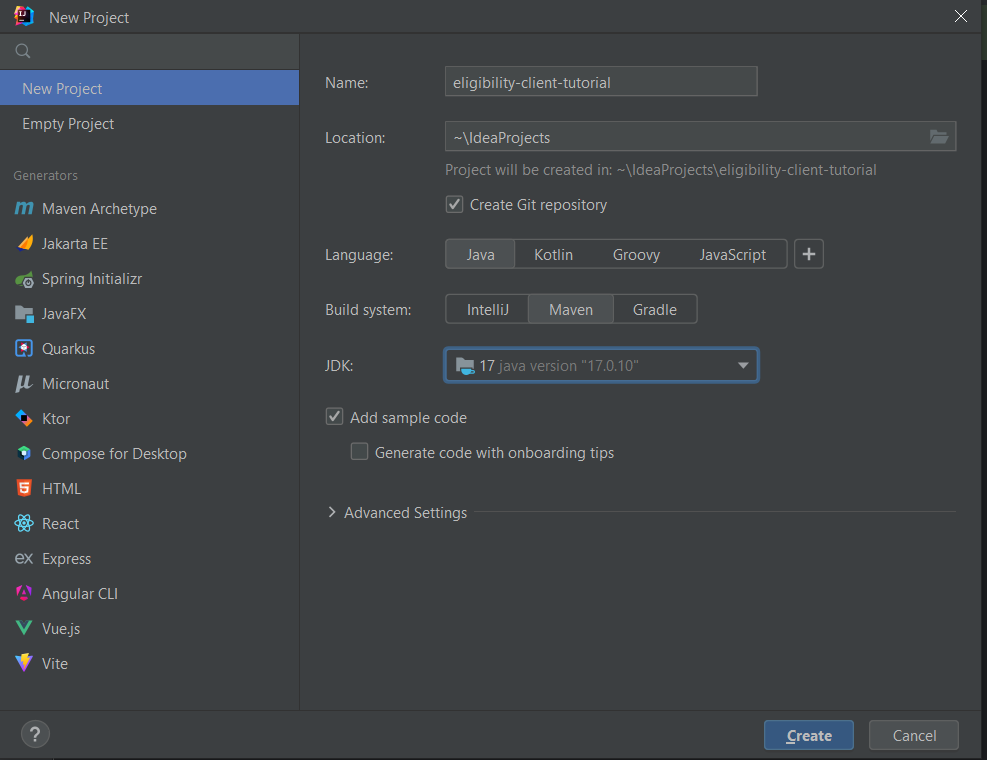
* Using IntelliJ IDEA, create a new Maven project, which sets up your directory structure automatically.
* Provide eligibility-client-tutorial as the artifact id and project name.
* Provide group id and location and create a project.
### Add resources {#add-resources}
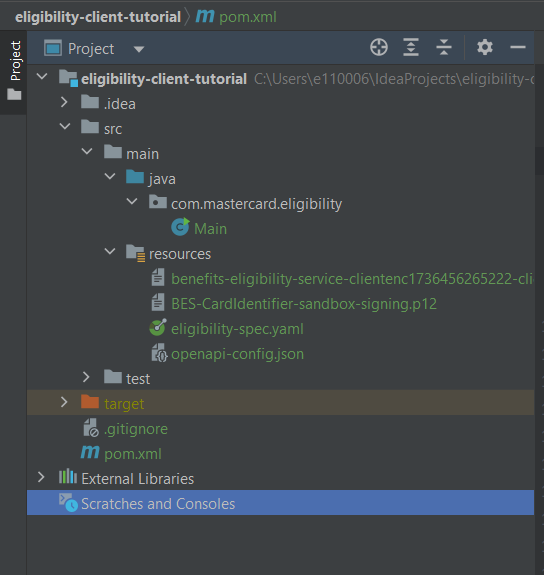
* Retrieve the Mastercard Eligibility API yaml file ( [eligibility-spec.yaml](https://static.developer.mastercard.com/content/eligibility-api/swagger/eligibility-spec.yaml) (34KB)) and add it to your maven project's resources folder.
* In [Mastercard Developers](https://developer.mastercard.com/), generate a Sandbox signing key and encryption key by creating a project choosing the Eligibility API service. Add the signing key (.p12) and encryption key (.pem) to your maven project's resources folder.
* Note: Encryption keys are required only if you intend to use /card-identifiers endpoint.
* Please refer to [quick start guide](https://developer.mastercard.com/eligibility-api/documentation/tutorials-and-guides/guide-quickstart/index.md) for creating a new project and generating p12 key and encryption key. The Mastercard APIs use OAuth authentication. For information on OAuth 1.0a and using it to access Mastercard APIs, see [this article](https://developer.mastercard.com/platform/documentation/security-and-authentication/using-oauth-1a-to-access-mastercard-apis/)
* Your maven project directory should look as follows.
* Note: The .idea and .iml items (not shown here) are used by IntelliJ IDEA.
## Step 2 - Add Dependencies and Plugins {#step-2---add-dependencies-and-plugins}
### Add dependencies {#add-dependencies}
* Add the following dependencies to your pom.xml file for the API client library generation and the Mastercard OAuth1 Signer library:
```xml
4.0.0
org.springframework.boot
spring-boot-starter-parent
3.3.0
com.mastercard.benefits.eligibility
eligibility-client-tutorial
1.0-SNAPSHOT
17
${java.version}
${java.version}
4.12.0
0.8.12
1.18.30
org.springframework.boot
spring-boot-starter-web
com.google.code.gson
gson
2.8.9
io.swagger
swagger-annotations
1.6.1
com.google.code.findbugs
jsr305
3.0.0
io.gsonfire
gson-fire
1.8.0
org.slf4j
slf4j-simple
1.7.21
org.apache.oltu.oauth2
org.apache.oltu.oauth2.client
1.0.2
javax.annotation
javax.annotation-api
1.3.2
com.squareup.okhttp3
okhttp
${okhttp-version}
com.squareup.okhttp3
logging-interceptor
${okhttp-version}
org.junit.jupiter
junit-jupiter-api
5.7.0
test
org.junit.jupiter
junit-jupiter-engine
5.7.0
test
org.springframework.boot
spring-boot-starter-test
test
com.mastercard.developer
client-encryption
1.8.4
com.mastercard.developer
oauth1-signer
1.5.3
org.mockito
mockito-inline
4.2.0
test
org.projectlombok
lombok
${lombok.version}
provided
```
### Add plugins {#add-plugins}
* Add OpenAPI generator plugin to the maven pom.xml. OpenAPI generator generates API client libraries from OpenAPI specifications (formerly known as Swagger files). OpenAPI generator provides multiple generators and library templates to support multiple languages and frameworks. You will be using the java generator with the default okhttp-gson library template for this project.
```xml
eligibility-rest-client
org.springframework.boot
spring-boot-maven-plugin
org.openapitools
openapi-generator-maven-plugin
7.9.0
Eligibility REST Client
generate
${project.basedir}/src/main/resources/eligibility-spec.yaml
java
${project.basedir}/src/main/resources/openapi-config.json
false
false
src/gen/java/main
okhttp-gson
```
When using OpenAPI Generator to generate the API client library, you have two options:
1. Generate and use the source files on the fly
2. Generate and deploy the source files to a maven repository
In this tutorial, you will be generating the API client library on the fly, so you will be including the dependencies that are needed to generate the library. (If you were deploying the source files to a Maven repository, you would only need to include the dependency for that repository.)
In addition, you include the dependency for one of the Mastercard OAuth1 signer libraries. Mastercard offers OAuth1 signer libraries that are developed and maintained by Mastercard's API team, which offer code helpers targeting the HTTP clients used by the different OpenAPI generator library templates. The libraries are hosted here on [Github](https://github.com/Mastercard?utf8=%E2%9C%93&q=oauth1-signer&type=&language=).
### Generate sources {#generate-sources}
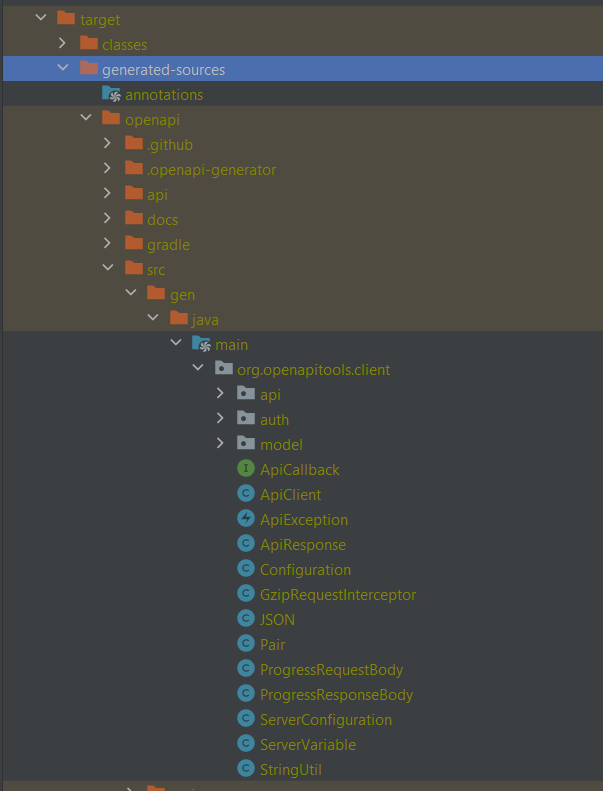
* Now that you have all the dependencies you need, you can generate the sources
```bash
mvn clean install
```
* Within your root directory you should now see a folder name target with generated classes for schemas and API calls.
## Step 3 - Writing Java Code {#step-3---writing-java-code}
### Create Java Class {#create-java-class}
* Create a Java file, called Main.java, at src/main/java/com/mastercard/eligibility.
* To make the API call, you need to make your OAuth credentials available to the program to use -
* A private key is created with the provided credentials for later use.
* Authentication is provided by the Mastercard OAuth signing library.
```java
private static final String API_BASE_PATH = "https://sandbox.api.mastercard.com/loyalty/eligibility";
//Below properties will be required for authentication of API calls.
String CONSUMER_KEY = "Your consumer key"; // This refers to your consumer key. Copy it from "Keys" section on your project page in [Mastercard Developers](https://developer.mastercard.com/dashboard)
String SIGNING_KEY_ALIAS = "your key alias"; // This is the default value of key alias. If it is modified, use the updated one from keys section in [Mastercard Developers](https://developer.mastercard.com/dashboard).
String SIGNING_KEY_FILE_PATH = "path to your.p12 private key file"; // This refers to .p12 file found in the signing key. Please place .p12 file at src\main\resources in the project folder and add classpath for .p12 file.
String SIGNING_KEY_PASSWORD = "your password"; // This is the default value of key alias. If it is modified, use the updated one from keys section in [Mastercard Developers](https://developer.mastercard.com/dashboard).
```
* Instantiate a client to sign requests that you send with your authentication credentials. The interceptor that you use, to sign requests is also provided by the Mastercard OAuth library.
```java
ApiClient client = new ApiClient();
File p12File = ResourceUtils.getFile(SIGNING_KEY_FILE_PATH);
PrivateKey signingKey = AuthenticationUtils.loadSigningKey(new FileInputStream(p12File), SIGNING_KEY_ALIAS, SIGNING_KEY_PASSWORD);
OkHttpClient.Builder httpClientBuilder = client.getHttpClient().newBuilder();
client.setHttpClient(
httpClientBuilder
.addInterceptor(new OkHttpOAuth1Interceptor(CONSUMER_KEY, signingKey)).build()
);
```
* Now you can set up a method to initialize API requests using APIClient instantiated in the above step.
* The classes in the below code snippet are the generated classes of API models and schemas in target folder using openapi-generator-maven-plugin.
```java
private static void getBenefitsByCardNumber(ApiClient apiClient) throws Exception {
try {
BenefitsApi benefitsApi = new BenefitsApi(apiClient);
ByCardNumber byCardNumber = new ByCardNumber();
byCardNumber.setBenefitCode("HMB");
byCardNumber.setEffectiveDate(TODAY);
byCardNumber.setCardNumber(CARD_NUMBER);
Benefits benefits = new Benefits();
benefits.setActualInstance(byCardNumber);
LOGGER.info("Search Benefits Payload: {}", new Gson().toJson(benefits.getActualInstance()));
//...
}
private static void getBenefitsByCardNumberId(ApiClient apiClient) throws Exception {
try {
BenefitsApi benefitsApi = new BenefitsApi(apiClient);
Benefits benefits = new Benefits();
ByCardNumberID byCardNumberID = new ByCardNumberID();
byCardNumberID.setBenefitCode("HMB");
byCardNumberID.setEffectiveDate(TODAY);
byCardNumberID.setCardNumberId(CARD_NUMBER_ID);
benefits.setActualInstance(byCardNumberID);
LOGGER.info("Search Benefits Payload: {}", new Gson().toJson(benefits.getActualInstance()));
//...
}
private static void getProductsByCardNumber(ApiClient apiClient) throws Exception {
try {
ProductsApi productsApi = new ProductsApi(apiClient);
Products products = new Products();
ProductByCardNumber productByCardNumber = new ProductByCardNumber();
productByCardNumber.setCardNumber(CARD_NUMBER);
productByCardNumber.setEffectiveDate(TODAY);
products.setActualInstance(productByCardNumber);
LOGGER.info("Search Products Payload: {}", new Gson().toJson(products.getActualInstance()));
//...
}
private static void getProductsByCardNumberId(ApiClient apiClient) throws Exception {
try {
ProductsApi productsApi = new ProductsApi(apiClient);
Products products = new Products();
ProductByCardNumberID productByCardNumberID = new ProductByCardNumberID();
productByCardNumberID.setCardNumberId(CARD_NUMBER_ID);
productByCardNumberID.setEffectiveDate(TODAY);
products.setActualInstance(productByCardNumberID);
LOGGER.info("Search Products Payload: {}", new Gson().toJson(products.getActualInstance()));
//...
}
```
* You can now invoke API requests from your Main class and parse the response as per your requirements. In this tutorial, we are going to simply log the response.
* SearchBenefits and GenerateBenefitsAccessToken are the auto-generated models using openapi-generator plugin.
```java
SearchBenefits searchBenefits = benefitsApi.searchBenefits(benefits);
LOGGER.info("Response: {}", new Gson().toJson(searchBenefits));
```
### Java Code {#java-code}
* Refer below for full contents of Main.java
```java
package com.mastercard.eligibility;
import com.google.gson.Gson;
import com.mastercard.developer.encryption.JweConfig;
import com.mastercard.developer.encryption.JweConfigBuilder;
import com.mastercard.developer.interceptors.OkHttpJweInterceptor;
import com.mastercard.developer.interceptors.OkHttpOAuth1Interceptor;
import com.mastercard.developer.utils.AuthenticationUtils;
import com.mastercard.developer.utils.EncryptionUtils;
import okhttp3.OkHttpClient;
import org.openapitools.client.ApiClient;
import org.openapitools.client.ApiException;
import org.openapitools.client.api.BenefitsApi;
import org.openapitools.client.api.CardIdentifiersApi;
import org.openapitools.client.api.WidgetAccessTokenApi;
import org.openapitools.client.model.Benefits;
import org.openapitools.client.model.ByCardNumber;
import org.openapitools.client.model.ByCardNumberID;
import org.openapitools.client.model.ProductByCardNumber;
import org.openapitools.client.model.ProductByCardNumberID;
import org.openapitools.client.model.Products;
import org.openapitools.client.model.*;
//import org.openapitools.client.api.BenefitsApi;
import org.openapitools.client.api.ProductsApi;
import org.slf4j.Logger;
import org.slf4j.LoggerFactory;
import org.springframework.util.ResourceUtils;
import java.io.File;
import java.io.FileInputStream;
import java.security.PrivateKey;
import java.security.cert.Certificate;
import java.time.LocalDate;
import java.time.format.DateTimeFormatter;
import java.util.ArrayList;
import java.util.List;
public class Main {
private static final Logger LOGGER = LoggerFactory.getLogger(Main.class);
public static final String TODAY = LocalDate.now().format(DateTimeFormatter.ofPattern("yyyy-MM-dd"));
public static final String CARD_NUMBER = "5416116******233";
public static final String CARD_NUMBER_ID = "2651207f-cc90-44ec-8842-70eaeb99cb38";
public static void main(String[] args) throws Exception {
String API_BASE_PATH = "https://sandbox.api.mastercard.com/loyalty/eligibility";
//Below properties will be required for authentication of API calls.
String CONSUMER_KEY = ""; // This refers to your consumer key. Copy it from "Keys" section on your project page in [Mastercard Developers](https://developer.mastercard.com/dashboard)
String SIGNING_KEY_ALIAS = ""; // This is the default value of key alias. If it is modified, use the updated one from keys section in [Mastercard Developers](https://developer.mastercard.com/dashboard).
String SIGNING_KEY_FILE_PATH = ""; // This refers to .p12 file found in the signing key. Please place .p12 file at src\main\resources in the project folder and add classpath for .p12 file.
String SIGNING_KEY_PASSWORD = ""; // This is the default value of key alias. If it is modified, use the updated one from keys section in [Mastercard Developers](https://developer.mastercard.com/dashboard).
String encryptionKeyFile = ""; // This refers to .p12 file found in the signing key. Please place .p12 file at src\main\resources in the project folder and add classpath for .p12 file.
ApiClient client = new ApiClient();
File p12File = ResourceUtils.getFile(SIGNING_KEY_FILE_PATH);
PrivateKey signingKey = AuthenticationUtils.loadSigningKey(new FileInputStream(p12File), SIGNING_KEY_ALIAS, SIGNING_KEY_PASSWORD);
OkHttpClient.Builder httpClientBuilder = client.getHttpClient().newBuilder();
client.setHttpClient(
httpClientBuilder
.addInterceptor(new OkHttpOAuth1Interceptor(CONSUMER_KEY, signingKey)).build()
);
client.setBasePath(API_BASE_PATH);
// To make a request to card-Identifiers endpoint, Instantiate a client to sign requests that you send with your authentication credentials along with encryption. The interceptor that you use, to sign requests is also provided by the Mastercard OAuth library. The interceptor that you use, to encrypt the request is provided by Mastercard client encryption library.
ApiClient clientForId = new ApiClient();
File encryptionCert = ResourceUtils.getFile(encryptionKeyFile);
Certificate encryptionCertificate = EncryptionUtils.loadEncryptionCertificate(encryptionCert.getAbsolutePath());
JweConfig config = JweConfigBuilder.aJweEncryptionConfig()
.withEncryptionCertificate(encryptionCertificate)
.withEncryptedValueFieldName("encryptedValue")
.build();
OkHttpClient.Builder httpClientBuilderForId = clientForId.getHttpClient().newBuilder();
clientForId.setHttpClient(
httpClientBuilderForId
.addInterceptor(new OkHttpJweInterceptor(config))
.addInterceptor(new OkHttpOAuth1Interceptor(CONSUMER_KEY, signingKey)).build()
);
clientForId.setBasePath(API_BASE_PATH);
LOGGER.info("Registration request: {}", API_BASE_PATH);
generateCardIdentifier(clientForId);
}
public static String cardNumberBuilder() {
return CARD_NUMBER;
}
private static void generateCardIdentifier(ApiClient apiClient) throws Exception {
try {
CardIdentifiersApi cardIdentifiersApi = new CardIdentifiersApi(apiClient);
LOGGER.info("Get Card Identifier Payload: {}", new Gson().toJson(CARD_NUMBER));
CardIdentification cardId = cardIdentifiersApi.generateCardId(new Gson().toJson(CARD_NUMBER));
LOGGER.info("Response: {}", new Gson().toJson(cardId));
} catch (ApiException apiException) {
LOGGER.info("Exception occurred while registration: Code - {} , Message - {} ", apiException.getCode(), apiException.getMessage());
logResponse(apiException.getResponseBody());
}
}
private static void getBenefitsByCardNumber(ApiClient apiClient) throws Exception {
try {
BenefitsApi benefitsApi = new BenefitsApi(apiClient);
ByCardNumber byCardNumber = new ByCardNumber();
byCardNumber.setBenefitCode("HMB");
byCardNumber.setEffectiveDate(TODAY);
byCardNumber.setCardNumber(CARD_NUMBER);
Benefits benefits = new Benefits();
benefits.setActualInstance(byCardNumber);
LOGGER.info("Search Benefits Payload: {}", new Gson().toJson(benefits.getActualInstance()));
SearchBenefits searchBenefits = benefitsApi.searchBenefits(benefits);
LOGGER.info("Response: {}", new Gson().toJson(searchBenefits));
} catch (ApiException apiException) {
LOGGER.info("Exception occurred while registration: Code - {} , Message - {} ", apiException.getCode(), apiException.getMessage());
logResponse(apiException.getResponseBody());
}
}
private static void getBenefitsByCardNumberId(ApiClient apiClient) throws Exception {
try {
BenefitsApi benefitsApi = new BenefitsApi(apiClient);
Benefits benefits = new Benefits();
ByCardNumberID byCardNumberID = new ByCardNumberID();
byCardNumberID.setBenefitCode("HMB");
byCardNumberID.setEffectiveDate(TODAY);
byCardNumberID.setCardNumberId(CARD_NUMBER_ID);
benefits.setActualInstance(byCardNumberID);
LOGGER.info("Search Benefits Payload: {}", new Gson().toJson(benefits.getActualInstance()));
SearchBenefits searchBenefits = benefitsApi.searchBenefits(benefits);
LOGGER.info("Response: {}", new Gson().toJson(searchBenefits));
} catch (ApiException apiException) {
LOGGER.info("Exception occurred while registration: Code - {} , Message - {} ", apiException.getCode(), apiException.getMessage());
logResponse(apiException.getResponseBody());
}
}
private static void getProductsByCardNumber(ApiClient apiClient) throws Exception {
try {
ProductsApi productsApi = new ProductsApi(apiClient);
Products products = new Products();
ProductByCardNumber productByCardNumber = new ProductByCardNumber();
productByCardNumber.setCardNumber(CARD_NUMBER);
productByCardNumber.setEffectiveDate(TODAY);
products.setActualInstance(productByCardNumber);
LOGGER.info("Search Products Payload: {}", new Gson().toJson(products.getActualInstance()));
SearchProducts searchProducts = productsApi.searchProducts(products);
LOGGER.info("Response: {}", new Gson().toJson(searchProducts));
} catch (ApiException apiException) {
LOGGER.info("Exception occurred while registration: Code - {} , Message - {} ", apiException.getCode(), apiException.getMessage());
logResponse(apiException.getResponseBody());
}
}
private static void getProductsByCardNumberId(ApiClient apiClient) throws Exception {
try {
ProductsApi productsApi = new ProductsApi(apiClient);
Products products = new Products();
ProductByCardNumberID productByCardNumberID = new ProductByCardNumberID();
productByCardNumberID.setCardNumberId(CARD_NUMBER_ID);
productByCardNumberID.setEffectiveDate(TODAY);
products.setActualInstance(productByCardNumberID);
LOGGER.info("Search Products Payload: {}", new Gson().toJson(products.getActualInstance()));
SearchProducts searchProducts = productsApi.searchProducts(products);
LOGGER.info("Response: {}", new Gson().toJson(searchProducts));
} catch (ApiException apiException) {
LOGGER.info("Exception occurred while registration: Code - {} , Message - {} ", apiException.getCode(), apiException.getMessage());
logResponse(apiException.getResponseBody());
}
}
private static void generateBenefitsAccessToken(ApiClient apiClient) throws Exception {
try {
WidgetAccessTokenApi widgetAccessTokenApi = new WidgetAccessTokenApi(apiClient);
BenefitsAccessToken generateBenefitsAccessToken = widgetAccessTokenApi.generateBenefitsAccessToken();
LOGGER.info("Response: {}", new Gson().toJson(generateBenefitsAccessToken));
} catch (ApiException apiException) {
LOGGER.info("Exception occurred while registration: Code - {} , Message - {} ", apiException.getCode(), apiException.getMessage());
logResponse(apiException.getResponseBody());
}
}
private static void logResponse(Object response) {
Gson gson = new Gson();
String responseString = "\n--------------------------- RESPONSE -------------------------------\n"
+ gson.toJson(response)
+ "\n--------------------------------------------------------------------\n";
LOGGER.info(responseString);
}
}
```
## Step 4 - Send a Request {#step-4---send-a-request}
You can now send a request using the maven command or by running the application from your IDE.
* Using Maven, run below command from project root directory
mvn compile exec:java -Dexec.mainClass="com.mastercard.eligibility.Main" -Dexec.cleanupDaemonThreads=false
* Run the java app from the target directory with the below commands `java cd target java -jar eligibility-rest-client.jar` or using IntelliJ IDEA, simply click run button next to class definition code