# Environment Set up
source: https://developer.mastercard.com/doconomy-aland-index/tutorial/build-end-to-end-application/step1/index.md
## Environment Set up {#environment-set-up}
### 1. Pre-requisites {#1-pre-requisites}
To complete this tutorial, you will need:
* JDK 17 or later.
* IntelliJ IDEA (or any other IDE of your choice).
* Mastercard Developers account with access to the Doconomy Aland Index API.
* Doconomy Aland Index Open API specification (Retrieved by clicking 'Open Specification' [here](https://developer.mastercard.com/doconomy-aland-index/documentation/api-reference/index.md)).
### 2. Create a Maven Project {#2-create-a-maven-project}
For this tutorial, IntelliJ IDEA as the IDE is used.
* In IntelliJ IDEA, create a new Maven project which sets your directory structure automatically.
* Provide ArtifactId and Project name as per your choice.
### 3. Add Resources {#3-add-resources}
* Add the Doconomy Aland Index Open API specification to your Maven project resources folder.
* Add the generated .p12 file to your Maven project resources folder. (Generated while creating your project on Mastercard Developers).
* Your Maven project directory structure should appear as:
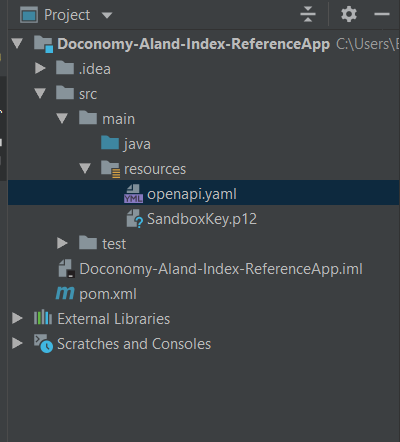
### 4. Update pom.xml file {#4-update-pomxml-file}
* In your IDE, add the [OpenAPI Generator Maven plugin](https://github.com/OpenAPITools/openapi-generator/tree/master/modules/openapi-generator-maven-plugin) to your project **pom.xml** file. Use the Plugin config as shown below.
* [OpenAPI Generator](https://openapi-generator.tech/) generates API client libraries using OpenAPI Specification. It provides multiple generators and library templates to support multiple languages and frameworks. We will be using the Java generator for this project.
* Plugin
```Plugin
org.openapitools
openapi-generator-maven-plugin
4.3.1
Doconomy Aland Index REST Client
generate
${project.basedir}/src/main/resources/openapi.yaml
java
false
false
src/gen/java/main
true
true
true
false
java8
true
false
false
true
Date=LocalDate
```
* Add the following dependencies to your **pom.xml** file, these are required by OpenAPI Generator and Mastercard OAuth1 Signer libraries.
* Dependencies
```Dependencies
17
${java.version}
${java.version}
UTF-8
1.5.0
1.8.4
1.5.24
3.14.7
2.11.0
3.10
1.4.3
1.3.2
4.13.2
UTF-8
io.swagger
swagger-annotations
${swagger-core-version}
com.google.code.findbugs
jsr305
3.0.2
com.squareup.okhttp3
okhttp
${okhttp-version}
com.squareup.okio
okio
1.17.6
com.squareup.okhttp3
logging-interceptor
${okhttp-version}
com.google.code.gson
gson
${gson-version}
io.gsonfire
gson-fire
${gson-fire-version}
org.apache.commons
commons-lang3
${commons-lang3-version}
org.threeten
threetenbp
${threetenbp-version}
javax.annotation
javax.annotation-api
${javax-annotation-version}
com.mastercard.developer
oauth1-signer
${oauth1-signer-version}
junit
junit
${junit-version}
```
> Refer to the page for more information on [Generating and Configuring a Mastercard API Client](https://developer.mastercard.com/platform/documentation/security-and-authentication/generating-and-configuring-a-mastercard-api-client/#overview).