# Build an end-to-end application
source: https://developer.mastercard.com/doconomy-aland-index/documentation/tutorials-and-guides/ref-app-tutorial/index.md
This tutorial helps you to create a simple Java application that makes an API call to the Doconomy Aland Index API in the Sandbox environment.
You can refer to the reference application available [here](https://developer.mastercard.com/doconomy-aland-index/documentation/reference-app/index.md).
>
> #### What you will learn. {#what-you-will-learn}
>
* How to set up the environment to develop a simple Java application.
* How to generate an API client library with OpenAPI Generator.
* How to make an API call.
> #### Estimated time to complete this tutorial. {#estimated-time-to-complete-this-tutorial}
>
> * 15-20 minutes.
## Environment Set up {#environment-set-up}
### 1. Pre-requisites {#1-pre-requisites}
To complete this tutorial, you will need:
* JDK 17 or later.
* IntelliJ IDEA (or any other IDE of your choice).
* Mastercard Developers account with access to the Doconomy Aland Index API.
* Doconomy Aland Index Open API specification (Retrieved by clicking 'Open Specification' [here](https://developer.mastercard.com/doconomy-aland-index/documentation/api-reference/index.md)).
### 2. Create a Maven Project {#2-create-a-maven-project}
For this tutorial, IntelliJ IDEA as the IDE is used.
* In IntelliJ IDEA, create a new Maven project which sets your directory structure automatically.
* Provide ArtifactId and Project name as per your choice.
### 3. Add Resources {#3-add-resources}
* Add the Doconomy Aland Index Open API specification to your Maven project resources folder.
* Add the generated .p12 file to your Maven project resources folder. (Generated while creating your project on Mastercard Developers).
* Your Maven project directory structure should appear as:

### 4. Update pom.xml file {#4-update-pomxml-file}
* In your IDE, add the [OpenAPI Generator Maven plugin](https://github.com/OpenAPITools/openapi-generator/tree/master/modules/openapi-generator-maven-plugin) to your project **pom.xml** file. Use the Plugin config as shown below.
* [OpenAPI Generator](https://openapi-generator.tech/) generates API client libraries using OpenAPI Specification. It provides multiple generators and library templates to support multiple languages and frameworks. We will be using the Java generator for this project.
* Plugin
```Plugin
org.openapitools
openapi-generator-maven-plugin
4.3.1
Doconomy Aland Index REST Client
generate
${project.basedir}/src/main/resources/openapi.yaml
java
src/gen/java/main
true
```
* Add the following dependencies to your **pom.xml** file, these are required by OpenAPI Generator and Mastercard OAuth1 Signer libraries.
* Dependencies
```Dependencies
17
${java.version}
${java.version}
UTF-8
1.5.0
1.8.4
1.5.24
3.14.7
2.11.0
3.10
1.4.3
1.3.2
4.13
com.mastercard.developer
oauth1-signer
${oauth1-signer-version}
io.swagger
swagger-annotations
${swagger-core-version}
com.squareup.okhttp
okhttp
${okhttp-version}
com.squareup.okhttp
logging-interceptor
${okhttp-version}
com.google.code.gson
gson
${gson-version}
io.gsonfire
gson-fire
${gson-fire-version}
org.apache.oltu.oauth2
org.apache.oltu.oauth2.client
1.0.1
org.threeten
threetenbp
${threetenbp-version}
junit
junit
${junit-version}
com.mastercard.developer
oauth1-signer
${oauth1-signer-version}
```
> Refer to the page for more information on [Generating and Configuring a Mastercard API Client](https://developer.mastercard.com/platform/documentation/security-and-authentication/generating-and-configuring-a-mastercard-api-client/#overview).
## Generating the API Client {#generating-the-api-client}
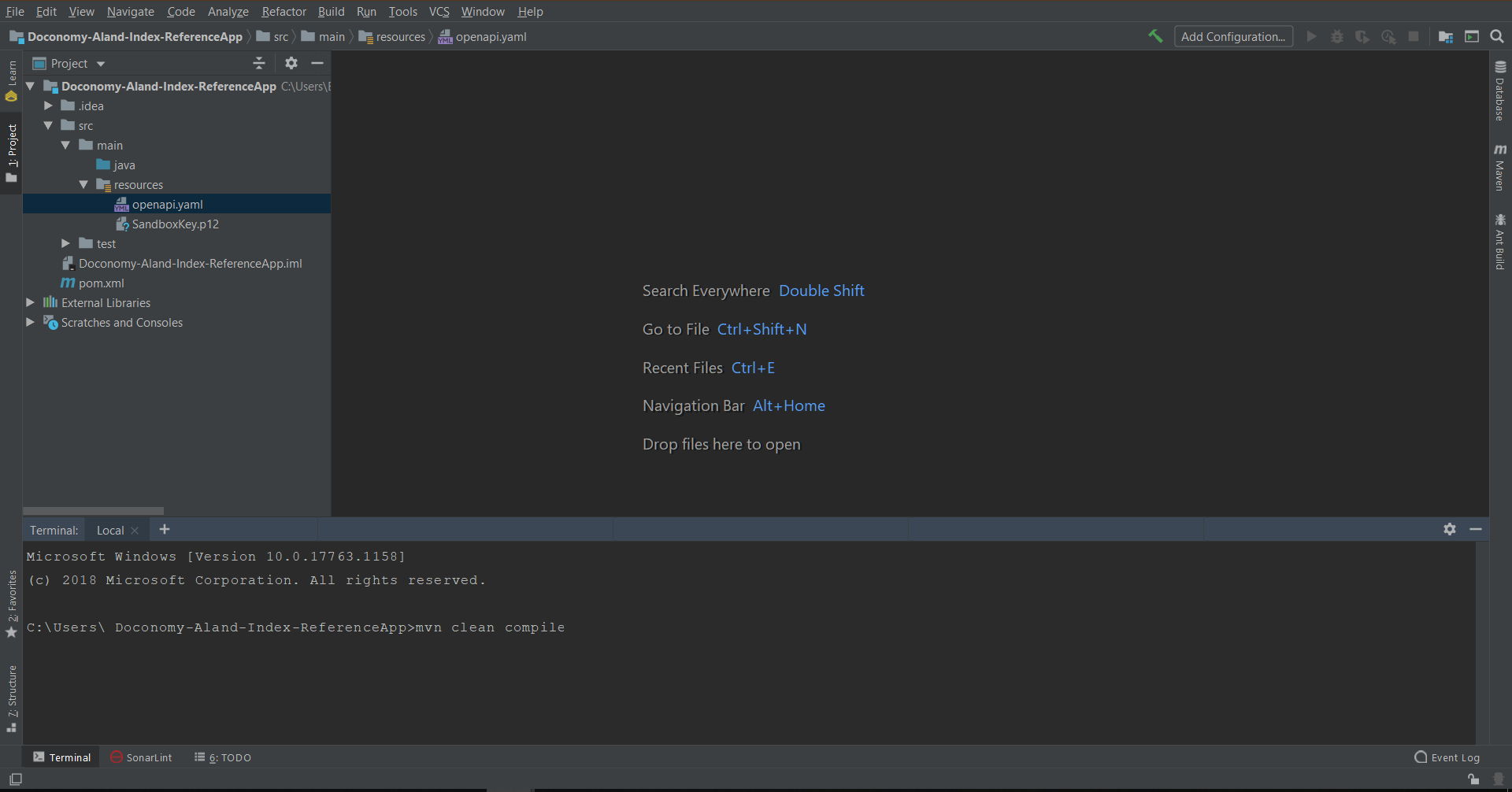
* Now that you have all the dependencies you need, you can generate the source code. You can navigate to the project root directory within a terminal window and run **mvn clean compile**.
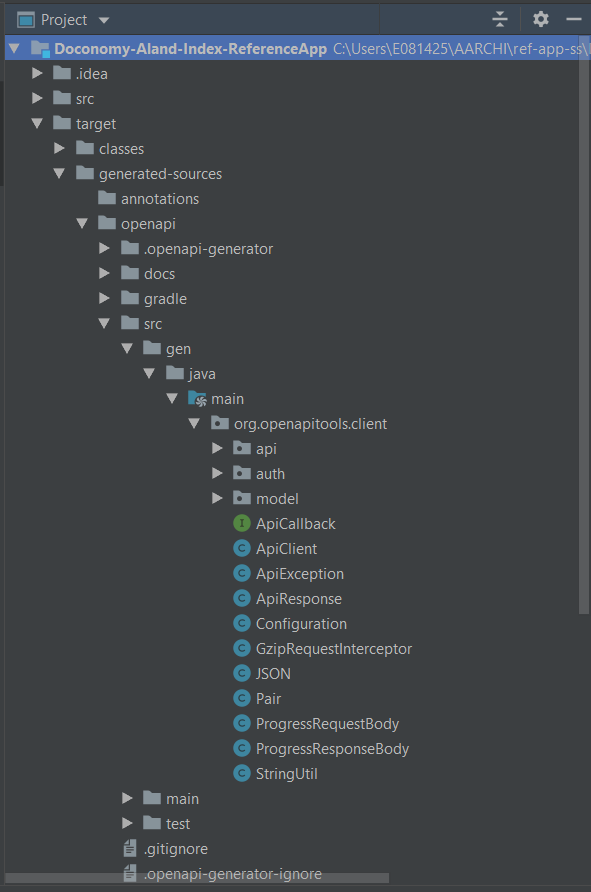
* Afterward, there should be a new folder named **target**, within your root directory, which contains classes generated for the schemas and API calls defined within the OpenAPI Specification. The generated classes can be found in the target folder as shown below.
## Making an API Call {#making-an-api-call}
* Under src/main/java/, create a Java file named **CarbonImpactApiMain.java**.
* To make the API call, you need to make your OAuth credentials available to the program to use.
* Java
```java
String consumerKey = "";
String signingKeyFilePath = "";
String signingKeyAlias = "";
String signingKeyPassword = "";
PrivateKey signingKey = AuthenticationUtils.loadSigningKey(signingKeyFilePath, signingKeyAlias, signingKeyPassword);
```
* Now you need to instantiate a client with your authentication credentials before you can send it.
* Java
```java
ApiClient client = new ApiClient();
client.setBasePath("https://sandbox.api.mastercard.com");
client.setDebugging(true);
client.setReadTimeout(10000);
List interceptors = client.getHttpClient().networkInterceptors();
interceptors.add(new ForceJsonResponseInterceptor());
interceptors.add(new OkHttp2OAuth1Interceptor(consumerKey, signingKey));
CarbonImpactApi carbonImpactApi = new CarbonImpactApi(client);
```
* The interceptor that you use to sign a request is also provided by the Mastercard OAuth library.
* Java
```java
private static class ForceJsonResponseInterceptor implements Interceptor {
@Override
public Response intercept(Chain chain) throws IOException {
Request originalRequest = chain.request();
String withJsonFormatUrl = withJsonFormat(originalRequest.uri().toString());
Request newRequest = originalRequest.newBuilder().url(withJsonFormatUrl).build();
return chain.proceed(newRequest);
}
private String withJsonFormat(String uri) {
StringBuilder newUri = new StringBuilder(uri);
newUri.append(uri.contains("?") ? "&" : "?");
newUri.append("Format=JSON");
return newUri.toString();
}
}
```
* Content of CarbonImpactApiMain.java.
* Java
```java
package com.mastercard.developer.doconomyalandindex;
import com.mastercard.developer.interceptors.OkHttp2OAuth1Interceptor;
import com.mastercard.developer.utils.AuthenticationUtils;
import com.squareup.okhttp.Interceptor;
import com.squareup.okhttp.Request;
import com.squareup.okhttp.Response;
import org.openapitools.client.ApiClient;
import org.openapitools.client.api.CarbonImpactApi;
import org.openapitools.client.model.*;
import java.io.IOException;
import java.math.BigDecimal;
import java.security.PrivateKey;
import java.util.List;
public class CarbonImpactApiMain {
public static void main(String[] args) throws Exception {
ApiClient client = new ApiClient();
String consumerKey = "your consumer key";
String signingKeyFilePath = "/path/to/your/key.p12";
String signingKeyAlias = "your key alias";
String signingKeyPassword = "your password";
PrivateKey signingKey = AuthenticationUtils.loadSigningKey(signingKeyFilePath, signingKeyAlias, signingKeyPassword);
client.setBasePath("https://sandbox.api.mastercard.com/doconomy");
client.setDebugging(true);
client.setReadTimeout(40000);
List interceptors = client.getHttpClient().networkInterceptors();
interceptors.add(new ForceJsonResponseInterceptor());
interceptors.add(new OkHttp2OAuth1Interceptor(consumerKey, signingKey));
CarbonImpactApi carbonImpactApi = new CarbonImpactApi(client);
System.out.println("Calling Calculate Transaction Footprint");
MCTransactions mcTransactions = new MCTransactions()
.addTransactionsItem(new MCTransaction().transactionId("TX-1")
.mcc("3000").amount(
new MCAmount().currencyCode("EUR").value(new BigDecimal(150))));
MCTransactionFootprints transactionFootprints = carbonImpactApi.footprintsByTransactionData(mcTransactions);
System.out.println("Calculate Transaction Footprint response : " + transactionFootprints);
System.out.println("Calling Get Supported Currencies");
MCSupportedCurrencies currencies = carbonImpactApi.getSupportedCurrencies();
System.out.println("Get Supported Currencies response : " + currencies);
System.out.println("Calling Get Supported Merchant Categories");
MCSupportedMerchantCategories mcSupportedMerchantCategories = carbonImpactApi.getSupportedMerchantCategories();
System.out.println("Get Supported Merchant Categories response : " + mcSupportedMerchantCategories);
}
/**
* Add "Format=JSON" to the request for the service/gateway to return a JSON response.
*/
private static class ForceJsonResponseInterceptor implements Interceptor {
@Override
public Response intercept(Chain chain) throws IOException {
Request originalRequest = chain.request();
String withJsonFormatUrl = withJsonFormat(originalRequest.uri().toString());
Request newRequest = originalRequest.newBuilder().url(withJsonFormatUrl).build();
return chain.proceed(newRequest);
}
private String withJsonFormat(String uri) {
StringBuilder newUri = new StringBuilder(uri);
newUri.append(uri.contains("?") ? "&" : "?");
newUri.append("Format=JSON");
return newUri.toString();
}
}
}
```