---
title: Standard Currency Conversion Calculator
service_id: currency-conversion-calculator
auth_type: OAuth1.0a
source_url:
- html: https://developer.mastercard.com/currency-conversion-calculator/documentation/
- md: https://developer.mastercard.com/currency-conversion-calculator/documentation/index.md
api_specification(s):
- https://static.developer.mastercard.com/content/currency-conversion-calculator/swagger/currency-conversion-calculator.yaml
---
Overview: The Standard Currency Conversion Calculator is a service for issuers to access Mastercard’s daily currency conversion rates and calculate cardholder billing amounts for card transactions. It supports building mobile or web experiences where cardholders can see the applicable conversion rate and billed amount based on their transaction details. Rates are published daily and are effective for 24 hours. The service is available in NA, LAC, MEA, Europe (excluding EEA), and AP; issuers in the EEA should use the Enhanced Currency Conversion Calculator API. Why it matters: This helps applications precisely determine conversion results for payment scenarios, verify the availability of the latest rates, and understand which currencies are supported. It supports use cases such as international peer-to-peer payments, travel expense tracking, e-commerce pricing, and banking transparency. By using Mastercard’s rates, the API ensures consistency with actual billing and helps users understand the financial impact of currency conversion.
Keywords: currency conversion, fx rates, mastercard fx rates, currency conversion api, fx rates api
- [Standard Currency Conversion Calculator](https://developer.mastercard.com/currency-conversion-calculator/documentation/index.md)
- [API Basics](https://developer.mastercard.com/currency-conversion-calculator/documentation/api-basics/index.md)
- [API Reference](https://developer.mastercard.com/currency-conversion-calculator/documentation/api-reference/index.md)
- [Code and Formats](https://developer.mastercard.com/currency-conversion-calculator/documentation/code-and-formats/index.md)
- [Parameters](https://developer.mastercard.com/currency-conversion-calculator/documentation/parameters/index.md)
- [Postman Collection](https://developer.mastercard.com/currency-conversion-calculator/documentation/postman-collection/index.md)
- [Reference App](https://developer.mastercard.com/currency-conversion-calculator/documentation/reference-app/index.md)
- [Support](https://developer.mastercard.com/currency-conversion-calculator/documentation/support/index.md)
- [Tutorials & Guides](https://developer.mastercard.com/currency-conversion-calculator/documentation/tutorials-guides/index.md)
- [Use Cases](https://developer.mastercard.com/currency-conversion-calculator/documentation/use-cases/index.md)
***
# Standard Currency Conversion Calculator
source: https://developer.mastercard.com/currency-conversion-calculator/documentation/index.md
## Overview {#overview}
The Mastercard Standard Currency Conversion Calculator enables issuers (for example, financial institutions, fintechs) to access daily cardholder currency conversion rates for cross-border payments when the transaction currency differs from the cardholder's billing currency.
The Standard Currency Conversion API utilizes transaction currency, transaction amount, cardholder billing currency and bank fee to provide the applicable currency conversion rate and the calculated cardholder billing amount.
In return, the issuers can present the information to their cardholders within their website or online banking application.
Note: The API is available in NA (North America), LAC (Latin America), MEA (Middle East and Africa), Europe \[Excluding EEA\] and AP (Asia Pacific) regions. For issuers in European Economic Area (EEA), see [Enhanced Currency Conversion Calculator API](https://developer.mastercard.com/enhanced-currency-conversion-calculator/documentation/ "Enhance Currency Conversion Calculator")
## How It Works {#how-it-works}
The standard Currency Conversion Calculator provides a simple equation to generate daily conversion rates for cross border payments.
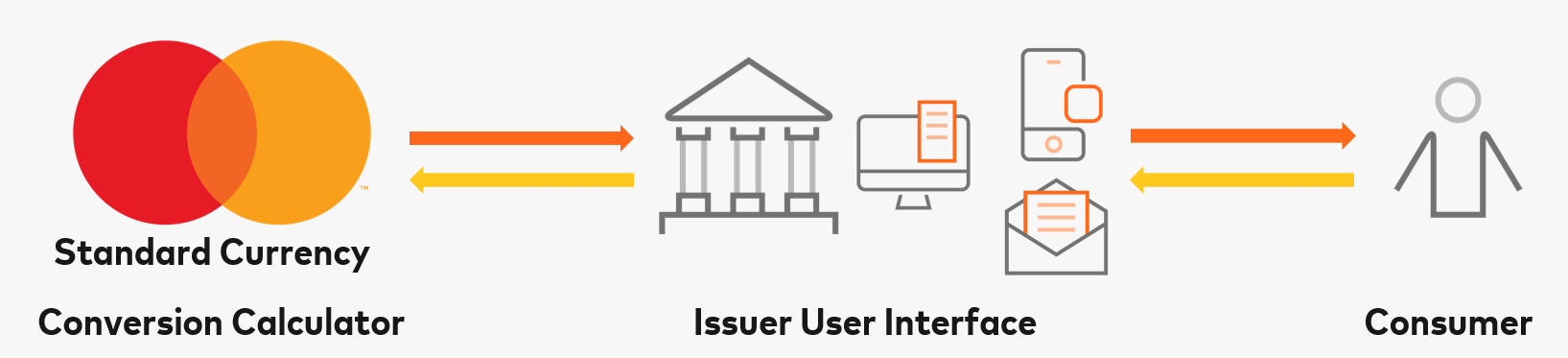
The Standard Currency Converter Calculator API offers the following three services:
* **Conversion Rate:**
Provides transaction details including date, transaction currency and amount, cardholder billing currency and issuer specific mark up to determine the applicable currency conversion rate and cardholder billing amount. To integrate using the reference app, refer [Conversion Rate Tutorial](https://developer.mastercard.com/currency-conversion-calculator/tutorial/how-to-integrate-using-the-reference-application/howitworks/index.md#conversion-rate)
Diagram currencyconv
In addition, you can also use the following services as reference when you want to create your digital solution using the Currency Conversion service.
* **Conversion Rate Issued** : Provides status update if the present day Mastercard currency conversion rates are issued. Mastercard rates are published daily and effective for 24 hours. To integrate using the reference app, refer to [Conversion Rate Issued Tutorial](https://developer.mastercard.com/currency-conversion-calculator/tutorial/how-to-integrate-using-the-reference-application/howitworks/index.md#conversion-rate-issued)
Diagram ratepublicationstatus
* **Currencies** : Provides a list of currencies for which Mastercard publishes currency conversion rates. To integrate using the reference app, refer [Currencies Tutorial](https://developer.mastercard.com/currency-conversion-calculator/tutorial/how-to-integrate-using-the-reference-application/howitworks/index.md#currencies)
Diagram currencies
## Before You Start {#before-you-start}
**Registration** : To access the production environment register as a Mastercard issuing customer. As a Mastercard customer you will have what is called a Interbank Card Association (ICA) Number, a customer ICA that identifies your organization internally in Mastercard. If you are an existing Mastercard customer, but don't know your ICA, you can find it by logging into [Mastercard Connect](https://www.mastercardconnect.com/).
**Regional Availability** : The API is available in NA (North America), LAC (Latin America), MEA (Middle East and Africa), Europe \[Excluding EEA\] and AP (Asia Pacific) regions. For issuers in European Economic Area (EEA), see [Enhanced Currency Conversion Calculator API](https://developer.mastercard.com/enhanced-currency-conversion-calculator/documentation/).
## Good to Know {#good-to-know}
The Standard Currency Converter API provides the currency conversion rate from the transaction currency to the cardholder billing currency. You will be required to provide the respective currencies for each currency conversion rate you wish to retrieve. Further, the API provides the current day's currency conversion rates. Historical rates are not available.
To try this API, you can use the [API Reference](https://developer.mastercard.com/currency-conversion-calculator/documentation/api-reference/index.md) to send requests directly from your browser to the Sandbox, to which you are not required to create a Mastercard Developers project and keys to try it out.
The Standard Currency Conversion Calculator APIs use authentication. You set up the required keys when you create your Mastercard Developers project for this service. For more information about authentication and the keys, see [API Basics](https://developer.mastercard.com/currency-conversion-calculator/documentation/api-basics/index.md).
Mastercard recommends that you use a group email address when creating your project to ensure that team members can access the Mastercard Developers account used for testing and production.
## Next Steps {#next-steps}
To learn more about the Standard Currency Converter Calculator refer the following links:
| Category | Description |
|--------------------------------------------------------------------------------------------------------------------------------|-------------------------------------------------------------------------------------------------|
| [API Basics](https://developer.mastercard.com/currency-conversion-calculator/documentation/api-basics/index.md) | Authentication, API environments and keys. |
| [Use Cases](https://developer.mastercard.com/currency-conversion-calculator/documentation/use-cases/index.md) | Common use cases and their implementations including high level and detailed sequence diagrams. |
| [Tutorials \& Guides](https://developer.mastercard.com/currency-conversion-calculator/documentation/tutorials-guides/index.md) | Tutorials \& Guides for easy integration. |
| [API Reference](https://developer.mastercard.com/currency-conversion-calculator/documentation/api-reference/index.md) | Try the Sandbox APIs directly from your browser. |
| [Reference Application](https://developer.mastercard.com/currency-conversion-calculator/documentation/reference-app/index.md) | Reference Application that can be downloaded. |
| [Parameters](https://developer.mastercard.com/currency-conversion-calculator/documentation/parameters/index.md) | Requests and responses for each endpoint. |
| [Code and Formats](https://developer.mastercard.com/currency-conversion-calculator/documentation/code-and-formats/index.md) | Error codes and the formats Mastercard uses. |
| [Support](https://developer.mastercard.com/currency-conversion-calculator/documentation/support/index.md) | FAQs and support. |
---
# Tutorials & Guides
source: https://developer.mastercard.com/currency-conversion-calculator/documentation/tutorials-guides/index.md
## Tutorials {#tutorials}
### Account \& Project Creation {#account--project-creation}
Here we have provided you with the information needed to create a new API Project and move from the Sandbox environment to Production.
Getting started on Mastercard developers is easy. You just need an account, and then you can begin accessing documentation and creating projects. To assist, we have provided a [quick start guide](https://developer.mastercard.com/platform/documentation/getting-started-with-mastercard-apis/quick-start-guide/). Make sure that you select **Standard Currency Conversion Calculator** when creating your project.
### Create a Sandbox Project {#create-a-sandbox-project}
Refer [How to Create a Project tutorial](https://developer.mastercard.com/currency-conversion-calculator/tutorial/how-to-create-a-project/index.md) to create a new project and generate the keys required for the Sandbox environment.
### Generating a Mastercard API Client {#generating-a-mastercard-api-client}
You can use open source tools, such as the [OpenAPI Generator](https://openapi-generator.tech), in conjunction with the provided [API Reference](https://developer.mastercard.com/currency-conversion-calculator/documentation/api-reference/index.md), to generate an API client. When used with the provided [client authentication libraries](https://developer.mastercard.com/platform/documentation/security-and-authentication/using-oauth-1a-to-access-mastercard-apis/), and if applicable, [client encryption libaries](https://developer.mastercard.com/platform/documentation/security-and-authentication/securing-sensitive-data-using-payload-encryption/#client-libraries), this is an agile and powerful way to get started with real code to access the service.
We have provided a tutorial that walks you through how to generate a Mastercard API client that includes integrating with our provided libraries. For the step-by-step tutorial, refer to [Generating and Configuring a Mastercard API Client](https://developer.mastercard.com/platform/documentation/security-and-authentication/generating-and-configuring-a-mastercard-api-client/).
### Promote Standard Currency Conversion Calculator API to Production {#promote-standard-currency-conversion-calculator-api-to-production}
Refer [How to Move to Production tutorial](https://developer.mastercard.com/currency-conversion-calculator/tutorial/how-to-move-to-production/index.md) to move your project to production from the sandbox environment.
### How to Integrate using Reference Application {#how-to-integrate-using-reference-application}
Refer [How to Integrate using Reference Application](https://developer.mastercard.com/currency-conversion-calculator/tutorial/how-to-integrate-using-the-reference-application/index.md) to integrate using reference application.
### Endpoint Tutorials {#endpoint-tutorials}
Endpoints are specific URLs or URIs (Uniform Resource Identifiers) that represents resources or services. Each endpoint corresponds to a specific function or operation that Standard Currency Conversion Calculator API can perform. When you make a request to a particular endpoint, you are instructing the API to carry out a specific action or retrieve specific information.
#### Tutorials of available API Calls {#tutorials-of-available-api-calls}
| Endpoint | Description |
|------------------------------------------------------------------------------------------------------------------------------------------------------------------------------------------------|--------------------------------------------------------------------------------------------------------------------------------------------------------------------------------------------------------------------------|
| [Conversion Rate](https://developer.mastercard.com/currency-conversion-calculator/tutorial/how-to-integrate-using-the-reference-application/howitworks/index.md#conversion-rate) | Provides transaction details including date, transaction currency and amount, cardholder billing currency, and issuer specific markup to determine the applicable currency conversion rate and cardholder billing amount |
| [Currencies](https://developer.mastercard.com/currency-conversion-calculator/tutorial/how-to-integrate-using-the-reference-application/howitworks/index.md#currencies) | Provides a list of currencies for which Mastercard publishes currency conversion rates |
| [Conversion Rate Issued](https://developer.mastercard.com/currency-conversion-calculator/tutorial/how-to-integrate-using-the-reference-application/howitworks/index.md#conversion-rate-issued) | Provides status update if the current day Mastercard currency conversion rates are issued. Mastercard rates are published daily and are effective for 24 hours. |
## Guides {#guides}
### Currency Conversion Rates guide {#currency-conversion-rates-guide}
The Standard Currency Conversion Calculator provides access to daily Mastercard currency conversion rates.
Mastercard publishes currency conversion rates once per day and the rates are effective for a 24-hour period. Mastercard foreign exchange rates are specific to the date and time the bank authorizes the transaction (which generally occurs at the point of sale/interaction). For certain transactions, including those submitted to Mastercard for processing nine or more days from the original date of authorization, Mastercard will apply the foreign exchange rate in effect at the date and time Mastercard processes the transaction.
* To retrieve currency conversion rates effective at the time of the request, provide 0000-00-00 in the `fxDate` parameter.
* To retrieve the currency conversion rates for a given date, provide the applicable date in the `fxDate` parameter. For example, if today is 20 August 2023, provide a date as 2023-08-20.
* For more information about Mastercard currency conversion rates, refer to the core manuals available on [Mastercard Connect](https://www.mastercardconnect.com/mccpblcui/#/public/signin)\> [Technical Resource Center](https://techdocs.mastercard.com/category/references).
Further information can be found in the below documents, which are available on [Mastercard Connect](https://www.mastercardconnect.com/mccpblcui/#/public/signin)\> [Technical Resource Center](https://techdocs.mastercard.com/category/references).
| Document | Description |
|------------------------------------------------------------------------------------------------------------------------------------------|--------------------------------|
| [Mastercard Rules](https://techdocs.mastercard.com/bundle/BM/page/eyf1624751947844.html) | Mastercard rules and standards |
| [Authorization Manual](https://techdocs.mastercard.com/bundle/m_AP/page/r_SmryChngs_AP_Aug2020_1.html) | Mastercard core manuals |
| [Global Clearing Management System Reference Manual](https://techdocs.mastercard.com/bundle/dai1627324065087/page/yxs1623791859792.html) | Mastercard core manuals |
---
# Use Cases
source: https://developer.mastercard.com/currency-conversion-calculator/documentation/use-cases/index.md
This section provides a sample use case on implementing the **Standard Currency Converter Calculator** to create a mobile app or web-page that allows cardholders to view daily currency conversion rates applicable for their card transactions.
Diagram usecase
**The Sequence of steps for this operation:**
1. The cardholder logs into the issuing bank website or mobile app and provides transaction details including transaction amount and transaction currency.
Tip: Consider providing a drop down list where a cardholder can select the transaction currency. You can use the `GET/settlement-currencies` service to access a list of currencies available.
2. Issuer validates the information entered by the customer and populates cardholder billing currency and bank fee (if applicable).
Tip: You can either request the cardholder to provide all the transaction information including cardholder billing currency and bank fee or populate based on cardholders profile.
3. Issuer's server sends the transaction information to Mastercard Currency Conversion Service via `GET/conversion-rate`.
Tip: You can enter 0000-00-00 in the `fxDate` parameter to retrieve the effective rates at the time of the request.
4. The Mastercard Conversion Rate Service retrieves information applicable to the currency pair.
5. The Mastercard Conversion Rate Service returns the currency conversion rate `conversionRate` and cardholder billing amount `crdhlBillAmt` in response.
6. The Issuer's server sends the data to be displayed on the Issuer's user interface.
## Next Steps {#next-steps}
| Category | Description |
|---------------------------------------------------------------------------------------------------------------------------------------------------------------|----------------------------------------------------|
| [API Reference](https://developer.mastercard.com/currency-conversion-calculator/documentation/api-reference/index.md) | Try the Sandbox APIs directly from your browser. |
| [Reference Application](https://developer.mastercard.com/currency-conversion-calculator/documentation/reference-app/index.md) | Reference Application that can be downloaded. |
| [Parameters](https://developer.mastercard.com/currency-conversion-calculator/documentation/parameters/index.md) | Requests and responses for each endpoint. |
| [HTTP Response codes](https://developer.mastercard.com/currency-conversion-calculator/documentation/code-and-formats/index.md#http-response-and-reason-codes) | Detailed descriptions on HTTP codes and structure. |
---
# Support
source: https://developer.mastercard.com/currency-conversion-calculator/documentation/support/index.md
## FAQ {#faq}
Available to Mastercard issuers in NA (North America), LAC (Latin America), MEA (Middle East and Africa), Europe \[Excluding EEA\] and AP (Asia Pacific) regions. The APIs are RESTful APIs with OAuth security. Your API requests must have an OAuth 1.0a Authorization Header for authentication, see [**API Basics**](https://developer.mastercard.com/payment-currency-conversion/documentation/api-basics/).
The APIs do not use additional encryption. Your API GET requests do not have body payloads.
Yes, the Sandbox APIs are provided so that you can try the APIs quickly. They are API stubs that return simulated, static responses. The expandable sections in [**API Reference**](https://developer.mastercard.com/currency-conversion-calculator/documentation/api-reference/) provide **Execute** buttons that allow you to try the Sandbox APIs quickly, directly from your browser.
When you are ready to make API calls to the Sandbox server from an API tool or your application, you must create a Mastercard Developers project choosing the **Standard** **Currency Conversion Calculator** API service. See [**Getting Started**](https://developer.mastercard.com/currency-conversion-calculator/documentation/).
Note: Please note there is a per hour quota of 150 API calls in the sandbox environment. This quota does not affect production. We recommend that customers call the API each time there is a request from the cardholder using the Issuer user interface to retrieve the effective rate at the time.
For more information, please refer to the support article *What time does Mastercard publish its rates and what is the effective time period for the rates*
Mastercard Conversion rates are published once per day and the rates are effective for a 24-hour period. Please refer to the [**Currency Conversion Rates guide**](https://developer.mastercard.com/currency-conversion-calculator/documentation/tutorials-guides/#guides) Currently there is no throttling limit for this API. Please refer to **How many times should I call the API? Are there any best practices I should follow?** for more information. The average response time for our API is typically within a few seconds, ensuring fast and efficient access to currency conversion data. The API can handle up to 1,000 transactions per second (TPS). The currency conversion rate and the converted amount are indicative only and inclusive of the bank fee you entered. Issuers may or may not use Mastercard currency conversion rates to bill cardholders and may impose additional fees in connection with foreign currency transactions.
Currency conversion rates are specific to the date and time the issuing bank authorizes the transaction (which generally occurs at the point of sale/interaction). If Mastercard is unable to apply the currency conversion rate at authorization, Mastercard will apply the currency conversion rate at the date and time the transaction is processed. If a transaction is converted by the merchant or ATM operator, Mastercard currency conversion rates will not apply. This will usually occur when you select to pay in your card's currency as opposed to the currency of the merchant or ATM. For more information on the currency conversion rate for purchases in Argentina, please visit: [Mastercard](https://www.mastercard.com.ar.).
Mastercard, in its sole discretion, may restrict usage of Currency Conversion API as Mastercard may deem necessary or appropriate.
## Get Help {#get-help}
### Contact us for technical support. {#contact-us-for-technical-support}
---
# Parameters
source: https://developer.mastercard.com/currency-conversion-calculator/documentation/parameters/index.md
This section provides details on each of the input and output responses.
## Currency Conversion Service {#currency-conversion-service}
| Input | Format | Description |
|----------------|-------------------|---------------------------------------------------------------------------------------|
| fxDate | YYYY-MM-DD | The date of the transaction |
| transCurr | ISO Currency Code | 3-digit ISO Currency Code of the transaction |
| crdhldBillCurr | ISO Currency Code | 3-digit ISO Currency Code of the cardholder billing currency |
| transAmount | Number | Amount in transaction currency |
| bankFee | Number | Percentage bank fee imposed by the issuer. Accommodates 4 decimal points to the right |
| Output | Format | Description |
|----------------|---------------------|------------------------------------------------------------------------------------------------------------------------------------------------------------------------------|
| conversionRate | number | Currency conversion rate applicable for the currency pair. Example: If transCurr = GBP and crdhldBillCurr = USD, then conversionRate = 1.2803999 where 1 GBP = 1.2803999 USD |
| crdhlBillAmt | number | Calculated cardholder billing amount based on the applicable currency conversion rate \[transAmount \* conversionRate\] |
| date | YYYY-MM-DD HH:MM:SS | The date and time the API server receives the request. The time is provided in GMT |
## Rate Publication Status Service {#rate-publication-status-service}
| Input | Format | Description |
|-------|------------|-----------------------------------------------------------------|
| date | YYYY-MM-DD | Provides current days rate to determine if the rates are issued |
| Output | Format | Description |
|------------|--------|-----------------------------------------------------------------|
| rateIssued | Yes/No | Provides status to indicate if the current day rates are issued |
## Available Currencies Service {#available-currencies-service}
This request has no parameters.
| Output | Format | Description |
|---------|--------|---------------------------|
| alphaCd | string | 3-digit ISO Currency Code |
| currNam | string | Name of the currency |
---
# API Reference
source: https://developer.mastercard.com/currency-conversion-calculator/documentation/api-reference/index.md
## Environment Domains {#environment-domains}
* Sandbox
* Production
```Sandbox
http://sandbox.api.mastercard.com/settlement/currencyrate
```
```Production
http://api.mastercard.com/settlement/currencyrate
```
## APIs {#apis}
Use the **Execute** buttons (in the expandable sections above) to send requests directly from your browser to the Sandbox, without needing to create a Mastercard Developers project and keys. This functionality will send the shown Request parameters, which you can alter, and the response will appear in a **Server Response** tab.
You can also make API calls to the Sandbox server from an API tool or your application code, which involves creating a Mastercard Developers project (see [**Getting Started**](https://developer.mastercard.com/currency-conversion-calculator/documentation/)) and using the Sandbox keys to generate the required OAuth 1.0a Authorization Header.
The Sandbox server returns simulated, static responses.
Note: In the expandable **Conversion-conversion-rate-details** section, please change the `rate_date` to the current date (a valid date) before clicking **Execute**.
API Specification: `https://static.developer.mastercard.com/content/currency-conversion-calculator/swagger/currency-conversion-calculator.yaml`
---
# Reference App
source: https://developer.mastercard.com/currency-conversion-calculator/documentation/reference-app/index.md
## Overview {#overview}
A Java reference application is created to guide you through the process of setup and integration with the Mastercard Standard Currency Conversion Calculator API services.
The application is a stand-alone project that does not require any dependency to perform end-to-end testing. The frameworks used to generate the client are Spring Boot, Thymeleaf, and OpenAPI Generator. You can make calls to access daily cardholder currency conversion rates for cross-border payments where the transaction currency differs from the cardholder billing currency.
Note: Existing customers using the Legacy SDK can migrate by downloading the reference application. For step by step instructions please follow the tutorial on [how to integrate using the reference application](https://developer.mastercard.com/currency-conversion-calculator/tutorial/how-to-integrate-using-the-reference-application/index.md).
## Get the Source Code {#get-the-source-code}
Reference Application for Currency Conversion Calculator API is available below:
Download
[currency-conversion-reference-app.zip](https://static.developer.mastercard.com/content/currency-conversion-calculator/uploads/currency-conversion-reference-app.zip) (209KB)
Note: The Reference Application built is for reference purposes only. Your production application does not need to function the same way.
---
# API Basics
source: https://developer.mastercard.com/currency-conversion-calculator/documentation/api-basics/index.md
The Standard Currency Converter Calculator API is organized around [REST](https://en.wikipedia.org/wiki/Representational_state_transfer). Our API returns [JSON-encoded](https://www.json.org/json-en.html) responses and uses standard HTTP response codes, authentication, and verbs.
## Authentication {#authentication}
The Standard Currency Converter Calculator API requires all requests to be signed using [OAuth 1.0a](https://oauth.net/core/1.0a/).
### Overview {#overview}
* Mastercard uses [OAuth 1.0a](https://oauth.net/core/1.0a/) for authenticating client applications
* Requests with a body must be signed using the Google Request Body Hash extension for OAuth
* OAuth Keys for your project can be set up in your dashboard
* Client authentication libraries can be found on GitHub, with how-to information provided in README.md files
For further details, see [Using OAuth 1.0a to Access Mastercard APIs](https://developer.mastercard.com/platform/documentation/security-and-authentication/using-oauth-1a-to-access-mastercard-apis/)
## API Host {#api-host}
The following are the Mastercard environments:
* Sandbox: Sandbox environment is where you access API stubs that return simulated, static responses.
* Production: Production environment is where you complete testing and launch your solution.
| Environment | URL |
|-------------|------------------------------------------------------------------------------|
| Sandbox | |
| Production | |
## API Keys {#api-keys}
* Mastercard authenticates API requests using your account's API keys. If you do not include your key when making an API request, or use one that is incorrect or outdated, Mastercard returns an error.
* Your API keys are available in your project dashboard on [Mastercard Developers](https://developer.mastercard.com).
* To renew your project keys, go to **My Project** **dashboard** , click **Actions** , and then click **Renew** . For more details, see [How To Renew Your Project Keys](https://developer.mastercard.com/platform/documentation/getting-started-with-mastercard-apis/renewing-your-keys/)
Warning: All keys created in the Mastercard Developer Portal account expire after one year and must be renewed, otherwise they will be revoked.
The following table outlines the key management activities. Once generated, most of these keys and their certificates are accessible from the API project dashboard, except for the private keys generated offline.
| Category | Description |
|----------------|---------------------------------------------------------------------------------------------------------------------------------------------------------------------------------------------------------------------------------------------------------------------------------------------------------------------------------------------------------------------------------------------------------|
| Sandbox Key | Private keys used for API authentication with the Sandbox environments. Mastercard generates the initial set of keys when creating your project (download the Signing Key via browser). The project dashboard displays the Consumer Key. If you want to generate and use your own keys, you can discard the Mastercard-generated keys and renew them using your Certificate Signing Request (CSR) file. |
| Production Key | Private keys used for API authentication with the Production environment. Mastercard can generate this key set for you when you request Production access (download the Signing Key via browser). The project dashboard displays the Consumer Key. |
## Conventions {#conventions}
To ensure best experience when integrating with Standard Currency Converter API, familiarize yourself with the following conventions:
| Category | Description |
|---------------------------------------------------------------------------------------------------------------------------------------------------------------|------------------------------------------------------|
| [Parameters](https://developer.mastercard.com/currency-conversion-calculator/documentation/parameters/index.md) | A glossary that explains input and output responses. |
| [HTTP Response codes](https://developer.mastercard.com/currency-conversion-calculator/documentation/code-and-formats/index.md#http-response-and-reason-codes) | Detailed descriptions on HTTP codes and messages. |
| [ISO Currency Codes](https://developer.mastercard.com/currency-conversion-calculator/documentation/code-and-formats/index.md#iso-currency-codes) | List of currencies available via the API. |
---
# Code and Formats
source: https://developer.mastercard.com/currency-conversion-calculator/documentation/code-and-formats/index.md
## HTTP Response and Reason Codes {#http-response-and-reason-codes}
API uses standard HTTP responses.
| Error Code | Description |
|------------|------------------------------------------------------------------------------------------------------------------------------------------------------------------------------------------------------------------------------|
| 400 | Request with an invalid client ID. If your client ID has not been moved to production. Go to [My Projects](https://developer.mastercard.com/dashboard) and click Request Production Access to request for Production access. |
| 400 | User does not have access to retrieve conversion rates for the requested date |
| 400 | Incorrect request parameter/s. For more information on permitted information, see [Parameters](https://developer.mastercard.com/currency-conversion-calculator/documentation/parameters/index.md) |
| 401 | User requests to retrieve conversion rate for a future date. The API only retrieves conversion rates for the current date |
| 124 | Conversion rate value is less than 0.000001 |
| 114 | Conversion rate is not available for this currency pair |
### Service Error Response Structure {#service-error-response-structure}
* JSON
```JSON
{
"name": "settlement-conversion-rate",
"description": "An error occurred during the request",
"date": "2020-09-25 21:09:50",
"type": "error",
"data": {
"errorCode": "114",
"errorMessage": "Not Found , Conversion rate is not available for this currency pair."
}
}
```
## Gateway Error Codes {#gateway-error-codes}
The error codes can also be returned by the gateway, which is used to verify your request's signature and route it to the correct location.
You can find a list of the errors returned by our gateway and the resolutions to each on [Gateway Error Codes](https://developer.mastercard.com/platform/documentation/security-and-authentication/gateway-error-codes/ "Gateway error").
### Gateway Error Response Structure {#gateway-error-response-structure}
* JSON
```JSON
{
"Errors": {
"Error": [
{
"Source": "Gateway",
"ReasonCode": "INVALID_CLIENT_ID",
"Description": "Project 1ABCeP7Xz1MLytj4BBuaL7YRDCGUR4SjJkG99lFn1674ae08 doesn't have access to the requested service",
"Recoverable": false,
"Details": null
}
]
}
}
```
## ISO Currency Codes {#iso-currency-codes}
Currencies are identified using the 3-character [ISO 4217 alpha-3 currency codes](https://www.iso.org/iso-4217-currency-codes.html) defined by ISO. For example, US dollar is `USD`. This applies to:
* Transaction Currency *\[transCurr\]*
* Cardholder Billing Currency *\[crdhldBillCurr\]*
## Date and Time Formats {#date-and-time-formats}
Date values have 10 characters, specified in the format YYYY-MM-DD. For example, 19 June 2020 is `2020-06-19`. This applies to:
* Transaction Date \[*fxDate\]*
---
# Postman Collection
source: https://developer.mastercard.com/currency-conversion-calculator/documentation/postman-collection/index.md
Postman is an application for easy RESTful API exploration. You can use Postman to test API calls multiple times without having to write code. You can save multiple sets of credentials to quickly test an API's calls in the sandbox and production environments.
See the following [Postman tutorial](https://developer.mastercard.com/platform/tutorial/use-postman-for-mastercard-apis/) for the generic steps needed to get Mastercard authentication working with the Postman collection.
Use the button below to fork our Postman collection and explore the API.
Run in Postman