# Payload Encryption
source: https://developer.mastercard.com/cross-border-services/documentation/api-ref/encryption/index.md
## Introduction {#introduction}
Mastercard APIs are secured through an authentication process where only authorized clients, with a valid digital signature are granted access.
Payload encryption provides an additional layer of security.
The encrypted payload is structured in JSON Web Encryption (JWE) format, the plain text JSON body is encrypted to form a JWE encrypted payload that is inserted into the request body(replacing the plain text data). The encryption process uses the appropriate public encryption key for the environment.
For further details, refer to the [JWE IETF standard - (RFC 7516)](https://tools.ietf.org/html/rfc7516#section-3.1)
## How to Enable Encryption {#how-to-enable-encryption}
Customers may set up payload encryption for partner-initiated transactions (such as for Quotes, Payment and Retrieve Payment APIs) on their own by following these steps:
**Step 1:** Create Encryption keys. See [How to Create Encryption Keys](https://developer.mastercard.com/cross-border-services/documentation/api-ref/encryption/index.md#how-to-create-encryption-keys) section below.
**Step 2:** Provide encrypted payload. See [How to Encrypt Payload](https://developer.mastercard.com/cross-border-services/documentation/api-ref/encryption/index.md#how-to-encrypt-payload) section below.
**Step 3:** Include the **x-encrypted: true** HTTP Header. Please refer the [HTTP header](https://developer.mastercard.com/cross-border-services/documentation/api-ref/encryption/index.md#http-header-parameters) section below.
## How to Create Encryption Keys {#how-to-create-encryption-keys}
Once you log into your Mastercard Developers account on [Mastercard Developer site](https://developer.mastercard.com/account/log-in), there are two ways to create encryption keys.
**Option 1:** Create keys with new project creation:
The [Quick Start Guide](https://developer.mastercard.com/cross-border-services/documentation/tutorials/guide-create-project/index.md) provides detailed information about creating a project and the project keys in Sandbox/MTF environment.
For creating encryption keys in production, you can request Production access for your project (refer [step-by-step guide](https://developer.mastercard.com/cross-border-services/documentation/tutorials/guide-move-to-production/index.md) )
**Option 2:** Add Keys to existing project:
To add keys to an existing project, simply click "Add Key" (next to the Client Encryption Keys)
## How to Encrypt Payload {#how-to-encrypt-payload}
Please follow the below steps to encrypt the payload as per above format:
**Step 1:** Construct the original JSON or XML Request per the API specification.
**Step 2:** Use JWE to encrypt the original request in compact serialized form using the below JOSE headers:
| JOSE Header | Value | Description |
|--------------------|-------------------------------------|-----------------------------------------------------------------------------------------------------------------|
| enc | A256GCM | Content encryption algorithm. |
| alg | RSA-OAEP-256 | Key encryption algorithm. |
| cty (content type) | Application/JSON or Application/XML | The application can use this value to disambiguate among the different kinds of objects that might be present. |
| kid | Public Fingerprint ID | The Public Fingerprint ID or client key will be used to identify the private key needed to decrypt the message. |
**Kid example:**
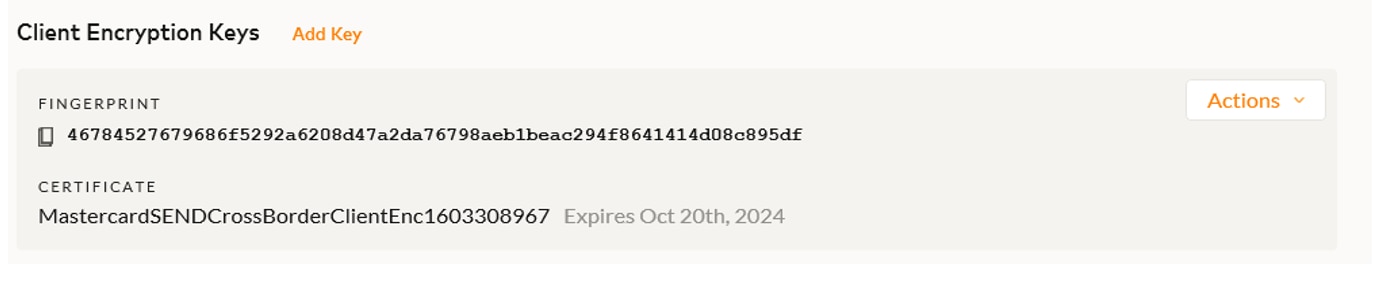
**Step 3:** Construct payload with below HTTP header parameters, and payload structure.
###### HTTP Header Parameters: {#http-header-parameters}
| Param Name | Example Value | Description |
|----------------|--------------------------------------|------------------------------------------------------------------------------------------|
| Content-Type | application/json | This is the format of the request content being submitted. |
| Content-Length | 380 | This is the length of the request content body in octets. |
| Accept | application/ JSON | This is the acceptable format for response content. |
| x-encrypted | TRUE | Flag to indicate the request body content is encrypted. This must be always set to true. |
| Authorization | Please see: The Authorization Header | OAuth authorization header. |
## Request Structure {#request-structure}
The following structure is needed when encrypting a payload.
```JSON
{
"encrypted_payload": {
"data": "JWE encrypted payload"
}
}
```
or
JWE encrypted payload
#### Sample Request Payload {#sample-request-payload}
Encrypted Request Body Example:
```JSON
{
"encrypted_payload": {
"data": "eyJhbGciOiJSU0EtT0FFUC0yNTYiLCJlbmMiOiJBMjU2R0NNIiwiY3R5IjoiYXBwbGljYXRpb24veG1sIiwia2lkIjoiODI2NTk3YzQ2MTRlMWY2ODZhOTllNmY5MTAzYmYxNmJhNTVjNDhmMDU3MmE1YTlkNmI5MmY5YzJiNDA3NDZhNiJ9.fLRDis0rBPUp-YSB4CmKemGZhxiQ2Bzk1F73_vjn2nrf9LF223EBqppto6RgoSdTUyEzCblSMT94r2ipsJ7h_mNFvsv-POcxqKJncYyrmQCvkuYrY-P8BhHun-HATY7OUzeYW2VQdcmVIFOHFWVSznqZ3Db6UcYNC3GSys0q8n-_oV0VcWLHYBopF0oo3nuPKOMUM68Hr9TU8mHQzMYxaclDjOTlX4y0a04OzuWXsWHEkmAtT7eC7Z7SUdtNb6Fh81qHXpEfGy880vCVJE91ymfTCutQXKdL6bykxv4rNM4Db1aWuZbrHj5ffmNo-1yzb6shBBNRHNPNc7hclZcuaA"
}
}
```
## Decrypting Response Payload {#decrypting-response-payload}
Mastercard Cross-Border Service will respond with an encrypted response for all encrypted requests which are able to be processed.
#### Response Structure {#response-structure}
The following Response payload structure will be used for encrypted responses.
```JSON
{
"encrypted_payload": {
"data": "JWE encrypted payload"
}
}
```
or
JWE encrypted payload
The below HTTP header parameters content type application/json or application/xml will be specified, additionally **x-encrypted: true** header will be returned in HTTP Response header.
| HTTP Header Parameters | Example Value | Description |
|------------------------|------------------|----------------------------------------------------------------------|
| Content-Type | application/json | This is the format of the response content. |
| x-encrypted | TRUE | Value would be 'true' to indicate the response content is encrypted. |
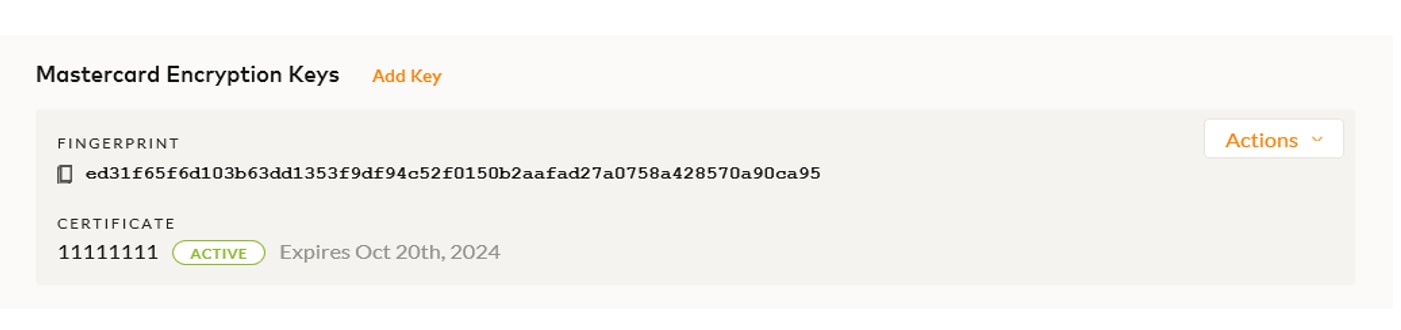
Mastercard will set the kid property to a value of the fingerprint displayed under Mastercard Encryption Keys when sending their encrypted response. In turn, the kid property on the JWE JOSE header can be used to identify the correct private key for decryption.
#### Mastercard Encryption Key example: {#mastercard-encryption-key-example}
#### Sample Response Payload {#sample-response-payload}
Encrypted Response Body Example:
```JSON
{
"encrypted_payload": {
"data": "eyJlbmMiOiJBMTI4R0NNIiwiYWxnIjoiUlNBLU9BRVAtMjU2In0.g8iwx7vrRYJJ9EzJnOvlwM0e3RceeYK7M9dST56HVi36MjmhW2a2Ap-h2MtRHALzpYA6BWbfT0QhV4QUz5PWfVjRsCr2Zw1gC8zEIKNSKQWOqDcnAntT-h3F7DRccdXXTdQli1WJJXLUR9DkbkNzuJDpj16bBnHghtXTEEJpznMpaJmDXIL9ItYjZv1Iz-WK90SdFJ9Iv-oXVMHSCXjgTyPwwjQk6TLNufOKsWCuztXC6SaMBZuAHy9TAPO2aDLMYq2BfoXJCWDS_-jidiL-HfTJw8u2s6UvcUMAbIRp57R_r-eycysVsa7CAG-mRuLlQFa0JHD3e7O-b3ER8dFDrg.0O2AuD6mL__dfB0e.ps2uDrU9wt7Nk9Cmt9sq3vPwJjoMOuLahHwaDe3Km38b5IKMNpIKe_mG5tpWm7cm9uGKXYc4RlPMMproZ-hDXks70BGCs5O0aBMM4AOl4sBFa4xRxa8B99cIBebYssRaJXxcoulU7FAUc6Ol0ShxN8pA7D--FpCMW4bnaKpXgHM9YNh9HWPTJLJKguGDm2qrqkSoKnWQS3J6XrW9VOV97lezAvYV4dLWOzU0IVxipF-RfvMoXK6XI-1sP3rgv2gIkObwho6yD2gcBO1A9uKi-kOCkvJaD7ouw5o67VwPjdF3ye-hTRSn9raq018ICW1cJPhE9auIWaKbI9EguqlMHfhF6grp2GHDcNilwVikPStEZAEisnUBMxR0nGmmQsW4foNDvWTXz8Adz0fC7h-zMgDmV0WUv1jKR2oa565K3WiYYb8Jx6Ymz1YI-Om6InbKkHvizkcFh8hAGXAGrID_sbGvcPjDguzutL_6LNy7hV4Zud9DOtSRyQJzLXHqEE77tKGR7NJw-QWoGI6YDSvYB3Mw6v-vC4lKNxgAAP5X3ysYIPtUXli31kzYkvwQxwjDnfRDFBLo9yS8XenYLNaCP089_kjb4tZy4G7rb4O9_vgTrs2iBZ2zdjHVam0eKJoOF3gOIIdLAAzJmn3RzdQa.te6ngAa6zahgREnOQeUhyg"
}
}
```
## Error Handling {#error-handling}
Error message responses, including Rejected payments, are not encrypted. The exact error structure documented from the original API will be provided in response.
#### HTTP Header Parameters {#http-header-parameters-1}
| Param Name | Example Value | Description |
|--------------|------------------|---------------------------------------------|
| Content-Type | application/json | This is the format of the response content. |
#### Sample Error Response Payload {#sample-error-response-payload}
Response Body:
```JSON
{
"Errors": {
"Error": {
"Description": "Value contains invalid character",
"Details": {
"Detail": {
"Name": "ErrorDetailCode",
"Value": "062000"
}
},
"ReasonCode": "INVALID_INPUT_FORMAT",
"Recoverable": "false",
"RequestId": null,
"Source": "Encrypted Payload"
}
}
}
```
## Testing Encrypted Payload {#testing-encrypted-payload}
**Live customers** wanting to test API payload encryption for partner-initiated transactions (such as Quotes, Payment and Retrieve payment APIs) can self-validate in the MTF and production environments by following the above steps then confirming:
1. Successful Response
2. X-encrypted field set to True in HTTP header.
If support is needed, live customers should reach out to their Mastercard Customer Support team.
**New customers** will test basic API payload encryption in Sandbox environment.
Specialized testing scenarios will be performed with the Customer Implementation Services (CIS) team during onboarding.
## Encrypted Push Notifications {#encrypted-push-notifications}
**Live** and **New customers** wanting to set up encryption for push notifications (such as Status change and Carded rates) will need to coordinate MTF/Production testing with the Customer Implementation Services team by opening a project.
The CIS Team will ask for the Open API Client ID for both MTF and Production when setting up the encrypted push notifications.
Test accounts to initiate push transactions will be provided if necessary.