# Tips for Sending Requests
source: https://developer.mastercard.com/consumer-clarity/documentation/tutorials-and-guides/tips-for-sending-requests/index.md
This article offers some tips to consider when sending your requests to the Consumer Clarity and Smart Subscriptions APIs. In all cases, these are just suggestions for how you can send your requests. Make decisions based on what you think is best for your particular banking app.
## Sending your Search Criteria {#sending-your-search-criteria}
In all cases, you must provide some `merchantCriteria` when sending a request. Then, if you also want digital receipts returned in the response, you must provide some `transactionCriteria` along with the required `merchantCriteria`. In addition:
* For the First-Party Trust program, you must also provide the `acquirerReferenceNumber` when you send the required `transactionCriteria` and the `merchantCriteria`.
* To receive a carbon footprint score in your response data, make sure you send `transactionAmount` (`value` and `currencyCode`) in your request as well.
Check out our [API Reference](https://developer.mastercard.com/consumer-clarity/documentation/api-reference/index.md#apis) for a list of all `merchantCriteria` and `transactionCriteria` fields that you can send in your request.
### Provide more merchant descriptor data {#provide-more-merchant-descriptor-data}
When you send a request to the Consumer Clarity API, it is in the form of a merchant descriptor. A merchant descriptor must include the `merchantCriteria` fields **cardAcceptorName** , **cardAcceptorLocation** , **cardAcceptorRegionCode** , **cardAcceptorCountryCode** , and **merchantCategoryCode**. If you don't provide all of these fields, the match rate will be lower and Consumer Clarity won't be as effective.
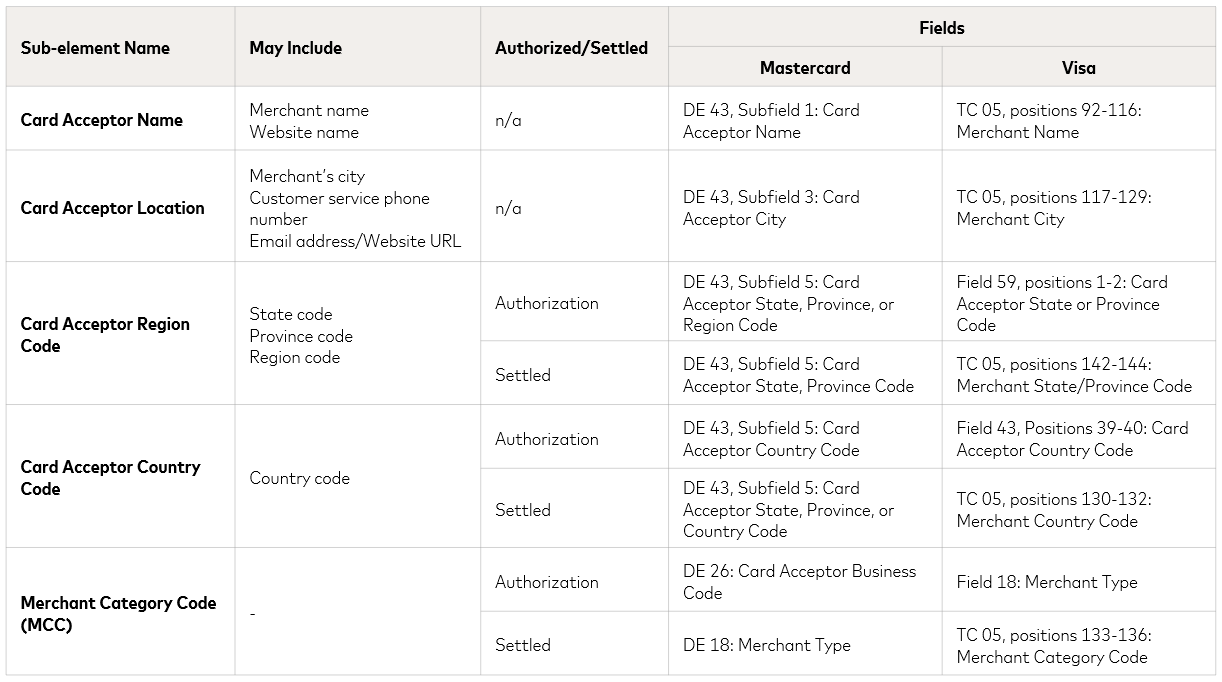
Note: **cardAcceptorName** is required for all requests to the Consumer Clarity API. In almost all cases, the more descriptor data you provide in your request, the more likely you'll get a merchant match.
Consider these two examples. In the first example, only `cardAcceptorName` and `cardAcceptorLocation` are provided in the request and so the response returned shows that no merchant could be located. **Example 2** provides more descriptor data, and so the merchant was found and the response shows the merchant detail.
#### Example 1 {#example-1}
```JSON
{
"locale": "en-US",
"searchCriteria": [
{
"merchantCriteria": {
"cardAcceptorName": "SHOE STORE 1234",
"cardAcceptorLocation": "AUSTIN",
"cardAcceptorRegionCode": null,
"cardAcceptorCountryCode": null,
"merchantCategoryCode": null
}
}
]
}
```
##### Response {#response}
```JSON
{
"searchResults": [
{
"recordId": "0.5324c317.1715181595.b2733348-01",
"resultStatus": {
"code": "OK",
"message": "OK."
},
"merchantResult": {
"resultStatus": {
"code": "MERCHANT_NOT_FOUND",
"message": "Merchant could not be identified; no merchant results available."
}
}
}
]
}
```
#### Example 2 {#example-2}
```JSON
{
"locale": "en-US",
"searchCriteria": [
{
"merchantCriteria": {
"cardAcceptorName": "SHOE STORE 1234",
"cardAcceptorLocation": "AUSTIN",
"cardAcceptorRegionCode": "TX",
"cardAcceptorCountryCode": null,
"merchantCategoryCode": "5661"
}
}
]
}
```
##### Response {#response-1}
```JSON
{
"searchResults": [
{
"recordId": "0.cef8da17.1672866204.72030a8a-01",
"resultStatus": {
"code": "OK",
"message": "OK."
},
"merchantResult": {
"merchantName": "The Shoe Store",
"address": {
"line1": "100 Main St",
"city": "Austin",
"postalCode": "78701",
"countryCode": "USA",
"countryName": "United States",
"countrySubdivisionCode": "TX"
},
"merchantCategory": {
"code": "5661",
"description": "SHOE STORES"
},
"logos": [
{
"height": 400,
"width": 400,
"url": "https://sandbox.content.ethoca.com/b/industry/61d0cd49-f86b-4c55-afbc-ccdc30abf990.png?size=400",
"type": "INDUSTRY",
"altTextTag": "Shoe Stores Logo"
},
{
"height": 200,
"width": 200,
"url": "https://sandbox.content.ethoca.com/b/industry/61d0cd49-f86b-4c55-afbc-ccdc30abf990.png?size=200",
"type": "INDUSTRY",
"altTextTag": "Shoe Stores Logo"
}
],
"merchantLocation": {
"latitude": "30.309558",
"longitude": "-97.759881"
},
"resultStatus": {
"code": "MERCHANT_FOUND",
"message": "Merchant results provided."
}
},
"purchaseReceipt": {
"resultStatus": {
"code": "RECEIPT_NOT_ACCESSIBLE",
"message": "Purchase receipt service not configured for this account."
}
}
}
]
}
```
### Provide transaction criteria for digital receipts {#provide-transaction-criteria-for-digital-receipts}
To receive a digital receipt in your response data, you must first include `paymenttype`, `locale`, and some `merchantcriteria` in your request. These fields are all required to return a digital receipt url.
In addition, you must also include some `transactionCriteria` fields in your request, such as **transactionAmount** or **cardLastFour** . If no `transactionCriteria` is provided, the API response returns a message indicating that a purchase receipt is not available.
Since different merchants accept different fields when identifying transactions, we recommend that you provide data for as many of the `transactionCriteria` fields as you can. This table lists the different fields that are commonly used to identify transactions and provides some additional guidance to help you decide which fields to send:
| Field | Description | Example |
|------------------------------|------------------------------------------------------------------------------------------------------------------------------------------------------------------------------------------------------------------------------------------------------------------------------------------------------------------------------------------------------------------------------------------------------------------------------------------------------------------|--------------------------|
| `cardLastFour` | Last four characters of the card used in transaction. | 1234 |
| `cardFirstSix` | First six characters of the card used in transaction. | 123456 |
| `transactionAmount` | Total amount value associated with the transaction. | 250.35 |
| `transactionDateTime` | Date, time, and time zone of the transaction. | 2020-06-18T22:11:05.000Z |
| `acquirerReferenceNumber` | 23-character numeric ID associated with the purchase details. This field is useful as it is often unique. The problem with using this field alone is that it's only rendered when a transaction is posted, and so it can take 3-4 days to render a receipt. | 12345678901234567890123 |
| `issuerAuthorizationCode` | Numerical or alphanumeric code sent by an issuer that's uniquely attributed to a transaction as authorization verification. This field is required by a number of our larger merchants as it gives a more accurate isolation of the transaction and can be very helpful to identify a single transaction for a large issuer who might regularly duplicate `acquirerReferenceNumber` or other fields. | 12345 |
| `transactionIdentifierValue` | Transaction identifier value associated with the type specified in `transactionIdentifierType`. The format of this field can be different depending on the card scheme. This field can sometimes be called BanknetRef Number or Invoice reference number depending on the issuer who is working on the field. | 123456 |
| `transactionIdentifierType` | Payment type-specific transaction identifier associated with the value specified in `transactionIdentifierValue` * **Mastercard:** DE 63, Subfield 2: Banknet Reference Number * **American Express:**TAB Field 26: Invoice/Reference Number * **Visa :** Transaction Identifier (TID) (Field 62.2) This field must match the Transaction Identifier (TID) generated by Visa and returned as part of the response message to the original authorization request. | BANKNET_REF_NUM |
| `currencyCode` | Alphabetic currency code associated with `transactionAmount:value`, in ISO 4217 format. | USD |
| `clearingDateTime` | Date, time, and time zone of the transaction clearing. | 2020-11-04T22:11:05.000Z |
| `clearingAmount` | Total amount value and currency associated with the clearing transaction. | 250.0 / USD |
Tip: Once again, including as many of the above fields in your request as you can gives you the best chance that a successful receipt is returned.
In this example, a request is sent for a transaction processed with a Mastercard and the `acquirerReferenceNumber` and `issuerAuthorizationCode` are provided. The transaction is found and a digital receipt URL is returned in the response.
#### Example {#example}
```JSON
{
"locale": "en-US",
"searchCriteria": [
{
"transactionCriteria": {
"acquirerReferenceNumber": "20292029202920292029101",
"issuerAuthorizationCode": "1B2A3Q",
"paymentType": "MC",
"clearingDateTime": "2020-11-04T22:11:05.000Z",
"clearingAmount": {
"value": "250.0",
"currencyCode": "USD"
},
"merchantCriteria": {
"cardAcceptorLocation": "PITTSBURGH",
"cardAcceptorName": "ETHOCA NINJA GAMES",
"cardAcceptorRegionCode": "PA",
"cardAcceptorCountryCode": "US"
}
}
]
}
```
##### Response {#response-2}
```JSON
{
"searchResults": [
{
"recordId": "0.5324c317.1715181595.b2733348-01",
"resultStatus": {
"code": "OK",
"message": "OK."
},
"merchantResult": {
"resultStatus": {
"code": "MERCHANT_FOUND",
"message": "Merchant results provided."
},
"merchantName": "Ethoca Ninja Games",
},
"merchantCategory": {
"code": "7993",
},
"logos": [
{
"height": 200,
"width": 200,
"url": "https://sandbox.content.ethoca.com/b/merchant/9ad4e625-3b95-4d18-adbc-f607f519881d.png?size=200",
"type": "MERCHANT",
"altTextTag": "Ethoca Ninja Games Logo"
},
{
"height": 400,
"width": 400,
"url": "https://sandbox.content.ethoca.com/b/merchant/9ad4e625-3b95-4d18-adbc-f607f519881d.png?size=400",
"type": "MERCHANT",
"altTextTag": "Ethoca Ninja Games Logo"
}
]
},
"purchaseReceipt": {
"resultStatus": {
"code": "RECEIPT_AVAILABLE",
"message": "Purchase Receipt available."
},
"url": "https://sandbox.ethoca.com/receipt/ABC123456789",
"contentType": "RECEIPT",
"expiresOn": "2021-06-21T12:37:24+00:00"
}
]
}
```
### Provide transaction criteria for First-Party Trust {#provide-transaction-criteria-for-first-party-trust}
To receive First-Party Trust compelling evidence, you must first include `paymenttype`, `locale`, and some `merchantcriteria` in your request. In addition, the `acquirerReferenceNumber` is a required value.
You must also include some `transactionCriteria` fields in your request. Values such as `transactionAmount` or `cardLastFour` are highly recommended. If no `transactionCriteria` is provided, the API response returns a message indicating that compelling evidence is not available.
Since different merchants accept different fields when identifying transactions, we recommend that you provide data for as many of the `transactionCriteria` fields as you can. This table lists the different fields that are commonly used to identify transactions and provides some additional guidance to help you decide which fields to send:
| Field | Description | Example |
|------------------------------|------------------------------------------------------------------------------------------------------------------------------------------------------------------------------------------------------------------------------------------------------------------------------------------------------------------------------------------------------------------------------------------------------------------------------------------------------------------|--------------------------|
| `acquirerReferenceNumber` | Required 23-character numeric ID associated with the purchase details. | 12345678901234567890123 |
| `cardLastFour` | Last four characters of the card used in transaction. | 1234 |
| `cardFirstSix` | First six characters of the card used in transaction. | 123456 |
| `transactionAmount` | Total amount value associated with the transaction. | 250.35 |
| `transactionDateTime` | Date, time, and time zone of the transaction. | 2020-06-18T22:11:05.000Z |
| `issuerAuthorizationCode` | Numerical or alphanumeric code sent by an issuer that's uniquely attributed to a transaction as authorization verification. This field is required by a number of our larger merchants as it gives a more accurate isolation of the transaction and can be very helpful to identify a single transaction for a large issuer who might regularly duplicate `acquirerReferenceNumber` or other fields. | 12345 |
| `transactionIdentifierValue` | Transaction identifier value associated with the type specified in `transactionIdentifierType`. The format of this field can be different depending on the card scheme. This field can sometimes be called BanknetRef Number or Invoice reference number depending on the issuer who is working on the field. | 123456 |
| `transactionIdentifierType` | Payment type-specific transaction identifier associated with the value specified in `transactionIdentifierValue` * **Mastercard:** DE 63, Subfield 2: Banknet Reference Number * **American Express:**TAB Field 26: Invoice/Reference Number * **Visa :** Transaction Identifier (TID) (Field 62.2) This field must match the Transaction Identifier (TID) generated by Visa and returned as part of the response message to the original authorization request. | BANKNET_REF_NUM |
| `currencyCode` | Alphabetic currency code associated with `transactionAmount:value`, in ISO 4217 format. | USD |
| `clearingDateTime` | Date, time, and time zone of the transaction clearing. | 2020-11-04T22:11:05.000Z |
| `clearingAmount` | Total amount value and currency associated with the clearing transaction. | 250.0 / USD |
Tip: Once again, including as many of the above fields in your request as you can gives you the best chance that compelling evidence can be returned. `acquirerReferenceNumber` is a required field.
In this example, the request is sent with all potential request parameters populated, and a successful response is returned.
#### Example {#example-3}
```JSON
{
"locale": "en-US",
"dataPolicyConsent": true,
"searchCriteria": [
{
"merchantCriteria": {
"cardAcceptorName": "ETHOCA CHAIRS",
"cardAcceptorId": "CardAcceptor123",
"cardAcceptorLocation": "SUNNYVALE",
"cardAcceptorRegionCode": "CA",
"cardAcceptorCountryCode": "USA",
"merchantCategoryCode": "5712"
},
"transactionCriteria": {
"transactionIdentifierType": "BANKNET_REF_NUM",
"transactionIdentifierValue": "123456",
"acquirerReferenceNumber": "20292029202920292029001",
"transactionDateTime": "2021-06-18T22:11:05+05:00",
"transactionAmount": {
"value": "361.56",
"currencyCode": "USD"
},
"cardFirstSix": "123456",
"cardLastFour": "5363",
"issuerAuthorizationCode": "123456",
"paymentType": "MC",
"clearingDateTime": "2020-11-04T22:11:05.000Z",
"clearingAmount": {
"value": "250.0",
"currencyCode": "USD"
},
"disputeCriteria": {
"disputeId": "200002007713",
"disputeIdType": "CLAIM_ID"
}
}
],
"requestor": {
"id": "1234",
"name": "Ethoca Bank",
"userId": "User6789"
},
"paymentId": "52318413-bd05-4960-a745-f79e5c3d6de9"
}
```
##### Response {#response-3}
```JSON
{
"searchResults": [
{
"recordId": "0.4ba4c017.1667856018.d6b74978-01",
"resultStatus": {
"code": "OK",
"message": "OK"
},
"firstPartyTrustResult": {
"resultStatus": {
"code": "FIRST_PARTY_TRUST_INFORMATION_FOUND",
"message": "First Party Trust information found"
},
"acquirerReferenceNumber": "20292029202920292029001",
"disputeId": "200002007713",
"firstPartyTrustDecision": {
"firstPartyFraud": "YES",
"reasonCode": "CE_FOUND",
"reasonDetails": "Compelling evidence found",
"assessmentTimeStamp": "2024-03-18T17:11:05-05:00",
"compellingEvidenceDetails": {
"deviceIdentity": {
"ipAddress": "127.0.0.1",
"deviceId": "ABC1234",
"deviceFingerPrint": "DAX9090989"
},
"deliveryFactor": {
"shippingAddress": {
"addressLine1": "223 Blythwood Rd",
"addressLine2": "Main Floor",
"addressLine3": "Main Floor",
"countrySubdivision": "MO",
"postalCode": "63119",
"alphaCountryCode": "USA"
},
"emailAddress": "test@test.com",
"telephoneNumber": {
"telephoneNumber1": "11234567890",
"telephoneNumber2": "11234567891",
"telephoneNumber3": "11234567892"
}
},
"additionalIdentityFactor": {
"loginAccountId": "ABC1234",
"telephoneNumber": {
"telephoneNumber1": "11234567890",
"telephoneNumber2": "11234567891",
"telephoneNumber3": "11234567892"
},
"deviceLocation": {
"latitude": "30.286254",
"longitude": "11234567891"
},
"deviceName": "Iphone 15",
"deviceId": "ABC1234",
"deviceFingerPrint": "DAX9090989",
"shippingAddress": {
"addressLine1": "223 Blythwood Rd",
"addressLine2": "Main Floor",
"addressLine3": "Main Floor",
"countrySubdivision": "MO",
"postalCode": "63119",
"alphaCountryCode": "USA"
},
"billingAddress": {
"addressLine1": "223 Blythwood Rd",
"addressLine2": "Main Floor",
"addressLine3": "Main Floor",
"countrySubdivision": "MO",
"postalCode": "63119",
"alphaCountryCode": "USA"
},
"ipAddress": "127.0.0.1",
"emailAddress": "test@test.com"
}
},
"firstPartyTrustTransactionDetails": [
{
"acquirerReferenceNumber": "20292029202920292029001",
"bin": "534781",
"cardLastFour": "5363",
"category": "DISPUTED",
"issuerAuthorizationCode": "849670",
"banknetReferenceNumber": "MPL0HJK5U",
"transactionAmount": {
"value": "361.56",
"alphaCurrencyCode": "USD"
},
"transactionDate": "2024-01-02",
"merchantName": "Ethoca Test Merchant",
"merchantAlphaCountryCode": "USA",
"merchantCountrySubdivisionCode": "MO",
"merchantCityName": "St. Louis"
},
{
"acquirerReferenceNumber": "20292029202920292029002",
"bin": "534781",
"cardLastFour": "5363",
"category": "HISTORICAL",
"issuerAuthorizationCode": "712574",
"banknetReferenceNumber": "ABC0AJR5C",
"transactionAmount": {
"value": "55.90",
"alphaCurrencyCode": "USD"
},
"transactionDate": "2023-09-01",
"merchantName": "Ethoca Test Merchant",
"merchantAlphaCountryCode": "USA",
"merchantCountrySubdivisionCode": "MO",
"merchantCityName": "St. Louis"
},
{
"acquirerReferenceNumber": "20292029202920292029003",
"bin": "534781",
"cardLastFour": "5363",
"category": "HISTORICAL",
"issuerAuthorizationCode": "147967",
"banknetReferenceNumber": "DAA0ZQC7Z",
"transactionAmount": {
"value": "100.90",
"alphaCurrencyCode": "USD"
},
"transactionDate": "2023-07-12",
"merchantName": "Ethoca Test Merchant",
"merchantAlphaCountryCode": "USA",
"merchantCountrySubdivisionCode": "MO",
"merchantCityName": "St. Louis"
}
]
}
}
}
]
}
```
### Provide payment ID and search criteria for subscription identification {#provide-payment-id-and-search-criteria-for-subscription-identification}
To receive subscription information in your response data, you must include `paymentId` in your request. This field is required to return subscription details for a transaction.
In addition, you must also include `merchantCriteria` and `transactionCriteria` fields in your request to receive subscription information. We recommend providing data for as many fields as possible to improve the likelihood of identification.
#### Data sharing for Smart Subscriptions {#data-sharing-for-smart-subscriptions}
Smart Subscriptions uses cardholder transaction data to maximize subscription identification accuracy and coverage. Data sharing for Smart Subscriptions requires you to implement two key functions: the **data sharing flow** and the **real-time API flow**.
During your integration with Smart Subscriptions, you must provide a one-time data share of historical transaction data to maximize coverage of a user's subscriptions. This is the the **data sharing flow** . Then, before the functionality is released in production, you'll begin sending new transactions regularly, as part of the **real-time API flow**. These two steps provide the best experience to the user.
This table and flow diagram show the data sharing requirements and details for Smart Subscriptions.
| Data sharing requirements | Details |
|---------------------------|--------------------------------------------------------------------------------------------------------------------------------------------------------------------------------------------------------------------------------------------------------------------------------------------------------------------------|
| **Pre-launch** | **One-time**: Up to 13 months\* of transaction data for all participating users\*\* via SFTP. |
| **Ongoing** | **Daily**: Incremental transaction data for all users\*\* via SFTP on a regular schedule. |
| **Real-time** API request | **Transaction view** : Send up to 50 transactions to the Consumer Clarity API `/searches` endpoint when a user navigates to transaction list view. **Subcription Hub** : Send a unique identifier for the user's account to the Consumer Clarity API `/listings` endpoint when a user navigates to the Subscription Hub. |
\* Thirteen months of data helps to capture additional subscriptions, such as annual subscriptions, and presents better real-time coverage and accuracy. \*\* Users with access to the Smart Subscriptions functionality are considered participating users.
#### Data fields for Smart Subscriptions {#data-fields-for-smart-subscriptions}
This table lists the different fields that are commonly used to identify subscription-related transactions and provides some additional guidance to help you decide which fields to send.
| Field name | Description |
|----------------------------------------|---------------------------------------------------------------------------------------------------------------------------------------------------------------------------------------------------------------------------------------------------------------------------------------------------------------------------------------------------------------------------------------------------------------------------------------|
| **Transaction identifiers** | Unique transaction IDs that identify a transaction (`acquirerReferenceNumber`, `issuerAuthorizationCode`, `transactionIdentifierType`). |
| `transactionDateTime` | Date of the transaction authorization. |
| `cardAcceptorName` | Merchant doing business as name (raw data elements from card schemes). |
| `cardAcceptorId` | Unique identifier for the card acceptor at point of transaction. |
| `cardAcceptorLocation` | Merchant city, telephone number, email address or URL (raw data elements from card schemes). |
| `transactionAmount` `currencyCode` | Transaction amount and currency at the time of transaction authorization and settlement. |
| `cardFirstSix` `cardLastFour` | First six and last four characters of the card used in transaction. |
| `paymentId` | Unique ID that is generated by an issuer to indicate a unique payment instrument. As an example, a cardholder that has three cards will have three unique payment IDs. This helps maintain a relationship between historical transactions and a payment instrument over time. |
| `consumerId` (optional) | Unique ID that is generated by an issuer to map a user to a unique user ID. As an example, a cardholder that has three cards will have the same unique user ID against those three cards. This helps us maintain a relationship between a user and their payment instruments over time. |
| `storedCredentialUsage` (optional) | Indicates how a stored payment credential is used for the transaction (e.g., recurring, installment, or unscheduled). *Mandatory for selected countries and as stated per customer's contracts; otherwise, optional* . For Mastercard, issuer must map to DE 61 *(Point-of-Service Data)* , subfield 4 *(POS Cardholder Presence)* . For Visa, issuer must map to *'POS Environment Code'* . For all other card schemes, leave blank. |
| `storedCredentialInitiator` (optional) | Indicates whether the transaction was initiated by the cardholder or by the merchant using a stored credential. *Mandatory for selected countries and as stated per customer's contracts; otherwise, optional* . For Mastercard, issuer must map to DE 48 (Additional Data---Private Use), subelement 22 (Multi-Purpose Merchant Indicator), subfield 05 (Payment Party). For all other card schemes, leave blank. |
#### Data Requirements for Payment Stop {#data-requirements-for-payment-stop}
When sending a request for a **Payment Stop**, include the following required and recommended data elements. These fields are used to identify the cardholder, define the merchant targeting scope, and configure optional stop payment controls.
This table defines the input data elements used to create and configure a payment stop.
| # | Data Element | Required | Filled by | Guidance |
|---|--------------------------------------------------|-------------|-----------|------------------------------------------------------------------------------------------------------------------------------------------------------------------------------------------------------------------------------------------------------------------------|
| 1 | **Cardholder PAN** | Mandatory | Issuer | The primary account number of the cardholder. |
| 2 | **Card Acceptor Name** | Conditional | Issuer | **Targeting Criteria Group:** At least one of these three fields (`cardAcceptorName`, `cardAcceptorId`, or `paymentFacilitatorId`) must be provided alongside the PAN for a successful payment stop creation. `paymentFacilitatorId` includes Sub-Merchant Identifier. |
| 3 | **Card Acceptor Identifier** | Conditional | Issuer | |
| 4 | **Payment Facilitator ID** | Conditional | Issuer | |
| 5 | **Number of months** payment stop will be active | Optional | Issuer | Default to 13 months; can be overridden by the issuer. |
| 6 | **Currency of amount** | Optional | Issuer | Transaction amount used for stopping must be the merchant's localized transaction currency, not the cardholder's billing currency. |
| 7 | **Minimum amount** | Optional | Issuer | Sets the lower threshold for the payment stop. |
| 8 | **Maximum amount** | Optional | Issuer | Sets the upper threshold for the payment stop. |
#### Subscription Hub example payload {#subscription-hub-example-payload}
This example shows a successful request for Subscription Hub. A POST request is sent with a valid request body containing a list of `paymentIds` and a `consumerId`. The response includes a list of subscriptions associated with the provided payment IDs, along with the most recent action taken on each subscription and spend summaries for the last month.
#### Example {#example-4}
```JSON
{
"paymentIds": [
"52318413-bd05-4960-a745-f79e5c3d6de9"
],
"consumerId": "7a5805e3-5271-4004-8cf2-df58aeef5616",
}
```
##### Response {#response-4}
```JSON
{
"consumerId": "7a5805e3-5271-4004-8cf2-df58aeef5616",
"subscriptions": [
{
"subscriptionId": "0194b23d- a61d-73be-9915-0491b0a23a2e",
"paymentId": "7a5805e3-5271-4004-8cf2-df58aeef5616",
"recurringPaymentType": "SUBSCRIPTION",
"merchantName": "Media Streaming",
"serviceId": "34dd336f-e614-4b29-b29a-bb61fe80849c",
"serviceName": "Basic Streaming Plan",
"amount": {
"value": "17.99",
"currencyCode": "USD"
},
"nextPaymentDate": "2025-03-16",
"frequency": "MONTHLY",
"supportedActions": [
"CANCEL"
],
"previousTransactions": [
{
"transactionAmount": {
"value": "17.99",
"currencyCode": "USD"
},
"transactionDate": "2025-02-16"
}
],
"actionState": {
"action": "CANCEL",
"method": "AUTOMATED",
"status": "SUCCESSFUL",
"estimatedProcessingDays": "3-5",
"flowState": "ACTION_APPLIED",
"statusReasonCode": "PROCESSED",
"statusReasonCodeDescription": "Additional context for action conclusion",
"createdDate": "2024-02-28T13:45:00.121778707Z",
"updatedDate": "2024-03-01T13:45:00.121778707Z",
"effectiveDate": "2024-03-16T13:45:00.121778707Z"
}
}
],
"spendSummaries": [
{
"paymentId": "52318413-bd05-4960-a745-f79e5c3d6de9",
"recurringPaymentType": "SUBSCRIPTION",
"month": "February",
"totalSpend": "17.99",
"subscriptionIds": [
"0194b23d- a61d-73be-9915-0491b0a23a2e"
]
}
]
}
```
#### Retrieve status updates for subscription actions {#retrieve-status-updates-for-subscription-actions}
You can use the `GET` request to regularly retrieve a list of the `/actions` requests that were recently updated. This lets you proactively notify your users of a status change for their subscription action request.
Call the Subscription Actions API with a `GET` request and use the `updated_from` parameter value to specify the date and time from which you would like to receive updates. Also use the `limit,` and `offset` parameters to specify the maximum limit of records to be returned in the paginated response, and the index position to fetch the records from in the paginated response.
The response includes all subscription actions that have moved from the **In Progress** status to a final state, such as **Successful** , **Unsuccessful** , or **Expired**. Additional context is returned for each of the records in the response, which lets you send updates to cardholders via digital channels, such as mobile push notifications or email.
#### Retrieve supported subscription actions for issuer-identified subscription transactions {#retrieve-supported-subscription-actions-for-issuer-identified-subscription-transactions}
If you're an issuer with an existing subscription identification capability, you can use Ethoca's subscription solution to only manage subscription actions, such as **Cancel** and **Payment Stop**.
As part of the POST request to the `/searches` endpoint, the `RecurringPaymentCriteria` object is required to indicate which transactions are subscriptions (as identified by the issuer) that require subscription enrichment in the response. If the merchant is supported by Ethoca's solution, then available subscription management actions are returned in the response. If a merchant isn't supported by Ethoca, then the response doesn't include any subscription enrichment.
If the response indicates that a subscription transaction has management actions available, follow the standard POST and PUT requests using the [Subscriptions Actions endpoint](https://developer.mastercard.com/consumer-clarity/documentation/use-cases/index.md#managing-a-subscription) to initiate and submit a cardholder's request.
### Provide transaction criteria for a carbon footprint score {#provide-transaction-criteria-for-a-carbon-footprint-score}
To receive a carbon footprint score in your response data, you must first sign up for the service by contacting [sales@ethoca.com](mailto:sales@ethoca.com).
Then, make sure you send `transactionAmount` (`value` and `currencyCode`) in your request, along with the parameters that are required for `merchantCriteria`.
#### Example {#example-5}
```JSON
{
"locale": "en-US",
"searchCriteria": [
{
"merchantCriteria": {
"cardAcceptorName": "SHOE STORE 1234",
"cardAcceptorLocation": "AUSTIN",
"cardAcceptorRegionCode": "TX",
"cardAcceptorCountryCode": null,
"merchantCategoryCode": "5661"
},
"transactionCriteria": {
"acquirerReferenceNumber":"00000000000000000001234",
"paymentType": "VISA",
"transactionAmount": {
"value": "362.10",
"currencyCode": "USD"
}
}
}
]
}
```
##### Response {#response-5}
```JSON
{
"searchResults": [
{
"recordId": "0.cef8da17.1669322998.3c08dbe8-01",
"resultStatus": {
"code": "OK",
"message": "OK."
},
"merchantResult": {
"merchantName": "The Shoe Store",
"address": {
"line1": "100 Main St",
"city": "Austin",
"postalCode": "78701",
"countryCode": "USA",
"countryName": "United States",
"countrySubdivisionCode": "TX"
},
"merchantCategory": {
"code": "5661",
"description": "SHOE STORES"
},
"logos": [
{
"height": 200,
"width": 200,
"url": "https://sandbox.content.ethoca.com/b/industry/61d0cd49-f86b-4c55-afbc-ccdc30abf990.png?size=200",
"type": "INDUSTRY",
"altTextTag": "Shoe Stores Logo"
},
{
"height": 400,
"width": 400,
"url": "https://sandbox.content.ethoca.com/b/industry/61d0cd49-f86b-4c55-afbc-ccdc30abf990.png?size=400",
"type": "INDUSTRY",
"altTextTag": "Shoe Stores Logo"
}
],
"merchantLocation": {
"latitude": "30.309558",
"longitude": "-97.759881"
},
"resultStatus": {
"code": "MERCHANT_FOUND",
"message": "Merchant results provided."
}
},
"purchaseReceipt": {
"resultStatus": {
"code": "RECEIPT_NOT_AVAILABLE",
"message": "Purchase Receipt not available for this merchant."
}
},
"carbonFootprint": {
"carbonEmissionInGrams": 77886.54,
"carbonEmissionInOunces": 2747.37,
"category": {
"mainCategory": "Shopping",
"subCategory": "Department Store",
"sector": "Specialty Retail & Services",
"sectorCode": "302"
}
}
}
]
}
```
### Provide payment type for billing purposes {#provide-payment-type-for-billing-purposes}
Note: This section is only relevant to issuers who are part of the Security Resiliency Program (SRP) in the United States, effective October 1, 2023.
If you are an SRP-eligible issuer, we recommend that you provide `paymentType` under `transactionCriteria` to ensure accurate billing under the SRP fee structure. `paymentType` indicates the payment network associated with the transaction, such as Mastercard, Visa, Amex, and Discover.
A Mastercard transaction, as identified through `paymentType`, is covered by SRP fees. A non-Mastercard transaction is subject to additional fees according to a customer's contract. If you don't provide `paymentType` in your request, the transaction is considered a non-Mastercard transaction and is billed accordingly. This applies to the Merchant Details and Digital Receipts products.
If you have questions, reach out to your [Ethoca Customer Success team](mailto:customerservice@ethoca.com) for more details.
| Field | Description | Example |
|---------------|--------------------------------------------------------------------------|---------|
| `paymentType` | Payment type associated with the purchase. * MC * VISA * AMEX * DISCOVER | MC |
### Provide payment mode {#provide-payment-mode}
You can indicate if a transaction occurred with the card present (CP) or card not present (CNP) by using the `paymentMode` field under `transactionCriteria` in the API request.
| Field | Description | Example |
|---------------|--------------------------------------------------------------------------------------------------------|---------|
| `paymentMode` | Indicates whether a transaction took place with card present or card not present. * CP * CNP * UNKNOWN | CP |
If your organization already has the ability to distinguish whether a transaction is CP or CNP, you can leverage existing data to populate the `paymentMode` field. Otherwise, we suggest you use the data fields in the following table. Two options are available under Mastercard Auth and Mastercard Clearing transactions that you can choose based on your preference.
| | Auth | Clearing |
|----------------|-----------------------------------------------------------------------------------------------------------------------------------------------------------------------------------------------------------------------------------------------|---------------------------------------------------------------------------------------------------------------------------------------------------------------------------------------------------------------------------------------------------------------------------------------------------------------------|
| **Mastercard** | **DE 61 (Point of Service POS Data)** **Subfield 5 (POS Card Presence)** CP: 0 CNP: 1
**DE 22** **Subfield 1 (POS Terminal PAN Entry Mode)** CP: 02, 03, 04, 05, 06, 07, 79, 80, 90, 91, 95 CNP: 01, 09, 10, 81, 82 Unknown: 00
| **DE 22 (Point of Service POS Entry Mode)** **Subfield 5 (Cardholder Present Data)** CP: 0 CNP: 1, 2, 3, 4, 5 Unknown: 9 **DE 22 (Point of Service POS Entry Mode)** **Subfield 6 (Card Present Data)** CP: 1 CNP: 0 Unknown: 9
|
| **Visa** | **Field 22 (POS Mode Code)** **Position1--2: PAN and Date Entry Mode** CP: 02, 03, 05, 07, 90, 95 CNP: 01, 10 Unknown: 00, 04, 06
| **POS Entry Mode** * Draft Data: TCR 0, Positions 162-163 * TC 57, Data Capture Advice: TCR 0 - Transaction Detail, Positions 152-153 * TC 59, Interface Transaction Advice: TCR 0 - Additional Data, Positions 158-159
CP: 02, 03, 05, 07, 08, 90, 91, 95 CNP: 01, 10 Unknown: Space, 00, 04, 06, 84
|
## Manage the Number of Requests Sent {#manage-the-number-of-requests-sent}
When you have many transactions to enrich, a best practice is to send multiple transactions at once within a single batch.
Alert: Sending batch requests only applies to the Consumer Clarity `/searches` and `/backoffice-searches` endpoints. It doesn't impact the `/transaction-data` endpoint for First-Party Trust or the Smart Subscriptions API, for which we only accept **one** search per request.
When sending multiple transactions in a single batch, we recommend that you send 25 because it's typically enough to load a page for your cardholder. However, if you need more, we currently accept up to 50 transactions per request. So for the best Consumer Clarity experience and the quickest response, make one call that includes multiple transactions (up to 50) rather than separate calls for each transaction.
Note: When you send a batch request of multiple transactions, the response is returned sequentially, so that the first response corresponds to the first request, the second response corresponds to the second request, and so on.
### Managing load times {#managing-load-times}
The Consumer Clarity API provides a highly interactive and responsive user experience because of our lightning-fast, sub-second response time. Because of this, we recommend a strategy of preloading your cardholder's banking app session with [up to 50](https://developer.mastercard.com/consumer-clarity/documentation/tutorials-and-guides/tips-for-sending-requests/index.md#manage-the-number-of-requests-sent) enriched transactions and making additional calls as needed.
In this scenario, once a cardholder enters their username and password and is authenticated, you immediately make a request to the Consumer Clarity API. That way, when the user chooses to see the list of transactions, the list is already populated with the enriched transactions data. Then you only make additional requests as the user scrolls to see more information.
Whenever you preload data, such as loading the first 50 transactions, thoroughly review and understand our [Guidance for Caching Response Data](https://developer.mastercard.com/consumer-clarity/documentation/tutorials-and-guides/how-to-use-response-data/caching-response-data/index.md) to ensure your implementation is in compliance with these standards.
### Prefetching requests (optional) {#prefetching-requests-optional}
Although we believe the above best practice is sufficient for most implementations, results can vary based on user experience design and approach. So you might have a need for additional solutions as you strictly manage and reduce load time as much as possible.
If load times pose a significant problem for you, an additional strategy to consider is to prefetch your requests to populate subsequent pages of transactions. In this approach, after you preload the first page of transactions and the user is authenticated, you can prefetch additional requests as the user is looking at their initial transaction history pages. In this way, transactions are ready to display if the cardholder wants to see more, by selecting a button or link or by scrolling further down the page.
* **PRO:** You can provide transactions more immediately to your cardholders.
* **CON:** You are making extra processing calls that the user might not end up seeing.
As with preloading requests, any prefetching approach must comply with our [Guidance for Caching Response Data](https://developer.mastercard.com/consumer-clarity/documentation/tutorials-and-guides/how-to-use-response-data/caching-response-data/index.md) rules and standards.
Note: Need additional help or support optimizing for performance or implementing engaging cardholder experiences? Contact the [Ethoca Customer Delivery Team](mailto:customerdelivery@ethoca.com) to see how they can help!
### Managing rate limits {#managing-rate-limits}
Rate limits for API calls per second, also called transactions per second (TPS), are in place to ensure the stability and performance of all customers within our environment.
You are assigned a rate limit tier based on the forecasted volume provided during integration. Then your tier is monitored and adjusted over time by our development teams based on usage data. Reach out to the [Ethoca Customer Success team](mailto:customerservice@ethoca.com) if you feel you are hitting limits frequently, anticipate a significant increase in TSP volume in the near future, or need to confirm your current rate limit.
Calls to the Consumer Clarity API will receive a 429 error if they hit their rate limit. See Status Code 429 in [Code and Formats](https://developer.mastercard.com/consumer-clarity/documentation/code-and-formats/index.md) and [Gateway Error Codes](https://developer.mastercard.com/platform/documentation/security-and-authentication/gateway-error-codes/#quotas-and-rate-limits) for rate limit error messages and information. Calls that receive this error will need to be retried within their total calls per second capacity rate.
## Next Steps {#next-steps}
* If you haven't already done so, check out our [Quick Start Guide](https://developer.mastercard.com/consumer-clarity/documentation/quick-start-guide/index.md) and [Reference Application Tutorial](https://developer.mastercard.com/consumer-clarity/documentation/tutorials-and-guides/reference-app-tutorial/index.md) for help getting setup to make API calls to our API.
* Review [How to Use the Response Data](https://developer.mastercard.com/consumer-clarity/documentation/tutorials-and-guides/how-to-use-response-data/index.md) for suggestions about using the response data in your banking app.
* Use the [API Reference](https://developer.mastercard.com/consumer-clarity/documentation/api-reference/index.md) information for details about the fields and values relevant to your specific needs.