# Benefit Allocation Service OAuth Tutorial
source: https://developer.mastercard.com/benefit-allocations-service/documentation/tutorials-and-guides/app-tutorial/index.md
## What you will learn {#what-you-will-learn}
* Generate the API Client SDK
* Make an API call
## Pre-requisites {#pre-requisites}
To complete this tutorial, you will need:
* [JDK 17](https://www.oracle.com/java/technologies/downloads/) or later
* [Maven 3.6](https://maven.apache.org/) or later
* [IntelliJ IDEA](https://www.jetbrains.com/idea/) (or any other IDE of your choice)
* Mastercard Developers account with access to the Benefit Allocation Service API
Click **Next** to begin.
### Step 1 - Create a Maven Project {#step-1---create-a-maven-project}
To create a Maven project:
* Create a new Java project in your favorite IDE
* For example,
* Using IntelliJ IDEA, create a new Maven project, which sets up your directory structure automatically.
* Provide bas-tutorial as the artifact id and project name.
* Provide group id and location and create a project. 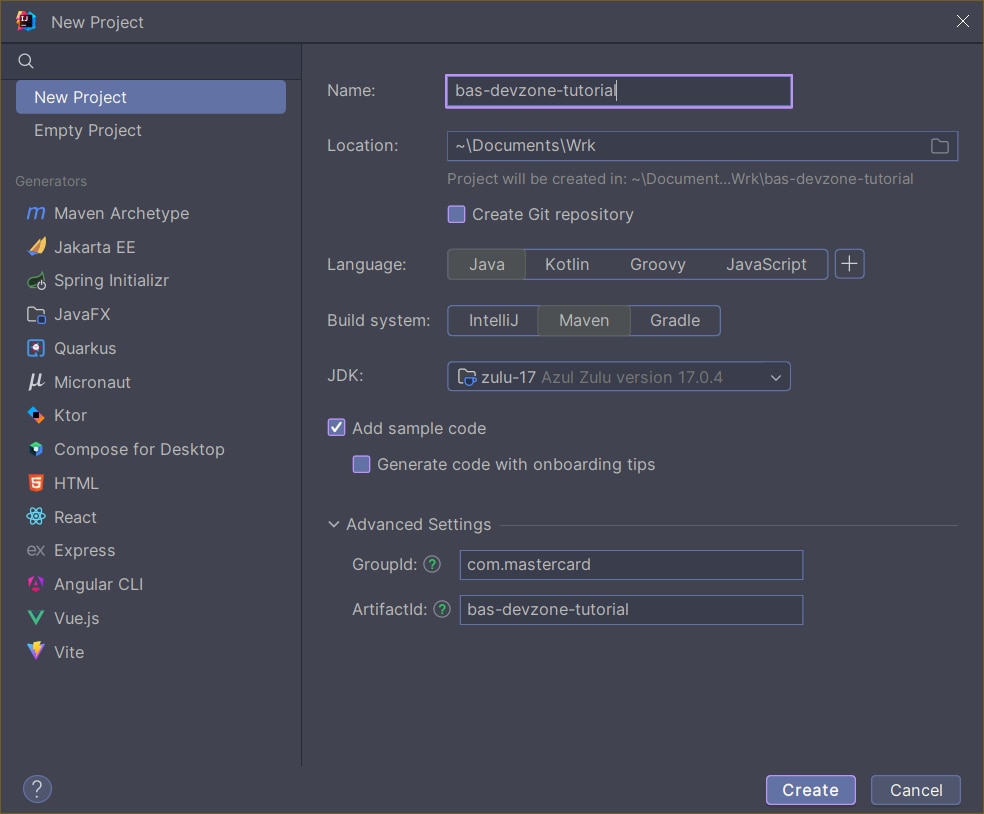
## 2. Add Resources {#2-add-resources}
* Retrieve the Benefit Allocation Service API specification ( [spec-benefit-allocations.yaml](https://static.developer.mastercard.com/content/benefit-allocations-service/swagger/spec-benefit-allocations.yaml) (27KB)) and add it to your Maven project's resources folder.
* Add the generated OAuth key (.p12 or .pfx file).
* Add the generated Client Encryption Key (.pem file).
Both of these are provided in the zipped folder that is downloaded at the end of project creation or production request.
Tip: The .pem file can be downloaded from the Client Encryption Keys section of the desired environment of the project. Click `the three dots` to download Encryption Key.
Your project should look as follows:
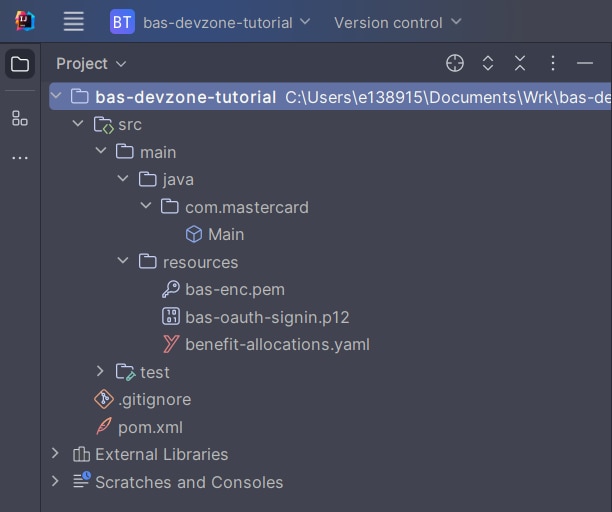
Note: Do not delete any files that were auto generated (Example: .iml and .idea), these are used by IntelliJ.
## 3. Dependencies and Plugins {#3-dependencies-and-plugins}
When using OpenAPI Generator to generate the API client library, you have two options:
1. Generate and use the source files on the fly
2. Generate and deploy the source files to a Maven repository
In this tutorial, you will be generating the API client library on the fly, so you will be including the dependencies that are needed to generate the library. (If you were deploying the source files to a Maven repository, you would only need to include the dependency for that repository.)
In addition, you include the dependency for the Client Encryption libraries. Mastercard offers libraries that are developed and maintained by Mastercard's API team, which offer code helpers targeting the HTTP clients used by the different OpenAPI generator library templates. The libraries are hosted here on [Github](https://github.com/Mastercard).
### Dependencies {#dependencies}
Add the following dependencies to your pom.xml file for the API client library generation and the Mastercard Client Encryption library:
```xml
org.springframework.boot
spring-boot-starter
3.2.5
com.mastercard.developer
oauth1-signer
1.5.2
com.mastercard.developer
client-encryption
1.7.7
com.google.code.gson
gson
2.10.1
io.gsonfire
gson-fire
1.8.5
io.swagger.parser.v3
swagger-parser
2.0.29
com.squareup.okhttp3
okhttp
4.9.1
com.squareup.okhttp3
logging-interceptor
4.9.1
javax.annotation
javax.annotation-api
1.2
org.slf4j
slf4j-simple
1.7.32
```
### Plugins {#plugins}
Add OpenAPI generator plugin to the maven pom.xml. OpenAPI generator generates API client libraries from OpenAPI specifications (formerly known as Swagger files). OpenAPI generator provides multiple generators and library templates to support multiple languages and frameworks. You will be using the java generator with the default okhttp-gson library template for this project.
```xml
bas-client
org.openapitools
openapi-generator-maven-plugin
7.7.0
generate
${project.basedir}/src/main/resources/spec-benefit-allocations.yaml
java
okhttp-gson
false
false
src/main/java
java8
```
If followed correctly your pom.xml file will look similar to this:
```xml
4.0.0
com.mastercard
bas-tutorial
1.0-SNAPSHOT
17
17
UTF-8
org.springframework.boot
spring-boot-starter
3.2.5
com.mastercard.developer
oauth1-signer
1.5.2
com.mastercard.developer
client-encryption
1.7.7
com.google.code.gson
gson
2.10.1
io.gsonfire
gson-fire
1.8.5
io.swagger.parser.v3
swagger-parser
2.0.29
com.squareup.okhttp3
okhttp
4.9.1
com.squareup.okhttp3
logging-interceptor
4.9.1
javax.annotation
javax.annotation-api
1.2
org.slf4j
slf4j-simple
1.7.32
bas-client
org.openapitools
openapi-generator-maven-plugin
7.7.0
generate
${project.basedir}/src/main/resources/benefit-allocations.yaml
java
okhttp-gson
false
false
src/main/java
java8
```
Note: The groupId and artifactId in your project will be whatever was given during project creation. Additionally, if the yaml file name was changed it must also be changed in the 'inputSpec' line of the plugin section.
### Generate Resources {#generate-resources}
Now that you have all the dependencies you need, you can generate the sources using:
```bash
mvn clean install
```
Within your root directory you should now see a folder name `target` with generated classes for schemas and API calls.

## 4. API Client {#4-api-client}
### Create Java Class {#create-java-class}
Create a Java file, called Main.java, at src/main/java. Within the file, create a new method within the file that throws **Exception** (this is needed for later steps). Everything going forward will be added within this method.

To make the API call, you need to make your credentials and certificates available to the program to use.
```java
String consumerKey = "#YOUR 97 CHARACTER CONSUMER KEY HERE#";
String keyAlias = "#YOUR KEYALIAS HERE#";
String keyStorePassword = "#YOUR KEY PASSWORD HERE#";
String p12File = ResourceUtils.getFile("classpath:bas.pfx");
string encryptionCert = ResourceUtils.getFile("classpath:bas.pem");
```
* consumerKey is the value shown in the project created on [Mastercard Developers](https://developer.mastercard.com/), it'll show under '(Environment) Client Id' section of the project summary page.
* keyAlias and keyStorePassword will be the same ones that were given when generating the project.
* p12File is the file that was added to the resource folder in an earlier step.
* encryptionCert is the pem file that was also added to the resource folder earlier.
Note: The path for the p12 (or pfx) and pem files can easily be obtained by right-clicking on it inside IntelliJ, then clicking 'Copy Path/Reference'-\>'Path from Content Root'.
### Instantiate ApiClient {#instantiate-apiclient}
Create an instance of the generated ApiClient class and configure it as below:
```java
ApiClient apiClient = new ApiClient();
apiClient.setBasePath("https://sandbox.api.mastercard.com/loyalty/benefits/sandbox");
// Load your client certificate
PrivateKey signingKey = AuthenticationUtils.loadSigningKey(p12File, keyAlias, keyStorePassword);
```
### Create configuration for payload encryption {#create-configuration-for-payload-encryption}
Due to PCI data in the payload ,the request must be encrypted, which is configured as below:
```java
Certificate encryptionCertificate = EncryptionUtils.loadEncryptionCertificate(encryptionCert.getAbsolutePath());
JweConfig config = JweConfigBuilder.aJweEncryptionConfig()
.withEncryptionCertificate(encryptionCertificate)
.withEncryptedValueFieldName("encryptedValue").build();
```
### Finish client setup {#finish-client-setup}
```java
OkHttpClient.Builder httpClientBuilder = apiClient.getHttpClient().newBuilder();
httpClientBuilder
.addInterceptor(OkHttpEncryptionInterceptor.from(config))
.addInterceptor(new OkHttpOAuth1Interceptor(consumerKey, signingKey));
apiClient.setHttpClient(httpClientBuilder.build());
```
## 5. How to call each endpoint {#5-how-to-call-each-endpoint}
Now you can use the instantiated APIClient to make calls to the Benefit Allocation Service API. Here's an example of how you would send a request to each endpoint. Please note that the classes used below are generated through the OpenAPI plugin.
### Assign Benefits {#assign-benefits}
```java
AssignBenefitAllocation assignBenefitAllocation = new AssignBenefitAllocation();
Long pan = 5291070000000000L;
List segCodeList = new ArrayList();
Segment segment = new Segment();
segment.setCode("DART");
segment.setEffectiveDate(LocalDate.parse("2023-08-08"));
segCodeList.add(segment);
assignBenefitAllocation.setCardNumber(pan);
assignBenefitAllocation.setSegments(segCodeList);
BenefitAllocationsSegmentManagementApi benefitAllocationApi = new BenefitAllocationsSegmentManagementApi(apiClient);
Bundles bundles = benefitAllocationApi.assignSegment(getAssignBundlesRequest());
```
### Replace Benefits {#replace-benefits}
```java
ReplaceBenefitAllocation replaceBenefitAllocation = new ReplaceBenefitAllocation();
Long pan = 5291070000000000L;
replaceBenefitAllocation.setCardNumber(pan);
replaceBenefitAllocation.setOldSegmentCode("DART");
replaceBenefitAllocation.setNewSegmentCode("PRT");
replaceBenefitAllocation.setEffectiveDate(LocalDate.parse("2023-09-15"));
BenefitAllocationsSegmentManagementApi benefitAllocationApi = new BenefitAllocationsSegmentManagementApi(apiClient);
benefitAllocationApi.replaceSegment(getReplaceBundlesRequest());
```
### Cancel Benefits {#cancel-benefits}
```java
CancelBenefitAllocation cancelBenefitAllocation = new CancelBenefitAllocation();
Long pan = 5291070000000000L;
List segCodeList = new ArrayList();
SegmentToCancel segmentToCancel = new SegmentToCancel();
segmentToCancel.setCode("DART");
segmentToCancel.setExpiryDate(LocalDate.parse("2023-08-08"));
segCodeList.add(segmentToCancel);
cancelBenefitAllocation.setCardNumber(pan);
cancelBenefitAllocation.setSegments(segCodeList);
BenefitAllocationsSegmentManagementApi benefitAllocationApi = new BenefitAllocationsSegmentManagementApi(apiClient);
benefitAllocationApi.cancelSegment(getCancelBundlesRequest());
```
### Card Replacement for Benefits {#card-replacement-for-benefits}
```java
CardReplacement cardReplacement = new CardReplacement();
Long oldPan = 5291070000000000L;
Long newPan = 5291070000000898L;
cardReplacement.setOldCardNumber(oldPan);
cardReplacement.setNewCardNumber(newPan);
cardReplacement.setDate(LocalDate.parse("2021-08-08"));
BenefitAllocationsCardManagementApi benefitAllocationApi = new BenefitAllocationsCardManagementApi(apiClient);
benefitAllocationApi.cardReplacement(getCardReplacementRequest());
```
### Card Freeze / Unfreeze for Benefits {#card-freeze--unfreeze-for-benefits}
```java
FrozenCard frozenCard = new FrozenCard();
Long pan = 5291070000000000L;
frozenCard.setCardNumber(pan);
frozenCard.setDate(LocalDate.parse("2021-08-08"));
// true for freezing the card
// false for un-freezing the card
frozenCard.setIsFrozen(true);
BenefitAllocationsCardManagementApi benefitAllocationApi = new BenefitAllocationsCardManagementApi(apiClient);
benefitAllocationApi.freezeUnfreeze(getFreezeUnfreezeRequest());
```
Tip: If you're experiencing issues viewing the response body place the call inside a print statement within a try-catch block. For example, this is what an assign call would look like:
```java
try {
System.out.println(benefitAllocationApi.assignSegment(assignBenefitAllocation));
}
catch (ApiException e) {
System.out.println(e.getResponseBody().toString());
}
```
## 6. Example Main Complete {#6-example-main-complete}
If you've followed along, the Main.java file should similar to the code below. Please note that the import lines have not been added for ease of reading.
```java
public class Main {
public static void main(String[] args) throws Exception{
String consumerKey = "#YOUR 97 CHARACTER CONSUMER KEY HERE#";
String keyAlias = "#YOUR KEYALIAS HERE#";
String keyStorePassword = "#YOUR KEY PASSWORD HERE#";
String p12File = ResourceUtils.getFile("classpath:bas.pfx");
string encryptionCert = ResourceUtils.getFile("classpath:bas.pem");
ApiClient apiClient = new ApiClient();
apiClient.setBasePath("https://sandbox.api.mastercard.com/loyalty/benefits/sandbox");
PrivateKey signingKey = AuthenticationUtils.loadSigningKey(p12File, keyAlias, keyStorePassword);
Certificate encryptionCertificate = EncryptionUtils.loadEncryptionCertificate(encryptionCert);
JweConfig config = JweConfigBuilder.aJweEncryptionConfig()
.withEncryptionCertificate(encryptionCertificate)
.withEncryptionPath("$", "$")
.withEncryptedValueFieldName("encryptedValue")
.build();
OkHttpClient.Builder httpClientBuilder = apiClient.getHttpClient().newBuilder();
httpClientBuilder
.addInterceptor(OkHttpEncryptionInterceptor.from(config))
.addInterceptor(new OkHttpOAuth1Interceptor(consumerKey, signingKey));
apiClient.setHttpClient(httpClientBuilder.build());
AssignBenefitAllocation assignBenefitAllocation = new AssignBenefitAllocation();
Long pan = 5291070000000000L;
List segCodeList = new ArrayList();
Segment segment = new Segment();
segment.setCode("DART");
segment.setEffectiveDate(LocalDate.parse("2023-08-08"));
segCodeList.add(segment);
assignBenefitAllocation.setCardNumber(pan);
assignBenefitAllocation.setSegments(segCodeList);
BenefitAllocationsSegmentManagementApi benefitAllocationApi = new BenefitAllocationsSegmentManagementApi(apiClient);
try {
System.out.println(benefitAllocationApi.assignSegment(assignBenefitAllocation));
} catch (org.openapitools.client.ApiException e) {
System.out.println(e.getResponseBody().toString());
}
}
}
```
To run the code execute `mvn exec:java -Dexec.mainClass="Main"` or, if running on windows, `mvn exec:java -D"exec.mainClass=Main"`. If the main file was added to a package you must include the path before the file name: `mvn exec:java -Dexec.mainClass="org.example.Main"`
Tip: To ensure you always execute the latest code and correct dependencies, use the following one-liner mvn clean compile exec:java -Dexec.mainClass="Main"