# Eligibility with Content Tutorial
source: https://developer.mastercard.com/bces-service/documentation/tutorials-and-guides/tutorial/index.md
This tutorial will help you to create a simple Java application that makes an API call to the Benefits Content Eligibility Service API in the Sandbox environment. It includes generating an API client library using the OpenAPI Generator, using the Mastercard Eligibility API OpenAPI Specifications.
### What you will learn {#what-you-will-learn}
* Generate the API Client SDK
* Make an API call
## Pre-requisites {#pre-requisites}
To complete this tutorial, you will need:
* [JDK 1.8.0](https://www.oracle.com/java/technologies/downloads/) or later
* [Maven 3.6](https://maven.apache.org/) or later
* [IntelliJ IDEA](https://www.jetbrains.com/idea/) (or any other IDE of your choice)
* A developer account on [Mastercard Developers](https://developer.mastercard.com/) with access to the Eligibility with Content API
## 1. Create a Maven Project {#1-create-a-maven-project}
To create a Maven project:
* Create a new Java project in your favorite IDE
* For example,
* Using IntelliJ IDEA, create a new Maven project, which sets up your directory structure automatically.
* Provide bces-client-tutorial as the artifact id and project name.
* Provide group id and location and create a project. 
## 2. Add Resources {#2-add-resources}
* Retrieve the Mastercard Eligibility with Content API yaml file ( [eligibility-with-content-specs.yaml](https://static.developer.mastercard.com/content/bces-service/swagger/eligibility-with-content-specs.yaml) (13KB)) and add it to your maven project's resources folder.
* Find Sandbox key (.p12 file) generated when creating a project and save to your Maven project resources folder. Then find or download the Client Encryption Key (.pem file) also generated when creating a project and save along the other files. For help to create a project view please refer to our [Sandbox Access](https://developer.mastercard.com/bces-service/tutorial/create-project/index.md) tutorial.
Tip: Download .pem file from the Client Encryption Keys section in the project dashboard. Click `Actions` to download Encryption Key
Your project should look as follows:

Note: Do not delete any files that were auto generated (Example: .iml and .idea), these are used by IntelliJ.
## 3. Dependencies and Plugins {#3-dependencies-and-plugins}
When using OpenAPI Generator to generate the API client library, you have two options:
1. Generate and use the source files on the fly
2. Generate and deploy the source files to a Maven repository
In this tutorial, you will be generating the API client library on the fly, so you will be including the dependencies that are needed to generate the library. (If you were deploying the source files to a Maven repository, you would only need to include the dependency for that repository.)
In addition, you include the dependency for the Mastercard OAuth1 signer and the Mastercard Client Encryption libraries. Mastercard offers libraries that are developed and maintained by Mastercard's API team, which offer code helpers targeting the HTTP clients used by the different OpenAPI generator library templates. The libraries are hosted here on [Github](https://github.com/Mastercard).
### Dependencies {#dependencies}
Add the following dependencies to your pom.xml file for the API client library generation and the Mastercard OAuth1 Signer library:
```xml
com.mastercard.developer
oauth1-signer
1.5.2
com.mastercard.developer
client-encryption
1.7.7
com.google.code.gson
gson
2.10.1
io.gsonfire
gson-fire
1.8.5
io.swagger.parser.v3
swagger-parser
2.0.29
com.squareup.okhttp3
okhttp
4.9.1
com.squareup.okhttp3
logging-interceptor
4.9.1
javax.annotation
javax.annotation-api
1.2
org.slf4j
slf4j-simple
1.7.32
```
### Plugins {#plugins}
Add OpenAPI generator plugin to the maven pom.xml. OpenAPI generator generates API client libraries from OpenAPI specifications (formerly known as Swagger files). OpenAPI generator provides multiple generators and library templates to support multiple languages and frameworks. You will be using the java generator with the default okhttp-gson library template for this project.
```xml
eligibility-rest-client
org.openapitools
openapi-generator-maven-plugin
5.3.0
generate
${project.basedir}/src/main/resources/eligibility-with-content-specs.yaml
java
okhttp-gson
false
false
src/main/java
java8
```
If followed correctly your pom.xml file will look something like this:
```xml
4.0.0
org.Mastercard
bces-client-tutorial
1.0-SNAPSHOT
11
11
com.mastercard.developer
oauth1-signer
1.5.2
com.mastercard.developer
client-encryption
1.7.7
com.google.code.gson
gson
2.10.1
io.gsonfire
gson-fire
1.8.5
io.swagger.parser.v3
swagger-parser
2.0.29
com.squareup.okhttp3
okhttp
4.9.1
com.squareup.okhttp3
logging-interceptor
4.9.1
javax.annotation
javax.annotation-api
1.2
org.slf4j
slf4j-simple
1.7.32
eligibility-rest-client
org.openapitools
openapi-generator-maven-plugin
5.3.0
generate
${project.basedir}/src/main/resources/eligibility-with-content-specs.yaml
java
okhttp-gson
false
false
src/main/java
java8
```
Note: The groupId and artifactId in your project will be whatever was given during project creation. Additionally, if the yaml file name was changed it must also be changed in the 'inputSpec' line of the plugin section.
### Generate Resources {#generate-resources}
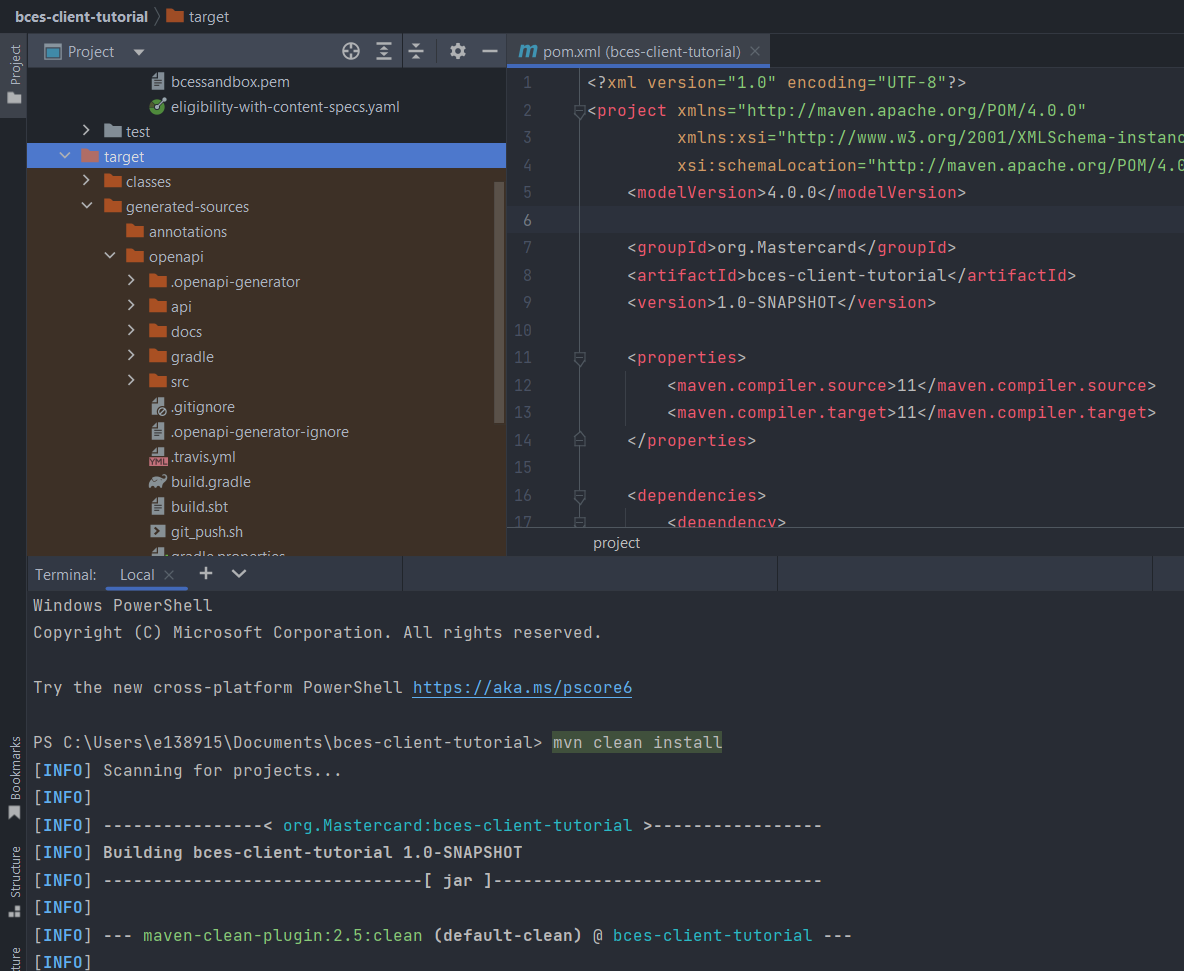
Now that you have all the dependencies you need, you can generate the sources
```bash
mvn clean install
```
Within your root directory you should now see a folder name target with generated classes for schemas and API calls.
## 4. Writing Java Code. {#4-writing-java-code}
### Create Java Class {#create-java-class}
Create a Java file, called Main.java, at src/main/java. Create a new method within the file that throws **Exception** (this is needed for later steps). Everything going forward will be added within this method.

To make the API call, you need to make your OAuth credentials and certificates available to the program to use.
```java
String consumerKey = "#YOUR 97 CHARACTER CONSUMER KEY HERE#";
String keyAlias = "#YOUR KEY ALIAS HERE#";
String keyStorePassword = "#YOUR KEY PASSWORD HERE#";
String p12File = "#PATH TO YOUR P12 FILE HERE#";
String encryptionCert = "#PATH TO YOUR PEM FILE HERE";
```
* consumerKey is the value shown in the project created on [Mastercard Developers](https://developer.mastercard.com/)
* keyAlias and keyStorePassword for sandbox will be the same ones that were given when generating the project.
* p12File is the file that was added to the resource folder in an earlier step.
* encryptionCert is the pem file that was also added to the resource folder earlier.
Note: The path for the p12 and pem files can easily be obtained by right-clicking on it inside IntelliJ, then clicking 'Copy Path/Reference'-\>'Path from Content Root'.
### Instantiate ApiClient {#instantiate-apiclient}
The interceptors will handle signing the request and encrypting the request parameters.
```java
ApiClient encryptedPayloadClient = new ApiClient();
OkHttpClient.Builder httpClientBuilder = encryptedPayloadClient.getHttpClient().newBuilder();
// Configure the Mastercard service URL
encryptedPayloadClient.setBasePath("https://sandbox.api.mastercard.com/loyalty/eligibility");
encryptedPayloadClient.setDebugging(true); // Optional debugging configuration
encryptedPayloadClient.setReadTimeout(40000);
```
### Create configuration for payload encryption {#create-configuration-for-payload-encryption}
```java
Certificate encryptionCertificate = EncryptionUtils.loadEncryptionCertificate(encryptionCert);
JweConfig config = JweConfigBuilder.aJweEncryptionConfig()
.withEncryptionCertificate(encryptionCertificate)
.withEncryptionPath("$", "$")
.withEncryptedValueFieldName("encryptedValue")
.build();
```
### Add sign in and encryption interceptors {#add-sign-in-and-encryption-interceptors}
```java
PrivateKey signingKey = AuthenticationUtils.loadSigningKey(p12File, keyAlias, keyStorePassword);
OkHttpClient.Builder httpClientBuilder = encryptedPayloadClient.getHttpClient().newBuilder();
// Add the interceptor code responsible for signing and encrypting HTTP requests
httpClientBuilder
.addInterceptor(OkHttpEncryptionInterceptor.from(config))
.addInterceptor(new OkHttpOAuth1Interceptor(consumerKey, signingKey));
encryptedPayloadClient.setHttpClient(httpClientBuilder.build());
```
Now you can use the APIClient instanciated to make calls to the Eligibility with Content API. Here's an example of how you would send a request. Please note that the classes used below are generated through the OpenApi plugin.
```java
PanSearch panSearch = new PanSearch();
panSearch.setCardNumber(5291070000000000L);
panSearch.setEffectiveDate(LocalDate.parse("2022-12-15"));
panSearch.setBenefitCode("CDW");
panSearch.setProductCode("DCG");
panSearch.setLocale("en-US");
ContentApi contentApi = new ContentApi(encryptedPayloadClient);
contentApi.getBenefitsWithContent(panSearch);
```
If you've followed along, the Main.java file should look like this
```java
import com.mastercard.developer.encryption.JweConfig;
import com.mastercard.developer.encryption.JweConfigBuilder;
import com.mastercard.developer.interceptors.OkHttpEncryptionInterceptor;
import com.mastercard.developer.interceptors.OkHttpOAuth1Interceptor;
import com.mastercard.developer.utils.AuthenticationUtils;
import com.mastercard.developer.utils.EncryptionUtils;
import okhttp3.OkHttpClient;
import org.openapitools.client.ApiClient;
import org.openapitools.client.api.ContentApi;
import org.openapitools.client.model.PanSearch;
import java.security.PrivateKey;
import java.security.cert.Certificate;
import java.time.LocalDate;
public class Main {
public static void main(String[] args) throws Exception{
String consumerKey = "#YOUR 97 CHARACTER CONSUMER KEY HERE#";
String keyAlias = "#YOUR KEY ALIAS HERE#";
String keyStorePassword = "#YOUR KEY PASSWORD HERE#";
String p12File = "#PATH TO YOUR P12 FILE HERE#";
String encryptionCert = "#PATH TO YOUR PEM FILE HERE";
ApiClient encryptedPayloadClient = new ApiClient();
// Configure the Mastercard service URL
encryptedPayloadClient.setBasePath("https://sandbox.api.mastercard.com/loyalty/eligibility");
encryptedPayloadClient.setDebugging(true); // Optional debugging configuration
encryptedPayloadClient.setReadTimeout(40000);
Certificate encryptionCertificate = EncryptionUtils.loadEncryptionCertificate(encryptionCert);
JweConfig config = JweConfigBuilder.aJweEncryptionConfig()
.withEncryptionCertificate(encryptionCertificate)
.withEncryptedValueFieldName("encryptedValue")
.build();
PrivateKey signingKey = AuthenticationUtils.loadSigningKey(p12File, keyAlias, keyStorePassword);
OkHttpClient.Builder httpClientBuilder = encryptedPayloadClient.getHttpClient().newBuilder();
// Add the interceptor code responsible for signing and encrypting HTTP requests
httpClientBuilder
.addInterceptor(OkHttpEncryptionInterceptor.from(config))
.addInterceptor(new OkHttpOAuth1Interceptor(consumerKey, signingKey));
encryptedPayloadClient.setHttpClient(httpClientBuilder.build());
PanSearch panSearch = new PanSearch();
panSearch.setCardNumber(5291070000000000L);
panSearch.setEffectiveDate(LocalDate.parse("2022-12-15"));
panSearch.setBenefitCode("CDW");
panSearch.setProductCode("DCG");
panSearch.setLocale("en-US");
ContentApi contentApi = new ContentApi(encryptedPayloadClient);
contentApi.getBenefitsWithContent(panSearch);
}
}
```
To run the code execute `mvn exec:java -Dexec.mainClass="Main"` or, if running on windows, `mvn exec:java -D"exec.mainClass=Main"`. If the main file was added to a package you must include the path before the file name: `mvn exec:java -Dexec.mainClass="package.path.Main"`
Tip: To ensure you always execute the latest code and correct dependencies, use the following one-liner mvn clean compile exec:java -Dexec.mainClass="Main"