# ABU Push Subscription Model
source: https://developer.mastercard.com/automatic-billing-updater/documentation/usecases/push-subscription-model/index.md
## How It Works {#how-it-works}
You may choose to automatically receive account update notifications for payment credentials stored in your systems. To do this, you must subscribe to 'watch' an account. Notifications for all your subscribed accounts will then be sent via API to a designated endpoint whenever account updates are received from issuers.
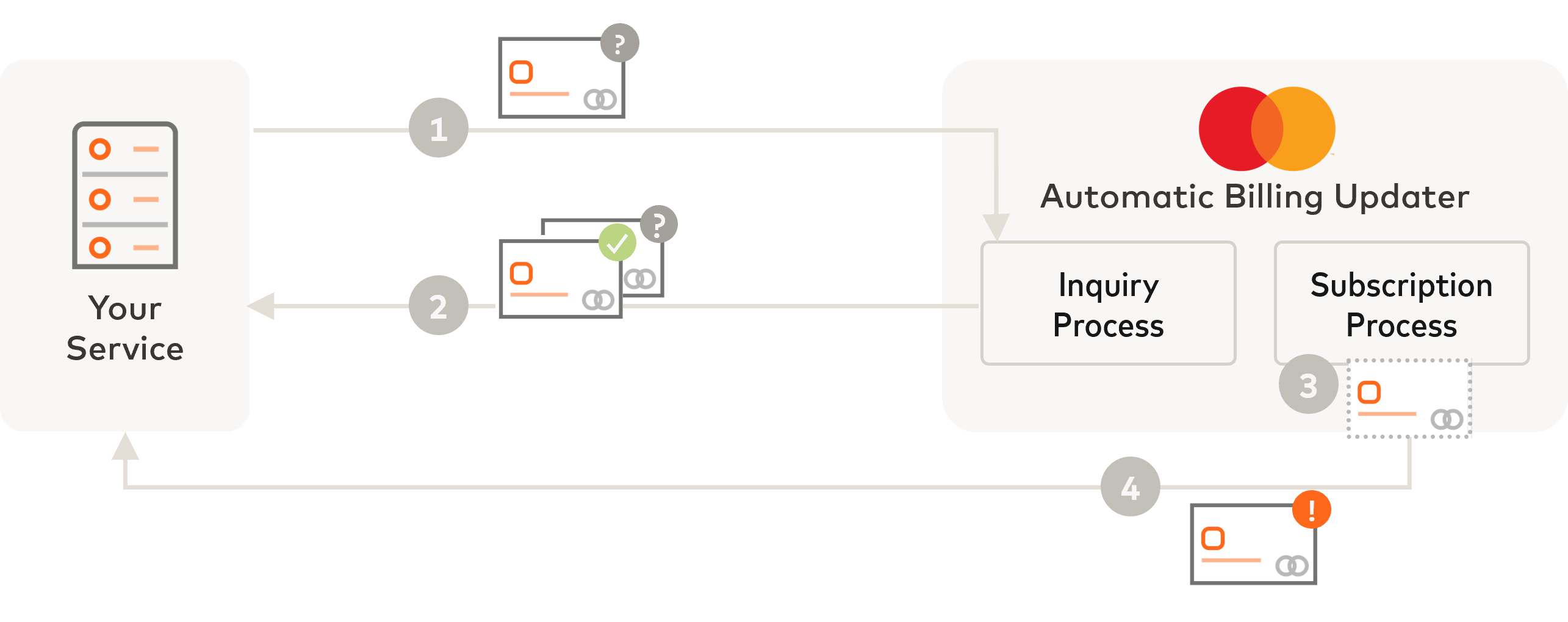
1. Send a subscription request to ABU with the payment account you want to subscribe to (account number and expiry date).
2. The account number (PAN) is queried against the ABU database to identify if there are updates immediately available (for example: account number change, expiry date change, or account closure). The API response back to you will contain the updated account credentials, if any.
3. ABU adds this account number to your PAN watchlist.
4. Henceforth, whenever ABU receives an account update from an issuer for this account, ABU will automatically send a notification API to your defined URL endpoint.
ABU supports three actions for managing your account subscriptions:
| Action | Account Subscriptions API Endpoint |
|-------------------------------------------------------------------|------------------------------------|
| Subscribe to start watching for account updates | /subscriptions |
| Delete an existing subscription to stop receiving account updates | /subscription-deletions |
| Check if you are subscribed for an account | /subscription-inquiries |
##### Example sequence {#example-sequence}
The following example sequence shows how you might use the API to manage your account subscriptions.
Diagram subscriptionmanagement
More details on the technical API specifications can be found in [API Reference](https://developer.mastercard.com/automatic-billing-updater/documentation/api-reference/index.md).
## Subscribe for Account Updates {#subscribe-for-account-updates}
This API allows ABU integrators (merchants, payment facilitators, and acquirers) to send a subscription request to start watching for updates on a given account. Once subscribed, and whenever an update is made available from the card issuer, ABU will automatically send a notification to the your URI with the updated account credentials.
##### Experience design guide {#experience-design-guide}
These flow diagrams illustrate when a customer saves a new payment method with you for easier checkouts in future.
The first user journey depicts your customer saving the card account details during a checkout process.
The second user journey shows the customer managing their payment methods from their profile page at your website.
## Check Subscription Status {#check-subscription-status}
This API allows ABU integrators (merchants, payment facilitators, and acquirers) to send a subscription inquiry request to check if you are subscribed to an account (am I watching this account for updates?). Based on the response, you can choose to take action if necessary; to subscribe to watch a card or unsubscribe, to stop watching a card.
##### Experience design guide {#experience-design-guide-1}
This flow diagram illustrates a payment transaction getting declined due to outdated account credentials for the selected payment method, despite the merchant being subscribed to receive notifications from ABU whenever there are updates for the account. ABU offers the ability for merchants to check if the subscription is in place for a given account.
## Delete A Subscription {#delete-a-subscription}
This API allows ABU integrators (merchants, payment facilitators, and acquirers) to stop watching for lifecycle updates for an account. Once the subscription has been deleted, you will no longer receive notifications when new information is available about the account.
##### Experience design guide {#experience-design-guide-2}
This flow diagram illustrates a customer deleting a stored payment method from their profile at a merchant's website. Upon deletion of the payment method, you should cancel the ABU subscription associated with this account so that you stop receiving notifications for this account.
The first user journey depicts a customer managing their payment methods from their profile page at a merchant's website. The second user journey shows the customer deleting their card account during a checkout process.
##### Best practices for managing your subscriptions {#best-practices-for-managing-your-subscriptions}
1. Deleting a merchant from ABU does not automatically purge any account subscriptions associated with the deleted merchant. ABU will continue sending account update notifications to the defined API endpoint.
2. Subscriptions are only active if the account being subscribed to remains valid and in ABU. Your subscription may be deleted if the account is expired for longer than 13 months and the issuer did not provide a lifecycle update event for the account.
## Receive Notifications {#receive-notifications}
Once an account number is successfully subscribed, when a card lifecycle event occurs a notification will be sent to the designated endpoint provided by the customer.
You may receive one of three possible notifications:
| Reason Identifier | Notification Type | Description | Recommended Action |
|-------------------|-------------------|------------------------------------------------------------|-----------------------------------------------------------------------------------------------|
| `A` | Account update | Account number and expiry date have changed | Update your customer's payment account information before making the next payment transaction |
| `E` | Account expiry | Expiry date has changed. Account number remains unchanged. | Update your customer's payment account information before making the next payment transaction |
| `C` | Account closed | Account has been closed | This account is no longer active. Use another payment method for making payment transactions. |
##### Experience design guide {#experience-design-guide-3}
This flow diagram illustrates a merchant updating a customer's account-on-file when ABU notifies the merchant about any updates for an account that they have subscribed to.
##### Example sequence {#example-sequence-1}
The following sequence shows how ABU will send you an update notification after you have subscribed to that account. In this example the account lifecycle event shown is a replacement, where the old account number and expiry date are replaced with new values. Note that the sequence flow is the same for any other lifecycle event.
Diagram pushsubscribe