# Automatic Billing Updater
source: https://developer.mastercard.com/automatic-billing-updater/documentation/index.md
## Overview: Mastercard's account updater service {#overview-mastercards-account-updater-service}
Automatic Billing Updater (ABU) is an account updater service. It provides access to updated payment account credentials including PAN and expiry date updates, for the saved cards and stored credentials held in your systems. E-commerce and recurring billing merchants can leverage ABU to ensure that their customers' payment profiles are always kept up-to-date to minimize authorization failures, including card-on-file declines caused by expired or reissued cards, when making card-not-present transactions. This service can be used in two different ways: either by proactively querying ABU for account updates (Pull inquiry model) or subscribing to listen for updates on account numbers that you are watching (Push subscription model).
See the [product page](https://developer.mastercard.com/product/automatic-billing-updater-abu/) for marketing and case study details.
## How it works {#how-it-works}
ABU maintains a global data repository to manage lifecycle events for card account numbers. Card issuers inform ABU when an account is created, updated, or closed. Registered merchants and acquirers can subscribe to an account to receive future updates or request updates ad-hoc for a specific account.
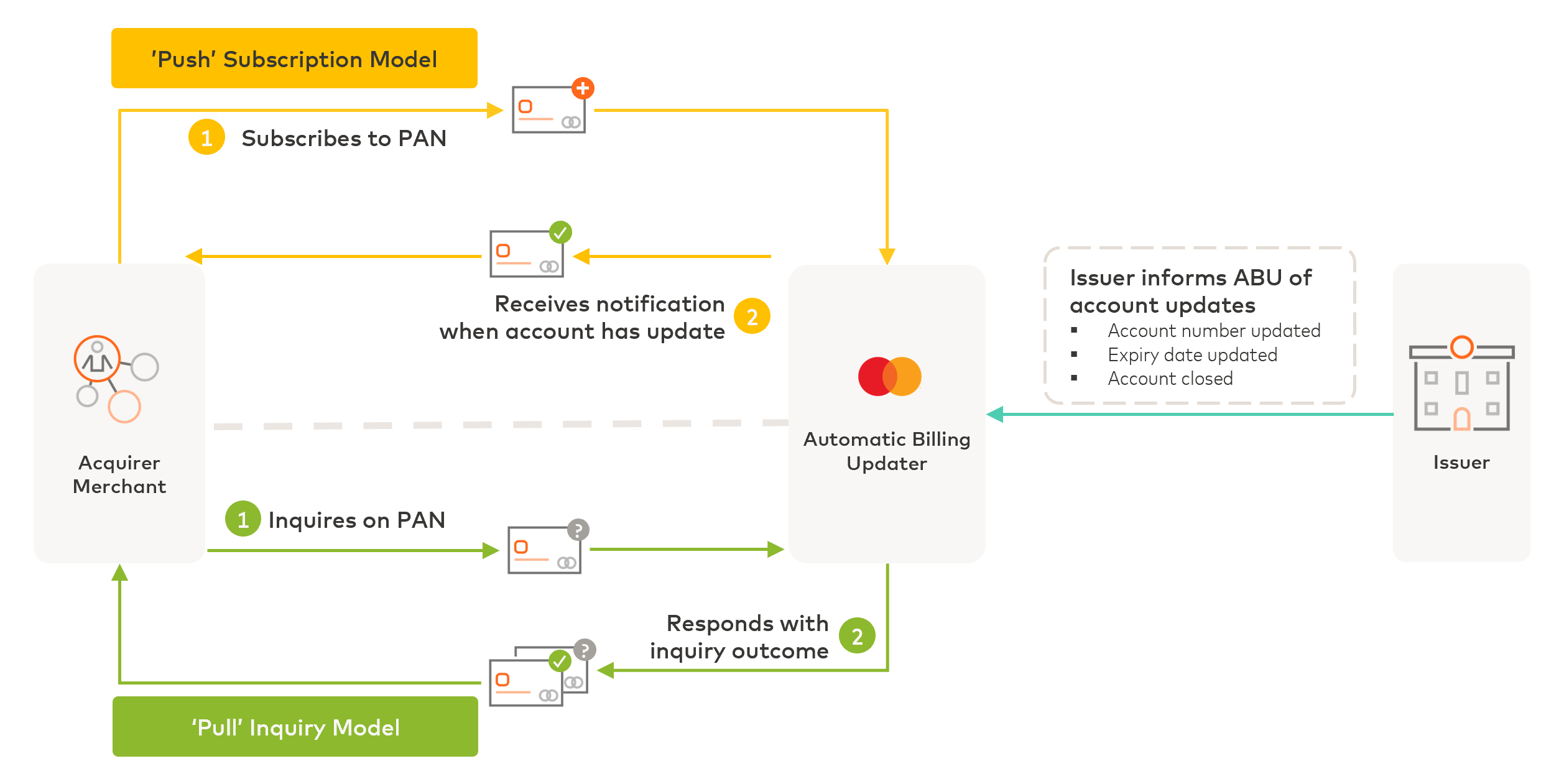
Subscribing to an account and receiving notifications automatically is described in the [Push subscription model](https://developer.mastercard.com/automatic-billing-updater/documentation/usecases/push-subscription-model/index.md). Requesting updates ad-hoc for a specific account is described in the [Pull inquiry model](https://developer.mastercard.com/automatic-billing-updater/documentation/usecases/pull-inquiry-model/index.md). Both pages set out the actors, the API calls in sequence, and the responses ABU returns.
## Who is this for? {#who-is-this-for}
### Digital and e-commerce credential-on-file merchants {#digital-and-e-commerce-credential-on-file-merchants}
Merchants with a digital store checkout may offer customers a better shopping experience by storing your customers' checkout preferences and payment and shipping information in your systems, thereby allowing returning customers to retrieve their stored profile preferences for easier checkout in future. ABU helps you to keep these stored payment credentials/saved cards current thereby reducing checkout friction, card-on-file declines, and cart abandonment due to payment failures caused by expired or reissued cards.
* The **Push subscription model** is especially relevant for credential-on-file (CoF) merchants since it can be difficult for you to accurately predict when the next transaction occurs for a given payment account. Subscribing all stored accounts to ABU takes the guesswork out of managing account changes.
* The **Pull inquiry model** is recommended as a fallback option and can be used after a transaction decline to check for account updates before retrying the transaction. Alternatively, you may proactively query ABU at regular intervals (daily, twice a week, or weekly) to keep your stored payment accounts current.
### Recurring billing merchants {#recurring-billing-merchants}
Merchants with a subscription-based or recurring billing business model can use ABU to validate that you have the most current payment credentials prior to processing a recurring payment. When you establish a new customer relationship and collect their payment information, you may instruct ABU to notify you whenever the stored payment credentials for your customer have been changed, helping maintain continuity of subscription payments when a card is reissued or expired.
Further details on how to consume ABU account data and more information about Push and Pull integration models can be found in [Use Cases](https://developer.mastercard.com/automatic-billing-updater/documentation/usecases/index.md).
### Acquirers {#acquirers}
Acquirers can register and consume ABU account data on behalf of the merchants they acquire, enabling account updater coverage across their merchant portfolio without requiring each merchant to onboard directly. Acquirers can subscribe merchant-held accounts to receive ongoing PAN or expiry updates, or query accounts ad-hoc, helping reduce card-on-file declines across the merchants they support.
### Payment service providers and payment facilitators {#payment-service-providers-and-payment-facilitators}
Payment service providers (PSPs) and payment facilitators can consume ABU account data on behalf of the merchants they serve, offering card account updater coverage as part of their platform rather than asking each submerchant to integrate separately. Registered submerchant accounts can be subscribed for ongoing notifications or queried on demand, which keeps stored credentials current across the portfolio.
### Subscription and recurring billing platforms {#subscription-and-recurring-billing-platforms}
Platforms that bill on a subscription or membership cycle can use ABU to refresh stored credentials before each renewal attempt, reducing involuntary churn caused by failed renewals when a card has expired or been reissued.
## Getting started {#getting-started}
To start using ABU, you must create a project and add the Automatic Billing Updater API to it. Follow the steps outlined in the [**quick start guide**](https://developer.mastercard.com/automatic-billing-updater/documentation/abu-quick-start/index.md) to receive access to the sandbox environment.
Review the technical specifications in [API Basics](https://developer.mastercard.com/automatic-billing-updater/documentation/api-basics/index.md) and [API Reference](https://developer.mastercard.com/automatic-billing-updater/documentation/api-reference/index.md) for how to integrate with the service, send sample requests, and download the API specifications.
### Before you start {#before-you-start}
You must first be enrolled to ABU as a Mastercard customer before you can use the ABU APIs. Next, you must register your merchants or submerchants with ABU as account lifecycle updates can only be delivered to pre-registered merchant entities that ABU recognizes.
Note: For customers who are already enrolled to ABU and want to start using Push subscription model, you must perform an additional technical onboarding that involves a certificate exchange and be enabled as an ABU Push model user.
### Good to know {#good-to-know}
Participation in the ABU program is bound by terms set forth in the **ABU Program Guide** , accessible from [Mastercard Connect](https://trc-techresource.mastercard.com/r/bundle/m_mab_en-us/page/d/en-US). Contact your Mastercard representative to get a copy of the guide.
Besides offering APIs to inform you about account updates, ABU also supports a file-based account inquiry process for refreshing saved cards in bulk. You may send a bulk file with a list of payment account credentials you would like to inquire upon. In the response file back to you, ABU provides a confirmation of account validity or provides updated credentials, including PAN or expiry updates, for each account queried. Technical specifications about bulk file processing for account inquiries and ABU activity reporting can also be found in the [ABU Program Guide](https://trc-techresource.mastercard.com/r/bundle/m_mab_en-us/page/d/en-US).
## Next Steps {#next-steps}
### Mastercard API Basics {#mastercard-api-basics}
Learn how to generate API credentials, and authenticate with Mastercard APIs.
[Learn more →](https://developer.mastercard.com/automatic-billing-updater/documentation/api-basics/index.md)
### Explore Use Cases {#explore-use-cases}
Learn how ABU helps merchants keep saved cards and recurring payment credentials up to date.
[Learn more →](https://developer.mastercard.com/automatic-billing-updater/documentation/usecases/index.md)
### Quick Start Guide {#quick-start-guide}
Follow the step-by-step guide to create a project, test in Sandbox, and prepare for Production.
[Learn more →](https://developer.mastercard.com/automatic-billing-updater/documentation/abu-quick-start/index.md)
### FAQs \& Support {#faqs--support}
Find answers to common questions and learn how to get assistance.
[Learn more →](https://developer.mastercard.com/automatic-billing-updater/documentation/support/index.md)