# Build an end-to-end application
source: https://developer.mastercard.com/account-catalog-services/documentation/tutorials-and-guides/build-end-to-end-app-tutorial/index.md
This tutorial helps you to create a simple Java application that makes an API call to the Account Catalog Services API in the Sandbox (MTF) environment.
**What you will learn**
* How to set up the environment to develop a simple Java application
* How to perform [payload encryption](https://developer.mastercard.com/platform/documentation/security-and-authentication/securing-sensitive-data-using-payload-encryption/#jwe-encryption)
* How to make an API call
## Step 1 - Set up the environment {#step-1---set-up-the-environment}
### 1. Pre-requisites {#1-pre-requisites}
To complete this tutorial, you will need:
* [JDK 1.8.0](https://www.java.com/en/) or later
* [Maven 3.6](https://maven.apache.org/) or later
* [IntelliJ IDEA](https://www.jetbrains.com/idea/) (or any other IDE of your choice)
* Mastercard Developers account with access to the Account Catalog Services APIs
### 2. Create a Maven project {#2-create-a-maven-project}
For this tutorial, IntelliJ IDEA is used as the IDE.
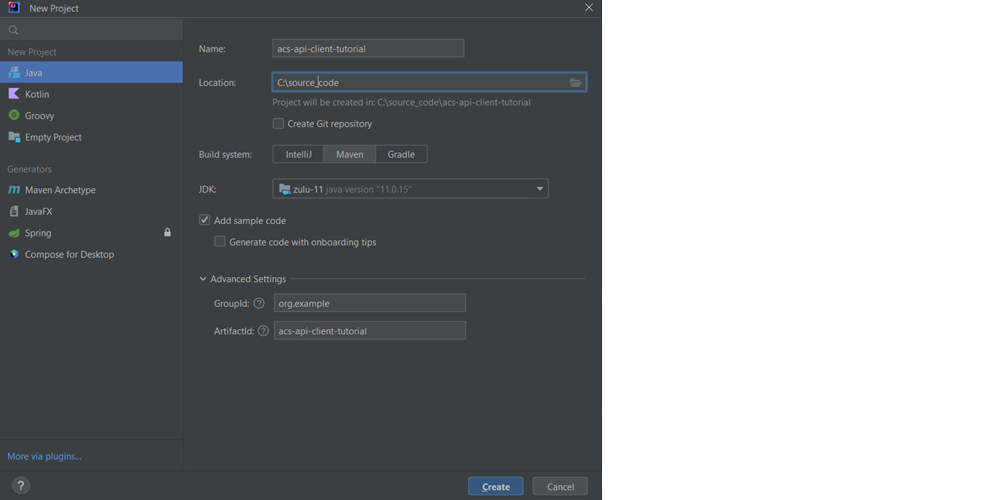
In IntelliJ IDEA, create a new Maven project that automatically sets your directory structure.
Provide an ArtifactId and a project name as per your choice.
### 3. Add resources {#3-add-resources}
Add the Account Catalog Services specification to your Maven project folder. For API description, refer to the [API Reference](https://developer.mastercard.com/account-catalog-services/documentation/api-reference/index.md).
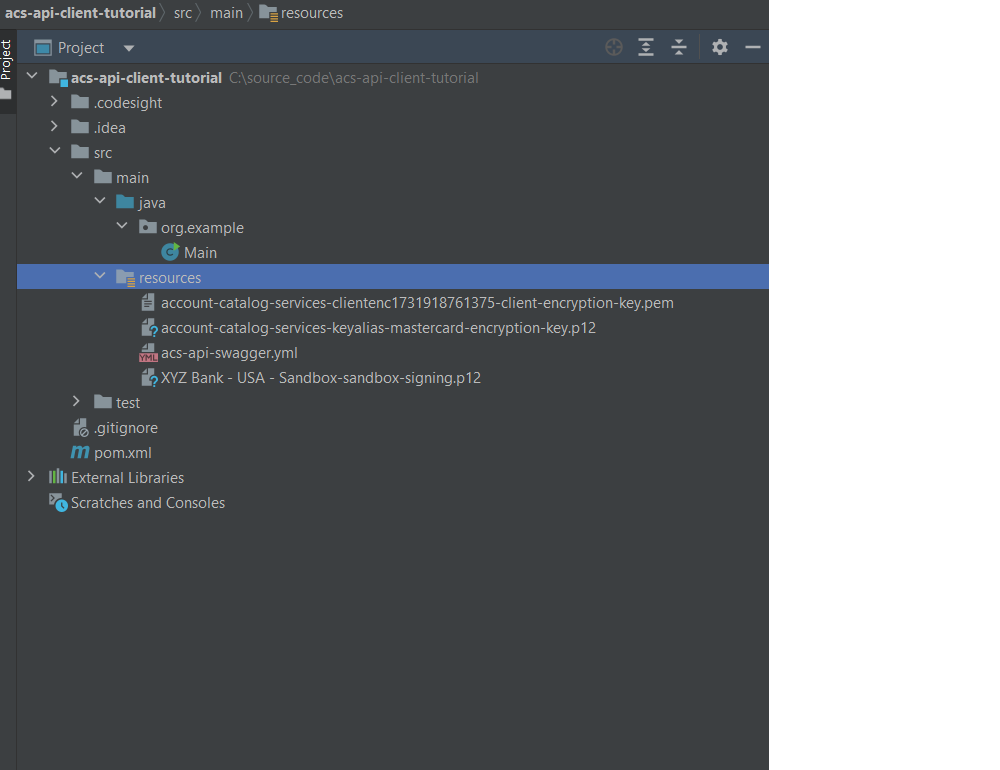
Add the generated Sandbox signing key (`.p12` file), payload decryption key (`.p12` file), and payload encryption cert (`.pem` file) to your Maven project resources folder. Those files are generated by creating a Sandbox (MTF) project in the Mastercard Developers.
Keeping a separate resource folder for these files is suggested. Your Maven project directory structure should appear as follows:
Note: This tutorial uses the specification for Account Catalog Services API, but you can easily adapt it to use any API specification file.
### 4. Update pom.xml file {#4-update-pomxml-file}
In your IDE, add the [OpenAPI Generator maven plugin](https://github.com/OpenAPITools/openapi-generator/tree/master/modules/openapi-generator-maven-plugin) to your project pom.xml file. Use the Plugin config as shown here:
Note: [OpenAPI Generator](https://openapi-generator.tech/) generates API client libraries using OpenAPI Specification. It provides multiple generators and library templates to support multiple languages and frameworks. We will use the Java generator for this project.
```XML
org.openapitoolsopenapi-generator-maven-plugin7.9.0generate${project.basedir}/src/main/resources/acs-api-swagger.ymljavaokhttp-gsonfalsefalsecom.mastercard.acs.generated.apiscom.mastercard.acs.generated.modelscom.mastercard.acs.generated.invokerssrc/gen/main/javajava11falsefalseorg.apache.maven.pluginsmaven-compiler-plugin3.13.01111
```
Add the following dependencies to your pom.xml file to add dependencies for the API client library generation and the Mastercard OAuth1 Signer library.
Note: Mastercard offers Oauth1 Signer Libraries, which offer code helpers targeting the HTTP clients used by the different OpenAPI Generator Library templates. The libraries are hosted on [GitHub](https://github.com/Mastercard?utf8=%E2%9C%93&q=client-encryption&type=&language=).
Mastercard offers Client Encryption Libraries, which offer code helpers for payload encryption. The libraries are hosted on [GitHub](https://github.com/Mastercard?utf8=%E2%9C%93&q=client-encryption&type=&language=).
```XML
org.openapitoolsopenapi-generator-cli7.9.0org.openapitoolsjackson-databind-nullable0.2.0io.swagger.core.v3swagger-annotations2.2.26io.swagger.parser.v3swagger-parser2.1.24com.squareup.okhttp3okhttp4.12.0com.squareup.okhttp3logging-interceptor4.11.0com.google.code.gsongson2.11.0io.gsonfiregson-fire1.9.0javax.annotationjavax.annotation-api1.3.2javax.ws.rsjavax.ws.rs-api2.1.1com.mastercard.developeroauth1-signer1.5.3com.mastercard.developerclient-encryption1.8.4
```
For more information, refer to the [Generating and Configuring a Mastercard API Client](https://developer.mastercard.com/platform/documentation/security-and-authentication/generating-and-configuring-a-mastercard-api-client/#overview) page.
## Step 2 -- Generate the API Client {#step-2--generate-the-api-client}
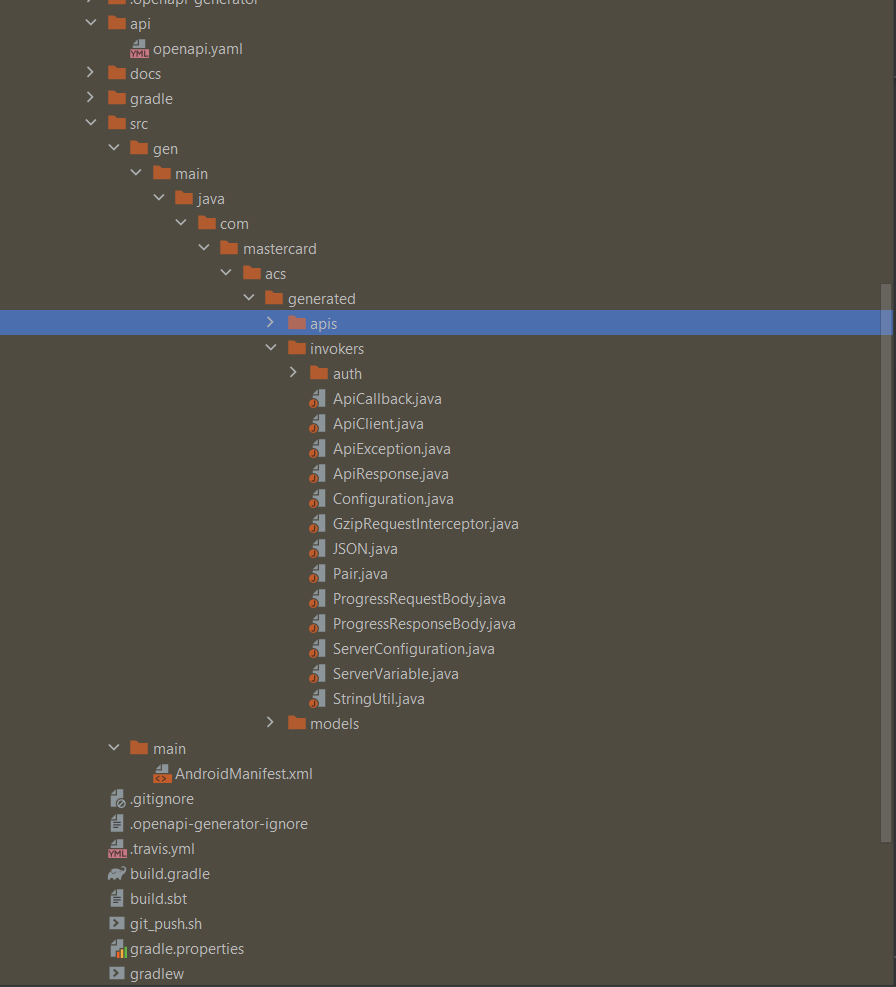
Now you have all the dependencies; you can generate the source code. You can navigate to the project root directory within a terminal window and run `mvn clean compile`.
A new folder named **target** is created within the root directory, which contains classes generated for the schemas and API calls defined within the OpenAPI Specification. The generated classes can be found in the target folder as shown below:
## Step 3 -- Authentication and encryption {#step-3--authentication-and-encryption}
Once the classes are generated, you can create a new `Main` class and method. All the following code snippets can be added to said method. An example of the file can be found at the [end of this tutorial](https://developer.mastercard.com/account-catalog-services/documentation/tutorials-and-guides/build-end-to-end-app-tutorial/index.md).
### Authentication {#authentication}
The authentication for each call is done using classes defined by the Mastercard OAuth1 signer library. Instantiating one interceptor for authentication (`OkHttpOAuth1Interceptor`) ensures that the client has the correct privileges to access the server.
```JAVA
// change these values accordingly
String signingKeyFilePath = "#PATH AND NAME OF YOUR P12 FILE HERE#";
String signingKeyAlias = "#YOUR KEY ALIAS HERE#";
String signingKeyPass = "#YOUR KEY PASSWORD HERE#";
String consumerKey = "#YOUR 97 CHARACTER CONSUMER KEY HERE#";
// Step 1.1- Load the signing key - Provided by the OAuth1 Signer lib
PrivateKey signingKey = AuthenticationUtils.loadSigningKey(signingKeyFilePath, signingKeyAlias, signingKeyPass);
// Step 1.2 -- Inject OAuth signing key and consumer key to interceptor
OkHttpOAuth1Interceptor authInterceptor = new OkHttpOAuth1Interceptor(consumerKey, signingKey);
```
### Encryption {#encryption}
The encryption and decryption of the payload for each call are done using classes defined by the Mastercard Client Encryption library. With the instantiation of a second interceptor (`OkHttpEncryptionInterceptor`), the data sent can be adequately protected.
The request body of the service calls is encrypted and put in Mastercard Encryption format. The details of what kind of keys to use, how to request and manage keys, and the algorithms used to encrypt or decrypt are present on the [API Basics](https://developer.mastercard.com/account-catalog-services/documentation/api-basics/index.md) page.
The `OkHttpEncryptionInterceptor` constructor receives a `JweConfig encryption` parameter that should be configured as such.
```JAVA
// change these values accordingly
String clientEncryptionCertPath = "#PATH AND NAME OF YOUR PEM FILE HERE#";
String mastercardEncryptionKeyFilePath = "#PATH AND NAME OF YOUR P12 FILE HERE#";
String mastercardEncryptionAlias = "#YOUR KEY ALIAS HERE#";
String mastercardEncryptionPass = "#YOUR KEY PASSWORD HERE#";
// Step 2.1 - This will be the certificate used to encrypt the payload before sending
Certificate encryptionCertificate = EncryptionUtils.loadEncryptionCertificate(clientEncryptionCertPath);
// Step 2.2 - The response received from the call will need to be decrypted using this key
PrivateKey decryptionKey = EncryptionUtils.loadDecryptionKey(
mastercardEncryptionKeyFilePath,
mastercardEncryptionAlias,
mastercardEncryptionPass);
// Step 2.3 -- Prepare JWEConfig
JweConfig jweConfig = JweConfigBuilder.aJweEncryptionConfig()
.withEncryptionCertificate(encryptionCertificate)
.withDecryptionKey(decryptionKey)
.withDecryptionPath("$.encryptedValue", "$")
.withEncryptionPath("$", "$")
.withEncryptedValueFieldName("encryptedValue")
.build();
// Step 2.4 -- Inject JweConfig to interceptor
String decryptedPayload =JweEncryption.decryptPayload(encryptedPayload, jweConfig);
```
An instance of the `ApiClient` class can be created, adding both interceptors that were instantiated.
```JAVA
// Step 3 -- Create ApiClient
ApiClient apiClient = new ApiClient();
// Step 3.1 -- Configure the Mastercard service URL
apiClient.setBasePath("https://sandbox.api.mastercard.com/asc/acs-api");
// Step 3.2 -- Add the interceptors responsible for signing, encrypting, and decrypting HTTP requests//responses
apiClient.setHttpClient(
apiClient.getHttpClient()
.newBuilder()
.addInterceptor(encryptionInterceptor)
.addInterceptor(authInterceptor)
.build()
);
// Step 3.3 - Enable or disable OK Http debugging - disable on UAT/PROD env.
apiClient.setDebugging(true);
```
## Step 4 -- Make an API call {#step-4--make-an-api-call}
Now an API call is ready to get started. In this tutorial, we are using `pan registration`. For further information on other APIs, refer to the [API Reference](https://developer.mastercard.com/account-catalog-services/documentation/api-reference/index.md) section.
```JAVA
// Example : register an account
// The resulting AccountRegistrationResult object will contain the response information already decrypted and ready to use
AccountRegistrationResult response = null;
try {
AccountCatalogServicesApi clientApi = new AccountCatalogServicesApi(apiClient);
String correlationId = UUID.randomUUID().toString();
AccountRegistration accountRegistration = new AccountRegistration();
accountRegistration.setAccountIdentifier("2229580001XXXXX"); // add correct Pan value
accountRegistration.setAccountIndicator(AccountIndicator.PRIMARY_ACCOUNT_NUMBER);
AccountLevelManagementServiceProperties almProperties = new AccountLevelManagementServiceProperties();
almProperties.setCcProcessingCodes(Arrays.asList("000z12"));
almProperties.setRewardsProgramId("MCC001");
almProperties.setAccountIdentifierStatus("A");
accountRegistration.setAccountLevelManagementServiceProperties(almProperties);
// Make an API Call
response = clientApi.registerAccount(correlationId, accountRegistration);
} catch (Exception exception) {
exception.printStackTrace();
}
```
## Step 5 -- Sample code {#step-5--sample-code}
By the end of this tutorial, your `Main.java` file should look something like this:
```JAVA
package org.example; // change accordingly
import com.mastercard.acs.generated.apis.AccountCatalogServicesApi;
import com.mastercard.acs.generated.invokers.ApiClient;
import com.mastercard.acs.generated.models.AccountIndicator;
import com.mastercard.acs.generated.models.AccountLevelManagementServiceProperties;
import com.mastercard.acs.generated.models.AccountRegistration;
import com.mastercard.acs.generated.models.AccountRegistrationResult;
import com.mastercard.developer.encryption.JweConfig;
import com.mastercard.developer.encryption.JweConfigBuilder;
import com.mastercard.developer.interceptors.OkHttpEncryptionInterceptor;
import com.mastercard.developer.interceptors.OkHttpOAuth1Interceptor;
import com.mastercard.developer.utils.AuthenticationUtils;
import com.mastercard.developer.utils.EncryptionUtils;
import java.security.PrivateKey;
import java.security.cert.Certificate;
import java.util.UUID;
public class Main {
public static void main(String[] args) throws Exception {
// change these values accordingly
String consumerKey =
"NfjqhLorGQC7oMZR2uA8UeW3B6j4MGFAYCh9DJOL79fe66b5!e7db68fce6a8402cbbdd1cd2beb497650000000000000000";
String signingKeyFilePath =
"src/main/resources/test-crypto-issue-sandbox-signing.p12";
String signingKeyAlias = "mastercard123";
String signingKeyPass = "mastercard123";
String clientEncryptionCertPath =
"src/main/resources/account-catalog-services-clientenc1731232241397-client-encryption-key.pem";
String mastercardEncryptionKeyFilePath =
"src/main/resources/account-catalog-services-mastercard123-mastercard-encryption-key.p12";
String mastercardEncryptionAlias = "mastercard123";
String mastercardEncryptionPass = "mastercard123";
// Create generic apiClient with required configurations
ApiClient apiClient =
getApiClient(
consumerKey,
signingKeyFilePath,
signingKeyAlias,
signingKeyPass,
clientEncryptionCertPath,
mastercardEncryptionKeyFilePath,
mastercardEncryptionAlias,
mastercardEncryptionPass);
// Example 1 - Register account details
AccountRegistrationResult response = registerAccount(apiClient);
if (response != null) {
System.out.println(response.toJson());
}
System.exit(0);
}
public static ApiClient getApiClient(
String consumerKey,
String signingKeyFilePath,
String signingKeyAlias,
String signingKeyPass,
String clientEncryptionCertPath,
String mastercardEncryptionKeyFilePath,
String mastercardEncryptionAlias,
String mastercardEncryptionPass)
throws Exception {
// Step 1.1 - Load the signing key - Provided by the OAuth1 Signer lib
PrivateKey signingKey =
AuthenticationUtils.loadSigningKey(signingKeyFilePath, signingKeyAlias, signingKeyPass);
// Step 1.2 -- Inject OAuth signing key and consumer key to interceptor
OkHttpOAuth1Interceptor authInterceptor = new OkHttpOAuth1Interceptor(consumerKey, signingKey);
// Step 2.1 - This will be the certificate used to encrypt the payload before sending
Certificate encryptionCertificate =
EncryptionUtils.loadEncryptionCertificate(clientEncryptionCertPath);
// Step 2.2 - The response received from the call will need to be decrypted using this key
PrivateKey decryptionKey =
EncryptionUtils.loadDecryptionKey(
mastercardEncryptionKeyFilePath, mastercardEncryptionAlias, mastercardEncryptionPass);
// Step 2.3 -- Prepare JWEConfig
JweConfig jweConfig = JweConfigBuilder.aJweEncryptionConfig()
.withEncryptionCertificate(encryptionCertificate)
.withDecryptionKey(decryptionKey)
.withDecryptionPath("$.encryptedValue", "$")
.withEncryptionPath("$", "$")
.withEncryptedValueFieldName("encryptedValue")
.build();
// Step 2.4 -- Inject JweConfig to interceptor
OkHttpEncryptionInterceptor encryptionInterceptor = OkHttpEncryptionInterceptor.from(jweConfig);
// Step 3 -- Create ApiClient
ApiClient client = new ApiClient();
// Step 3.1 -- Configure the Mastercard service URL
client.setBasePath("https://sandbox.api.mastercard.com/asc/acs-api");
// Step 3.2 -- Add the interceptors responsible for signing, encrypting, and decrypting HTTP
// requests/responses
client.setHttpClient(
client
.getHttpClient()
.newBuilder()
.addInterceptor(encryptionInterceptor)
.addInterceptor(authInterceptor)
.build());
// Step 3.3 - Enable or disable OK Http debugging - disable on UAT/PROD env.
client.setDebugging(true);
return client;
}
private static AccountRegistrationResult registerAccount(ApiClient apiClient) {
// Example : register an account
// The resulting AccountRegistrationResult object will contain the response information already decrypted and ready to use
AccountRegistrationResult response = null;
try {
AccountCatalogServicesApi clientApi = new AccountCatalogServicesApi(apiClient);
String correlationId = UUID.randomUUID().toString();
AccountRegistration accountRegistration = new AccountRegistration();
accountRegistration.setAccountIdentifier("2229580001400003"); // add correct Pan value
accountRegistration.setAccountIndicator(AccountIndicator.PRIMARY_ACCOUNT_NUMBER);
AccountLevelManagementServiceProperties almProperties = new AccountLevelManagementServiceProperties();
almProperties.setRewardsProgramId("MCC001");
almProperties.setAccountIdentifierStatus("A");
accountRegistration.setAccountLevelManagementServiceProperties(almProperties);
System.out.println("request payload in clear text->" + accountRegistration.toJson());
// Make an API Call
response = clientApi.registerAccount(correlationId, accountRegistration);
} catch (Exception exception) {
exception.printStackTrace();
}
return response;
}
}
```
Once the code is written, it can be executed using the `mvn exec:java -Dexec.mainClass="package.of.Main"` command.
Tip: To ensure you always execute the latest code and correct dependencies, use the following one-liner `mvn clean compile exec:java -Dexec.mainClass="package.of.Main"`. Note: For more information about test cases, refer to the [testing](https://developer.mastercard.com/account-catalog-services/documentation/testing/index.md).